1. Introduction
This manual provides detailed instructions for the Megadream USB C Mobile Gaming Controller. Please read this manual thoroughly before use to ensure proper operation and to maximize your gaming experience. This controller is designed to transform your mobile phone into a powerful gaming console, offering precise control and broad compatibility.

Image 1.1: Megadream USB C Mobile Gaming Controller
2. Product Features
- Wide Device Compatibility: Compatible with iPhone 16/16 Plus/16 Pro/16 Pro Max, iPhone 15/15 Plus/15 Pro/15 Pro Max, Galaxy S24/S24+/S24 Ultra, Galaxy S23/S23+/S23 Ultra, Galaxy S22, and various other Android phones equipped with a Type-C charging port.
- Multi-Platform Support: Supports most controller-enabled games from iPhone App Store and Google Play. Compatible with cloud gaming platforms such as NVIDIA GeForce Now, Xbox Game Pass, and Luna. Also supports remote play for PS5/PS4/Xbox One/Xbox Series/PC console games via streaming applications.
- Pass-Through Charging & Audio Jack: Connects to your phone via USB-C, drawing power from the phone while supporting 15W charging. Features a 3.5mm audio jack for headphones, providing an immersive gaming experience with ultra-low latency audio output.
- Hall-Effect Joysticks & Triggers: Utilizes Hall-effect technology for superior precision, eliminating drift and dead zones. The highly sensitive Hall sensor ensures accuracy and durability for seamless, precise 360° in-game control. Triggers offer 100% response area and consistent smoothness.
- Customizable Controls: Features TURBO mode (auto and manual) for enhanced gameplay in battle games. Includes two mappable back macro buttons (M1/M2) that can be programmed to replicate up to 16 basic keys (A+B+X+Y+L+ZL+R+ZR+L3+R3+D-pad).

Image 2.1: Multi-Platform Compatibility

Image 2.2: Key Features and Components

Image 2.3: Hall Effect Technology Explained
3. Device Compatibility and Dimensions
The Megadream controller supports a wide range of USB-C enabled smartphones. Please ensure your phone's dimensions are within the supported range for optimal fit.
- Supported Lengths: 4.52 inches - 7.59 inches (115mm - 193mm)
- Supported Thickness: Up to 0.59 inches (15mm)
Compatible iPhone Models:
- iPhone 16 Series (iPhone 16, 16 Plus, 16 Pro, 16 Pro Max)
- iPhone 15 Series (iPhone 15, 15 Plus, 15 Pro, 15 Pro Max)
Compatible Android Phone Models (USB-C):
- Samsung Galaxy S24/S23/S22/S21/S20 Series
- Samsung Galaxy Note20 Ultra 5G, Note10/10+, Note9, Note8
- Samsung Galaxy Z Flip4, Z Flip3 5G
- Honor 50
- LG G7 ThinQ
- Nothing 1
- Oppo Find X5 Pro, OnePlus 9 Pro
- P30 p0, Realme 7 Pro, Vivo Pro+, Xiaomi POCO Pro
Note: Please remove your phone case when using the controller if it exceeds the supported thickness. The list of compatible Android phones is not exhaustive.

Image 3.1: Compatibility and Dimensions
4. Setup and Connection
The Megadream controller offers plug-and-play functionality for most compatible devices. Follow these steps to connect your phone:
4.1 Physical Connection
- Gently extend the left side of the controller.
- Align your phone's USB-C port with the controller's USB-C connector.
- Carefully insert your phone into the controller, ensuring a secure fit. The controller's USB-C connector is designed to flex slightly to reduce strain.
- Once connected, the orange indicator light on the controller will remain on, signifying a successful connection.
4.2 Connection Modes
The controller supports different connection modes depending on your device and game:
- Wired USB-C Mode (Android): Press and hold 'H' + 'A' keys. (Some Android phones may require enabling OTG to power on and use the controller.)
- Wired USB-C Mode (PS Mode for iPhone 15/16 Series): Press and hold 'H' + 'X' keys. (For PS Remote Play, please choose this mode.)
- Bluetooth Mode (Android): Press and hold 'H' + 'B' keys. (For Android players, some games like Call of Duty Mobile work best in Bluetooth mode.)
Video 4.1: iPhone Connection Guideline. This video demonstrates the physical connection process for iPhone Type-C models and the indicator light behavior.

Image 4.2: How to Connect - Overview of Connection Modes

Image 4.3: Connection Mode Details
5. Operating Instructions
5.1 Basic Controls
The controller features standard gamepad buttons, joysticks, and triggers for intuitive gameplay. Refer to the in-game control settings for specific button mappings.
5.2 TURBO Mode
Activate TURBO mode for rapid, automatic button presses, useful in games requiring quick repetitive actions.
- Setting TURBO: Press and hold the 'M' key, then press the desired action button (A/B/X/Y/L/ZL/R/ZR/L3/R3/D-pad) to enable TURBO for that button.
- Clearing TURBO: Repeat the process (hold 'M' + action button) to disable TURBO for that button.

Image 5.1: TURBO Functionality
5.3 Macro Programming (M1/M2 Buttons)
The M1 and M2 back buttons can be programmed to execute a sequence of up to 16 button inputs, allowing for complex actions with a single press.
- Programming: Refer to the MooWii Gaming APP for detailed instructions on macro programming.
- Default Mapping: M1/M2 can be mapped to A+B+X+Y+L+ZL+R+ZR+L3+R3+D-pad.

Image 5.2: Macro Programming
5.4 Trigger Mode Switching
To switch to linear trigger mode, press and hold 'H' + 'LT/RT' keys for 2 seconds. This provides a more direct input response for certain games.

Image 5.3: Multi-Function Quick Control
6. Software Customization
The Megadream controller can be further customized using the dedicated MooWii Gaming APP. This application allows for advanced settings and testing.
- Keys Mapping: Customize button assignments to suit your preferences.
- Joystick Deadzone Setting: Adjust joystick sensitivity and dead zones for precise control.
- Trigger Lever Setting: Fine-tune trigger response.
- Controller Test Function: Verify controller functionality and button responses.
Download the MooWii Gaming APP from the Google Play Store or Apple App Store. You can also scan the QR code below for direct access.
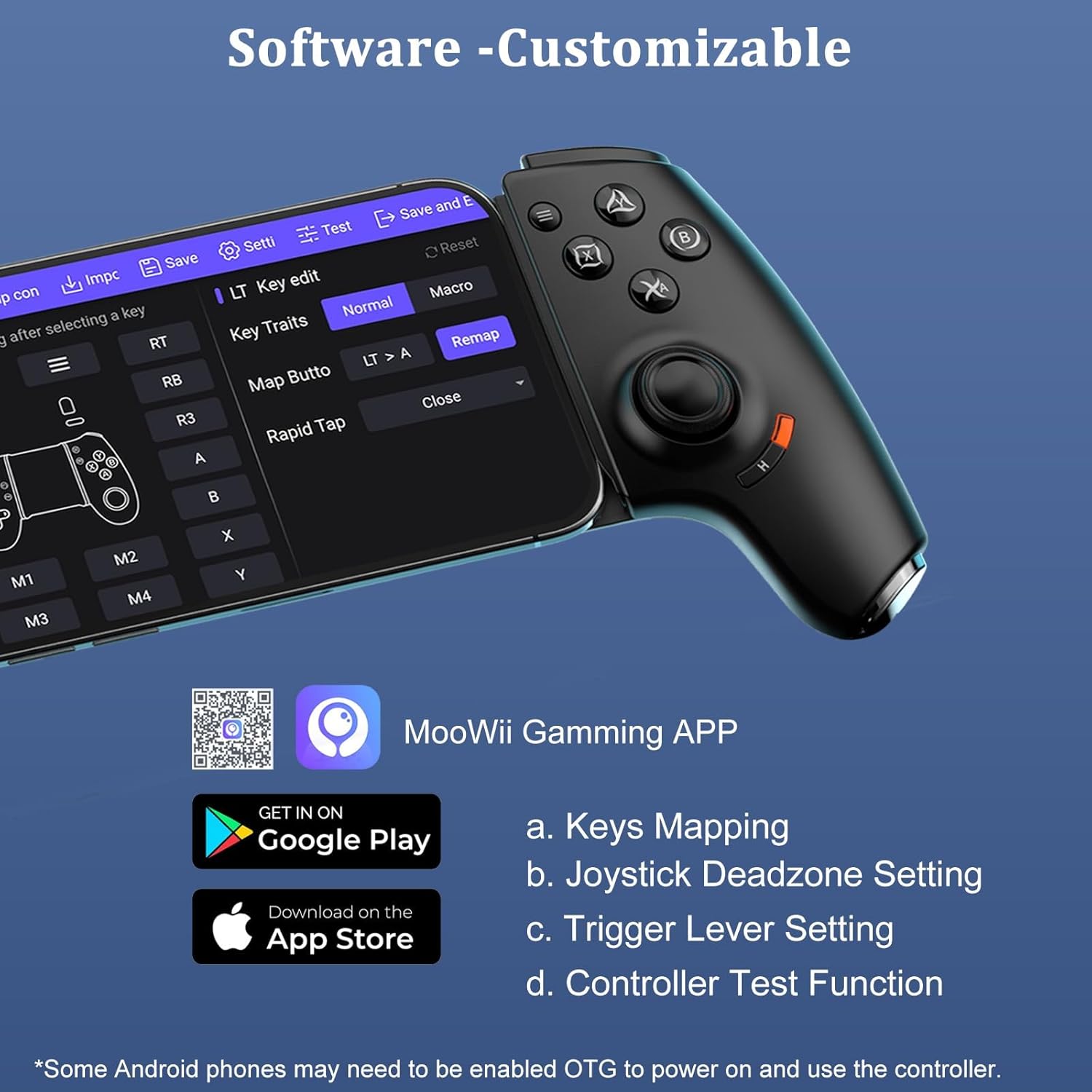
Image 6.1: MooWii Gaming APP Interface
Download the app: MooWii Gaming APP
7. Specifications
| Attribute | Detail |
|---|---|
| Model | USB C Connection Black |
| Connectivity | USB-C Wired, Bluetooth (for specific Android games) |
| Audio Output | 3.5mm Audio Jack |
| Charging Support | 15W Pass-Through Charging |
| Joystick Technology | Hall-Effect |
| Trigger Technology | Hall-Effect, Linear Trigger Mode |
| Mappable Buttons | 2 (M1/M2), up to 16 inputs |
| Dimensions (Package) | 9.61 x 5.04 x 2.72 inches |
| Item Weight | 10.5 ounces |
| Manufacturer | SHENZHEN JIAYINGHUANQIU TECHNOLOGY CO., LTD. |
| Country of Origin | China |
8. Troubleshooting
8.1 Controller Not Responding
- Check Connection: Ensure your phone is securely seated in the controller and the USB-C connection is firm. The orange indicator light should be on.
- Verify Mode: Confirm you are in the correct connection mode (Wired USB-C or Bluetooth) for your device and game. Refer to Section 4.2.
- Android OTG: For some Android phones, you may need to enable the OTG (On-The-Go) function in your phone's settings for the controller to power on and function.
- Restart Devices: Disconnect the controller, restart your phone, and then reconnect the controller.
8.2 Buttons or Joysticks Not Working Correctly
- Test with App: Use the Controller Test Function within the MooWii Gaming APP (Section 6) to diagnose specific button or joystick issues.
- Recalibrate: If joysticks exhibit drift, use the MooWii Gaming APP to adjust joystick deadzone settings.
- Game Compatibility: Ensure the game you are playing supports external controllers. Some mobile games may not have native controller support.
8.3 Charging Issues
- Check Cable: Ensure the charging cable connected to the controller's pass-through port is functional and properly connected to a power source.
- Power Source: Verify the power source is providing sufficient power (e.g., a wall adapter, not a low-power USB port).
9. Warranty and Support
For warranty information, technical support, or further inquiries, please contact Megadream customer service or visit the official Megadream store.
Megadream Store: Visit the Megadream Store on Amazon


