
Phantomgogo 8.5 Inch Wheels (Black)
Phantomgogo Electric Scooter User Manual
Model: 8.5 Inch Wheels (Black)
Brand: Phantomgogo
Introduction
This manual provides essential information for the safe operation, maintenance, and troubleshooting of your Phantomgogo Electric Scooter. Please read this manual thoroughly before your first ride to ensure proper use and maximize the lifespan of your scooter.
Safety Warnings
- Always wear a helmet and appropriate safety gear.
- Do not ride in wet conditions or on slippery surfaces.
- Adhere to local traffic laws and regulations.
- Maximum weight limit: 264 lbs (120 kg).
- Recommended age: Adults and children ages 6-12 (with supervision).
Package Contents
Verify that all items are present in your package:
- Phantomgogo Electric Scooter
- Charger
- User Manual (this document)
- Assembly Tools (if applicable)
Setup
Assembly
Your Phantomgogo Electric Scooter requires minimal assembly.
- Carefully remove the scooter and all components from the packaging.
- Lift the handlebar stem until it locks into place.
- Attach the handlebars to the stem, ensuring they are securely fastened.
- Verify all screws and quick-release levers are tightened before use.

Figure 1: Overview of Phantomgogo Electric Scooter components and dimensions (42.1" height, 43.9" length, 22.4" folded height).

Figure 2: The scooter features a 3-step folding mechanism: 1. Pull down release lever, 2. Pull down stem, 3. Lock in handlebar.
Initial Charging
Before first use, fully charge the scooter's battery.
- Locate the charging port, typically on the side of the deck.
- Connect the charger to the scooter and then to a power outlet.
- The indicator light on the charger will change (e.g., red to green) when fully charged.
- Charging time: Approximately 5.5 hours.
Operating Your Scooter
Power On/Off
Press and hold the power button on the display panel to turn the scooter on or off.

Figure 3: The digital display shows current speed, battery level, and selected speed mode (ECO/D/S).
Riding Modes
The scooter features multiple speed modes for different riding conditions:
- ECO Mode: For energy efficiency and lower speeds.
- D Mode (Drive): Standard mode for balanced performance.
- S Mode (Sport): For maximum speed (up to 15.5 mph) and acceleration.
To switch modes, double-press the power button.
Acceleration and Braking
- Acceleration: Use the thumb throttle on the right handlebar to accelerate.
- Braking: Apply the brake lever on the left handlebar to activate the dual braking system (front drum + rear EABS brake). The tail light will flash upon braking.
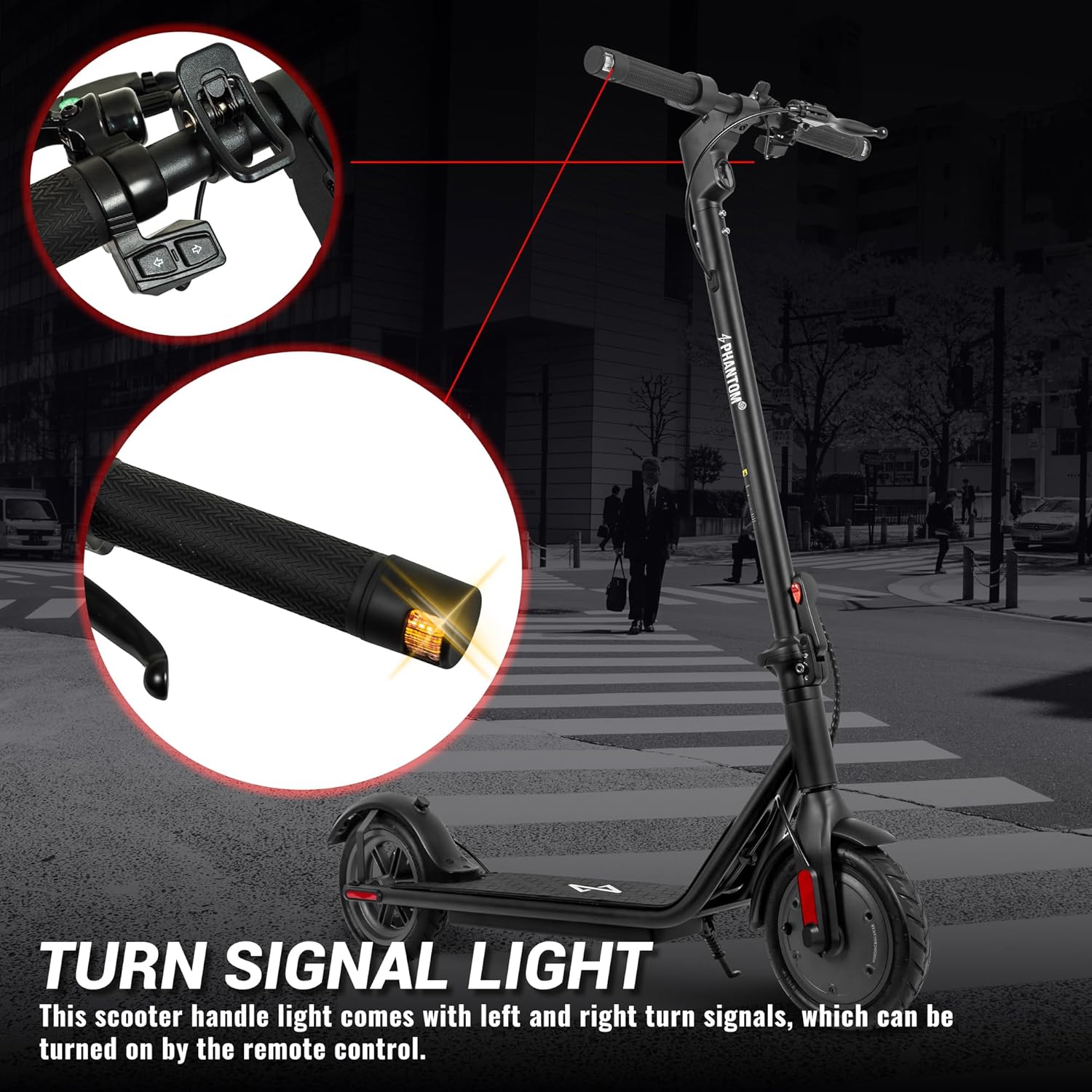
Figure 4: The scooter features integrated turn signal lights on the handlebars for enhanced visibility.
Smart Features
- Smart Lighting: The 2.5W headlight automatically turns on in low light conditions. Side lights flash when turning, and the tail light flashes when braking.
- Cruise Control: Maintain a consistent speed by holding the throttle for a few seconds until a beep is heard. Deactivate by applying the brake or throttle.
- Mobile App Integration: Connect your scooter to the dedicated mobile app for additional features like startup self-check, electronic lock, riding records, and real-time statistics.

Figure 5: Key features include a 264 lbs weight limit, 5.5 hr charge time, 15.5 mph max speed, 12 mile max range, and 8-degree climbing angle.
Video 1: Official product video showcasing the Phantomgogo Electric Scooter P85, highlighting its features and design.
Maintenance
Cleaning
Regularly clean your scooter with a damp cloth. Avoid using high-pressure water or abrasive cleaners.
Battery Care
- Charge the battery fully before long-term storage.
- If storing for extended periods, charge the battery every 30-60 days to prevent deep discharge.
- Do not expose the battery to extreme temperatures.
Tire Pressure
The 8.5-inch wheels feature anti-slip rubber tires. While tubeless, regularly inspect them for wear and tear.
Troubleshooting
Scooter Not Turning On
- Check battery level and ensure it is charged.
- Verify the power button is pressed and held correctly.
Reduced Performance/Speed
- Check battery level; performance may decrease with low charge.
- Ensure you are in the appropriate speed mode (e.g., Sport mode for maximum speed).
- Verify rider weight is within the specified limit (max 264 lbs).
- Road conditions (e.g., inclines) can affect speed and range.
Braking Issues
- Inspect brake cables and ensure they are not loose or damaged.
- Check the mechanical disc brake for any obstructions.
Specifications
| Feature | Detail |
|---|---|
| Brand | Phantomgogo |
| Model Name | Electric Scooter |
| Color | Black |
| Motor Power | 350W Brushless Motor |
| Max Speed | 15.5 mph (25 km/h) |
| Max Range | 12 miles (19.3 km) |
| Weight Limit | 264 Pounds (120 kg) |
| Wheel Size | 8.5 Inches |
| Wheel Material | Rubber |
| Frame Material | Aluminum |
| Brake Style | Rear Braking (Mechanical Disc + EABS) |
| Special Feature | Foldable, Smart Lighting, App Control, Cruise Control |
| UL Certified | UL 2272 Certified |
Warranty and Support
Warranty Information
The Phantomgogo Electric Scooter comes with a 1 Year Limited Warranty. Please refer to the warranty card included in your package for full details and terms.
Customer Support
For technical assistance, troubleshooting, or warranty claims, please contact Phantomgogo customer support.
- Visit the official Phantomgogo Store on Amazon: Phantomgogo Store
- Refer to the contact information provided in your product packaging.
Related documents8.5 Inch Wheels (Black)


Ask a question about this manual
Ask about setup, troubleshooting, compatibility, parts, safety, or missing instructions. Manuals+ will review the question and use this page’s manual context to help answer it.