
Introduction
Thank you for choosing the GRECELL P500+S100 Portable Solar Generator. This comprehensive system combines a powerful 500W portable power station with a high-efficiency 100W solar panel, providing a reliable and versatile power solution for various applications. Whether for outdoor adventures, home backup during emergencies, or commercial use, this manual will guide you through the safe and optimal operation of your device.
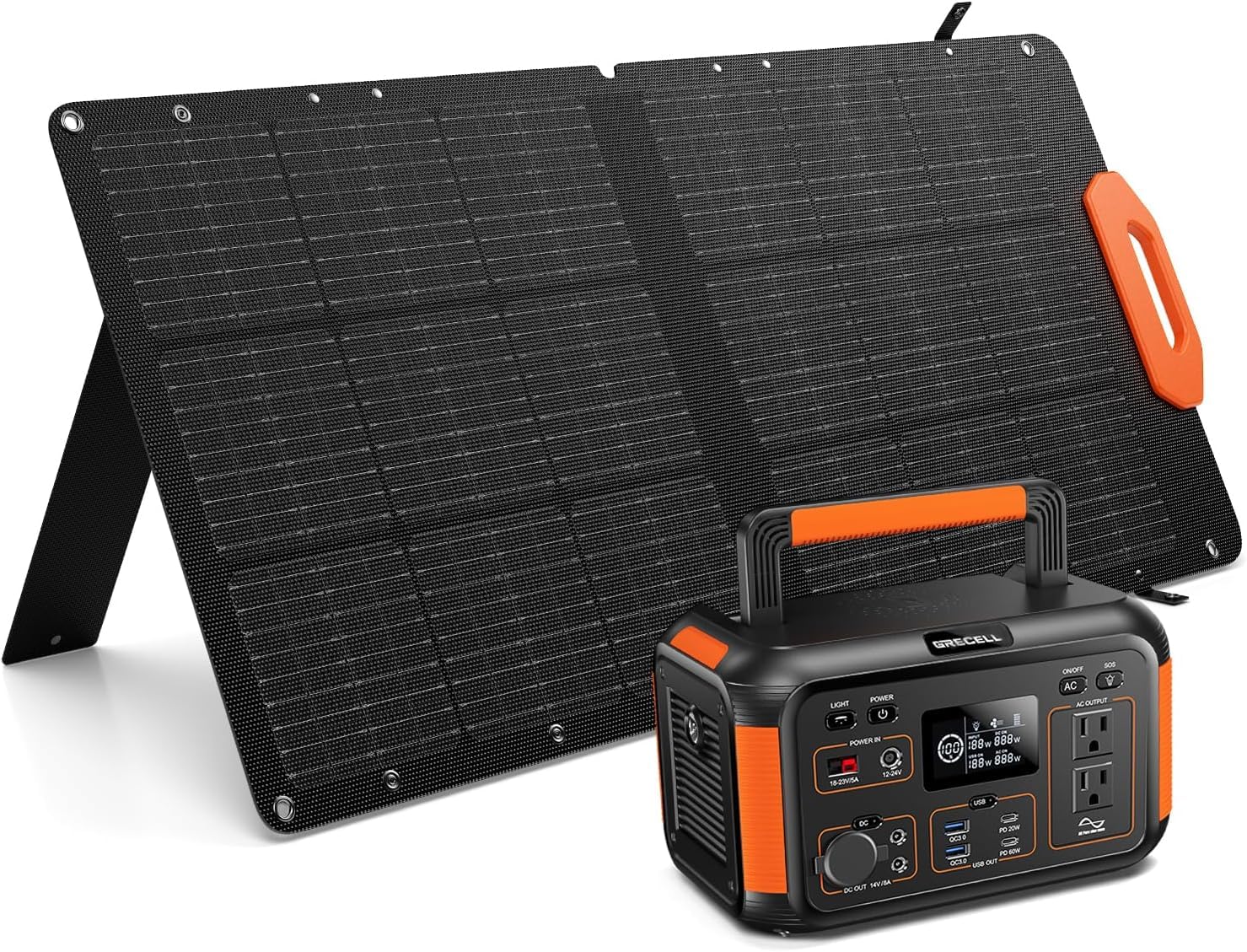
Image: The GRECELL P500+S100 Portable Solar Generator and its accompanying 100W solar panel, showcasing the complete system.
Package Contents
Please verify that all items listed below are included in your package:
- 1x GRECELL 500W Portable Power Station
- 1x GRECELL 100W Solar Panel
- 1x AC Charging Cable
- 1x MC4 Solar Charging Cable
- 1x Anderson Cable
- 1x DC 7.9*0.9/8mm Adapter
- 1x Cable Storage Bag
- 2x User Manuals (for Power Station and Solar Panel)
- 1x DC 5.5*2.1mm Cable
- 1x DC 5.5*2.5mm Adapter
Product Features
- High Capacity & Power Output: The P500 Power Station offers a 500W (1000W surge) pure sine wave AC output and a 440Wh capacity, suitable for various devices.
- Efficient Solar Charging: The 100W solar panel features monocrystalline silicon cells with up to 24% conversion efficiency, ensuring rapid recharging from sunlight. It includes 2 adjustable kickstands for optimal sun exposure.
- Advanced Safety Protections: Equipped with a safe lithium battery and a pure sine wave AC inverter, the system includes over-current, short-circuit, over-discharge, over-charging, over-voltage, and over-heating protection.
- Durable & Weatherproof Design: The foldable 100W solar panel is made with advanced one-piece lamination technology and an ETFE surface, providing durability and an IP67 waterproof rating.
- Wide Compatibility: The 100W solar panel is compatible with most power stations and solar generators, offering multiple connectors (MC4, 8mm, 5.5*2.5mm, 3.5*1.35mm, 5.5*2.1mm DC adapter/Anderson cable).
Setup and Assembly
1. Unfolding the Solar Panel
Carefully unfold the GRECELL 100W Solar Panel. Extend the integrated kickstands on the back of the panel to position it at an optimal angle towards the sun. The adjustable kickstands allow for angles between 35-55 degrees for maximum solar exposure.
Image: The GRECELL 100W Portable Solar Panel unfolded with its adjustable kickstands, positioned for optimal sunlight absorption.
2. Connecting the Solar Panel to the Power Station
Locate the MC4 Solar Charging Cable. Connect the MC4 connectors from the solar panel to the MC4 cable. Then, use the appropriate DC adapter (e.g., 8mm, 5.5*2.5mm, 3.5*1.35mm, 5.5*2.1mm) or Anderson cable to connect the MC4 cable to the 'PV Input' port on your GRECELL P500 Portable Power Station. Ensure a secure connection.

Image: Diagram illustrating the wide compatibility of the GRECELL solar panel with different power stations using various DC adapters and Anderson cable.
3. Initial Power Station Check
Press the 'Power' button on the GRECELL P500 Power Station to turn on the LCD display. Verify the battery level and input wattage from the solar panel. The display will show the charging status.

Image: The front panel of the GRECELL Portable Power Station, highlighting the various output ports and the LCD display.
Operating Instructions
1. Charging the Power Station
Your GRECELL P500 Power Station can be recharged using three primary methods:
- Solar Panel (Included): Connect the 100W solar panel as described in the Setup section. Charging time is approximately 5-7 hours depending on sunlight intensity.
- AC Wall Outlet: Use the provided AC Charging Cable to plug the power station into a standard wall outlet. Full charge typically takes 5-7 hours.
- Car Charger: Use the appropriate DC cable to charge the power station from your vehicle's 12V cigarette lighter port. Charging time is approximately 5-7 hours (when the car is running).

Image: Visual representation of the three charging methods for the GRECELL Portable Power Station: via solar panel, car outlet, and wall outlet.
2. Using the Power Station Outputs
The P500 offers a variety of output ports to power your devices:
- AC Output: Two pure sine wave AC outlets (500W total, 1000W surge) for household appliances. Press the 'AC' button to activate.
- DC Output: Includes a 12V/10A car outlet and two DC 5.5*2.5 output ports (14V/8A). Press the 'DC' button to activate.
- USB Output: Two USB-A QC3.0 ports (18W) and two USB-C PD ports (PD60W/PD20W) for fast charging mobile devices.
- Wireless Charging: A 15W wireless charging pad on top for compatible devices.
Image: The front panel of the GRECELL Portable Power Station, highlighting the various output ports and the LCD display.
3. LCD Display and Controls
The clear LCD display provides real-time information on battery level, input/output wattage, and remaining runtime. Control buttons allow you to activate/deactivate AC, DC, and light functions independently.
4. Integrated LED Light
Press the 'Light' button to activate the built-in LED flashlight. Multiple modes are available: constant on, strobe, and SOS for emergency signaling.
5. Video Demonstrations
Video: An official GRECELL video demonstrating the features and operation of the 500W 444Wh Power Station, including its various ports and display.
Video: An official GRECELL video showcasing the portable power station being used for crafting activities, demonstrating its practical applications.
Maintenance
- Cleaning: Use a dry, soft cloth to clean the power station and solar panel. Avoid using harsh chemicals or abrasive materials.
- Storage: Store the power station in a cool, dry place away from direct sunlight and extreme temperatures. For long-term storage, charge the battery to 50-80% every 3-6 months to prolong battery life.
- Battery Care: Avoid fully discharging the battery frequently. It is recommended to recharge the unit before it drops below 20% capacity.
- Solar Panel Care: Regularly wipe the solar panel surface to remove dust and debris, ensuring maximum efficiency.
Troubleshooting
- Unit Not Turning On: Ensure the power button is pressed firmly. If the battery is completely depleted, connect it to a power source for a few minutes before attempting to turn it on.
- No Output from Ports: Verify that the specific output (AC, DC, USB) is activated via its respective button. Check the device being charged for proper connection and functionality.
- Solar Panel Not Charging: Ensure the solar panel is in direct sunlight and not shaded. Check all cable connections for security. Verify the solar panel is clean.
- Overload Protection: If the unit shuts down due to overload, disconnect the device causing the overload, wait a few minutes, and then restart the power station.
- Overheating: Ensure the power station's ventilation vents are not blocked. Operate the unit in a well-ventilated area.
Specifications
| Feature | Specification |
|---|---|
| Brand | GRECELL |
| Model Name | P500+S100 |
| Power Station Wattage | 500 Watts (Running), 1000 Watts (Starting) |
| Power Station Capacity | 440Wh |
| Solar Panel Wattage | 100 Watts |
| Solar Panel Voltage | 21.5 Volts |
| Solar Panel Current | 5.5 Amps |
| Power Source | Solar Powered |
| Item Weight | 9.92 Pounds |
| Product Dimensions | 10.75"L x 2"W x 21.1"H |
| Material | ABS |
| Special Features | Lightweight, Portable, USB Port |
| Recommended Uses | Camping, Commercial, Residential |
| Solar Panel Efficiency | Up to 24% |
| Solar Panel Waterproof Rating | IP67 |
Warranty & Support
The GRECELL P500+S100 Portable Solar Generator comes with a 2-Year Warranty from the date of purchase. This warranty covers defects in materials and workmanship under normal use. For warranty claims, technical support, or any inquiries, please contact GRECELL customer service through the retailer's platform or the official GRECELL website.
Please retain your proof of purchase for warranty validation.


