
Introduction
This manual provides essential instructions for the safe and efficient operation, installation, and maintenance of your Cecotec Proclean 5010 Inverter Microwave. Please read this manual thoroughly before using the appliance and retain it for future reference.
The Cecotec Proclean 5010 Inverter Microwave features inverter technology for even and fast cooking, a 19-liter capacity, and 700W power with 5 adjustable levels. It includes 8 pre-configured programs, a 30-minute timer, an LED display, and a child lock for safety.
Setup
Unpacking and Placement
Carefully remove the microwave oven and all packaging materials. Inspect the oven for any damage, such as dents or a broken door. Do not operate the oven if it is damaged. Place the microwave on a stable, level countertop surface that can support its weight (approximately 6.1 kg). Ensure adequate ventilation space around the unit: at least 20 cm above, 10 cm at the rear, and 5 cm on each side.

Image: The Cecotec Proclean 5010 Inverter Microwave positioned on a kitchen counter, ready for use.
Turntable Installation
- Place the roller ring in the center of the oven cavity floor.
- Place the glass turntable on top of the roller ring, ensuring it sits securely in the center hub.
Ensure the turntable rotates freely. The turntable is essential for even cooking and must always be in place when operating the microwave.
Power Connection
Plug the microwave oven into a grounded electrical outlet. The appliance operates on 230 Volts and consumes 700 Watts of power. Do not use extension cords or adapters.
Initial Cleaning
Before first use, wipe the interior and exterior of the microwave with a soft, damp cloth to remove any dust or manufacturing residues.
Operating Instructions
Control Panel Overview
The microwave features an intuitive control panel with an LED display, buttons for various functions, and a rotary knob for time and power adjustments.
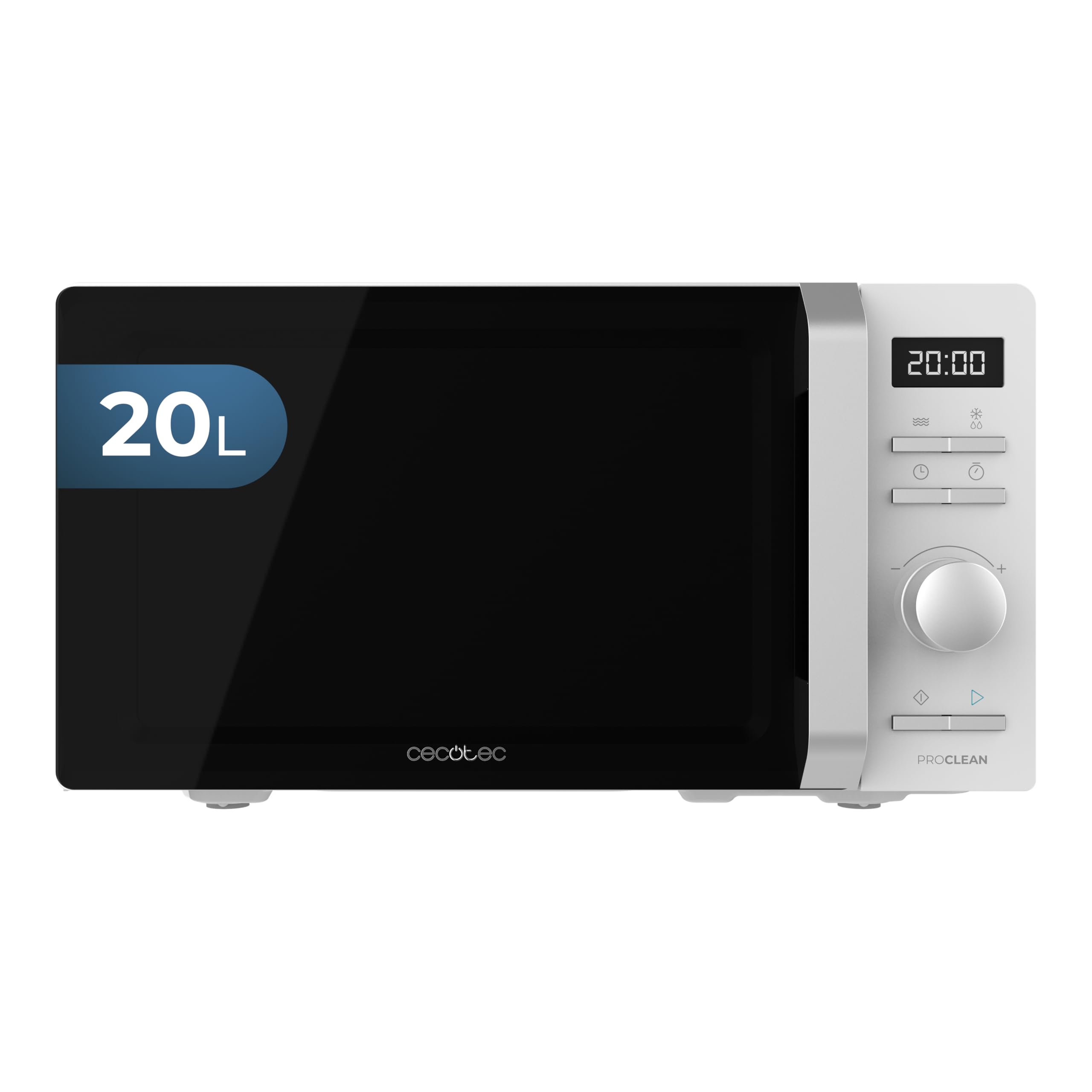
Image: Detailed view of the microwave's control panel, highlighting the digital display and buttons.
Basic Microwave Cooking
- Place food in a microwave-safe container on the glass turntable. Close the door securely.
- Use the rotary knob to set the desired cooking time (up to 30 minutes).
- Press the appropriate power level button (the microwave has 5 power levels, with a maximum of 700W).
- Press the Start button to begin cooking. The LED display will show the remaining time.

Image: A user adjusting the cooking time using the rotary knob.

Image: Food being heated inside the microwave cavity.
Using Pre-configured Programs
The microwave offers 8 pre-configured programs for common dishes. To use them:
- Press the 'Program' button (or similar, refer to specific button icons on your unit) to cycle through the available programs. The LED display will show the program number (e.g., 'A-01', 'A-08').
- Once the desired program is selected, press the Start button. The microwave will automatically set the cooking time and power level.

Image: A user selecting a pre-configured program on the control panel.
Defrosting
The inverter technology ensures even and quick defrosting. To defrost food:
- Place the frozen food in the microwave.
- Press the 'Defrost' button (often indicated by a snowflake icon).
- Use the rotary knob to select the defrost time or weight, if applicable.
- Press Start.
Two-Phase Cooking
This feature allows you to set two different cooking stages with varying times and power levels, useful for thawing followed by cooking. Consult the specific instructions on your control panel for setting up two-phase cooking.
Child Lock
To prevent accidental use, especially by children, activate the child lock. Refer to your microwave's specific instructions for activating and deactivating this feature, typically involving pressing and holding a specific button for a few seconds.
Maintenance
Cleaning the Microwave Oven
Regular cleaning helps maintain the performance and longevity of your microwave. Always unplug the appliance before cleaning.
- Interior: Wipe the interior cavity, including the stainless steel inner material, with a soft cloth dampened with mild soap and water. For stubborn food splatters, place a bowl of water with lemon slices inside and microwave for a few minutes to loosen residue, then wipe clean.
- Exterior: Clean the exterior surfaces with a soft, damp cloth. Avoid abrasive cleaners or solvents.
- Door and Seal: Keep the door and door seal clean to ensure proper closure. Wipe with a soft cloth.
- Turntable: The glass turntable and roller ring can be washed in warm, soapy water or in a dishwasher. Ensure they are completely dry before placing them back in the oven.
General Care
Do not operate the microwave when empty, as this can damage the appliance. Avoid placing heavy objects on top of the microwave.
Troubleshooting
If you encounter issues with your microwave, consult the following common problems and solutions:
| Problem | Possible Cause | Solution |
|---|---|---|
| Oven does not start | Power cord not securely plugged in. Door not closed properly. Fuse blown or circuit breaker tripped. | Ensure power cord is firmly plugged into outlet. Close door completely. Check household fuse or reset circuit breaker. |
| Food not heating | Incorrect cooking time or power level set. Microwave-safe dish not used. | Adjust cooking time and power level. Use only microwave-safe cookware. |
| Turntable not rotating | Turntable or roller ring not correctly positioned. Debris under turntable. | Ensure turntable and roller ring are properly seated. Clean any debris from under the turntable. |
| Unusual noise during operation | Food container touching oven walls. Turntable not centered. | Ensure container is not touching oven walls. Reposition turntable. |
If the problem persists after attempting these solutions, please contact Cecotec customer support.
Specifications
| Feature | Detail |
|---|---|
| Brand | Cecotec |
| Model Name | Proclean 5010 |
| Part Number | A01_EU01_100005 |
| Capacity | 19 Litres (listed as 20 litres in some specifications) |
| Installation Type | Countertop |
| Wattage | 700 Watts |
| Voltage | 230 Volts |
| Inner Material Type | Stainless Steel |
| Defrost System | Manual Defrost |
| Special Features | Inverter Technology, Lightweight, Programmable, Child Lock |
| Product Dimensions (LxWxH) | 34D x 43W x 24H Centimeters |
| Item Weight | 6 kg 100 g |
| Included Components | Microwave, Instruction Manual |
Warranty and Support
For warranty information and customer support, please refer to the warranty card included with your product or visit the official Cecotec website. Keep your purchase receipt as proof of purchase for any warranty claims.
Manufacturer: Cecotec