
Oraolo CAM01
Oraolo Indoor Surveillance Camera User Manual
Model: CAM01
1. Introduction
Thank you for choosing the Oraolo Indoor Surveillance Camera. This manual provides essential information for the safe and efficient operation of your device. Please read it thoroughly before use and retain it for future reference.
The Oraolo Indoor Surveillance Camera is designed for home security monitoring, offering 1080P HD video quality, clear night vision, motion detection, and flexible storage options. Its compact design allows for discreet placement in various indoor environments.
2. Package Contents
Before proceeding with installation, please verify that all items listed below are present in your package:
- 1 x Oraolo Indoor Surveillance Camera
- 2 x Charging Cable
- 1 x User Manual (This document)
Note: A TF Card for local storage is not included and must be purchased separately if desired.
3. Product Overview
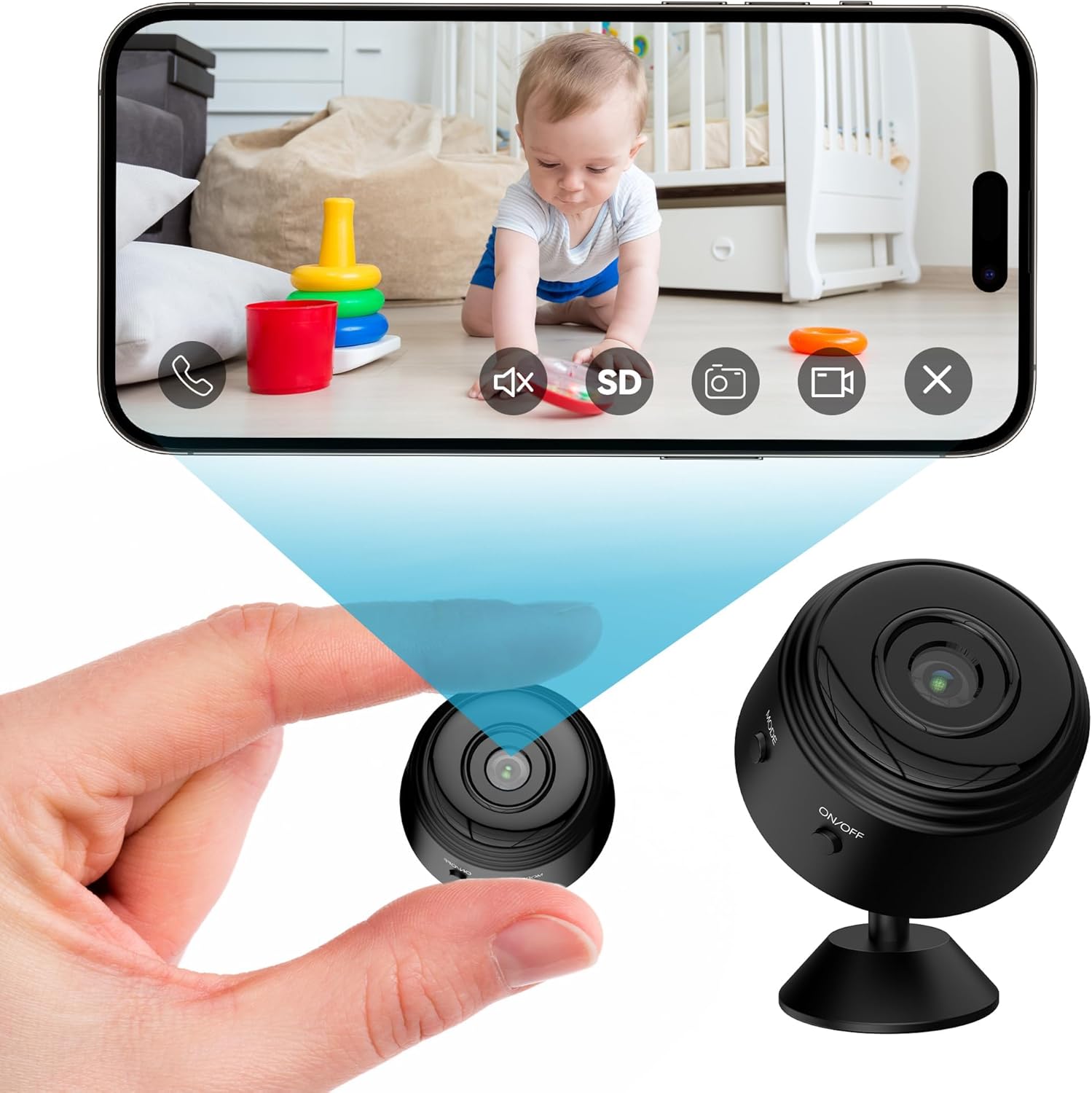
Figure 3.1: Oraolo Indoor Surveillance Camera and Live View on Smartphone. This image illustrates the compact size of the camera, held in a hand, alongside a smartphone displaying its live video feed, highlighting its primary function for remote monitoring.
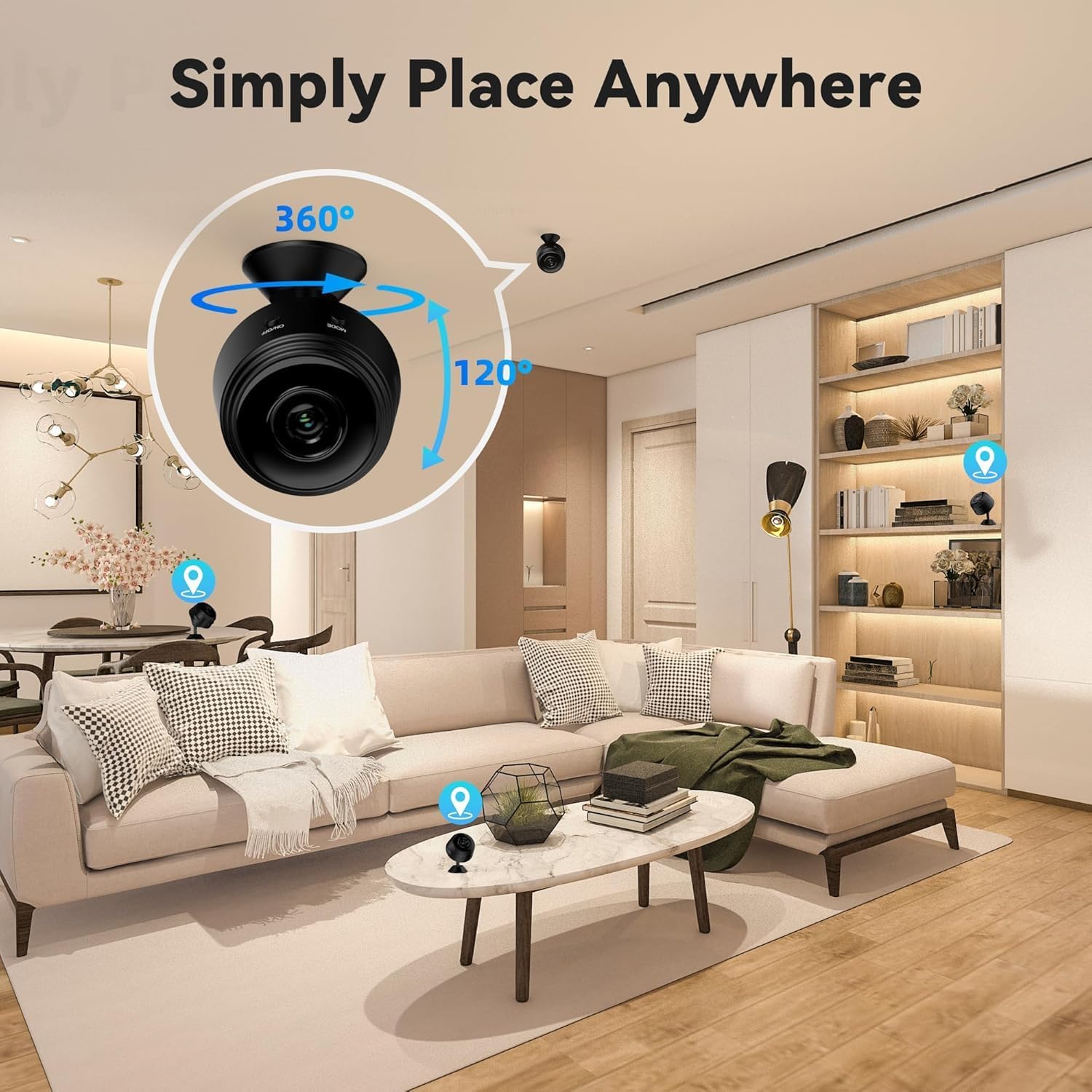
Figure 3.2: Flexible Placement Options. This image demonstrates how the Oraolo camera can be discreetly placed in various indoor settings, such as on shelves, tables, or mounted on a ceiling, indicating its versatility for home security.
Key Features:
- 1080P HD Video Quality: Ensures clear and detailed video capture.
- 150-Degree Wide-Angle View: Covers a broad area, minimizing blind spots.
- Clear Night Vision: Provides visibility in low-light or dark conditions.
- Motion Detection & App Notification: Alerts you instantly to detected movement.
- Two Connection Methods: Supports 2.4G WiFi and Camera Hotspot for flexible connectivity.
- Multi-user Viewing: Allows sharing access to the camera feed with others.
- TF Card & Cloud Storage: Offers options for local and remote video storage.
4. Setup Guide
4.1 Charging the Camera
Before initial use, ensure the camera is fully charged. Connect the provided charging cable to the camera's charging port and a 5V/1A power adapter (not included).
4.2 App Installation
To control and view the camera feed, you need to install the dedicated application on your smartphone.
- For iOS devices, download the APP from the Apple App Store.
- For Android devices, download the APP from Google Play. If the app is not found on Google Play, scan the QR code provided in the physical instructions included with your camera.
4.3 Initial Setup and Connection (Wi-Fi)
Follow these steps to connect your camera to your home Wi-Fi network:
- Power On: Press and hold the ON/OFF button on the camera for approximately 3 seconds until the indicator light illuminates.
- Open App: Launch the installed application on your smartphone.
- Add Device: Follow the in-app instructions to add a new device. This typically involves selecting your camera model and entering your 2.4G Wi-Fi network credentials.
- Pairing: The app will guide you through the pairing process, which may involve scanning a QR code displayed on your phone with the camera, or connecting to the camera's temporary hotspot.
- Confirmation: Once successfully connected, the camera's indicator light will change, and you will see the live feed in the app.
Note: The camera supports 2.4G Wi-Fi networks only. 5G Wi-Fi networks are not supported.
5. Operating Instructions
5.1 Live View and Monitoring
After successful setup, open the app to access the live video feed from your camera. You can view real-time footage anytime, anywhere.

Figure 5.1: High-Definition Color Reproduction. This image visually compares 720P and 1080P video quality, demonstrating the superior clarity and detail offered by the 1080P resolution of the Oraolo camera.

Figure 5.2: Multi-user Viewing Online. This image illustrates the feature allowing multiple authorized users to simultaneously view the camera's live feed from different devices, facilitating shared monitoring.
5.2 Night Vision
The camera automatically switches to night vision mode in low-light conditions, providing clear black and white video.

Figure 5.3: Clear Night Vision. This image shows a smartphone screen displaying a clear, grayscale image of a sleeping baby, demonstrating the camera's effective night vision capabilities in a dark room.
5.3 Motion Detection and Notifications
The camera is equipped with intelligent motion detection. When movement is detected, the camera will:
- Send an immediate push notification to your smartphone via the app.
- Begin recording the event (if storage is enabled).
You can adjust motion detection sensitivity and notification settings within the app.

Figure 5.4: Motion Detection and App Notification. This image depicts a smartphone receiving an alert notification, indicating motion detection by the camera, with a visual representation of a person triggering the alert, emphasizing the real-time security updates.
5.4 Storage Options (TF Card & Cloud)
The Oraolo camera offers two primary storage methods for recorded footage:
- TF Card Loop Recording: Supports up to 256GB TF card (not included). The camera will continuously record, overwriting the oldest footage when the card is full.
- Cloud Storage: A cloud storage service is available for remote access and playback of videos. Details on subscription and usage can be found within the app.

Figure 5.5: TF Card & Cloud Storage. This image visually represents the camera's dual storage capabilities, showing a TF card inserted into the camera and cloud icons, indicating both local and remote storage options for video recordings.
6. Maintenance
6.1 Cleaning
To maintain optimal performance, regularly clean the camera lens and body. Use a soft, dry cloth. Do not use liquid cleaners or abrasive materials.
6.2 Firmware Updates
Periodically check the app for available firmware updates. Keeping your camera's firmware updated ensures the latest features, security patches, and performance improvements.
6.3 Storage Management
If using a TF card, consider formatting it periodically through the app to ensure smooth recording and prevent data corruption. For cloud storage, monitor your storage usage as per the service provider's guidelines.
7. Troubleshooting
| Problem | Possible Cause | Solution |
|---|---|---|
| Camera not powering on. | Low battery; faulty charging cable/adapter. | Ensure camera is fully charged. Try a different charging cable or power adapter. |
| Cannot connect to Wi-Fi. | Incorrect Wi-Fi password; 5G Wi-Fi network; camera too far from router. | Verify Wi-Fi password. Ensure you are connecting to a 2.4G Wi-Fi network. Move camera closer to the router. Reset camera and try again. |
| No motion detection alerts. | Motion detection disabled; app notifications off; low sensitivity. | Check app settings to ensure motion detection is enabled and sensitivity is appropriate. Verify app notification permissions on your phone. |
| Video quality is poor. | Poor network connection; dirty lens. | Ensure stable Wi-Fi connection. Clean the camera lens with a soft cloth. |
| TF card not recording. | TF card not inserted correctly; card full; incompatible card; card corrupted. | Reinsert TF card. Format TF card via app. Ensure card is within supported size (up to 256GB). Try a different TF card. |
8. Specifications
| Feature | Detail |
|---|---|
| Model Name | CAM01 |
| Indoor/Outdoor Usage | Indoor |
| Video Capture Resolution | 1080p |
| Video Coding Format | Smart H.264 |
| Frame Rate | 25fps |
| Video Format | AVI |
| Connectivity Technology | Wireless (Wi-Fi) |
| Wi-Fi Frequency | 2.4Ghz Only |
| Power Input | 5V/1A |
| Local Storage | TF Card (up to 256GB, not included) |
| Cloud Storage | Supported |
| Minimum Illumination | 1.0Lux / F1.2 |
| Dimensions (L x W x H) | 1.78 x 1.78 x 0.98 inches |
| Item Weight | 1.76 ounces |
| Batteries Required | Yes (1 A battery included) |
| Special Feature | Night Vision, Motion Detection |
9. Warranty and Support
9.1 Warranty Information
Oraolo products are designed and manufactured to the highest quality standards. For specific warranty terms and conditions, please refer to the warranty card included with your product or contact Oraolo customer support.
9.2 Customer Support
If you encounter any issues or have questions not covered in this manual, please contact Oraolo customer support. Contact information can typically be found on the product packaging, the official Oraolo website, or within the product application.
For the most up-to-date support resources, please visit the official Oraolo store page on Amazon: Oraolo Store
Ask a question about this manual
Ask about setup, troubleshooting, compatibility, parts, safety, or missing instructions. Manuals+ will review the question and use this page’s manual context to help answer it.