
1. Introduction
Thank you for choosing the Mellif Cordless Vacuum Pump Kit. This manual provides essential information for the safe and efficient operation, maintenance, and troubleshooting of your 2.5CFM vacuum pump. Please read this manual thoroughly before using the product and retain it for future reference.
This kit is designed for creating a vacuum in various systems, particularly in HVAC/R applications, offering portability and convenience with its cordless design.
2. Safety Instructions
WARNING: Read all safety warnings and instructions. Failure to follow the warnings and instructions may result in electric shock, fire, and/or serious injury.
- Always wear appropriate personal protective equipment (PPE), including safety glasses and gloves, when operating the vacuum pump.
- Do not operate the pump in explosive atmospheres, such as in the presence of flammable liquids, gases, or dust.
- Ensure the work area is well-ventilated.
- Keep children and bystanders away while operating the pump.
- Do not expose the pump or battery to rain or wet conditions. Water entering the pump or battery will increase the risk of electric shock.
- Use only Mellif specified batteries and chargers. Using other batteries may create a risk of injury and fire.
- Do not modify the pump or battery.
- Disconnect the battery pack from the pump before making any adjustments, changing accessories, or storing the tool.
- Store idle tools out of the reach of children and do not allow persons unfamiliar with the power tool or these instructions to operate the power tool.
- Maintain the pump with care. Check for misalignment or binding of moving parts, breakage of parts, and any other condition that may affect the pump’s operation. If damaged, have the pump repaired before use.
3. Package Contents
Verify that all items listed below are included in your package. If any items are missing or damaged, please contact Mellif customer support.
- Mellif 2.5CFM Cordless Vacuum Pump
- 4.0Ah 20V Battery Pack (x1)
- Battery Charger (x1)
- User Manual (this document)
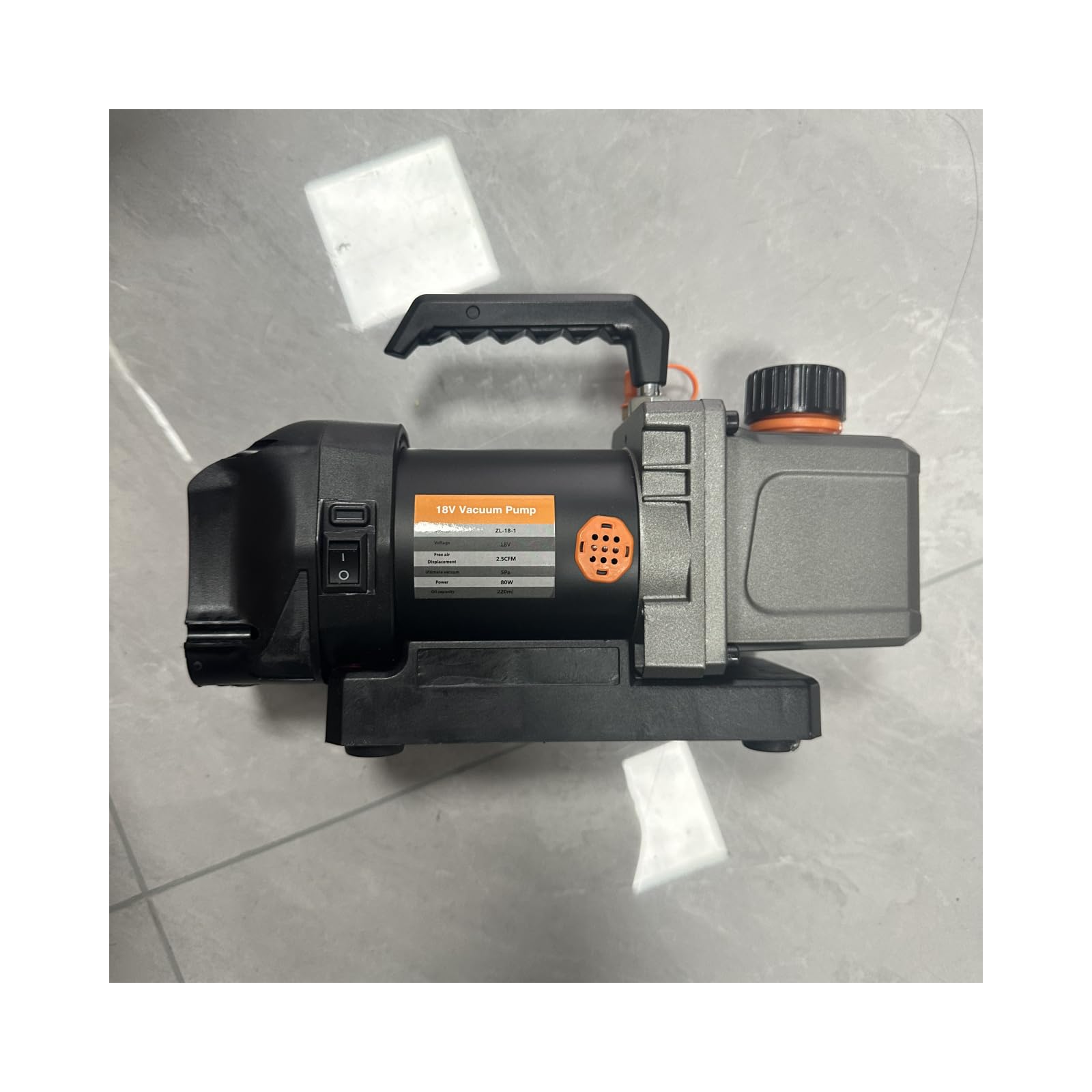
Image 1: Mellif Cordless Vacuum Pump Kit showing the main pump unit, a 4.0Ah 20V battery, and the battery charger.
4. Setup
4.1 Charging the Battery
- Connect the battery charger to a standard electrical outlet. The charger's indicator light will illuminate.
- Slide the 4.0Ah 20V battery pack onto the charger until it clicks into place.
- Monitor the charger's indicator light. It will typically change color or blink to indicate charging status (e.g., red for charging, green for fully charged).
- Once fully charged, remove the battery pack from the charger. Unplug the charger from the outlet.
Note: For optimal battery life, fully charge the battery before first use.
4.2 Attaching the Battery to the Pump
- Align the battery pack with the battery port on the vacuum pump.
- Slide the battery pack firmly into the port until it locks securely into place. Ensure it is fully seated to prevent accidental disconnection during operation.
- To remove the battery, press the release button(s) on the battery pack and slide it out.
5. Operating Instructions
5.1 Connecting to the System
- Ensure the system you intend to evacuate is properly sealed and all valves are closed.
- Connect a suitable vacuum hose from the system's service port to the inlet port of the Mellif vacuum pump. Ensure connections are tight to prevent leaks.
- It is recommended to use a vacuum gauge or manifold set to monitor the vacuum level during operation.
5.2 Starting and Stopping the Pump
- With the battery attached and connections secured, press the power button on the vacuum pump to start operation.
- Allow the pump to run until the desired vacuum level is achieved, as indicated by your vacuum gauge. The 2.5CFM pump is designed for efficient evacuation.
- Once the desired vacuum is reached, close the service valve on the system first, then press the power button to turn off the pump.
- Carefully disconnect the vacuum hose from the pump and the system.
Caution: Do not run the pump for extended periods without evacuating a system, as this can lead to unnecessary wear.
5.3 Best Practices for Evacuation
- Always use clean, dry hoses and fittings.
- Minimize the length of vacuum hoses to improve evacuation speed.
- Ensure the system is free of liquid contaminants before starting evacuation.
- Monitor the vacuum level and pump performance throughout the process.
6. Maintenance
Regular maintenance ensures the longevity and optimal performance of your Mellif Cordless Vacuum Pump.
6.1 Cleaning
- After each use, wipe down the exterior of the pump with a clean, dry cloth.
- Keep the air vents clear of dust and debris to ensure proper cooling.
- Do not use harsh chemicals or abrasive cleaners.
6.2 Battery Care and Storage
- Store batteries in a cool, dry place away from direct sunlight and extreme temperatures.
- Do not store batteries in a discharged state for extended periods. Charge them periodically if not in use.
- Protect battery terminals from shorting.
6.3 Long-Term Storage
- Before storing the pump for an extended period, ensure it is clean and dry.
- Remove the battery pack from the pump.
- Store the pump and battery in a secure, dry location, out of reach of children.
7. Troubleshooting
This section addresses common issues you might encounter. For problems not listed here, please contact Mellif customer support.
| Problem | Possible Cause | Solution |
|---|---|---|
| Pump does not start |
|
|
| Poor vacuum performance |
|
|
| Pump runs but no vacuum |
|
|
8. Specifications
| Feature | Detail |
|---|---|
| Model | MFVCP01 |
| Brand | Mellif |
| Vacuum Flow Rate | 2.5 CFM |
| Battery Voltage | 20V |
| Battery Capacity | 4.0Ah |
| Item Weight | 4.15 kg (9.15 lbs) |
| Parcel Dimensions | 34.49 x 24.99 x 19.2 cm (13.58 x 9.84 x 7.56 inches) |
9. Warranty and Support
Mellif products are manufactured to high-quality standards. For information regarding warranty coverage, please refer to the warranty card included with your product or visit the official Mellif website.
If you require technical assistance, troubleshooting, or have questions about your Mellif Cordless Vacuum Pump Kit, please contact Mellif customer support through their official website or the contact information provided on your purchase documentation.
Please have your model number (MFVCP01) and purchase date available when contacting support.