
1. Introduction
This manual provides detailed instructions for the safe and effective use of your Yeaki 71-inch Auto Face Tracking Tripod. This versatile device combines a tripod, selfie stick, and intelligent face tracking technology with integrated lighting and remote control capabilities, designed to enhance your video recording and photography experience.

Image: The Yeaki 71-inch Auto Face Tracking Tripod shown in various configurations, highlighting its extendable pole, tripod base, phone holder with dual LED lights, and detachable remote control.
2. Package Contents
Verify that all items listed below are included in your package:
- Auto Face Tracking Tripod (1)
- Remote Control for TikTok Video Recording (1)
- LED Fill Lights (2)
- Type-C charging cable (1)
- User Manual (1)

Image: An overhead view displaying all components included in the Yeaki tripod package: the main tripod unit, remote control, two LED fill lights, Type-C charging cable, and user manual.
3. Product Overview
The Yeaki Auto Face Tracking Tripod is constructed from durable aluminum alloy, offering both stability and portability. Its design incorporates a unique four-legged base for enhanced stability when fully extended. The device features a 360° rotating head and 270° tilt angle for flexible positioning.

Image: A close-up view of the tripod's base, highlighting the aluminum alloy pole, anti-slip silicone mat, and umbrella-like skeleton structure for reinforced sturdy construction.
4. Setup
4.1 Unfolding the Tripod and Adjusting Height
- Gently pull the legs of the tripod outwards until they are fully extended and stable. The unique four-legged design provides enhanced stability.
- Extend the telescopic pole to your desired height. The tripod can extend up to 71 inches and folds down to a compact 13 inches.
4.2 Attaching Your Device
- For Smartphones: The flexible phone holder accommodates devices with screen sizes from 4.7 to 7 inches. Gently pull apart the phone holder clamps and insert your smartphone.
- For Cameras/GoPros/Ring Lights: The integrated 1/4" screw mount supports various devices. Attach your camera, GoPro, or ring light directly to this screw mount.
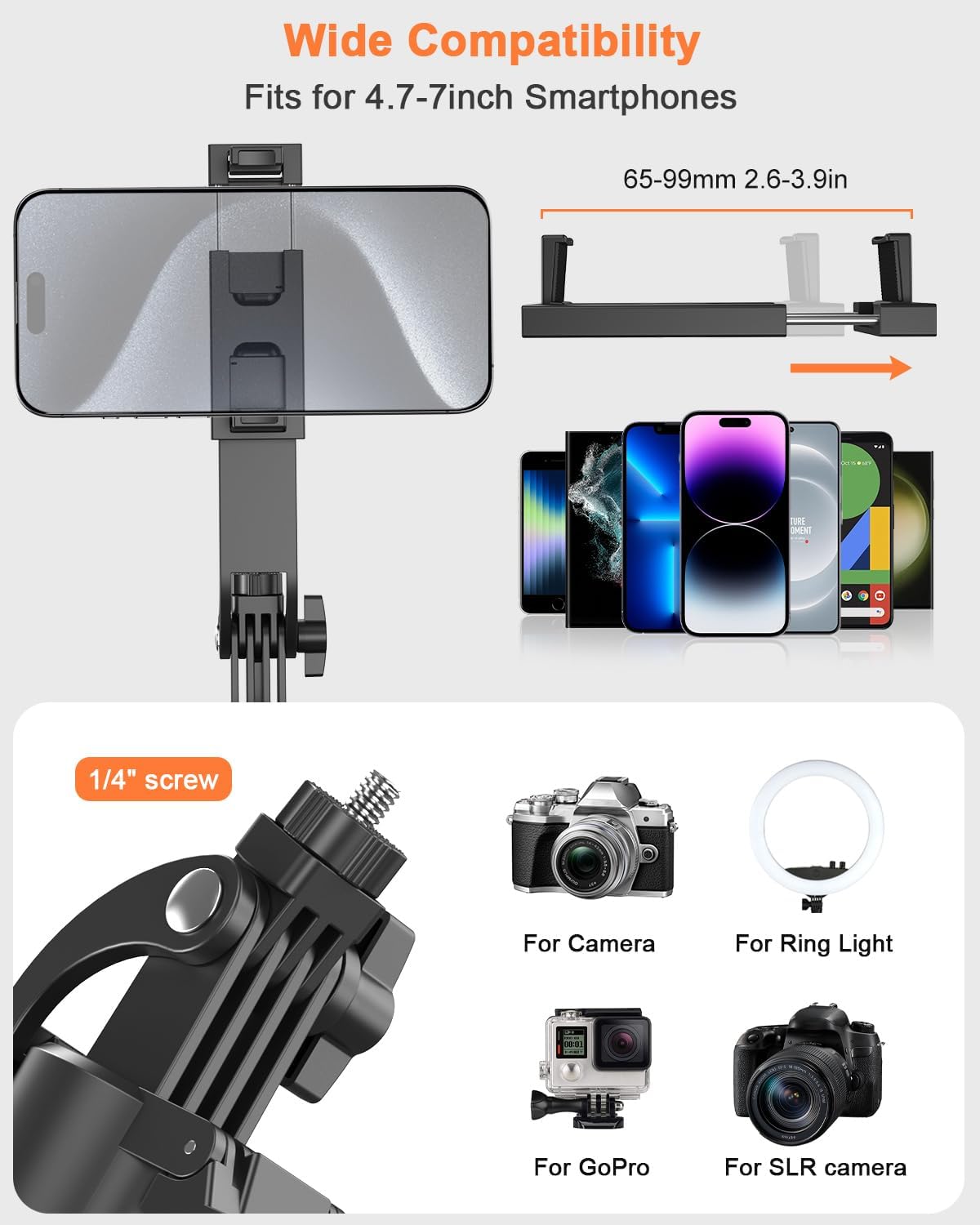
Image: Illustrations showing the phone holder accommodating various smartphone sizes and the 1/4" screw mount for cameras, GoPros, and ring lights.
4.3 Attaching LED Fill Lights
The two detachable LED fill lights can be attached to the sides of the phone holder for optimal illumination. Ensure they are securely fastened.
5. Charging
Use the provided Type-C charging cable to charge the following components:
- Face Tracking Module: Locate the Type-C port on the face tracking module and connect the charging cable.
- Remote Control: The remote control has a Type-C charging port.
- LED Fill Lights: Each LED fill light has its own Type-C charging port.
Ensure all components are fully charged before extended use for optimal performance. The LED lights can be used continuously for approximately 50 minutes at maximum brightness.
6. Operating Instructions
6.1 Powering On/Off
Long press the power button on the face tracking module to turn the device on or off.
6.2 Auto Face Tracking with Gesture Control
The tripod features advanced 360° automatic face tracking without requiring an app.
- Unlock the Head: Unlock the head when using the face tracking function.
- Lift to Unlock Handle: Lift up to unlock the balance handle.
- Power On: Long press the power button to turn on the face tracking module.
- Start Tracking: Make an "OK" gesture with your hand and hold for 2 seconds in front of the camera to initiate face tracking.
- Stop Tracking: Make a "Palm" gesture with your hand and hold for 2 seconds in front of the camera to stop face tracking.
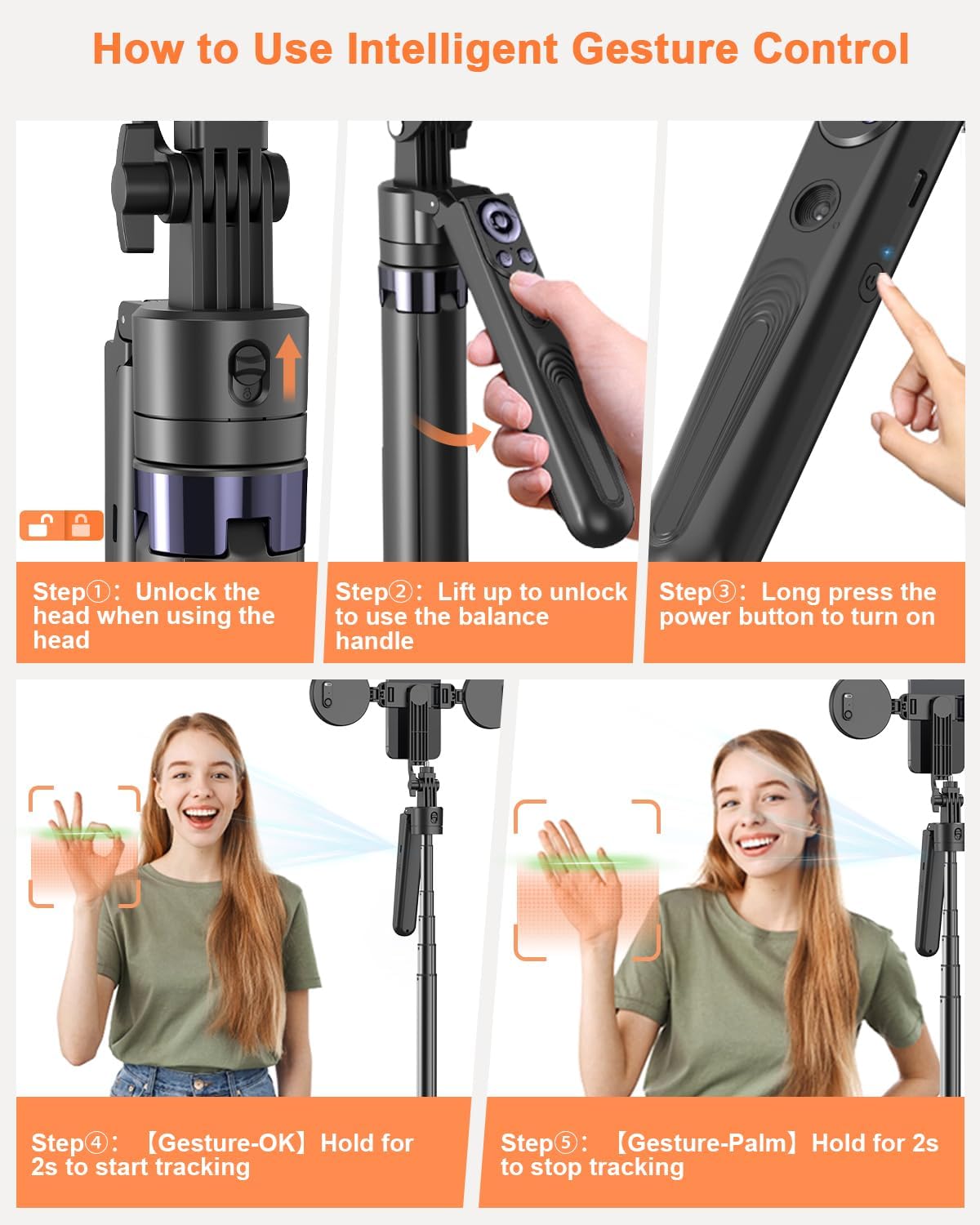
Image: A step-by-step visual guide demonstrating how to unlock the tripod head, power on the device, and use "OK" and "Palm" hand gestures to start and stop face tracking.
Video: A user demonstrating the auto face tracking feature, showing how the tripod follows their movement, ideal for solo content creation.
6.3 Remote Control Functions
The rechargeable Bluetooth remote control allows for convenient operation from a distance.
- Bluetooth Pairing: Pair the remote control with your smartphone via Bluetooth settings.
- TikTok Control: Use the remote to scroll up/down, swipe left/right, or double-tap to like videos on TikTok.
- Photo/Video Capture: Start/stop video recording or take photos remotely.
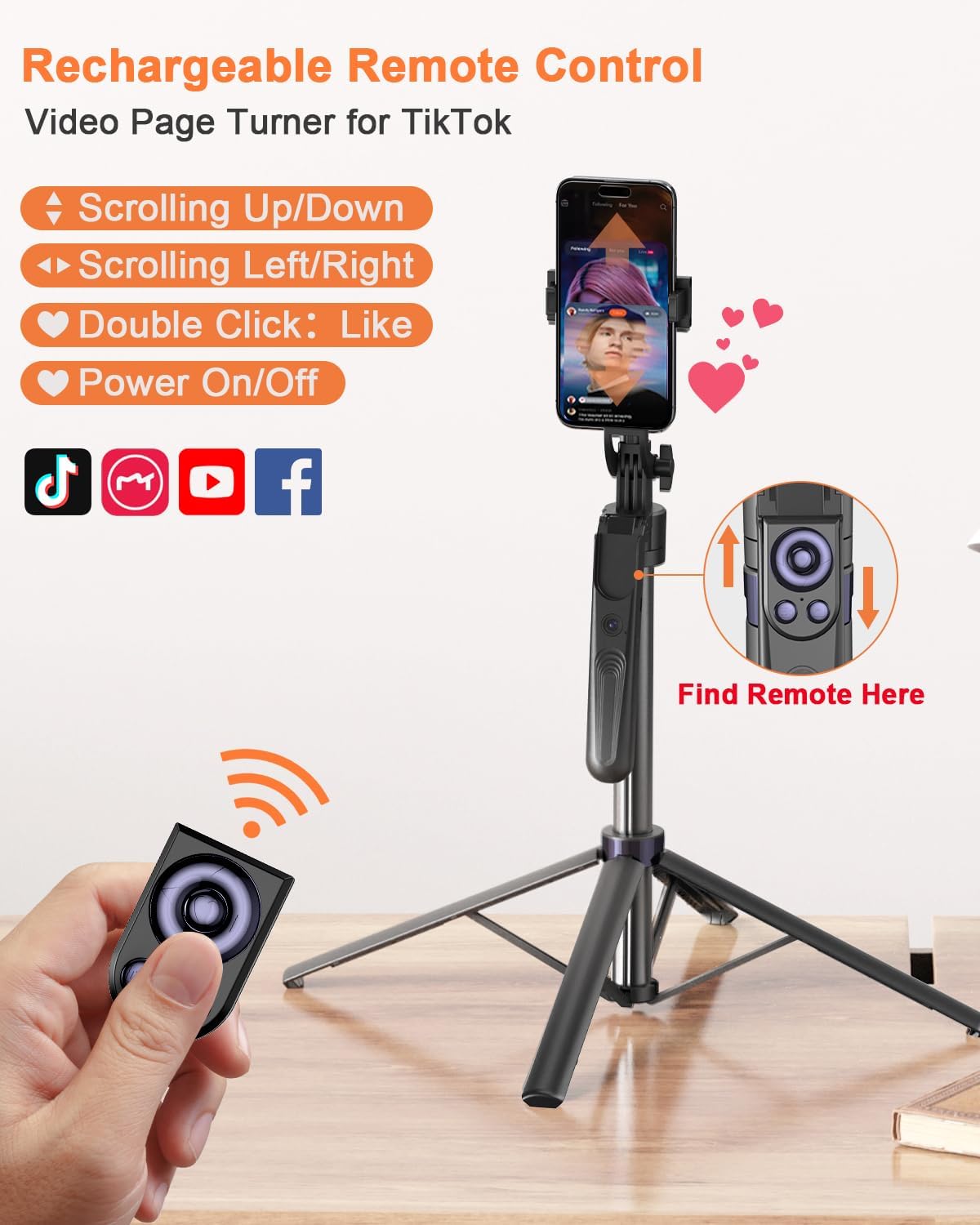
Image: A visual representation of the remote control, detailing its buttons for scrolling, liking, and power, along with its compatibility with social media apps like TikTok.
6.4 Adjusting LED Fill Lights
The detachable dual LED fill lights offer customizable illumination.
- Color Modes: Choose from three color lighting modes: warm, white, or natural light.
- Brightness Levels: Adjust the brightness to suit your environment.

Image: A demonstration of the dual LED fill lights, showing the three available color temperatures (white, natural, warm) and their adjustable brightness levels.
Video: A user showcasing the adjustable LED fill lights, demonstrating the different color temperatures and brightness levels for various lighting conditions.
6.5 Multi-Angle Adjustment
The tripod offers versatile positioning for capturing content from various angles.
- 360° Rotating Head: Adjust the phone holder to rotate horizontally.
- 270° Tilt Angle: Tilt the phone holder vertically to achieve desired shooting angles.
- 360° Balanced Handle: The handle can be adjusted for stability and precise control.

Image: Examples of the tripod's versatility, showing it used in "Desk Mode" (13 inches), "Floor Mode" (71 inches), and "Selfie Mode" (31 inches).
7. Maintenance
- Keep the tripod clean by wiping it with a soft, dry cloth.
- Avoid exposing the device to extreme temperatures or moisture.
- Store the tripod in its carrying bag when not in use to protect it from dust and damage.
8. Troubleshooting
| Problem | Possible Cause | Solution |
|---|---|---|
| Face tracking not working. | Device not powered on; incorrect gesture; face not visible to camera. | Ensure device is powered on. Use "OK" gesture clearly. Position yourself within the camera's view. |
| Remote control not connecting. | Remote not charged; Bluetooth not enabled on phone; remote not paired. | Charge the remote. Enable Bluetooth on your phone. Pair the remote via your phone's Bluetooth settings. |
| LED lights not turning on. | Lights not charged; power button not pressed. | Charge the LED lights. Press the power button on each light. |
| Tripod unstable when extended. | Legs not fully spread; uneven surface. | Ensure all four legs are fully extended. Place the tripod on a flat, stable surface. |
9. Specifications
- Brand: Yeaki
- Model: ES-B181K
- Material: Aluminum Alloy
- Maximum Height: 71 Inches
- Minimum Height: 11.6 Inches
- Folded Size: 13 Inches
- Item Weight: 1.2 lbs (approx. 1.85 pounds in package)
- Compatible Devices: Smartphones (4.7-7 inches), Cameras, GoPros, Ring Lights
- Special Features: Auto Face Tracking, 360° Rotation, Gesture Control, Rechargeable Remote Control, Detachable Dual LED Fill Lights (3 color modes, 3 brightness levels), 1/4" Screw Mount
- Battery: 1 C battery (included) for main unit, rechargeable for remote and LED lights.
10. Warranty and Support
For warranty information or technical support, please refer to the contact details provided with your purchase or visit the official Yeaki website. Keep your proof of purchase for any warranty claims.