
NEXPOW NP17
NEXPOW NP17 Portable Air Compressor Instruction Manual
Model: NP17
Introduction
The NEXPOW NP17 Portable Air Compressor is a versatile and compact digital tire inflator designed for efficient and precise inflation of various items. Featuring a powerful motor, 150 PSI maximum pressure, and a 9000mAh rechargeable battery, it offers rapid inflation and extended use. Its intelligent design includes an auto shut-off function to prevent over-inflation, a clear digital display for real-time pressure monitoring, and a built-in LED light for enhanced visibility. This manual provides essential information for the safe and effective operation, maintenance, and troubleshooting of your NP17 Portable Air Compressor.
What's in the Box
Carefully unpack all components and ensure the following items are included:
- NEXPOW NP17 Tire Inflator (Orange)
- 19.69" Inflatable Hose
- Nozzles for Swimming Rings (2 types)
- Bicycle Pump Nozzle
- Sports Ball Pump Needle
- Type-C Charging Cable
- Storage Bag
- 3-meter Cigarette Lighter Adapter
- User Manual (this document)

Image: All components included in the NEXPOW NP17 package.
Setup
Initial Charging
Before first use, fully charge the NP17 air compressor. Connect the provided Type-C charging cable to the charging port on the device and the other end to a suitable USB power source (e.g., wall adapter, car charger, power bank). The digital display will indicate the charging status. A full charge provides enough power to inflate approximately 2 car tires, 25 bike tires, or 60 balls.
Attaching the Inflatable Hose
Screw the 19.69-inch inflatable hose onto the air outlet port at the top of the compressor until it is securely fastened. Ensure a tight connection to prevent air leakage during operation.

Image: The NP17 inflator with its hose and included accessories.
Operating Instructions
Basic Operation
- Turn On: Long press the power button (⑁) for 2 seconds to turn on the device. The digital display will illuminate.
- Connect Hose: Align the inflation hose with the tire valve and firmly press the quick-connect chuck onto the valve stem. Ensure it is securely attached to prevent air leaks.
- Select Mode: Press the 'M' button to cycle through the 4 preset inflation modes: Car, Bicycle, Motorcycle, and Ball. Each mode has a default pressure range.
- Set Pressure: Use the '+' and '-' buttons to adjust the desired target pressure. The device supports PSI, BAR, KPA, and Kg/cm² units.
- Start Inflation: Press the power button (⑁) again to begin inflation. The compressor will automatically stop once the preset pressure is reached.
- Disconnect: Once inflation is complete, quickly remove the chuck from the valve stem.
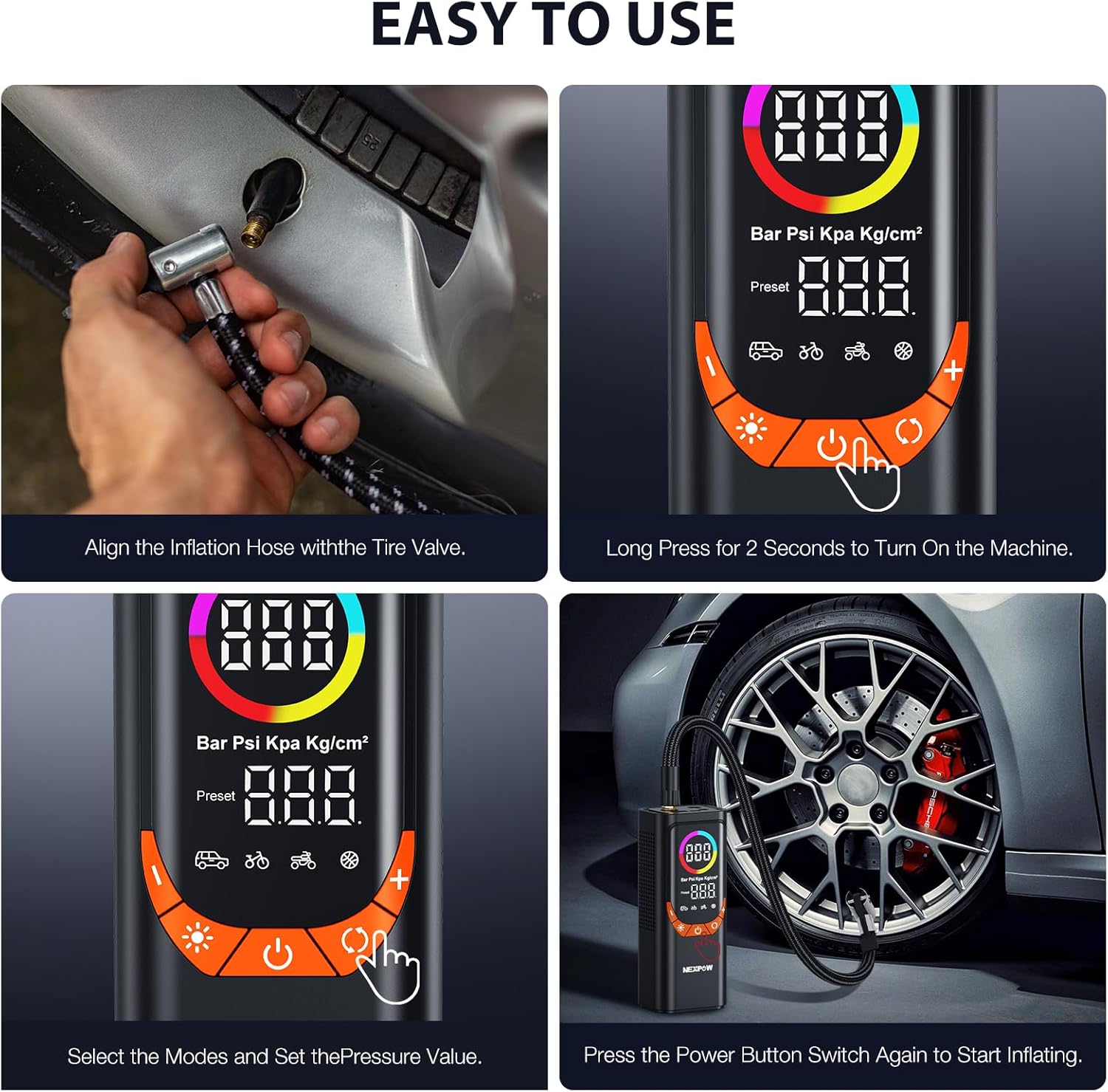
Image: Visual guide for operating the NP17 inflator.
Using Different Nozzles
The NP17 comes with various nozzles for different inflation needs:
- Sports Ball Needle: For inflating sports balls (e.g., basketballs, soccer balls).
- Bicycle Pump Nozzle: For bicycle tires with Presta valves (requires adapter).
- Swimming Ring Nozzles: For inflatable toys, swimming rings, and other low-pressure inflatables.

Image: Instructions for attaching various inflation accessories.
LED Light Modes
The built-in LED light offers three modes for various situations:
- Lighting Mode: Press the light button (☀️) once for continuous illumination. Useful for working in low-light conditions.
- Alarm Mode: Press the light button (☀️) a second time for a flashing red light. Useful as a warning signal.
- SOS Mode: Press the light button (☀️) a third time for an SOS signal (three short, three long, three short flashes). For emergency situations.

Image: The NP17's multi-purpose functionality, including its LED light modes.
Maintenance
- Cleaning: Wipe the device with a soft, dry cloth. Do not use harsh chemicals or abrasive cleaners.
- Storage: Store the air compressor in a cool, dry place away from direct sunlight and extreme temperatures. Use the provided storage bag for protection.
- Battery Care: To prolong battery life, charge the device at least once every three months, even if not in regular use. Avoid completely draining the battery before recharging.
- Hose Inspection: Regularly inspect the inflatable hose and nozzles for any signs of wear, cracks, or damage. Replace if necessary to ensure optimal performance and safety.
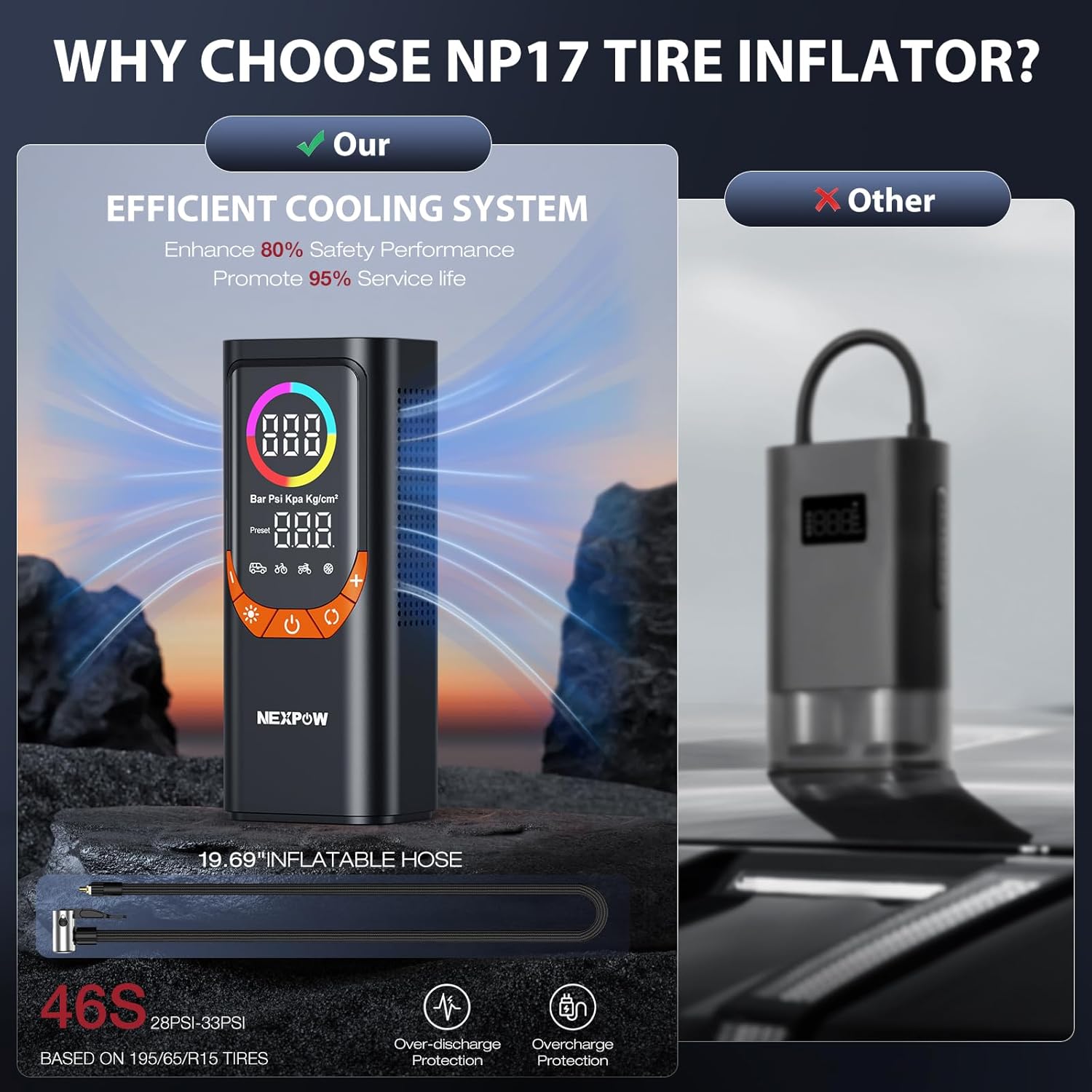
Image: The NP17 features an efficient cooling system to maintain performance and extend lifespan.
Troubleshooting
| Problem | Possible Cause | Solution |
|---|---|---|
| Device does not turn on. | Low battery. | Charge the device using the Type-C cable. |
| Device does not turn on. | Power button not pressed correctly. | Long press the power button (⑁) for 2 seconds. |
| Air leakage during inflation. | Hose not securely attached. | Ensure the inflatable hose is tightly screwed onto the device and the chuck is firmly pressed onto the valve stem. |
| Inflation is slow or weak. | Low battery. | Recharge the device. If using the 12V adapter, ensure the car's engine is running. |
| Inflation is slow or weak. | Hose or nozzle blockage. | Check the hose and selected nozzle for any obstructions. |
| Device overheats. | Continuous operation for too long. | Allow the device to cool down for at least 10-15 minutes before resuming use. Avoid prolonged continuous operation. |
Specifications
| Feature | Detail |
|---|---|
| Brand | NEXPOW |
| Model Name | NP17 ORANGE |
| Color | Orange |
| Maximum Operating Pressure | 150 PSI |
| Power Source | Battery Powered (1 Lithium Ion battery included) |
| Battery Capacity | 9000mAh (approximate) |
| Voltage | 12 Volts |
| Noise Level | 70 dB |
| Item Weight | 1.95 pounds |
| Package Dimensions | 8.62 x 4.25 x 3.74 inches |
| Special Feature | Cordless, Digital Display, LED Light, Auto Shut-Off, Power Bank Function |
| Recommended Uses | Tire Inflation (Car, Bike, Motorcycle), Sports Balls, Inflatables |
Warranty and Support
For specific warranty information and customer support, please refer to the documentation included with your product or visit the official NEXPOW website. You may also contact NEXPOW customer service directly for assistance with product inquiries, technical support, or warranty claims.
Keep your purchase receipt as proof of purchase for any warranty-related services.
Related documentsNP17

Ask a question about this manual
Ask about setup, troubleshooting, compatibility, parts, safety, or missing instructions. Manuals+ will review the question and use this page’s manual context to help answer it.