
1. Important Safety Instructions
Before operating the AGARO Regal Vibration Plate Massager, please read and understand all safety instructions. Failure to follow these instructions may result in injury or damage to the product.
- Consult a Physician: Always consult with a healthcare professional before starting any new exercise program, especially if you have pre-existing medical conditions, are pregnant, or have recently undergone surgery.
- Weight Limit: Do not exceed the maximum user weight of 120 kg (264 lbs).
- Stable Surface: Place the vibration plate on a flat, stable, and non-slip surface. Ensure adequate space around the unit.
- Power Supply: Connect the unit only to a grounded electrical outlet with the specified voltage (220-240V/~50 Hz). Do not use extension cords or adapters.
- Keep Dry: Do not use the unit in wet or damp environments. Keep away from water.
- Children and Pets: Keep children and pets away from the unit during operation. This appliance is not intended for use by persons with reduced physical, sensory or mental capabilities, or lack of experience and knowledge, unless they have been given supervision or instruction concerning use of the appliance by a person responsible for their safety.
- Proper Attire: Wear appropriate exercise clothing and footwear. Avoid loose clothing that could get caught in the machine.
- Stop if Unwell: If you experience pain, dizziness, or discomfort during use, stop immediately and consult a physician.
- Maintenance: Do not attempt to repair or modify the unit yourself. Refer all servicing to qualified personnel.
- Unplug When Not in Use: Always unplug the power cord from the outlet when the unit is not in use or before cleaning.
2. Package Contents
Carefully unpack the box and ensure all items are present and in good condition. If any items are missing or damaged, contact customer support immediately.

Image: Package contents of the AGARO Regal Vibration Plate Massager.
- Vibration Plate x 1
- Remote Control x 1
- Resistance Bands x 2
- User Manual x 1
3. Product Overview and Features
The AGARO Regal Vibration Plate Massager is designed for full-body workouts, muscle toning, calorie burning, and vibration massaging. It offers a range of features for a customizable fitness experience.
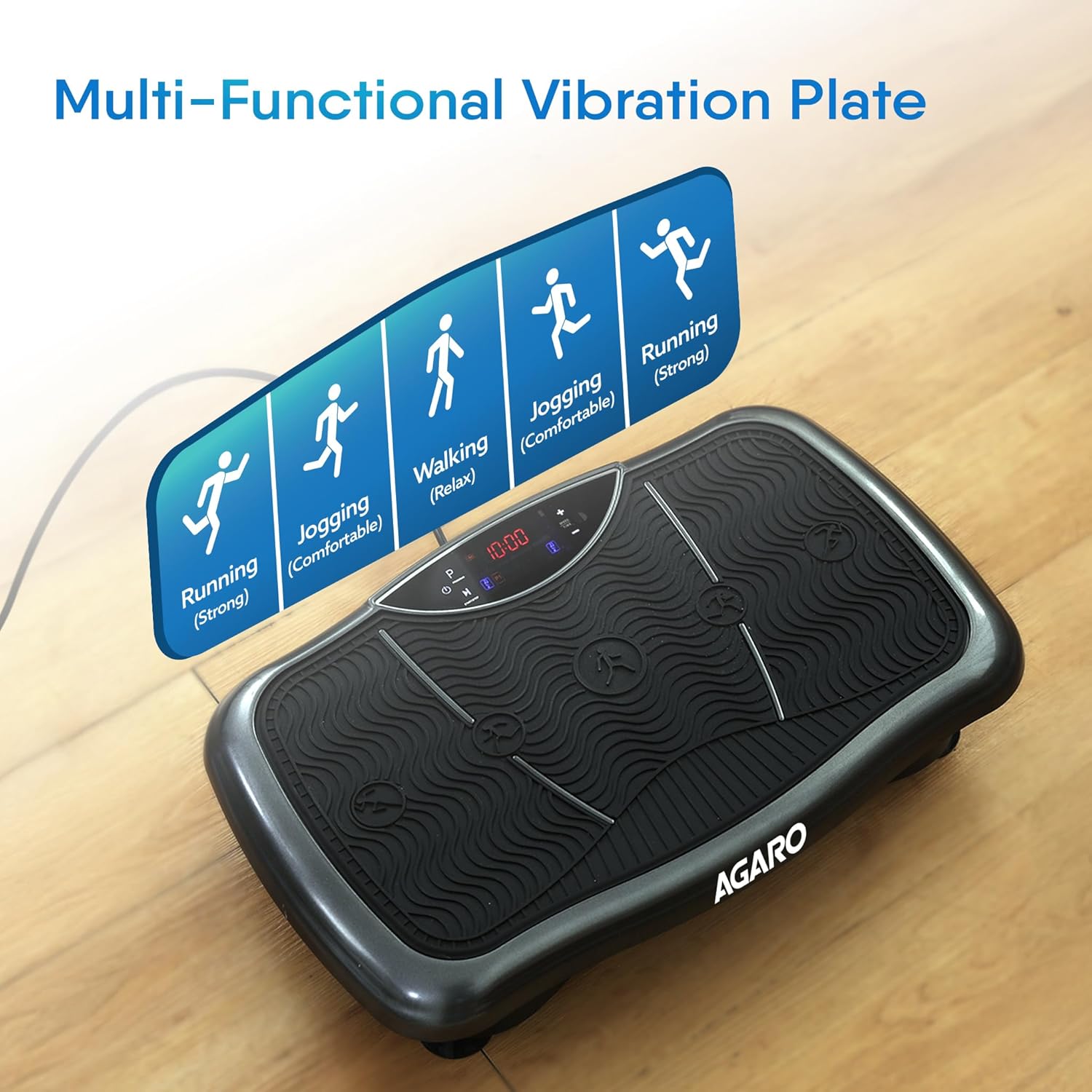
Image: Key features of the AGARO Regal Vibration Plate Massager.
- Adjustable Speed: 0-180 levels for varied intensity.
- User-friendly Display: Clear interface for easy monitoring.
- 5 Pre-Set Programs (P1-P5): Automated workout routines.
- Manual Mode: Allows custom speed and timer settings.
- Calorie Count: Tracks estimated calories burned during sessions.
- Maximum Load: Supports users up to 120 kg.
- Anti-Slip Rubber Feet & Surface: Ensures stability and safety during use.
- Compact Design: Easy to store when not in use.
4. Setup and Assembly
The AGARO Regal Vibration Plate Massager requires minimal setup. Follow these steps to prepare your device for use.
- Placement: Choose a flat, stable, and dry surface for the vibration plate. Ensure there is enough clear space around the unit for safe operation.
- Power Connection: Insert the power cord into the power inlet on the side of the vibration plate. Plug the other end into a grounded 220-240V/~50 Hz electrical outlet.
- Remote Control: Ensure the remote control has working batteries. If not, insert or replace batteries according to the markings inside the battery compartment (typically 2x AAA batteries, not always included).
- Resistance Bands (Optional): If desired, attach the resistance bands to the designated attachment points on the sides of the vibration plate.
5. Operating Instructions
The vibration plate can be operated using the touch control panel on the unit or the included remote control.
5.1 Remote Control Functions
The remote control provides convenient access to all functions. Familiarize yourself with the buttons:

Image: Remote control layout and functions.
- Power Button (⏻): Turns the unit ON/OFF.
- Start Button (▶): Begins the vibration program.
- Stop Button (‖): Pauses or stops the vibration program.
- Program Button (P): Cycles through the 5 automatic programs (P1-P5).
- Timer Increase/Decrease Buttons (▲/▼): Adjusts the workout duration in Manual Mode (up to 10 minutes).
- Speed Increase/Decrease Buttons (▲/▼): Adjusts the vibration speed in Manual Mode (0-180 levels).
- Speed Level Shortcuts (Low, Mid, High): Quickly sets the speed to predefined levels (e.g., 60, 120, 180).
5.2 Getting Started
- Power On: Plug in the unit and press the Power button on the control panel or remote. The display will illuminate.
- Select Mode:
- Automatic Programs: Press the 'P' button to cycle through P1, P2, P3, P4, P5. Each program has a pre-set speed and time.
- Manual Mode: Do not select a program. Use the Speed Increase/Decrease buttons to set your desired vibration intensity (0-180). Use the Timer Increase/Decrease buttons to set your desired workout duration (up to 10 minutes).
- Start Workout: Press the Start button. The vibration will begin.
- Adjust During Workout: You can adjust speed and time (in Manual Mode) or switch programs during a workout using the remote control.
- End Workout: The unit will automatically stop when the timer runs out. You can also press the Stop button at any time to pause or end the session.
5.3 Recommended Postures and Usage
Varying your posture on the vibration plate can target different muscle groups and provide different benefits.

Image: Multi-functional usage with different foot positions.
- Standing Position: Place your feet in the center for a gentler vibration (Walking/Relax), or wider apart towards the edges for more intense vibration (Jogging/Running).
- Squatting Position: Perform squats on the plate to engage leg and glute muscles more effectively.
- Sitting Position: Sit on the plate or place your feet on it while seated to target lower body muscles or for foot massage.
- Using Resistance Bands: Attach the bands and perform exercises like bicep curls, tricep extensions, or shoulder presses while standing on the plate to incorporate upper body training.

Image: Ease of use and storage.
6. Maintenance and Care
Proper maintenance ensures the longevity and optimal performance of your vibration plate.
- Cleaning: Always unplug the unit before cleaning. Wipe the surface with a soft, damp cloth. Do not use abrasive cleaners or solvents. Avoid spraying liquids directly onto the unit.
- Storage: Store the unit in a cool, dry place away from direct sunlight and moisture. Its compact design allows for easy storage under furniture.
- Inspection: Regularly inspect the power cord for any damage. If the cord is damaged, discontinue use and contact customer support.
- No User Serviceable Parts: The internal components are not user-serviceable. Do not attempt to open or repair the unit.
7. Troubleshooting
If you encounter any issues with your AGARO Regal Vibration Plate Massager, refer to the following common problems and solutions.
| Problem | Possible Cause | Solution |
|---|---|---|
| Unit does not power on. | Power cord not properly connected. No power from outlet. | Ensure power cord is securely plugged into both the unit and a working electrical outlet. Check the circuit breaker or try a different outlet. |
| Vibration does not start. | Unit is powered on but Start button not pressed. Program not selected (in Auto Mode). | Press the Start button on the control panel or remote. Select a program (P1-P5) or set speed/time in Manual Mode, then press Start. |
| Remote control not working. | Batteries are dead or incorrectly inserted. Obstruction between remote and unit. | Replace batteries with new ones, ensuring correct polarity. Remove any objects blocking the signal path. Ensure you are within range. |
| Unusual noise during operation. | Unit not on a flat surface. Loose components. | Ensure the unit is placed on a completely flat and stable surface. If noise persists, discontinue use and contact customer support. |
If the problem persists after trying these solutions, please contact customer support.
8. Specifications
| Feature | Detail |
|---|---|
| Model Number | 34297 |
| Product Dimensions (LxWxH) | 52.5 x 33 x 12 cm |
| Item Weight | 7.12 kg |
| Maximum Weight Recommendation | 120 kg |
| Power Source | Corded Electric |
| Voltage | 220-240V/~50 Hz |
| Wattage | 200 Watts |
| Number of Resistance Levels | 180 |
| Number of Programs | 5 |
| Controls Type | Remote, Touch Panel |
| Material | Plastic |
| Country of Origin | China |
9. Warranty and Support
The AGARO Regal Vibration Plate Massager comes with a 1-year warranty.
- Warranty Coverage: The warranty covers manufacturing defects of the product during the warranty period.
- Contact Support: For any queries, concerns, or warranty claims, please contact AGARO customer support.
- Email: info@uclindia.com
- Customer Support Number: 9821486487
- Timings: 10:00 AM to 6:00 PM (IST) Monday-Saturday (Excluding Holidays)