
LIORQUE SG-5
LIORQUE Kids Alarm Clock User Manual
Model: SG-5
Product Overview
The LIORQUE Kids Alarm Clock is designed to assist children in developing healthy sleep habits and time management skills. This multi-functional device combines an alarm clock, sleep trainer, night light, and sound machine into one adorable cat-shaped unit.

Image Description: A front view of the LIORQUE Kids Alarm Clock, showcasing its cute cat design. The digital display shows "10:30 AM" with a sun and cloud icon, indicating daytime. The clock features a vibrant, gradient light ring around the display, and small alarm icons are visible on the left side of the screen. The overall color is a soft off-white.
Key Features
- Adorable Cat Design: A friendly cat shape that appeals to children.
- Sleep Training Function: Uses sun and moon icons to visually signal wake-up and bedtime.
- Dual Alarm & Snooze: Allows for two independent alarm settings with a 9-minute snooze option.
- Colorful Night Light: Offers 4 fixed colors and 1 dynamic mode with adjustable brightness.
- Soothing Sounds & Ringtones: Includes 6 alarm sounds and 7 relaxing sounds for sleep, with timer options.
- Rechargeable Battery: Built-in 1800mAh battery with USB-C charging.
Setup Guide
1. Initial Charging
Before first use, fully charge the alarm clock. Connect the provided USB-C cable to the charging port located at the back of the device and plug the other end into a compatible USB power adapter (not included).
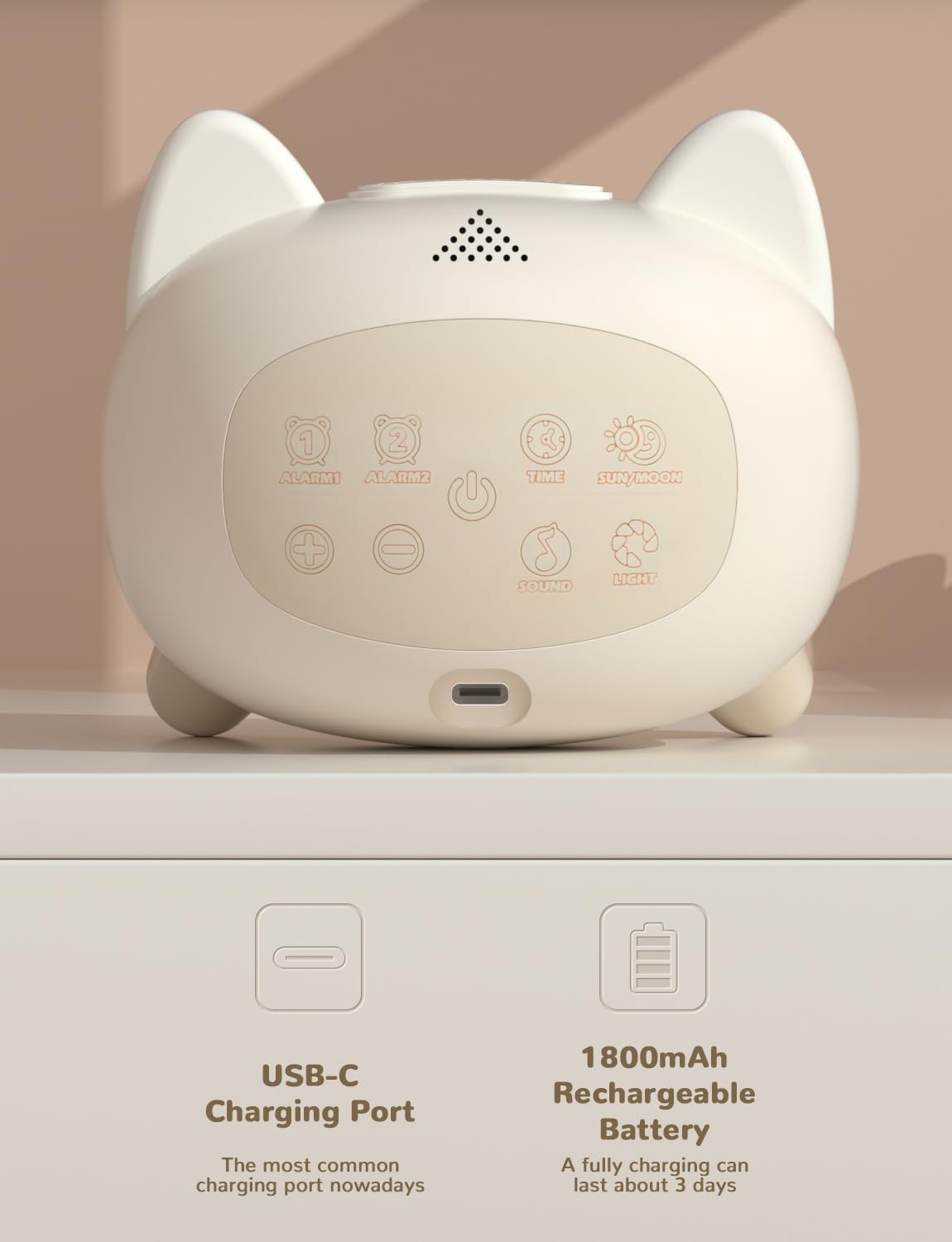
Image Description: A rear view of the LIORQUE Kids Alarm Clock, highlighting the USB-C charging port at the bottom. Above it, several embossed control buttons are visible, including "ALARM1", "ALARM2", "TIME", "SUN/MOON", "+", "-", "SOUND", and "LIGHT". A speaker grille is also present at the top.
2. Setting the Current Time
- Press the TIME button to enter time setting mode.
- Use the + and - buttons to adjust the hour.
- Press TIME again to switch to minute adjustment, then use + and -.
- Press TIME once more to confirm and exit.
Operating Instructions
1. Setting Alarms (Dual Alarm Function)
The clock supports two independent alarms, useful for different wake-up times or weekday/weekend schedules.
- Press the ALARM1 or ALARM2 button to select the alarm you wish to set. The alarm icon will flash.
- Use the + and - buttons to set the desired hour.
- Press the selected alarm button again to switch to minute adjustment, then use + and -.
- Press the alarm button one more time to confirm and activate the alarm. The alarm icon will remain lit.
- To deactivate an alarm, press its corresponding alarm button until the icon disappears from the display.
When an alarm sounds, press any button (except the power button) to activate the 9-minute snooze function. To turn off the alarm completely, press the power button or let it ring for 3 minutes.

Image Description: The LIORQUE Kids Alarm Clock showing its digital display with the time 10:30 AM. Two alarm clock icons are visible on the left side of the screen, indicating that both dual alarms are active. The image emphasizes the convenience of setting two separate alarms.

Image Description: An image illustrating the snooze function of the LIORQUE Kids Alarm Clock. The clock is shown on a bedside table next to a sleeping child, with "Zzz" icons floating around, indicating the snooze feature is active. The display shows "8:30" with a small "Zzz" icon, signifying the snooze period.
2. Sleep Training Function (Sun & Moon Icons)
This feature helps children understand when it's time to wake up and when it's time to go to bed using visual cues.
- Press the SUN/MOON button to enter sleep training setting mode.
- The sun icon will flash. Use + and - to set the desired wake-up time (when the sun appears).
- Press SUN/MOON again to switch to the moon icon setting. Use + and - to set the desired bedtime (when the moon appears).
- Press SUN/MOON one more time to confirm and activate.

Image Description: Two images of the LIORQUE Kids Alarm Clock. The top image shows the clock displaying "8:00" with a bright sun icon, indicating wake-up time. The bottom image shows the clock displaying "20:00" (8:00 PM) with a crescent moon and stars, indicating bedtime. This visually explains the sleep training feature.
3. Night Light Settings
The clock offers various light colors and brightness levels to create a comforting environment.
- Press the LIGHT button to cycle through the available light colors: 4 fixed colors (e.g., Cyan-Blue, Warm White, Blue-Purple, White) and 1 dynamic color loop mode.
- To adjust brightness, press and hold the LIGHT button. The brightness will cycle through 4 levels. Release the button at the desired brightness.
- To turn off the screen completely for a dark sleeping environment, continue cycling brightness until the screen turns off.

Image Description: A collage of six images of the LIORQUE Kids Alarm Clock, each demonstrating a different night light color or brightness setting. The colors shown include green, purple, orange, white, and a multi-color gradient, illustrating the variety of lighting options available.
4. Sound Settings (Alarm Ringtones & Soothing Sounds)
Choose from various alarm sounds and relaxing melodies for sleep.
- Press the SOUND button to cycle through the 6 alarm sounds. The selected sound will play briefly.
- To select a soothing sound for sleep, press and hold the SOUND button. The clock will enter soothing sound mode. Use + and - to cycle through the 7 available sounds (e.g., bird chirping, rain, campfire, white noise, lullabies).
- To set a timer for soothing sounds (15, 30, or 60 minutes), press the SOUND button repeatedly while a soothing sound is playing until the desired timer duration is displayed.
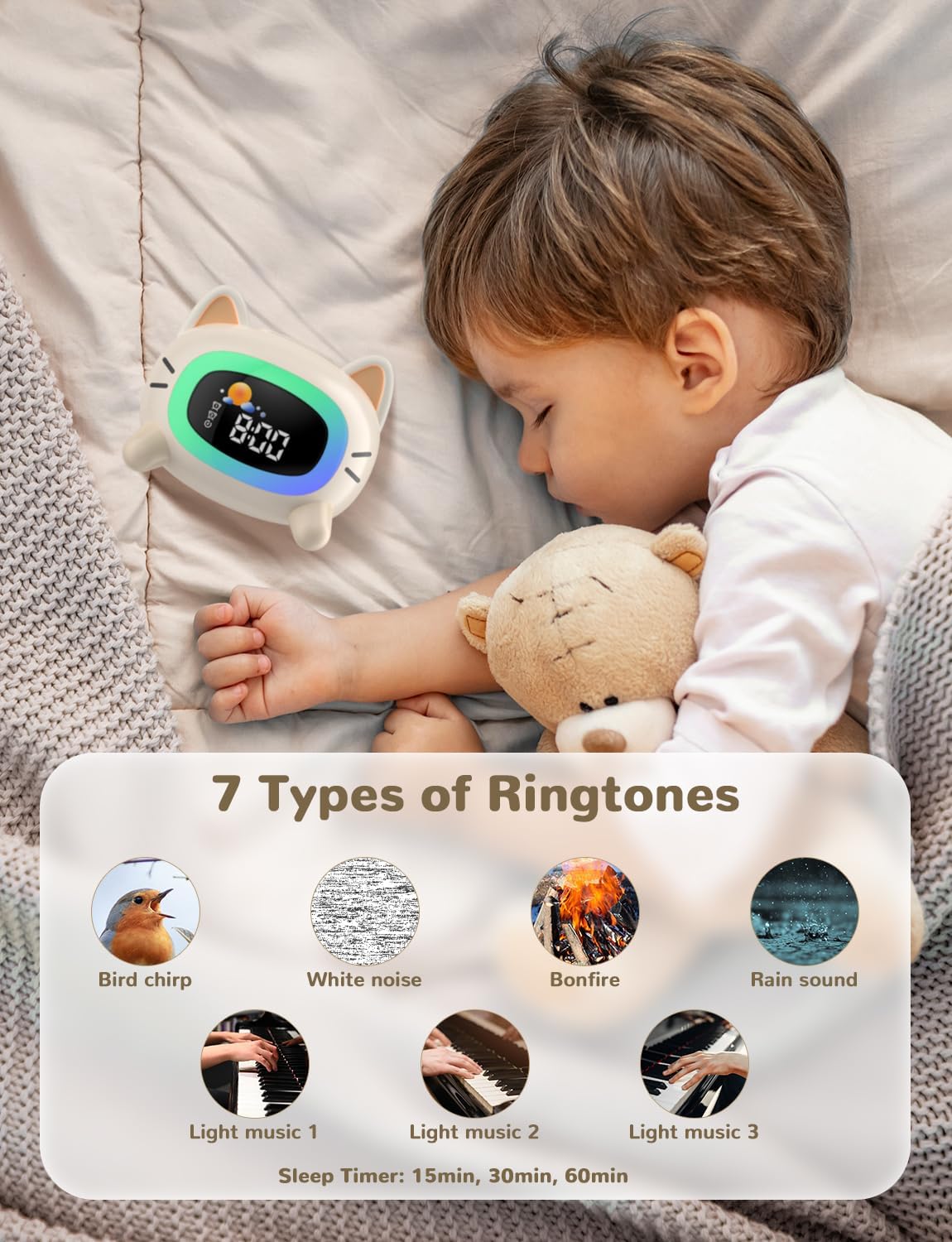
Image Description: The LIORQUE Kids Alarm Clock is shown on a bedside table next to a sleeping child. An overlay displays seven circular icons representing different ringtones and soothing sounds: bird chirping, white noise, bonfire, rain sound, and three light music options. Text below indicates sleep timer options of 15, 30, or 60 minutes.
Maintenance
- Cleaning: Wipe the clock with a soft, dry cloth. Do not use abrasive cleaners or solvents.
- Storage: Store in a cool, dry place away from direct sunlight and extreme temperatures.
- Battery Care: To prolong battery life, avoid fully discharging the battery frequently. Charge the device regularly.
Troubleshooting
| Problem | Possible Cause | Solution |
|---|---|---|
| Clock not turning on. | Low battery or no charge. | Connect to a USB-C charger and allow it to charge for at least 30 minutes before attempting to power on. |
| Alarm not sounding. | Alarm not activated or volume too low. | Ensure the alarm icon is lit on the display. Check the sound settings to ensure a ringtone is selected and volume is adequate. |
| Sleep training icons not changing. | Sleep training feature not set or activated. | Verify that the sun/moon times are correctly set and the feature is active. |
| Display is too dim or off. | Brightness level set too low or screen turned off. | Press and hold the LIGHT button to cycle through brightness levels until desired illumination is reached. |
Specifications
| Brand | LIORQUE |
| Model Number | SG-5 |
| Colour | Cat |
| Material | Acrylonitrile Butadiene Styrene (ABS) |
| Item Weight | 320 g |
| Parcel Dimensions | 14.9 x 12.3 x 9.7 cm |
| Display Type | Digital |
| Power Source | Battery Powered (1800mAh Rechargeable) |
| Special Features | Alarm, Battery Indicator, Sleep Training, Night Light, Soothing Sounds |
Warranty and Support
For warranty information or technical support, please contact LIORQUE customer service through the retailer's platform or visit the official LIORQUE store page on Amazon:
Visit the LIORQUE Store on Amazon
Please retain your proof of purchase for any warranty claims.
Ask a question about this manual
Ask about setup, troubleshooting, compatibility, parts, safety, or missing instructions. Manuals+ will review the question and use this page’s manual context to help answer it.