
MAXSHOT 10Inch Air Tires-14.5Ah
MAXSHOT Electric Scooter User Manual
Model: 10Inch Air Tires-14.5Ah
Brand: MAXSHOT
Introduction
This manual provides essential information for the safe operation, maintenance, and troubleshooting of your MAXSHOT Electric Scooter. Please read this manual thoroughly before first use to ensure proper assembly and safe riding practices. The MAXSHOT Electric Scooter is designed for adults and teens, featuring 10-inch air tires, dual braking, dual suspension, and app connectivity for an enhanced riding experience.

Image: The MAXSHOT Electric Scooter in its upright and folded positions, alongside a smartphone displaying its control app interface.
Safety Information
Your safety is paramount. Always wear a helmet and appropriate protective gear when riding. Adhere to local traffic laws and regulations. This electric scooter has undergone UL-2272 testing for electrical safety.
Important Safety Warnings:
- Initial Charge: The first charge should be 6 hours. Subsequent charges should not exceed 5 hours.
- Battery and Charging: Regularly inspect the battery and charging device. Ensure only the matching battery is used with the correct charging method. Avoid charging in unventilated or flammable environments.
- Rider Weight: The scooter supports riders up to 265 lbs (120 kg). Exceeding this limit may affect performance and safety.
- Environmental Conditions: Actual performance (speed, range) may vary based on rider weight, terrain, slope, wind resistance, and riding habits. These variations are normal and do not indicate a defect.
- Braking: The scooter features dual braking systems. Always test brakes before riding.
- Visibility: Utilize the ultra-bright LED headlights and warning taillights for safe travel during nighttime rides.
Package Contents
Upon opening the package, please verify that all components are present and in good condition:
- MAXSHOT Electric Scooter
- User Manual (this document)
- Charger
Setup
Unfolding the Scooter:
The MAXSHOT Electric Scooter is designed for quick and easy folding and unfolding. Follow these steps to unfold your scooter:
- Place the scooter on a flat surface.
- Release the folding mechanism latch, typically located near the base of the handlebar stem.
- Carefully lift the handlebar stem until it locks into the upright position. Ensure the locking mechanism is securely engaged.
- Adjust the handlebars if necessary.

Image: A visual guide demonstrating the three-step process for folding the electric scooter for compact storage.
Initial Charging:
Before your first ride, fully charge the scooter's battery. Connect the charger to the charging port on the scooter and then to a power outlet. The first charge should take approximately 6 hours. Subsequent charges will typically take up to 5 hours.

Image: An illustration highlighting the scooter's 42V 14.5AH lithium battery, indicating a 5-hour fast charge time and a 28-mile travel range.
Operating Instructions
Powering On/Off:
Press and hold the power button on the handlebar display to turn the scooter on or off.
Speed Modes and Display:
The integrated LED digital display shows your current speed, selected riding mode, and battery level. Use the controls on the handlebar to switch between different speed modes to suit your riding environment and preference.

Image: Close-up of the scooter's handlebar, showing the digital display with speed, battery life, and headlight indicators, along with the brake handle, scooter bell, and anti-slip handlebar grips.
App Connectivity:
The MAXSHOT Electric Scooter can connect to your smartphone via a dedicated app (compatible with both iPhone and Android devices). This app provides comprehensive control over various settings, including:
- Checking cruise control status
- Viewing speedometer data
- Locking or unlocking the scooter
- Customizing speed limits
- Switching riding modes
- Controlling headlights

Image: A hand holding a smartphone displaying the 'E-Scooter' app interface, showing options for phone pairing, cruise control, headlight control, customized speed limit, lock/unlock, and switching riding modes.
Braking System:
The scooter is equipped with a dual braking system for reliable stopping power. Apply the brake levers on the handlebar to engage the brakes. Always brake smoothly and gradually, especially at higher speeds.
Lights:
The scooter features an ultra-bright LED headlight and warning taillights. Activate the headlight for improved visibility during low-light conditions or nighttime rides. The taillight illuminates when braking, enhancing safety.

Image: A diagram illustrating the scooter's safety features, including a strong headlight, 265 lbs loading capacity, and a brake tail light.
Maintenance
Charging the Battery:
To maintain battery health and maximize lifespan, ensure proper charging practices. After the initial 6-hour charge, subsequent charges should not exceed 5 hours. Always use the provided charger. Store the scooter in a cool, dry place when not in use, and avoid completely draining the battery for extended periods.
General Care and Cleaning:
Regularly inspect your scooter for any loose screws or components. Keep the scooter clean by wiping it with a damp cloth. Avoid using harsh chemicals or abrasive materials that could damage the finish. Do not wash the scooter with high-pressure water.
Tire Care:
The 10-inch pneumatic tires provide excellent shock absorption. Regularly check tire pressure and inflate them to the recommended PSI to ensure optimal performance and prevent punctures.

Image: A detailed view of the scooter's 10-inch pneumatic tire, emphasizing its ability to easily travel over small obstacles and provide better shock absorption.
Troubleshooting
Refer to the following common issues and their solutions. If the problem persists, please contact customer support.
- E1 Error Code on Display:
Issue: E1 indicates a communication failure.
Solution: Check if the communication cable between the mainboard and the display is loose or improperly connected. Reconnect securely. - Rear Wheel Noise or Poor Braking:
Issue: This may be due to loose screws or motor misalignment.
Solution: Check and tighten all rear wheel screws. Ensure the motor is properly aligned. - Loose Hand Brake or Non-functional Brake:
Issue: The hand brake feels loose or doesn't work effectively.
Solution: Check the brake cable connection and adjust tension with a wrench.
Specifications
| Feature | Detail |
|---|---|
| Brand | MAXSHOT |
| Model Name | MAXSHOT |
| Style | 10Inch Air Tires-14.5Ah |
| Color | Black |
| Age Range (Description) | Adult |
| Weight Limit | 265 Pounds (120 kg) |
| Item Weight | 40.8 Pounds (18.5 kg) |
| Product Dimensions (LxWxH) | 46.5" x 18.5" x 48.8" (118.1 x 47 x 123.9 cm) |
| Frame Material | Aluminum |
| Number of Wheels | 2 |
| Wheel Size | 10 Inches |
| Wheel Material | Rubber |
| Wheel Type | Pneumatic |
| Suspension Type | Dual Suspension |
| Brake Style | Dual Braking System (mainly front braking) |
| Motor Power | 500W |
| Max Speed | Up to 22 MPH (35.4 km/h) |
| Maximum Distance Range | Up to 28 Miles (45 km) |
| Battery | 42V 14.5AH Lithium-ion (rechargeable and replaceable) |
| Charging Time | 5 Hours (after initial 6-hour charge) |
| Special Features | Cruise Control, Digital Display, Lockable, Replaceable Battery, Speedometer, App Connectivity |
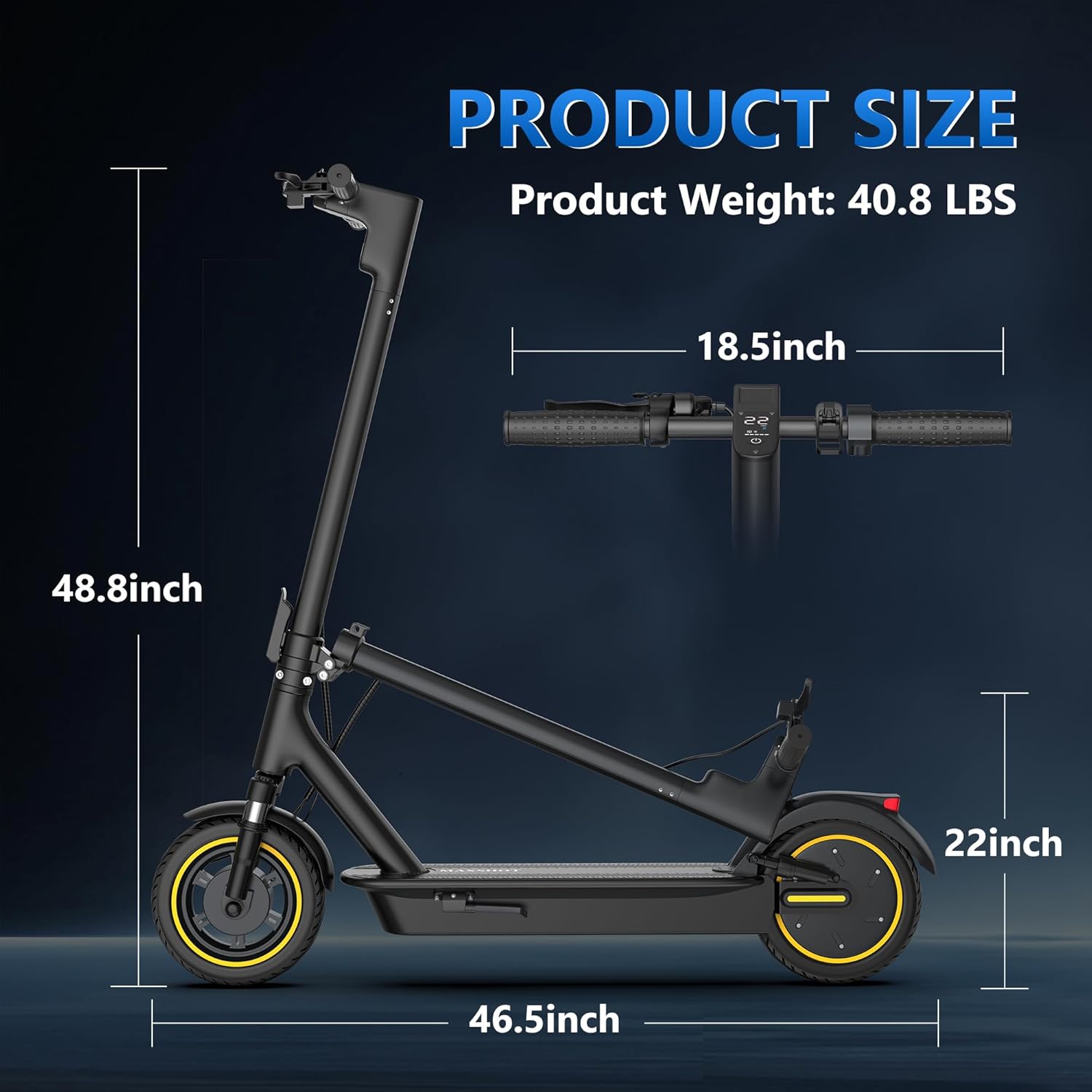
Image: A diagram illustrating the dimensions of the MAXSHOT Electric Scooter, including its height (48.8 inches), length (46.5 inches), and handlebar width (18.5 inches), along with its folded height (22 inches).
Warranty and Support
Warranty Information:
The MAXSHOT Electric Scooter comes with a 1-year limited warranty. This warranty covers manufacturing defects and issues arising from normal use. Please retain your proof of purchase for warranty claims.
Customer Support:
For any questions, technical assistance, or warranty claims, please contact MAXSHOT customer support. The smart control system is designed to deliver responses within 24 hours for a smooth riding experience.
For more information or to visit the official store, please refer to the brand's presence on Amazon: MAXSHOT Store on Amazon.
Ask a question about this manual
Ask about setup, troubleshooting, compatibility, parts, safety, or missing instructions. Manuals+ will review the question and use this page’s manual context to help answer it.