
Soundcore A31X1
Soundcore Select 4 Go Bluetooth Shower Speaker User Manual
Model: A31X1
Introduction
The Soundcore Select 4 Go is a portable Bluetooth speaker designed for robust outdoor and indoor use. Featuring IP67 waterproof and dustproof protection, it is built to withstand various environments, including showers, beaches, and camping trips. Its compact design, long battery life, and powerful sound make it an ideal companion for music on the go. This manual provides essential information for setting up, operating, and maintaining your speaker.

Image: The Soundcore Select 4 Go speaker, showcasing its compact and colorful design.
What's in the Box
- Soundcore Select 4 Go Bluetooth Shower Speaker (Purple & Yellow)
- 30cm USB-A to C Charging Cable
- Safety Card & Quick Start Guide
Note: A wall charger is not included and must be supplied separately.

Image: A visual representation of the Soundcore Select 4 Go speaker and its included accessories.
Product Overview
The Soundcore Select 4 Go features intuitive controls and a durable design. Familiarize yourself with the button layout and key features for optimal use.
Controls and Indicators:
- Power Button: Press and hold to power on/off.
- Bluetooth Button: Press to enter pairing mode. Press and hold for TWS pairing.
- Volume Down (-): Decrease volume.
- Multi-function Button (Play/Pause): Play/pause music, answer/end calls.
- Volume Up (+): Increase volume.
- BassUp Button: Activate/deactivate BassUp mode for enhanced bass.
- USB-C Charging Port: For charging the speaker.
- LED Indicators: Show power, Bluetooth status, and charging status.

Image: Close-up view of the speaker's side, highlighting the control buttons and integrated strap.
Setup
1. Charging the Speaker
Before first use, fully charge the speaker to ensure optimal battery performance. The charging time is approximately 4.5 hours.
- Connect the provided USB-A to C cable to the speaker's USB-C charging port.
- Connect the other end of the cable to a USB wall charger (not included) or a powered USB port.
- The LED indicator will show charging status and turn off when fully charged.
2. Bluetooth Pairing
Pair your Soundcore Select 4 Go with your Bluetooth-enabled device to start playing audio.
- Power on the speaker by pressing and holding the Power button. The Bluetooth indicator will flash blue, indicating it's in pairing mode.
- On your device, enable Bluetooth and search for "Soundcore Select 4 Go" in the list of available devices.
- Select "Soundcore Select 4 Go" to connect. Once connected, the Bluetooth indicator will turn solid blue.
Operating
Basic Functions
- Power On/Off: Press and hold the Power button for 2 seconds.
- Volume Control: Press the '+' button to increase volume, '-' button to decrease volume.
- Play/Pause: Press the Multi-function button once.
- Next Track: Double-press the Multi-function button.
- Previous Track: Triple-press the Multi-function button.
- Answer/End Call: Press the Multi-function button once.
- Reject Call: Press and hold the Multi-function button for 2 seconds.
- Activate BassUp: Press the BassUp button to toggle bass enhancement.
True Wireless Stereo (TWS) Pairing
For a more immersive audio experience, you can pair two Soundcore Select 4 Go speakers together.
- Ensure both Soundcore Select 4 Go speakers are powered on.
- Connect one speaker to your smartphone via Bluetooth (this will be the primary speaker).
- On both speakers, press and hold the Bluetooth button for 2 seconds until you hear a tone. The Bluetooth indicators will flash white.
- Once successfully paired, the Bluetooth indicator on the primary speaker will remain solid blue, and the secondary speaker's indicator will turn solid white.
- To disconnect TWS, press and hold the Bluetooth button on either speaker for 2 seconds.

Image: Two Soundcore Select 4 Go speakers being used together for a stereo sound experience.
Maintenance
Proper care ensures the longevity and performance of your Soundcore Select 4 Go speaker.
- Cleaning: Use a soft, damp cloth to clean the speaker's surface. Avoid using harsh chemicals or abrasive cleaners.
- Waterproof Seal: Ensure the rubber cover for the charging port is securely sealed before exposing the speaker to water to maintain its IP67 rating.
- Storage: Store the speaker in a cool, dry place when not in use. Avoid extreme temperatures.
- Battery Care: To preserve battery life, charge the speaker at least once every 3 months if not used regularly.
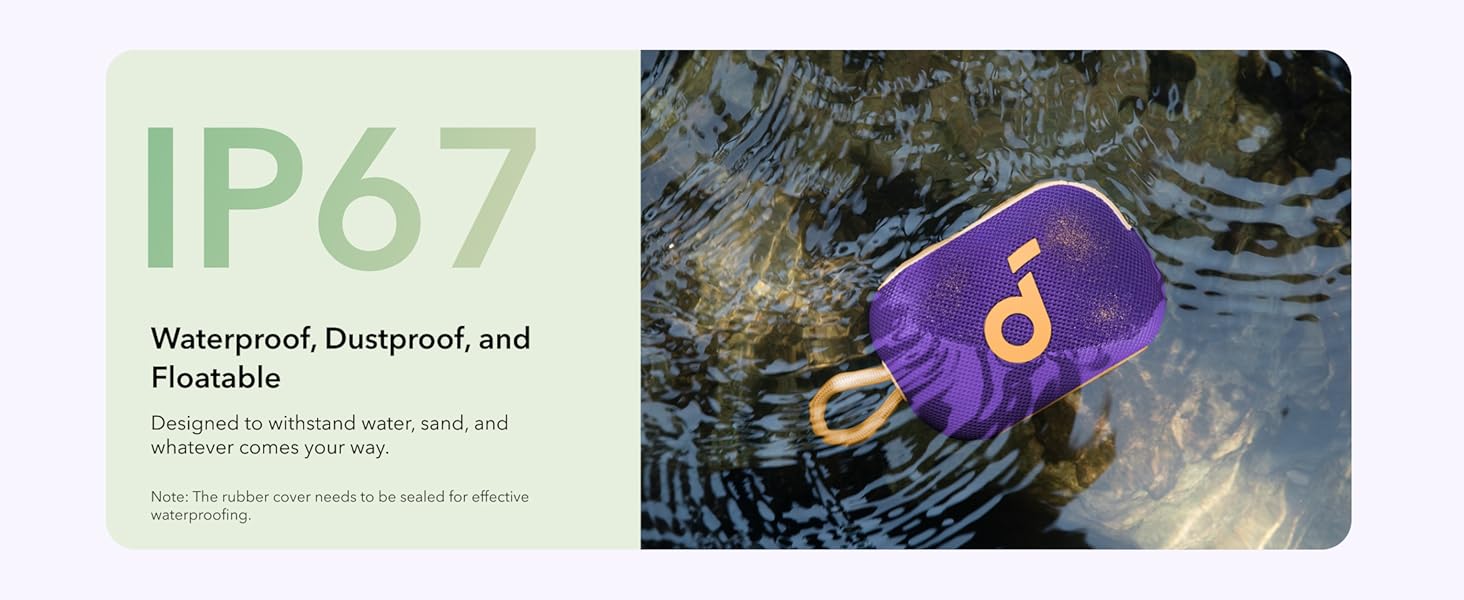
Image: The speaker submerged in water, highlighting its waterproof capabilities. Ensure the charging port cover is sealed.
Troubleshooting
| Problem | Solution |
|---|---|
| Speaker won't turn on. | Ensure the speaker is charged. Connect to a power source and try again. |
| Cannot pair with device. | Make sure the speaker is in pairing mode (flashing blue LED). Disable and re-enable Bluetooth on your device. Move speaker closer to device. |
| No sound or low volume. | Increase volume on both the speaker and your device. Ensure the speaker is connected. |
| Sound distortion. | Reduce volume. Ensure the speaker is not placed on a vibrating surface. |
| TWS pairing fails. | Ensure both speakers are Soundcore Select 4 Go models. Follow TWS pairing steps carefully. Disconnect any existing Bluetooth connections before TWS pairing. |

Image: An X-ray view of the speaker, illustrating its internal structure and 5W audio output.
Specifications
| Feature | Detail |
|---|---|
| Model Name | A31X1 |
| Speaker Maximum Output Power | 5 Watts |
| Connectivity Technology | Bluetooth |
| Bluetooth Range | 30 Meters |
| Battery Life | 20 Hours |
| Charging Time | 4.5 Hours |
| Water Resistance Level | IP67 (Waterproof & Dustproof) |
| Item Weight | 9.3 Ounces |
| Product Dimensions | 3.23"D x 4.72"W x 1.89"H |
| Material | PC+ABS |
| Audio Output Mode | Mono (Stereo with TWS pairing) |
Image: An X-ray view of the speaker, illustrating its internal structure and 5W audio output.
Warranty and Support
Warranty Information
The Soundcore Select 4 Go speaker comes with a Limited Warranty. Please refer to the Safety Card & Quick Start Guide included in your package for specific warranty terms and conditions. Soundcore products are designed for durability, with the battery retaining 95% performance after 300 cycles at max current, and buttons tested for up to 3,000 presses.

Image: A graphic highlighting the 24-month protection period for Soundcore products.
Customer Support
For technical support, warranty claims, or general inquiries, please visit the official Soundcore support website or contact their customer service. You can often find FAQs and additional resources online.
Online Resources:
Related documentsA31X1


Ask a question about this manual
Ask about setup, troubleshooting, compatibility, parts, safety, or missing instructions. Manuals+ will review the question and use this page’s manual context to help answer it.