
1. Introduction and Overview
The Jesverty SPS-6015H is a high-performance, variable DC regulated bench power supply designed for a wide range of applications. It features an encoder knob for precise voltage and current adjustments, an output ON/OFF switch for convenience, and a 4-digit LED display for clear readings. Built-in Over-Voltage Protection (OVP) and Over-Current Protection (OCP) ensure safe operation for both the device and connected loads. Its compact and lightweight design makes it suitable for laboratories, educational sites, factory testing, maintenance, battery charging, anodizing, and DIY electronic projects.

Figure 1.1: Front view of the Jesverty SPS-6015H DC Power Supply.

Figure 1.2: The Jesverty SPS-6015H is suitable for various applications including DIY, school, electronic laboratories, and auto repair shops.
2. Safety Instructions
To ensure safe operation and prolong the lifespan of your device, please adhere to the following safety guidelines:
- Always connect the power supply to a grounded outlet.
- Do not operate the device in wet or damp conditions.
- Ensure proper ventilation to prevent overheating. Do not block the cooling fan or vents.
- Avoid short-circuiting the output terminals when the output is active.
- Do not attempt to disassemble or modify the unit. Refer all servicing to qualified personnel.
- Verify the input voltage requirements match your local power supply before connecting.
- Always turn off the output before connecting or disconnecting loads.
3. Product Features
- Encoder Adjustment Knob: Upgraded from traditional potentiometers, offering more convenient and precise setting of voltage and current with 0.01V/0.01A resolution.
- Output ON/OFF Button: Easily switch the output on or off without disconnecting the load or turning off the main power.
- Comprehensive Protection: Includes Over-Voltage Protection (OVP) and Over-Current Protection (OCP) to safeguard connected devices.
- Temperature-Regulated Cooling Fan: Ensures stable operation and prevents overheating.
- Compact & Lightweight Design: Measures approximately 13.2(D) x 8.4(W) x 6.5(H) inches and weighs about 6.6 lbs, saving workbench space.
- 4-Digit LED Display: Provides clear and accurate readings of voltage and current.

Figure 3.1: High precision 4-digit LED display for accurate power output.
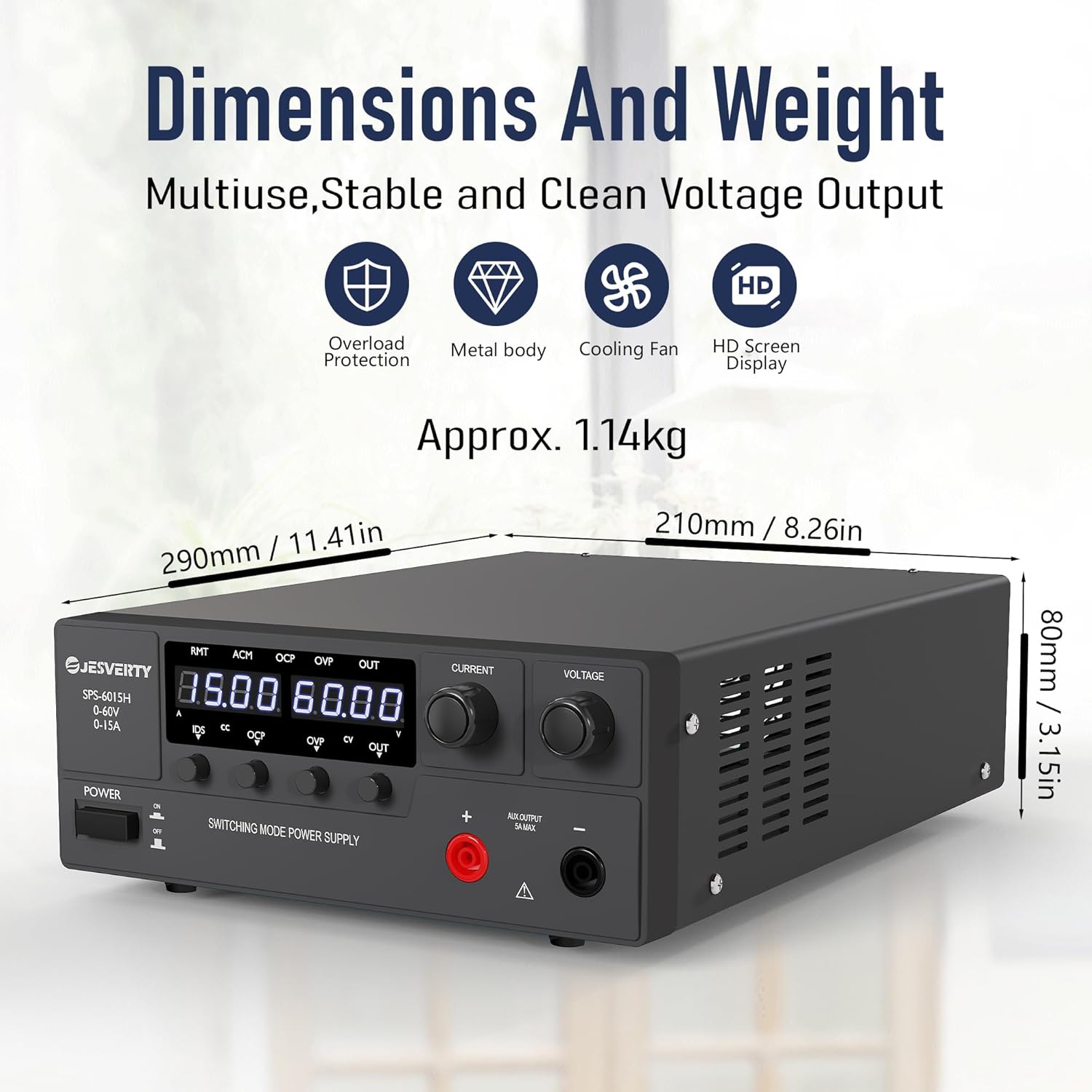
Figure 3.2: Compact dimensions and lightweight design for efficient use of space.
4. Package Contents
Upon opening the package, please verify that all items are present and in good condition:
- 1 x Jesverty SPS-H/HP Unit (SPS-6015H)
- 1 x Power Cord (AC input settings may vary by region)
- 1 x Instruction Manual (this document)
5. Setup
Follow these steps to set up your Jesverty SPS-6015H DC Power Supply:
- Unpacking: Carefully remove the power supply and all accessories from the packaging.
- Placement: Place the unit on a stable, flat surface with adequate ventilation. Ensure there is sufficient space around the unit for air circulation, especially around the rear cooling fan.
- Power Connection: Connect the provided power cord to the AC input terminal on the rear of the power supply and then to a grounded electrical outlet.
- Output Connections: The unit features main output terminals (red for positive, black for negative) on the rear and an auxiliary output terminal (5A max) on the front. Connect your load using appropriate cables to the desired output terminals. Ensure correct polarity.

Figure 5.1: Front and rear panel overview, showing output connectors and cooling fan.
6. Operating Instructions
This section details the operational procedures for your DC power supply.
Video 6.1: A demonstration video showing the operation of the Jesverty SPS-6015H DC Power Supply, including power on/off, voltage and current adjustment, and OVP/OCP protection settings.
6.1. Power On/Off
- To turn on the power supply, press the POWER button located on the front panel. The LED display will illuminate.
- To turn off the power supply, press the POWER button again.
6.2. Voltage and Current Adjustment
The SPS-6015H uses encoder knobs for precise adjustments:
- Voltage Adjustment: Rotate the VOLTAGE knob to adjust the output voltage. Press the VOLTAGE knob to select which digit to adjust (e.g., tens, units, tenths, hundredths). Rotate to change the value of the selected digit.
- Current Adjustment: Rotate the CURRENT knob to adjust the output current limit. Press the CURRENT knob to select which digit to adjust. Rotate to change the value of the selected digit.
6.3. Output ON/OFF Control
- After setting the desired voltage and current, press the OUT button to enable the output. The OUT LED will illuminate.
- To disable the output, press the OUT button again. The OUT LED will turn off. This allows for safe connection/disconnection of loads without powering down the unit.
6.4. Over-Voltage Protection (OVP) Setting
OVP protects your load from excessive voltage. When the output voltage exceeds the set OVP trip point, the output will be automatically shut off.
- Press the OVP button to enter the OVP configuration interface. The OVP LED will flash.
- Use the VOLTAGE knob to set the desired OVP trip point.
- To enable/disable OVP, press and rotate the CURRENT knob to toggle between ON and OFF.
- Press the OVP button again to exit the OVP configuration and return to the main interface.
6.5. Over-Current Protection (OCP) Setting
OCP protects your load from excessive current. When the output current exceeds the set OCP trip point, the output will be automatically shut off.
- Press the OCP button to enter the OCP configuration interface. The OCP LED will flash.
- Use the VOLTAGE knob to set the desired OCP trip point.
- To enable/disable OCP, press and rotate the CURRENT knob to toggle between ON and OFF.
- Press the OCP button again to exit the OCP configuration and return to the main interface.
6.6. Battery Charging Function
The Jesverty SPS-6015H can be used for charging various battery types. Always ensure to set the correct voltage and current limits for your specific battery type before connecting.

Figure 6.1: Example of the power supply connected for battery charging. Always set current and voltage correctly.
7. Maintenance
Regular maintenance helps ensure optimal performance and longevity of your power supply:
- Cleaning: Use a soft, dry cloth to clean the exterior of the unit. Do not use abrasive cleaners or solvents. Ensure the unit is powered off and unplugged before cleaning.
- Ventilation: Periodically check that the ventilation openings and cooling fan are free from dust and debris. Use compressed air to clear any blockages.
- Storage: When not in use for extended periods, store the power supply in a cool, dry place, away from direct sunlight and extreme temperatures.
8. Troubleshooting
If you encounter issues with your Jesverty SPS-6015H, refer to the table below for common problems and solutions:
| Problem | Possible Cause | Solution |
|---|---|---|
| No power/display off | Power cord not connected; Power switch off; No power from outlet. | Check power cord connection; Ensure power switch is ON; Test outlet with another device. |
| No output voltage/current | Output switch (OUT) is off; OVP/OCP activated; Load short-circuited or open-circuited. | Press the OUT button; Check OVP/OCP settings and reset if necessary; Verify load connection and integrity. |
| Voltage/Current cannot be adjusted | Knob not pressed to select digit; Unit in protection mode. | Press the knob to select the digit for adjustment; Check OVP/OCP status. |
| Unit overheats | Blocked ventilation; Excessive load. | Ensure clear ventilation paths; Reduce load or operating time. |
If the problem persists after attempting these solutions, please contact Jesverty Customer Service for assistance.
9. Specifications
| Parameter | Value |
|---|---|
| Model | SPS-6015H |
| Output Voltage | 0-60V |
| Output Current | 0-15A |
| Output Wattage | 900W |
| Input Voltage (AC) | 100-73V (AC) |
| Display | 4-Digit LED |
| Adjustment Type | Encoder Knob |
| Protection Features | OVP (Over-Voltage Protection), OCP (Over-Current Protection) |
| Cooling Method | Air (with Temperature-Regulated Fan) |
| Item Weight | 3 Kilograms (approx. 6.61 Pounds) |
| Package Dimensions | 15.63 x 10.94 x 5.79 inches |
| Country of Origin | China |
10. Warranty and Customer Support
Jesverty products are designed for reliability and performance. For specific warranty details, please refer to the warranty card included with your product or contact Jesverty Customer Service.
Should you have any problems or questions about your order or the product, please feel free to contact Jesverty Customer Service via Amazon message or email. Our professional technical support team is ready to assist you.
For the latest information and support, visit the official Jesverty Store on Amazon: Jesverty Store


