
1. Introduction and Overview
The Bowers & Wilkins Zeppelin Pro Edition is a high-fidelity wireless speaker designed to deliver exceptional sound quality and versatile streaming options. This manual provides essential information for setting up, operating, maintaining, and troubleshooting your speaker.
Key features include:
- Advanced Acoustics: Features (2) 3.5" midrange drivers, a 6" subwoofer, and (2) 1" Titanium Dome tweeters for clear, powerful, room-filling audio.
- Versatile Wireless Streaming: Supports AirPlay 2, Bluetooth 5.0 (with aptX Adaptive, SBC, AAC codec support), and Spotify Connect.
- Integrated Streaming Services: Access Amazon Music, Deezer, Last.FM, Pandora, Qobuz, TIDAL, and more via the Bowers & Wilkins Music app.
- Multiroom Support: Seamlessly integrate into a multiroom audio system using the Bowers & Wilkins Music app.
- Elegant Design: Iconic Zeppelin shape with a downward-firing illuminated light (user adjustable via app).
2. Setup
Follow these steps to set up your Bowers & Wilkins Zeppelin Pro Edition speaker:
- Unpacking: Carefully remove the speaker and all accessories from the packaging. Ensure you have the speaker, power cable, and Quick Start Guide.
- Placement: Position the speaker on a stable, flat surface. Consider its dimensions (7.64"D x 25.59"W x 8.27"H) and weight (22.7 pounds / 10.3 Kilograms) for optimal placement. The speaker is designed to be a statement piece and should be placed where its sound can project freely.
- Power Connection: Connect the provided power cable to the speaker's power input and then to a wall outlet. The speaker requires a corded electric power source.
- Initial Power On: Once connected to power, the speaker will automatically power on or can be turned on using the power button.
- App Installation: Download the Bowers & Wilkins Music app from your device's app store. This app is essential for full control and access to streaming services.
- Network Connection: Open the Bowers & Wilkins Music app and follow the on-screen instructions to connect your Zeppelin Pro Edition to your Wi-Fi network. This enables AirPlay 2, Spotify Connect, and integrated streaming services.
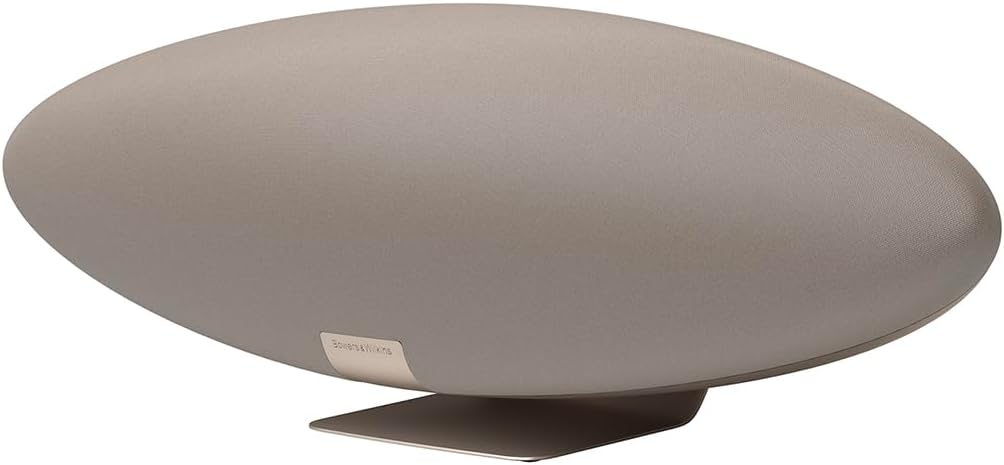
Image: The Bowers & Wilkins Zeppelin Pro Edition Wireless Speaker in Solar Gold, showcasing its distinctive elliptical design.
3. Operating Instructions
The Zeppelin Pro Edition offers multiple ways to enjoy your audio:
3.1. Bowers & Wilkins Music App
The dedicated app provides comprehensive control over your speaker:
- Direct Streaming: Access integrated streaming services like Amazon Music, Deezer, Qobuz, and TIDAL directly from the app.
- Multiroom Control: Manage multiple Bowers & Wilkins multiroom compatible devices for synchronized audio playback across your home.
- Sound Customization: Adjust bass and treble settings to fine-tune your listening experience.
- Ambient Light Control: Customize the color and brightness of the downward-firing LED light.
3.2. Bluetooth Streaming
For quick and easy connection from any Bluetooth-enabled device:
- Ensure Bluetooth is enabled on your source device.
- Press the Bluetooth pairing button on the speaker (located on the rear panel or via the app).
- Select "Zeppelin Pro Edition" from your device's Bluetooth settings.
3.3. AirPlay 2 and Spotify Connect
These features allow seamless streaming from compatible devices and apps:
- AirPlay 2: From an Apple device, select the AirPlay icon in your audio app and choose your Zeppelin Pro Edition.
- Spotify Connect: In the Spotify app, select the 'Devices Available' icon and choose your Zeppelin Pro Edition.

Image: The Bowers & Wilkins Music app displayed on multiple smartphones, showing options for direct streaming, EQ adjustments, and ambient light control.
4. Maintenance
To ensure the longevity and optimal performance of your Zeppelin Pro Edition speaker:
- Cleaning: Use a soft, dry cloth to gently wipe the speaker's surfaces. Avoid abrasive cleaners, solvents, or sprays.
- Dust Removal: Regularly dust the fabric grille with a soft brush or vacuum cleaner with a brush attachment.
- Avoid Liquids: The speaker is not waterproof. Keep it away from water, moisture, and excessive humidity.
- Temperature: Operate and store the speaker within recommended temperature ranges to prevent damage.
- Ventilation: Ensure adequate airflow around the speaker to prevent overheating. Do not block ventilation openings.
5. Troubleshooting
If you encounter issues with your Zeppelin Pro Edition, try the following:
- No Power: Check that the power cable is securely connected to both the speaker and a working wall outlet.
- No Sound: Verify that the volume is not muted or set too low on both the speaker and your source device. Ensure the correct input source is selected in the Bowers & Wilkins Music app.
- Connection Issues: For Wi-Fi, ensure your router is functioning correctly and the speaker is within range. For Bluetooth, ensure the speaker is in pairing mode and your device's Bluetooth is enabled. Try restarting both the speaker and your source device.
- App Not Responding: Close and reopen the Bowers & Wilkins Music app. If the issue persists, try reinstalling the app.
- Factory Reset: If problems persist, a factory reset may resolve them. Refer to the Quick Start Guide or the Bowers & Wilkins Music app for instructions on performing a factory reset.
6. Specifications
| Model Name | Zeppelin Pro Solar Gold |
| Item Model Number | FP45306 |
| Brand | Bowers & Wilkins |
| Speaker Type | Wireless Speaker |
| Speaker Maximum Output Power | 240 Watts |
| Surround Sound Channel Configuration | 2.1 |
| Subwoofer Diameter | 6 Inches |
| Tweeter Diameter | 1 Inches |
| Speaker Size (Midrange) | 3.5 Inches |
| Connectivity Technology | Bluetooth |
| Wireless Communication Technology | Airplay, Bluetooth |
| Bluetooth Range | 20 Meters |
| Control Method | App |
| Power Source | Corded Electric |
| Product Dimensions | 7.64"D x 25.59"W x 8.27"H |
| Item Weight | 22.7 pounds (10.3 Kilograms) |
| Color | Solar Gold |
| Material | High-quality materials |
| Water Resistance Level | Not Water Resistant |
| Included Components | Speaker, Quick Start Guide, Power Cable |
7. Warranty and Support
Your Bowers & Wilkins Zeppelin Pro Edition Wireless Speaker comes with a Limited Warranty. Please refer to the included Quick Start Guide and the Bowers & Wilkins Music app for detailed warranty information and terms.
For further assistance, visit the official Bowers & Wilkins support website or contact their customer service. The Quick Start Guide provides initial setup instructions and contact details.


