
Introduction
This manual provides detailed instructions for the proper installation, operation, and maintenance of your SGPRO Audio Rack Mount Kit, Model SG-MK21S. This kit is designed to integrate wireless microphone receivers and wireless in-ear monitor system transmitters into standard 19-inch audio racks, enhancing both organization and signal reception.
Key Features:
- Antenna Extension: Includes snap-on antenna extension cables and mounting brackets for optimal antenna positioning at the front of your audio rack.
- Standard Rack Compatibility: Fits standard 19-inch audio racks, with each side measuring 13.8 cm (5.47 inches). Ideal for equipment with a width of 20-21 cm (7.87-8.27 inches).
- Easy Installation: Comes with all necessary mounting screws and snap-on antenna extension cables. Only a Phillips screwdriver is required for assembly.
- Versatile Use: Compatible with various SGPRO wireless microphone and in-ear monitor systems, and can also be used with non-SGPRO equipment if dimensions and antenna types are compatible.
What's in the Box
Please verify that all components listed below are included in your package:
- Rack Mount Pair
- Antenna Extension Cable (2)
- Mounting Screws

An overview of the kit contents, including the rack mount pair, mounting screws, and antenna extension cables.
Setup Instructions
Follow these steps to properly install your SGPRO Audio Rack Mount Kit:
- Prepare Your Equipment: Ensure your wireless microphone receiver or in-ear monitor system transmitter is powered off before installation.
- Attach Rack Ears: Align the rack mount ears with the screw holes on the sides of your audio equipment. Use the provided mounting screws to securely fasten the rack ears to the device. A Phillips screwdriver is the only tool required.
- Mount in Audio Rack: Slide the assembled equipment into a standard 19-inch audio rack. Secure the rack ears to the rack rails using appropriate rack screws (not included with this kit, typically supplied with the audio rack).
- Connect Antenna Extensions: Attach one end of each snap-on antenna extension cable to the antenna ports on the rear of your wireless receiver/transmitter.
- Position Antennas: Connect the other end of the antenna extension cables to the antenna mounting brackets on the front of the rack ears. Position the antennas for optimal signal reception.

This image shows the SGPRO Audio Rack Mount Kit with a wireless microphone receiver securely mounted. The kit includes two rack ears and two antenna extension cables with antennas attached, positioned at the front for optimal signal reception.

A detailed view of one of the antenna extension cables connected to the rack ear, showing the secure BNC connector and the adjustable antenna.
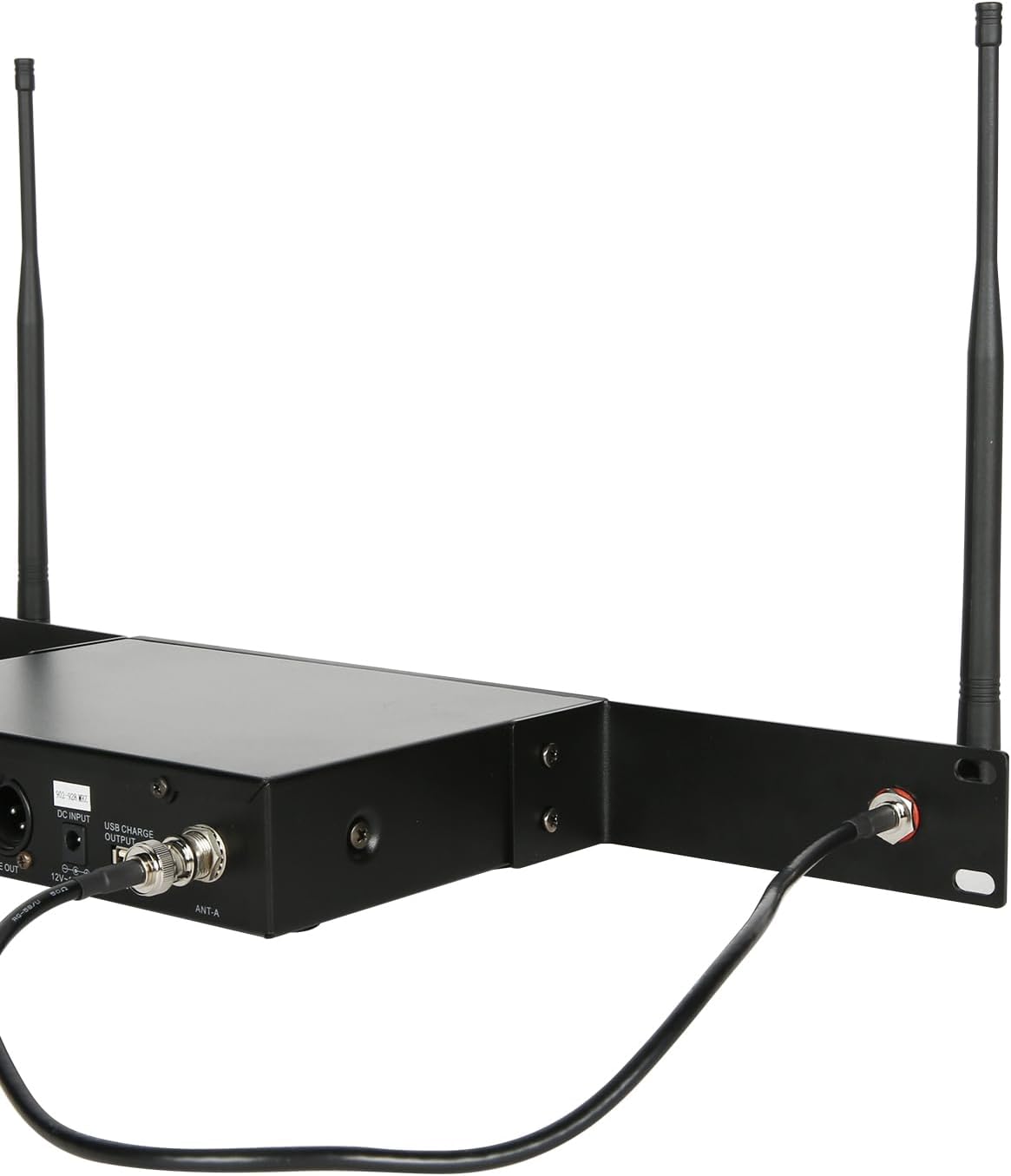
This image displays the rear of a wireless microphone receiver installed in the rack mount kit. The antenna extension cables are connected to the receiver's antenna ports, illustrating the cable management.
Helpful Setup Videos:
This video demonstrates the process of mounting dual wireless microphone receivers onto a standard audio rack using a rack mount kit. It shows how to secure the receivers and connect the necessary cables.
A video review of the Diandian 3U rack case, demonstrating its features such as automatic resetting carry handles, butterfly locks, and foam inserts for microphone storage. It also includes a durability test.
This video showcases a durable HDPE material rack case, highlighting its heavy-duty latches and robust construction suitable for protecting audio equipment during transport and storage.
Operating Instructions
Once your equipment is securely mounted and connected, operate your wireless microphone receivers and in-ear monitor system transmitters as per their individual instruction manuals. The SGPRO Audio Rack Mount Kit primarily facilitates the physical integration and antenna placement for improved signal integrity.
Ensure that the antennas are positioned clear of obstructions to maximize signal reception and minimize interference. Regularly check all cable connections to ensure they remain secure during operation.
Maintenance
To ensure the longevity and optimal performance of your rack mount kit:
- Cleaning: Use a soft, dry cloth to wipe down the rack ears and antenna extensions. Avoid abrasive cleaners or solvents that could damage the finish.
- Connection Checks: Periodically inspect all screw and cable connections for tightness. Loose connections can affect performance and stability.
- Antenna Care: Handle antennas with care to prevent bending or breaking. Ensure they are securely fastened but not overtightened.
- Storage: If disassembling the kit for storage, keep all components together in a safe, dry place to prevent loss or damage.
Troubleshooting
If you encounter issues with your SGPRO Audio Rack Mount Kit, consider the following:
- Fit Issues: If the mount kit does not fit your equipment or rack, double-check the dimensions of your device against the kit's specifications (20-21 cm width for equipment, 19-inch standard rack). As audio equipment dimensions may vary, please keep the original packaging when testing the mount kit to ensure easy returns if it does not fit your setup.
- Poor Signal Reception: Ensure antennas are positioned at the front of the rack and are free from any metal obstructions. Verify that antenna extension cables are securely connected to both the receiver/transmitter and the rack ears.
- Loose Components: Re-tighten all mounting screws if any part of the kit feels loose.
- Compatibility: For non-SGPRO products, confirm that your device's dimensions and antenna type (if applicable) are compatible before purchase.
Specifications
| Attribute | Value |
|---|---|
| Brand | SGPRO |
| Model Name | MK21 |
| Model Number | SG-MK21S |
| Color | Black |
| Compatible Devices | Wireless In-ear Monitor System Receiver, Wireless Microphone Receiver |
| Mounting Type | Audio Rack 19" |
| Special Feature | Antenna Extension, Fits 19" Standard Audio Rack |
| Material | Metal |
| Item Weight | 0.39 Kilograms |
| Arm Length | 14 Centimeters |
| Built-In Media | Antenna Extension Cable, Rack Mount Pair, Screws |
Warranty and Support
This SGPRO product comes with a 90-day warranty from the date of purchase. For warranty claims or technical support, please contact SGPRO customer service through the retailer where the product was purchased or visit the official SGPRO website for contact information.
Please retain your proof of purchase for warranty validation.