
1. Safety Information
Please read this entire manual before operating the Hetoy 12V Ride On Truck Car. Failure to follow these safety instructions may result in serious injury or death.
- Adult Supervision Required: This product is intended for children aged 3-8 years and must always be operated under direct adult supervision.
- Protective Gear: Always ensure the child wears appropriate safety gear, such as a helmet, knee pads, and elbow pads, when operating the vehicle.
- Safety Belts: The vehicle is equipped with 3-point safety belts. Always ensure the child is securely fastened before operation.
- Operating Environment: Operate the vehicle only on flat, level, and dry surfaces. Avoid public roads, sidewalks, steep inclines, steps, swimming pools, or other bodies of water.
- Weight and Age Limits: Do not exceed the maximum weight capacity of 44 lbs (20 kg). The recommended age range is 3-8 years.
- Battery Safety: Follow all instructions regarding battery charging and maintenance to prevent overheating or damage. Do not allow children to handle the battery.
- Locking Doors: Ensure the vehicle's doors are securely locked before the child begins driving.
- Parental Remote Control: Utilize the parental remote control for younger children or in situations requiring immediate intervention, such as emergency braking.
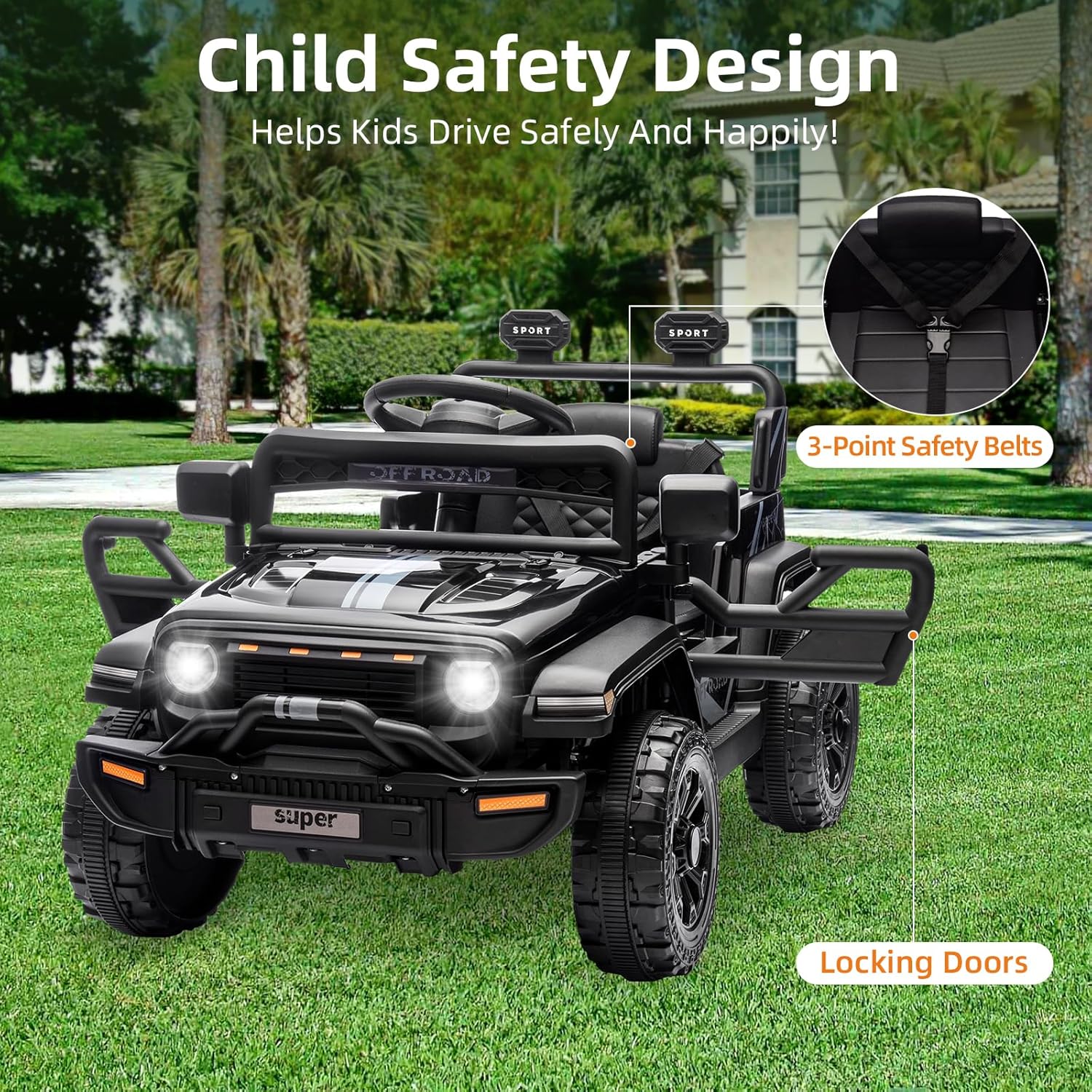
Image: The Hetoy 12V Ride On Truck Car highlighting its 3-point safety belts and locking doors for child safety.
2. Setup and Initial Charge
2.1 Unboxing and Assembly
Carefully remove all components from the packaging. Inspect all parts for damage. If any parts are missing or damaged, do not proceed with assembly and contact customer support.
- Refer to the separate assembly guide for detailed step-by-step instructions on how to assemble the vehicle.
- Ensure all screws, nuts, and bolts are securely tightened before first use.
- Attach the wheels, steering wheel, and any other accessories as per the assembly instructions.
2.2 Initial Battery Charging
Before the first use, the battery must be fully charged for approximately 8-12 hours. Do not overcharge the battery for more than 18 hours.
- Locate the charging port on the vehicle (typically under the seat or near the dashboard).
- Connect the charger to the charging port and then plug the charger into a standard wall outlet.
- The charging indicator light on the charger will typically show red during charging and turn green when fully charged.
- Disconnect the charger once charging is complete.

Image: Illustration of the 12V 4.5Ah rechargeable battery and two 25W motors, indicating the power system of the ride-on car.
3. Operating Instructions
3.1 Power On/Off
To power on the vehicle, press the red power button on the dashboard. Press it again to power off.
3.2 Driving Modes
The Hetoy 12V Ride On Truck Car offers two driving modes:
- Child Manual Operation: For older children, they can drive the vehicle using the foot pedal and steering wheel. This mode typically offers 2 speeds (low/high).
- Parental Remote Control: For younger children or when adult intervention is needed, parents can control the vehicle using the included remote. This mode typically offers 3 speeds.

Image: A child operating the ride-on car in manual mode, and a parent using the remote control to guide a younger child.

Image: A split image showing a child independently controlling the car on one side and a parent using a remote control for a younger child on the other.
3.3 Speed and Direction Controls
- Speed Switch: Use the 'High' and 'Low' switch on the dashboard to select the desired speed for manual operation.
- Forward/Reverse Switch: Use the 'Forward' and 'Reverse' switch to change the driving direction.
- Foot Pedal: Press the foot pedal to accelerate the vehicle in manual mode. Release to brake.
3.4 Steering Wheel Functions
The upgraded steering wheel includes buttons for music and horn sounds, enhancing the realistic driving experience.
- Press the designated buttons on the steering wheel to activate music or the horn.

Image: Close-up of the upgraded steering wheel, showing integrated music and speaker functions.
3.5 Headlights
The vehicle is equipped with LED headlights. Use the dedicated button on the dashboard to turn them on or off.
4. Maintenance
4.1 Battery Care
- Always recharge the battery after each use, even if only for a short period.
- If the vehicle is not used for an extended period, charge the battery at least once a month to prolong its lifespan.
- Store the battery in a cool, dry place. Do not expose it to extreme temperatures.
- Only use the charger provided by the manufacturer.
4.2 Cleaning
- Wipe the vehicle with a soft, damp cloth. Do not use abrasive cleaners or solvents.
- Avoid spraying water directly onto electrical components.
4.3 General Inspection
- Regularly check all screws, nuts, and bolts to ensure they are tight.
- Inspect the wheels and tires for wear and tear.
- Ensure the electrical connections are secure and free from corrosion.
5. Troubleshooting
| Problem | Possible Cause | Solution |
|---|---|---|
| Vehicle does not move | Low battery; Loose wire connection; Blown fuse; Overload. | Charge battery; Check all connections; Replace fuse; Reduce load. |
| Vehicle moves slowly | Low battery; Overload; Operating on rough terrain. | Charge battery; Reduce load; Operate on flat surfaces. |
| Remote control not working | Remote batteries dead; Remote not paired; Interference. | Replace remote batteries; Re-pair remote (refer to remote manual); Move away from interference sources. |
| Lights or music not working | Loose connection; Damaged component. | Check connections; Contact customer support if damaged. |
6. Specifications
| Feature | Detail |
|---|---|
| Model | Hetoy 12V Ride On Truck Car |
| Battery | 12V 4.5Ah Rechargeable |
| Motors | Two 25W Motors |
| Max Speed | Up to 3.1 mph |
| Overall Dimensions (L x W x H) | 35" x 23" x 23" (89 cm x 58 cm x 58 cm) |
| Item Weight | 31.6 lbs (14.3 kg) |
| Weight Capacity | 44 lbs (20 kg) |
| Recommended Age | 3 - 8 years |
| Features | LED Lights, Music, Horn, 4-Wheel Spring Suspension, 3-Point Safety Belts, Locking Doors, Parental Remote Control |

Image: Visual representation of the product dimensions and recommended age range for the ride-on truck.

Image: A child standing next to the ride-on car, illustrating its dimensions and highlighting the maximum load capacity of 44 lbs.
7. Warranty and Support
7.1 Product Warranty
This product comes with a manufacturer's warranty. Please refer to the warranty card included in your product packaging or visit the official Hetoy website for detailed warranty terms and conditions. Keep your proof of purchase for warranty claims.
7.2 Customer Support
For any questions, technical assistance, or to report issues with your Hetoy 12V Ride On Truck Car, please contact Hetoy customer service. Contact information can typically be found on the product packaging or the official Hetoy website.
You may also visit the Hetoy Store on Amazon for more information.


