
1. Introduction
Thank you for choosing the Chongker Interactive Companion Robot Cat. This product is designed to provide comfort, companionship, and joy through realistic interactions. It features touch-sensitive responses, purring, a simulated heartbeat, and voice interaction, mimicking the experience of a real cat without the need for traditional pet care. Please read this manual carefully to ensure proper use and enjoyment of your new companion.
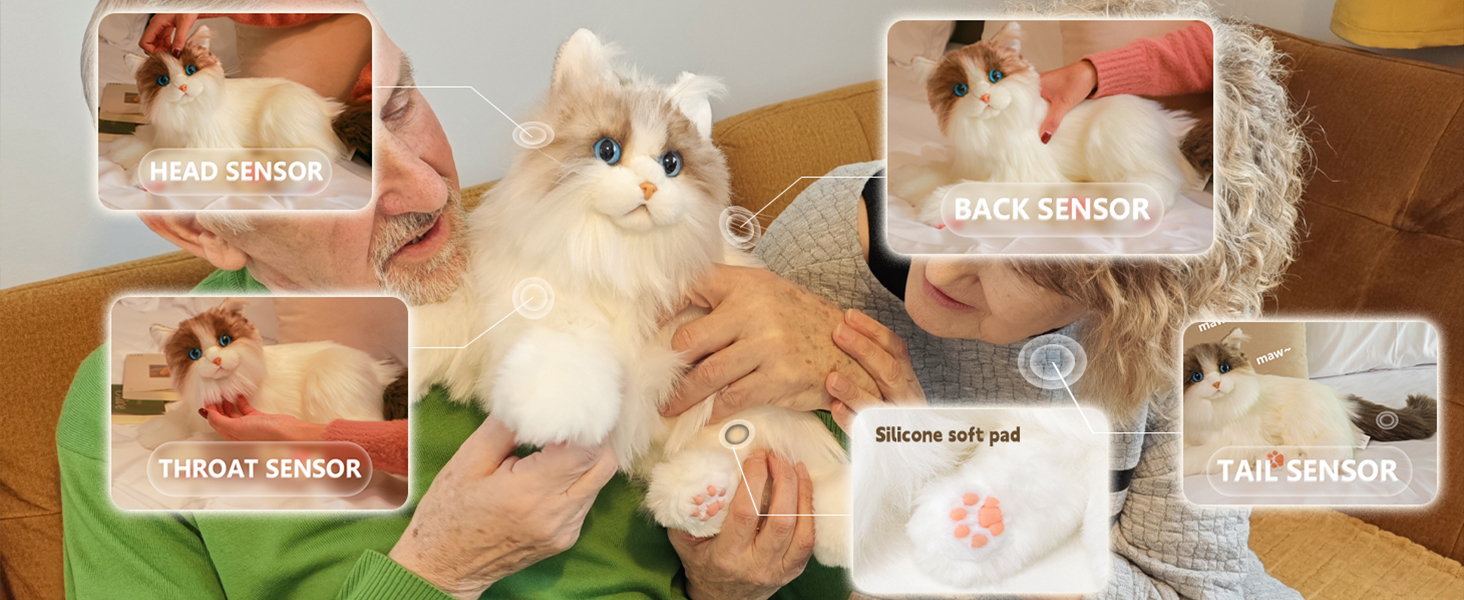
Figure 1: Key Functions Diagram of the Chongker Robot Cat.
2. Product Overview
The Chongker Interactive Companion Robot Cat is a meticulously handcrafted plush toy designed for realistic interaction. It offers emotional support and companionship, making it an ideal choice for individuals seeking the comfort of a pet without the associated responsibilities. The cat is weighted to feel substantial, enhancing its lifelike quality.
Key Features:
- Emotional Support: Provides comfort and companionship, helping to soothe stress and emotional challenges.
- Realistic Interactions: Features 4 built-in sensors that respond to touch with various meow sounds, purring, and a simulated heartbeat.
- Handcrafted Design: Each cat is handmade with attention to detail, replicating real kitty features.
- User-Friendly: Equipped with a built-in rechargeable battery and hidden controls for seamless operation.
- Voice Response: Can be customized with a unique name and responds to specific voice commands.

Figure 2: The Chongker Interactive Companion Robot Cat (White Cat style).
3. Setup
3.1 Unboxing
Carefully remove the Chongker Robot Cat and its accessories from the packaging. Inspect all components for any damage. The package includes: 1 Robot Cat, 1 USB charging cable, and 1 Comb.
Video 1: Unboxing the Chongker Robot Cat. This video demonstrates the process of opening the product packaging and revealing the interactive cat and its accessories.
3.2 Charging the Robot Cat
The charging port is located in a hidden pouch on the cat's belly. Gently open the pouch to reveal the USB-C port. Connect the provided USB charging cable to the port and plug the other end into a compatible USB power adapter (not included). A red light indicates charging is in progress. Once fully charged (approximately 4 hours), the light will turn green. Avoid overcharging to prolong battery life.
Video 2: How to charge your Chongker Robot Cat. This video illustrates the correct method for locating the charging port and connecting the USB cable.

Figure 3: The hidden charging port on the cat's belly.
3.3 Power On/Off
After charging, locate the ON/OFF switch within the belly pouch. Slide the switch to the 'ON' position. You will hear excited cat calls, indicating that Percy has been awakened. A blue light will illuminate, confirming the device is active. To turn off, slide the switch to 'OFF'.
4. Operating Instructions
4.1 Touch Interaction
The Chongker Robot Cat features multiple touch sensors that respond to your touch with various sounds and movements:
- Head/Neck/Back/Tail: Touching these areas will elicit different cat 'meows' and 'purring' sounds.
- Heartbeat Function: Long press the back sensor for more than 2 seconds to feel Percy's realistic heartbeat, providing a calming sensation.

Figure 4: Demonstrating cat purring through touch interaction.

Figure 5: Feeling the realistic heartbeat of the robot cat.
4.2 Voice Interaction
The cat can be activated through simple voice wake-up and interactive feedback with command words. You can customize your pet's name and use specific commands:
- Custom Pet Name: Press and hold both Volume buttons simultaneously for over 2 seconds. When prompted, say your pet's new name in silence. You can then say your pet's name and complete naming according to the voice prompt.
- Commands: Once named, you can call your pet by its unique name and interact using commands like "Pretty Kitty" or "Rise and Shine" to elicit corresponding cat purrs or meows.

Figure 6: Voice interaction with the robot cat.
Video 3: Demonstrating the features and breathing function of the Chongker Robot Cat.
Video 4: Overview of the Chongker Robot Cat's interactive capabilities.
4.3 Volume Adjustment
Volume can be adjusted by pressing the '+' or '-' buttons located near the ON/OFF switch in the belly pouch.
4.4 Automatic Sleep Function
If there is more than 30 minutes of no interaction with Percy, it will automatically enter sleep mode. The blue light will turn off. To wake Percy up, simply touch it or use a voice command.
5. Maintenance
5.1 Cleaning
To maintain the quality and longevity of your Chongker Robot Cat, avoid immersing the toy in water or placing it in a washing machine. Instead, use a damp cloth to gently wipe it clean. Ensure the charging port is covered when cleaning.
5.2 Grooming
Use the provided comb to gently groom Percy's fur, keeping it soft and free of tangles. Regular grooming helps maintain its realistic appearance.

Figure 7: The included comb for grooming the robot cat.
6. Troubleshooting
| Issue | Solution |
|---|---|
| Product won't turn on/off after charging. | Ensure the charging cable is fully inserted (red light for charging, green for full). If unresponsive in blue light state, allow battery to fully drain and recharge. Contact support if issue persists. |
| Battery life is short. | Battery provides 6-10 hours of continuous use. Avoid overcharging (max 5 hours) and use the included USB-C cable. |
| Purring sound is low or short. | Purring volume and frequency are set to a comfortable level. Each purring session lasts at least 3 seconds for a natural experience. |
| Cat only meows, does not purr. | Default mode triggers meows or purrs through touch. Avoid continuous touching, as it may be recognized as a single interaction. Actions are randomized for authenticity. |
7. Specifications
| Feature | Detail |
|---|---|
| Brand | Chongker |
| Model Number | BPAI-B1002-T |
| Material | Polyester |
| Item Dimensions (L x W x H) | 15.75 x 7.87 x 7.87 inches |
| Item Weight | 2.2 Pounds |
| Battery Type | Rechargeable Lithium-ion (included) |
| Battery Capacity | 2000mAh |
| Charging Duration | Approximately 4 hours |
| Age Range | Over 3 years old |
8. Warranty and Support
Chongker provides a 180-day quality assurance for its products. If you encounter any issues, please contact our support team for assistance. We promise to provide a satisfactory solution within 24 hours.
Contact Information:
Email: Support@Chongker.com
Website: www.chonker.com


