
1. Introduction
Thank you for purchasing the Bnf USB LED Ultrasonic Aroma Humidifier Diffuser. This device is designed to disperse a fine mist of water and essential oils into the air, enhancing your environment with pleasant aromas and increased humidity. Please read this manual carefully before use to ensure proper operation and maintenance.
2. Safety Information
- Always place the diffuser on a flat, stable surface.
- Do not place the diffuser near heat sources or in direct sunlight.
- Keep out of reach of children and pets.
- Use only clean tap water or distilled water. Do not use hot water.
- Do not exceed the maximum water level indicated.
- Unplug the device before cleaning or refilling.
- Do not touch the ultrasonic vibrating plate with bare hands when the device is operating.
- If the device emits smoke or an unusual smell, unplug it immediately.
- Do not immerse the entire unit in water or other liquids.
3. Package Contents
Please check the package for the following items:
- Bnf USB LED Ultrasonic Aroma Humidifier Diffuser
- USB Power Cable
- User Manual
4. Product Overview
Familiarize yourself with the main components of your diffuser:

Image: Side view of the Bnf USB LED Ultrasonic Aroma Humidifier Diffuser, highlighting the power button on the turtle shell.
- Mist Outlet: Where the mist is released.
- Power Button: Controls power and mist modes.
- Water Tank: Holds water and essential oils.
- Ultrasonic Vibrating Plate: Generates mist (located inside the water tank).
- USB Power Port: For connecting the USB power cable.
5. Setup
- Unpack: Carefully remove all components from the packaging.
- Placement: Place the diffuser on a firm, level, and waterproof surface away from direct sunlight or heat sources.
- Open the Diffuser: Gently lift the top cover of the diffuser to access the water tank.
- Fill Water Tank: Using a measuring cup, fill the water tank with clean tap water or distilled water up to the maximum water level line. Do not overfill.
- Add Essential Oils (Optional): Add 2-3 drops of your preferred essential oil directly into the water tank. Adjust the amount based on personal preference.
- Close the Diffuser: Carefully place the top cover back onto the base, ensuring it is securely seated.
- Connect Power: Insert the small end of the USB power cable into the USB power port on the back of the diffuser. Connect the other end to a USB power adapter (not included) or a compatible USB port.

Image: The diffuser separated into its top and base components, revealing the internal water tank and misting mechanism.

Image: A detailed view of the USB power input port located on the rear of the diffuser.
6. Operating Instructions
Once the diffuser is set up and powered, follow these steps to operate it:
- Power On/Mist Mode: Press the power button once to turn on the diffuser. It will immediately start producing mist.
- LED Light Function: The diffuser features an integrated LED light. The light will typically turn on automatically with the mist. Specific light modes (e.g., color changing, fixed color) may be controlled by subsequent presses of the power button, if applicable to your model. Refer to the product description for detailed light functions.
- Power Off: Press and hold the power button for a few seconds, or press it repeatedly until the mist and light turn off. The diffuser will also automatically shut off when the water level is too low.
7. Maintenance
Regular cleaning is essential to ensure optimal performance and longevity of your diffuser.
Daily Maintenance:
- Empty any remaining water from the tank.
- Wipe the inside of the water tank with a clean, soft cloth.
Weekly Cleaning:
- Unplug the diffuser from the power source.
- Remove the top cover.
- Pour out any remaining water from the 'DRAIN SIDE' of the water tank to avoid water entering the air outlet.
- Clean the ultrasonic vibrating plate with a cotton swab dipped in white vinegar or a mild cleaning solution. Gently wipe away any mineral buildup or residue. Do not scrub or use abrasive materials.
- Wipe the entire unit with a soft, damp cloth.
- Allow all parts to air dry completely before reassembling or storing.
Note: Do not use harsh detergents, solvents, or abrasive cleaners, as these can damage the diffuser.
8. Troubleshooting
If you encounter any issues with your diffuser, please refer to the following common problems and solutions:
| Problem | Possible Cause | Solution |
|---|---|---|
| No mist or weak mist | Low water level Water tank overfilled Ultrasonic plate dirty Air outlet blocked | Add water to the appropriate level Reduce water to below max line Clean the ultrasonic plate Ensure mist outlet is clear |
| No power/Unit not turning on | Power cable not connected No power from USB source Unit malfunction | Check USB cable connection Try a different USB port/adapter Contact customer support |
| Unusual odor | Dirty water tank Old essential oil residue | Clean the water tank thoroughly Use fresh water and essential oils |
9. Specifications
- Model: USB LED Ultrasonic Aroma Humidifier Diffuser
- Power Input: DC 5V (via USB)
- Rated Power: Approximately 2W
- Water Tank Capacity: Approximately 200ml (refer to product label for exact capacity)
- Mist Output: Varies based on environmental conditions
- Material: ABS/PP
- Dimensions: Refer to product packaging or online listing for specific measurements.
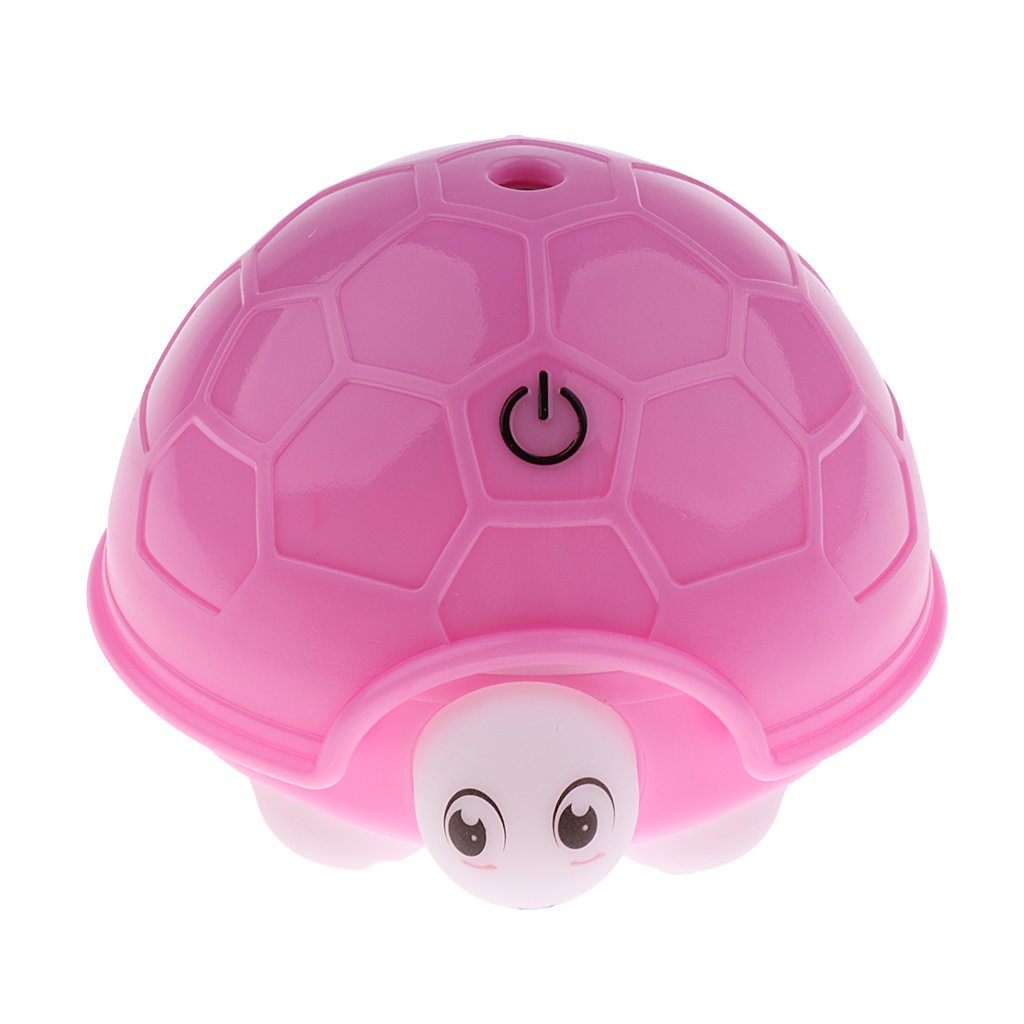
Image: The underside of the diffuser, displaying a label with product specifications.
10. Warranty & Support
This product comes with a standard manufacturer's warranty. For warranty claims, technical support, or any questions not covered in this manual, please contact the retailer or manufacturer's customer service. Keep your purchase receipt as proof of purchase.