
Introduction
Thank you for choosing the KEF Q11 Meta Floorstanding Speaker. This manual provides essential information for the safe and optimal use of your speaker. Please read it thoroughly before installation and operation, and retain it for future reference.

Image: The KEF Q11 Meta Floorstanding Speaker in its white finish, showcasing its sleek design.
The KEF Q11 Meta is a high-fidelity floorstanding speaker designed to deliver immersive audio performance. It features KEF's advanced Meta material technology and the 12th generation Uni-Q driver array, ensuring clear, detailed, and powerful sound reproduction for both music and home theater systems.
Safety Information
Please observe the following safety precautions to prevent damage to the speaker and ensure user safety:
- Do not expose the speaker to excessive heat, direct sunlight, or moisture.
- Ensure proper ventilation around the speaker to prevent overheating.
- Use only the recommended power source and speaker wire connections.
- Avoid placing heavy objects on the speaker.
- Keep the speaker away from strong magnetic fields.
- Do not attempt to disassemble or modify the speaker. Refer all servicing to qualified personnel.
- Position the speaker on a stable, level surface to prevent tipping.
Setup
1. Unboxing
Carefully remove the speaker from its packaging. Retain all packaging materials for future transport or storage. Inspect the speaker for any signs of damage during transit. If damage is found, contact your dealer immediately.
2. Placement
Optimal speaker placement is crucial for sound quality. Consider the following guidelines:
- Stereo Setup: Place the speakers equidistant from your primary listening position, forming an equilateral triangle.
- Distance from Walls: Experiment with distance from walls to control bass response. Generally, a few feet from the rear and side walls is a good starting point.
- Room Acoustics: Room furnishings and materials can affect sound. Adjust placement to minimize reflections and optimize soundstage.
- Stability: Ensure the speaker is placed on a stable, level surface. The Q11 Meta is designed for indoor usage.

Image: A KEF Q11 Meta Floorstanding Speaker integrated into a modern living room setup, demonstrating typical placement.
3. Connections
Connect the Q11 Meta speakers to your amplifier or receiver using high-quality speaker wire. Ensure correct polarity (+ to + and - to -) for optimal sound performance.
- Speaker Wire: Use appropriate gauge speaker wire for the length of your run.
- Binding Posts: The Q11 Meta features robust binding posts. Unscrew the terminal caps, insert the stripped wire ends, and tighten securely.
- Impedance: The speaker has an impedance of 4 Ohms. Ensure your amplifier is compatible with this load.
- Audio Output Mode: The speaker supports surround sound configurations, typically 2.0 for stereo or as part of a larger home cinema system.
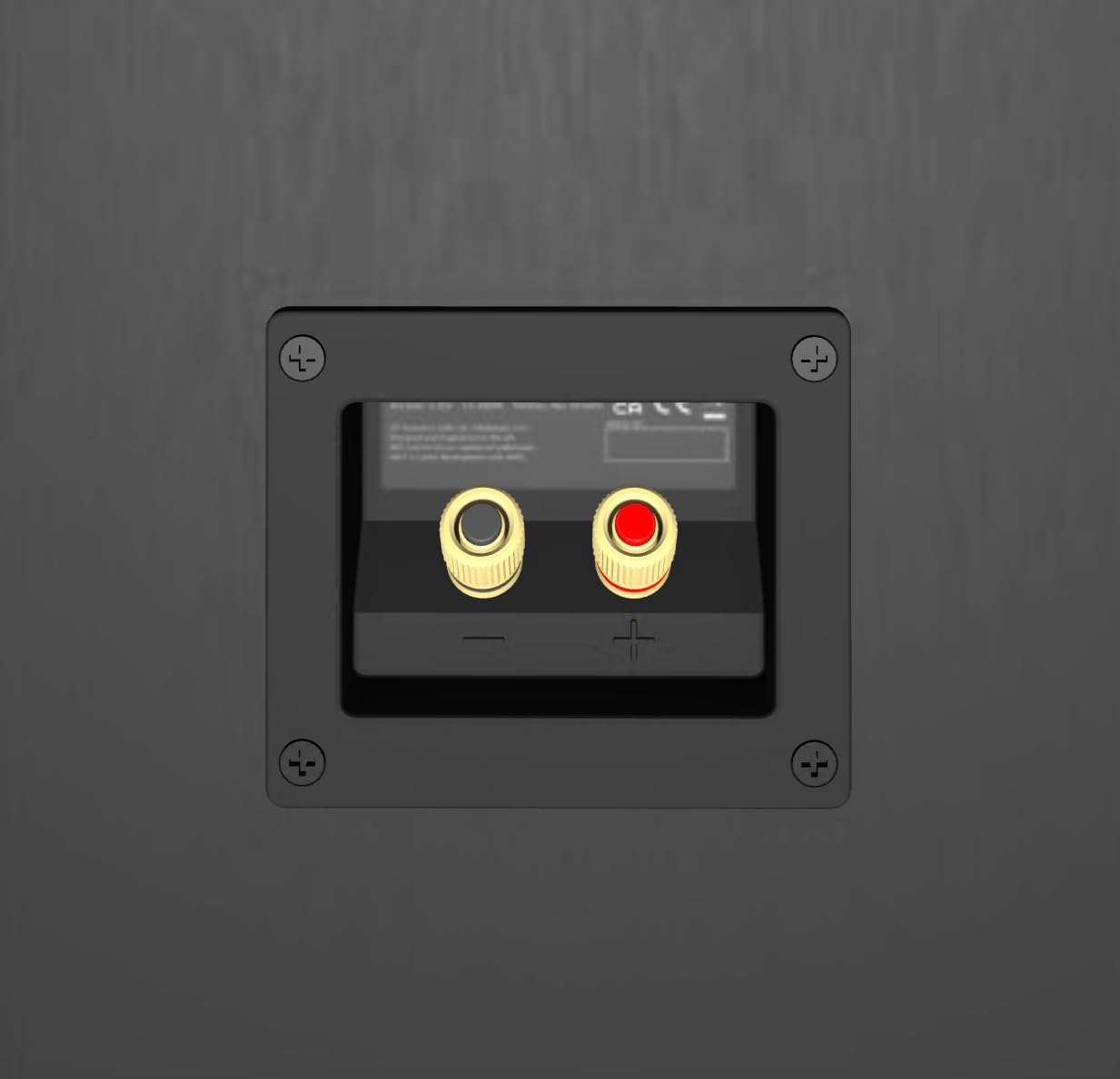
Image: The rear panel of the KEF Q11 Meta speaker, highlighting the gold-plated binding posts for speaker wire connection.
Operating Instructions
1. Powering On/Off
The KEF Q11 Meta speakers are passive and do not have a separate power switch. They receive power directly from your connected amplifier. Ensure your amplifier is powered on and off according to its own manual.
2. Audio Playback
Once connected to an amplifier and an audio source (e.g., music player, home theater system, game console, television), you can begin playing audio. Adjust the volume and other audio settings on your amplifier or source device. The Q11 Meta is compatible with various devices including desktop systems, home theaters, and MP3 players.
The Q11 Meta features advanced technologies for superior sound:
- Meta Material Technology: Absorbs 99% of unwanted sound from the rear of the driver, resulting in purer, more natural sound.
- Uni-Q Driver Array: Acts as a single point source, dispersing sound evenly for an immersive and cohesive soundstage.
- Hybrid Bass Driver Design: Provides stiffness for piston-like movement, delivering precise and agile bass.

Image: A detailed view of the Meta Material Technology, designed to absorb unwanted sound.

Image: A close-up of the KEF Uni-Q Driver Array, showing the tweeter positioned at the acoustic center of the midrange cone.

Image: An exploded view illustrating the components of KEF's Hybrid Bass Driver, designed for powerful and precise low-frequency reproduction.
Maintenance
Cleaning
To maintain the appearance and performance of your KEF Q11 Meta speakers:
- Wipe the cabinet with a soft, dry, lint-free cloth.
- Do not use abrasive cleaners, solvents, or strong detergents, as these can damage the finish.
- For stubborn marks, lightly dampen the cloth with water, then dry immediately.
- Avoid touching the driver cones directly.
Troubleshooting
If you experience issues with your KEF Q11 Meta speakers, refer to the following common problems and solutions:
- No Sound:
- Check all speaker wire connections at both the speaker and amplifier ends for secure contact and correct polarity.
- Ensure the amplifier is powered on and the correct input source is selected.
- Verify that the volume on your amplifier is not set to minimum or muted.
- Distorted Sound:
- Reduce the volume level on your amplifier.
- Check speaker wire connections for any loose strands that might be shorting.
- Ensure the amplifier is not being overdriven.
- Uneven Sound (one speaker louder/softer):
- Check individual speaker wire connections for looseness or incorrect polarity.
- Verify balance settings on your amplifier.
- Ensure speakers are placed symmetrically in the room.
If the problem persists after trying these steps, please contact KEF customer support or your authorized dealer.
Specifications
| Feature | Detail |
|---|---|
| Model Name | Q11 Meta |
| Mounting Type | Floor Standing |
| Speaker Type | Tower |
| Material | Aluminum |
| Color | White |
| Product Dimensions (D x W x H) | 15"D x 8.3"W x 41.8"H |
| Item Weight | 49.5 pounds (22.5 Kilograms) |
| Impedance | 4 Ohms |
| Speaker Maximum Output Power | 225 Watts |
| Frequency Response | 20 KHz (Upper limit, actual range depends on design) |
| Connectivity Technology | Speaker Wire |
| Audio Output Mode | Surround |
| Audio Driver Type | Hybrid Driver |
| Number Of Circuits | 3 |
| Power Source | Corded Electric (via amplifier) |
| Recommended Uses | For Game Consoles, Gaming Consoles, Home Cinema Systems, Music Players, Televisions |
| Compatible Devices | Desktop, Home Theater, MP3 Player |
| Indoor/Outdoor Usage | Indoor |
| UPC | 637203219009 |
Warranty Information
The KEF Q11 Meta Floorstanding Speaker comes with a limited warranty. Please refer to the warranty card included in your product packaging for specific terms, conditions, and duration of coverage. Retain your proof of purchase for warranty claims.
Support
For further assistance, technical support, or service inquiries, please visit the official KEF website or contact your authorized KEF dealer.
You can also visit the KEF Store on Amazon for more information and products: KEF Amazon Store


