
Vu 65MASTERPIECE
Vu 65MASTERPIECE 4K QLED TV User Manual
Model: 65MASTERPIECE
1. Important Safety Information
Please read all safety instructions carefully before using your television. Keep this manual for future reference. Failure to follow these instructions may result in electric shock, fire, or damage to the product.
- Do not expose the TV to rain or moisture.
- Do not block ventilation openings. Ensure adequate space around the TV for proper airflow.
- Use only attachments/accessories specified by the manufacturer.
- Unplug the TV during lightning storms or when unused for long periods.
- Refer all servicing to qualified service personnel.
2. What's in the Box
Carefully unpack your Vu 65MASTERPIECE TV and ensure all components are present. It is recommended to retain the original packaging for potential future transport or service needs.

Image: Contents of the Vu 65MASTERPIECE TV box, including the TV unit, remote control, batteries, power cord, AV converting cable, wall mount bracket, stand screws, base stand, and user manual.
The box should contain the following items:
- 1x TV Unit
- 1x Remote Control
- 1x Power Cord
- 1x User Manual (this document)
- 1x Table Mount Stand (set)
- 1x VESA Wall Mount Bracket (set)
- 2x AAA Batteries (for remote control)
For successful returns, ensure all original internal and external packaging components are kept. Refer to the diagram below for proper packaging.

Image: Guide for returning the TV, emphasizing the need to retain original packaging components like the outer box, thermocol/foam cushioning, and screen protection sheet.
3. Setup
3.1 Stand Installation
If you choose to place your TV on a table, attach the included base stands. Ensure the TV is placed on a stable, level surface.
- Carefully place the TV screen-down on a soft, clean surface to prevent scratches.
- Align the base stands with the screw holes on the bottom of the TV.
- Secure the stands using the provided screws.

Image: TV dimensions and weight, illustrating the TV with its base stand attached.
3.2 Wall Mount Installation
For wall mounting, use the provided VESA wall mount bracket. The TV supports a VESA standard of 400 x 200 mm. Professional installation is recommended for wall mounting to ensure safety and proper alignment.
3.3 Connecting Peripherals
Your TV offers various ports for connecting external devices. Refer to the image below for port locations.

Image: Rear and side connectivity ports of the TV, detailing AV Input, Headphone Jack, USB ports, HDMI ports (including eARC/ARC), Optical Out, and LAN port.
- HDMI Ports: Connect set-top boxes, Blu-ray players, gaming consoles (HDMI 2.1 supports up to 144Hz VRR).
- USB Ports: Connect hard drives or other USB devices for media playback.
- AV Input: For older devices using composite video.
- Headphone Jack: Connect headphones for private listening.
- Optical Out: For connecting to external audio systems.
- LAN Port: For wired internet connection.
3.4 Remote Control Setup
Insert the two AAA batteries into the remote control, ensuring correct polarity. The remote uses both IR and Bluetooth technology. For voice control and full functionality, the remote may need to be paired via Bluetooth during initial setup or through the TV's settings menu.

Image: The ActiVoice Remote Control, featuring dedicated buttons for various functions and streaming services.
3.5 Initial Power On and First-Time Setup
After connecting the power cord, press the power button on the remote or TV. Follow the on-screen instructions to complete the initial setup, which includes language selection, network connection (Wi-Fi or Ethernet), Google account login, and channel scanning.
4. Operating Your TV
4.1 Basic Functions
- Power: Press the power button on the remote to turn the TV on or off.
- Volume: Use the VOL +/- buttons to adjust the volume.
- Input Source: Press the 'Input' button to select connected devices (HDMI 1/2/3, AV).
- Navigation: Use the directional pad and 'OK' button to navigate menus.
4.2 Google TV Interface
Your Vu 65MASTERPIECE TV runs on Google TV, providing a personalized and integrated entertainment experience. Access streaming apps, live TV, and recommendations from a single interface.

Image: The Google TV interface, displaying a selection of apps and personalized content recommendations.
- Apps: Download and manage applications from the Google Play Store.
- Voice Control: Use the ActiVoice remote with Google Assistant for voice commands.
- Chromecast Built-in: Cast content from your mobile devices directly to the TV.
4.3 Picture and Sound Settings
Optimize your viewing and listening experience with various picture and sound modes.
- Picture Modes: The TV supports 4K Quantum Dot Technology, Dolby Vision, HDR10+, and HLG. Dedicated modes like FILMMAKER Mode, Cricket Mode, and Cinema Mode are available for specific content types.
- Sound Modes: Featuring 2.1.2 CH sound with a built-in subwoofer and 124 watts of output, enhanced by Dolby Atmos.
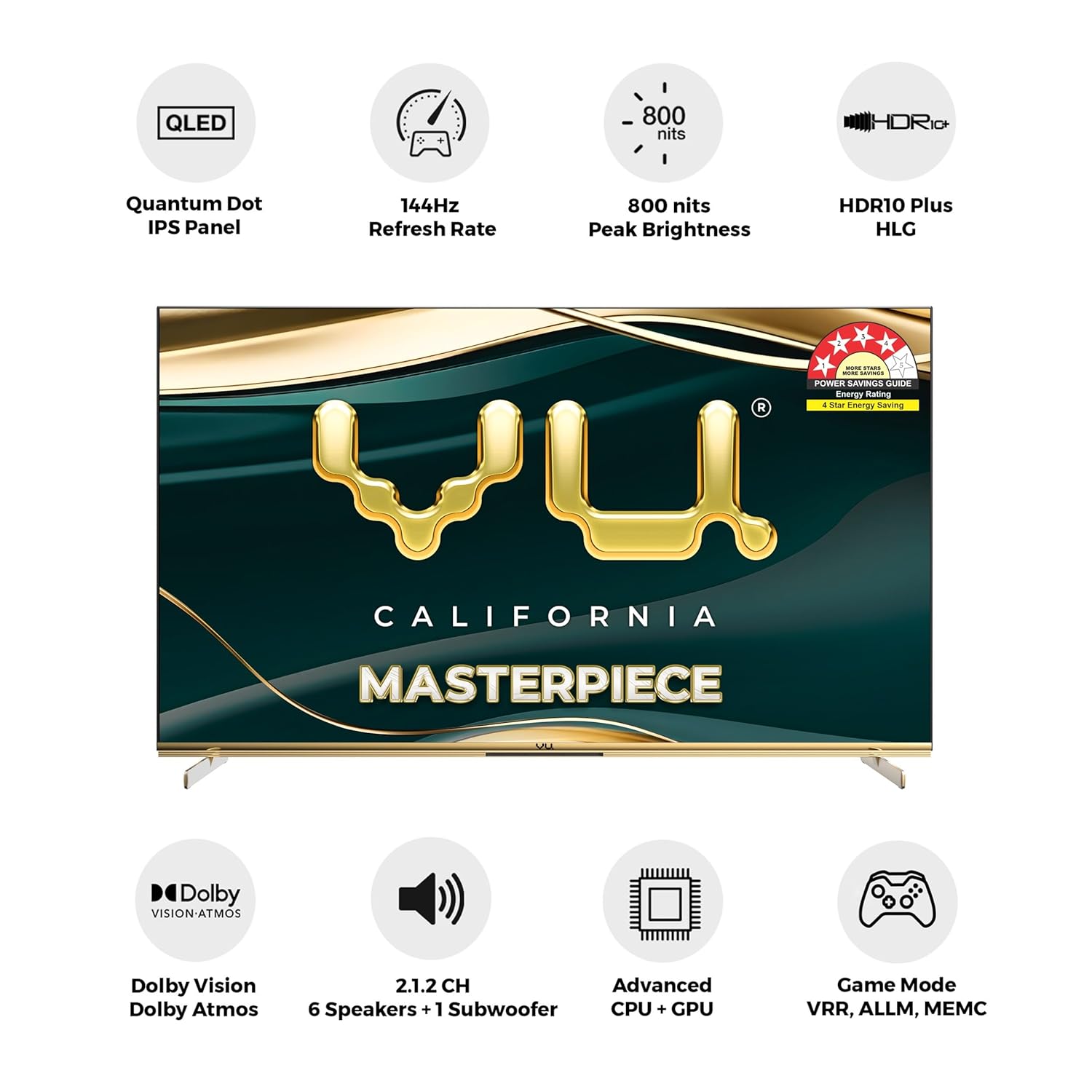
Image: Overview of the TV's core features, including display, audio, and processing capabilities.
4.4 Art Mode
Transform your TV into a personalized art display when not in use with the Masterpiece Frame's Art Mode.

Image: The TV displaying Art Mode options, allowing users to select preloaded art, vibe images, or personal photos.
- Family Photo Mode: Upload personal photos from your phone or USB drive to display.
- Frame Style: Choose from five different frame styles to complement your decor.
- Interlining Style: Select an interlining style to enhance your photo background.
- Dynamic Frame: Create a slideshow of pictures with adjustable intervals.
4.5 Gaming Features
The TV is equipped with features designed for an enhanced gaming experience.

Image: Gaming on the TV, showcasing its high refresh rate and gaming-specific technologies.
- 144Hz Refresh Rate (VRR): Provides smooth motion for fast-paced games.
- ALLM (Auto Low Latency Mode): Automatically switches to a low-latency mode when a gaming device is detected.
- HDMI 2.1: Supports high bandwidth for 4K@144Hz gaming.
- Game Mode Pro: Optimizes settings for gaming performance.
5. Maintenance
5.1 Cleaning the TV
To maintain the appearance and performance of your TV, follow these cleaning guidelines:
- Always unplug the TV before cleaning.
- Use a soft, dry, lint-free cloth to gently wipe the screen and frame.
- For stubborn marks, lightly dampen the cloth with water or a specialized screen cleaner. Do not spray cleaner directly onto the screen.
- Avoid using abrasive cleaners, waxes, or solvents as they can damage the finish.
5.2 Software Updates
Your TV may receive software updates periodically to improve performance and add new features. Ensure your TV is connected to the internet to receive these updates. You can check for updates manually in the TV's settings menu.
6. Troubleshooting
If you encounter issues with your TV, refer to the following common solutions before contacting support.
| Problem | Possible Solution |
|---|---|
| No Power | Check if the power cord is securely connected to the TV and the power outlet. Ensure the outlet is functional. |
| No Picture, but Sound is Present | Verify the correct input source is selected. Check cable connections to external devices. |
| No Sound, but Picture is Present | Check the volume level and ensure the TV is not muted. Verify audio cable connections if using external speakers. |
| Remote Control Not Responding | Replace batteries. Ensure there are no obstructions between the remote and the TV. Re-pair the Bluetooth remote if necessary. |
| Network Connection Issues | Restart your router/modem. Check Wi-Fi password. Try a wired Ethernet connection if Wi-Fi fails. |
If the problem persists after trying these solutions, please contact customer support.
7. Specifications
Detailed technical specifications for the Vu 65MASTERPIECE 4K QLED TV.
| Feature | Detail |
|---|---|
| Screen Size | 65 Inches (164 cm) |
| Display Technology | QLED, LED |
| Resolution | 4K (3840x2160) |
| Refresh Rate | 144 Hz (VRR) |
| Peak Brightness | 800 Nits |
| Color Volume | 100% |
| HDR Support | Dolby Vision, HDR10+, HLG |
| Sound Output | 124 Watts (2.1.2 CH with Built-in Subwoofer) |
| Audio Encoding | Dolby Atmos |
| Operating System | Google TV |
| RAM | 3 GB |
| Storage | 16 GB |
| Connectivity | 3x HDMI (HDMI 2.1), 2x USB, 2.4/5GHz Wi-Fi, Bluetooth 5.0, Ethernet, AV Input, Optical Out |
| VESA Mount Standard | 400 x 200 mm |
| Dimensions (with stand) | 28.8D x 145.3W x 88H Centimeters |
| Weight (without stand) | 22.1 Kilograms |
| Annual Energy Consumption | 203 kWh |
8. Warranty and Support
8.1 Warranty Information
Your Vu 65MASTERPIECE TV comes with a 1-year manufacturer warranty from the date of purchase on the television set and a 6-month warranty on the remote control. Warranty claims can be processed using your Amazon e-invoice.
The warranty covers manufacturing defects. It does not cover damages caused by misuse, accidents, unauthorized repairs, or normal wear and tear.
8.2 Customer Support
For any queries, technical assistance, installation/wall mounting/demo arrangements, or warranty claims, please contact Vu customer support:
- Phone: 022-45417000
- WhatsApp: +91 9867740000
- Email: support@vutvs.com
Please have your product model number (65MASTERPIECE) and purchase details ready when contacting support.
Ask a question about this manual
Ask about setup, troubleshooting, compatibility, parts, safety, or missing instructions. Manuals+ will review the question and use this page’s manual context to help answer it.