
1. Introduction
Thank you for choosing the XIAOMI Flexible Rechargeable Lamp. This manual provides essential information for the safe and efficient use of your new lamp. Please read it thoroughly before operation and retain it for future reference.

Figure 1: XIAOMI Flexible Rechargeable Lamp
2. Safety Information
- Do not disassemble, repair, or modify the lamp yourself.
- Keep the lamp away from water, moisture, and high temperatures.
- Use only the provided charging cable or a certified USB-C cable for charging.
- Avoid direct eye exposure to the light source for extended periods.
- Dispose of the product and its battery responsibly according to local regulations.
3. Package Contents
Verify that all items are present in the package:
- XIAOMI Flexible Rechargeable Lamp Unit
- Lamp Base
- Clamp Attachment
- USB-C Charging Cable
- User Manual (this document)
4. Product Overview
The XIAOMI Flexible Rechargeable Lamp is designed for versatile illumination, functioning as a desk lamp, clip-on lamp, or handheld light source. It features a magnetic attachment for easy angle adjustment and multiple lighting modes.

Figure 2: Versatile Usage Modes

Figure 3: Design Details (Charging Port, Button, Anti-slip Strip)
5. Setup
- Initial Charge: Before first use, fully charge the lamp using the provided USB-C cable. Connect the cable to the lamp's Type-C port and a compatible USB power adapter (not included). The battery status indicator will show charging progress.
- Assembly (Desk Lamp): Place the lamp unit onto the circular lamp base. The magnetic connection will secure it.
- Assembly (Clip-on Lamp): Attach the clamp accessory to a suitable surface (e.g., desk edge, shelf). Then, magnetically attach the lamp unit to the designated area on the clamp.
6. Operating Instructions
6.1 Power On/Off and Mode Selection
- Short Press: Briefly press the power button to turn the lamp ON or OFF.
- Long Press: Press and hold the power button to cycle through the four available lighting modes.

Figure 4: Four Lighting Modes
6.2 Angle Adjustment
The lamp head is attached magnetically, allowing for flexible positioning:
- Vertical Rotation: Adjust the lamp head up or down by up to 180 degrees.
- Horizontal Rotation: Rotate the lamp head horizontally by up to 360 degrees.
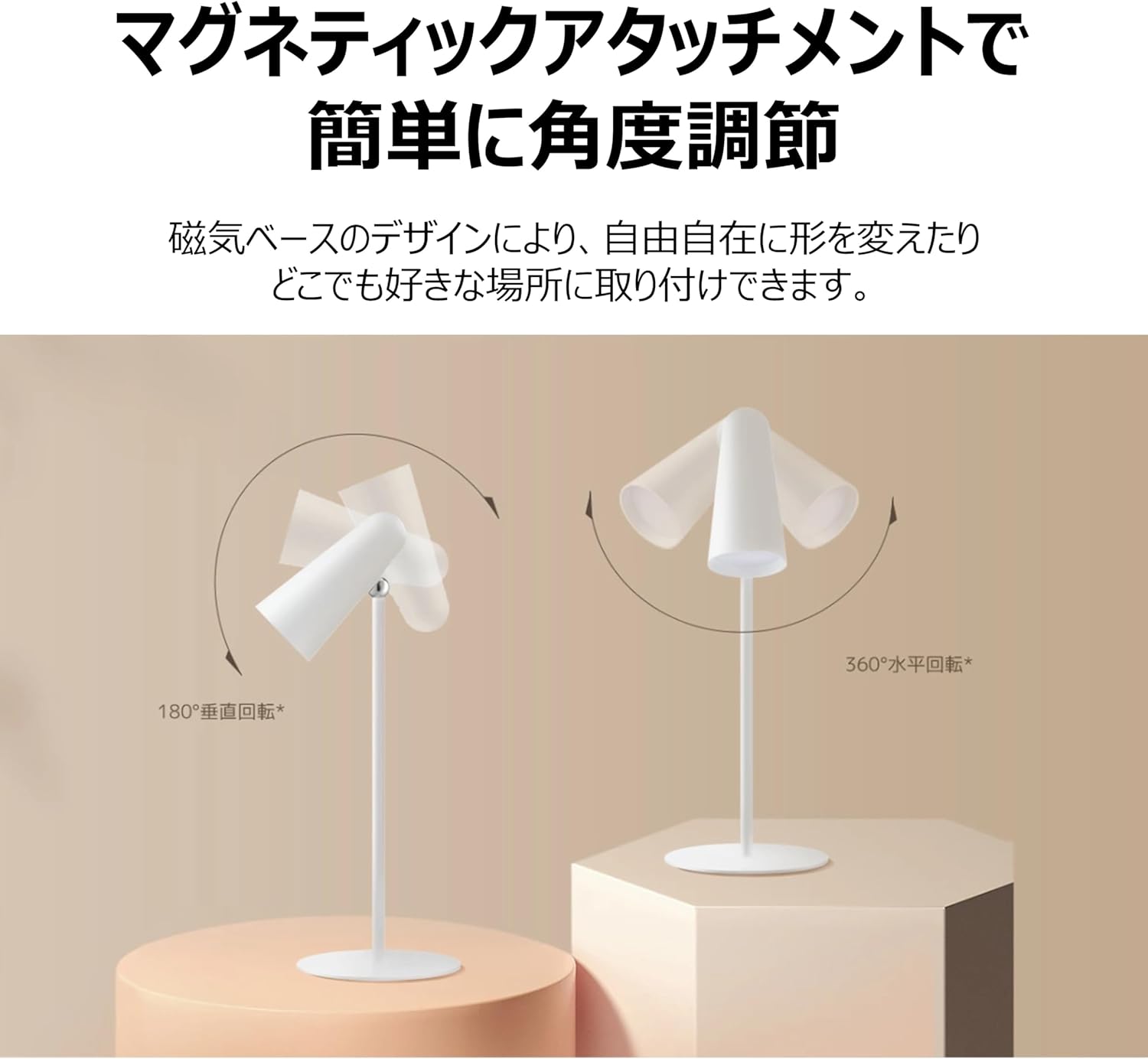
Figure 5: Magnetic Angle Adjustment
6.3 Charging
Connect the lamp to a power source using the USB-C cable. The lamp maintains consistent brightness even while charging. A full charge provides over 40 hours of illumination at the lowest brightness setting.

Figure 6: Charging the Lamp
7. Maintenance
- Cleaning: Wipe the lamp with a soft, dry cloth. Do not use abrasive cleaners or solvents.
- Storage: Store the lamp in a cool, dry place when not in use for extended periods.
- Battery Care: To prolong battery life, avoid fully discharging the lamp frequently. Charge it regularly, even if not in constant use.
8. Troubleshooting
| Problem | Possible Cause | Solution |
|---|---|---|
| Lamp does not turn on | Low battery; Power button not pressed correctly | Charge the lamp; Ensure a firm short press on the power button. |
| Lamp not charging | Faulty cable or adapter; Loose connection | Check USB-C cable and adapter; Ensure connections are secure; Try a different cable/adapter. |
| Light is dim or flickers | Low battery | Charge the lamp fully. |
| Magnetic attachment feels loose | Lamp not properly seated on base/clamp | Re-seat the lamp unit firmly onto the magnetic base or clamp. |
9. Specifications
| Feature | Specification |
|---|---|
| Model Number | BHR8959GL |
| Dimensions (D x W x H) | 4.72" x 2.21" x 11.42" |
| Item Weight | 14.1 ounces (400 Grams) |
| Power Source | Battery Powered (Lithium Ion) |
| Battery Life | Up to 40 Hours (lowest brightness) |
| Light Source Type | LED |
| Wattage | 5 Watts |
| Voltage | 5 Volts |
| Material | Plastic (Acrylonitrile Butadiene Styrene base) |
| Control Method | Touch (Magnetic Switch) |
| Color Rendering Index (CRI) | Ra90 |
| Included Components | Stand, Clamp |
10. Warranty and Support
This XIAOMI product is covered by a limited warranty. For detailed warranty terms and conditions, please refer to the warranty card included with your purchase or visit the official XIAOMI website.
For technical support, troubleshooting assistance, or service inquiries, please contact XIAOMI customer support through their official channels. Contact information can typically be found on the XIAOMI website or your purchase documentation.


