
Introduction
Thank you for choosing the Kanto TTS140 Tabletop TV Stand. This stand is designed to provide a secure and adjustable mounting solution for televisions ranging from 40 to 90 inches and weighing up to 125 lbs (57 kg). It offers enhanced viewing flexibility with height adjustment, swivel, and tilt capabilities. Please read this manual thoroughly before installation to ensure proper setup and safe operation.

The Kanto TTS140 Tabletop TV Stand provides a stable and adjustable base for your television.

This image highlights the key capabilities of the TTS140, including TV size compatibility, VESA standards, and weight capacity.
Safety Information
WARNING: Exceeding the weight capacity of this product can result in serious personal injury or property damage. Ensure your TV's weight does not exceed 125 lbs (57 kg).
- Do not use this product for any purpose not explicitly specified by the manufacturer.
- Improper assembly or installation may cause damage or serious injury.
- Always use the included safety tether to anchor your TV and stand to the wall, preventing accidental tipping.
- Ensure the surface supporting the stand is stable and capable of holding the combined weight of the stand and your TV.
- Keep children away from the TV stand during assembly and operation.

This icon represents the safety tether mechanism designed to prevent accidental tipping.
Package Contents
Before assembly, please verify that all components are present and undamaged. Refer to the parts list in your included printed manual for a complete inventory. If any parts are missing or defective, contact Kanto support immediately.
Setup and Assembly Instructions
Follow these steps carefully to assemble your Kanto TTS140 Tabletop TV Stand.
- Assemble the Base: Attach the main support column to the heavy-duty base plate. Ensure all screws are tightened securely.
- Attach TV Brackets: Secure the vertical TV brackets to the horizontal mounting plate. These brackets are designed to accommodate VESA patterns up to 600x400mm.
- Mount TV to Brackets: Carefully attach the TV brackets to the back of your television using the appropriate screws and spacers provided. Ensure the brackets are level and centered.
- Hang TV on Stand: With assistance, lift your TV and hook the mounted brackets onto the horizontal mounting plate of the stand. Secure the TV using the safety locking mechanisms on the brackets.
- Install Safety Tether: For increased stability and safety, attach the included safety tether from the stand to a wall stud. This prevents the TV from tipping forward.

This diagram illustrates the VESA mounting hole patterns supported by the stand, ranging from 200x200mm to 600x400mm.

This image highlights the safety tether feature for securing the TV stand and the integrated cable management system to keep wires organized.
Operating Adjustments
The TTS140 offers several adjustment options to optimize your viewing experience.
- Height Adjustment: The TV can be adjusted vertically along the main column, offering a height range between 11.1 inches (28.1 cm) and 35.1 inches (89.1 cm) from the base to the center of the TV. Loosen the adjustment screws on the column, set the desired height, and re-tighten securely.
- Swivel: The TV can swivel up to 32 degrees left or right, allowing you to direct the screen towards different viewing areas. Gently rotate the TV to the desired angle.
- Tilt: Adjust the vertical tilt angle from +10 degrees forward to -5 degrees backward. This helps reduce glare and achieve a comfortable viewing angle. Loosen the tilt adjustment knobs, set the angle, and re-tighten.
- Horizontal Leveling: The stand provides up to 6 degrees of total horizontal adjustment to ensure your TV is perfectly level. This adjustment is typically made during initial setup before mounting the TV.
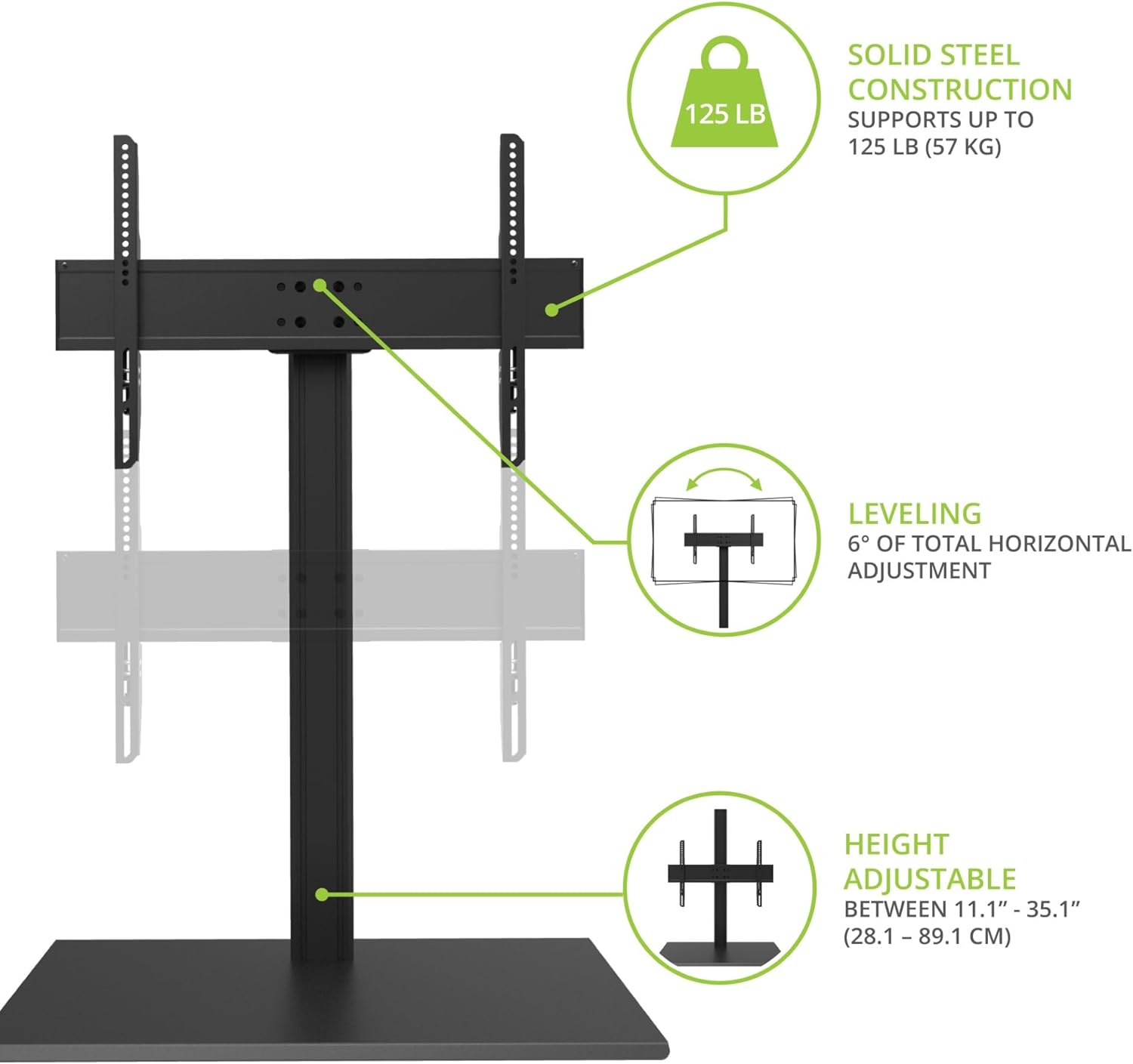
This image details the stand's robust construction, weight capacity, horizontal leveling feature, and adjustable height range.

A visual representation of the stand's height adjustment capability, allowing for optimal TV positioning.

This diagram illustrates the tilt and swivel functionalities, along with the base dimensions of the stand.

Visuals demonstrating the flexible tilt and swivel angles for customized viewing.
Cable Management
The TTS140 features integrated cable management to keep your entertainment area tidy. Route your TV and accessory cables down the center of the stand's column to conceal them from view.

A visual indicating the built-in cable management system for a tidy setup.
Maintenance
To ensure the longevity and proper function of your TV stand:
- Periodically check all screws and connections to ensure they remain tight.
- Clean the stand with a soft, dry cloth. Avoid abrasive cleaners or solvents.
- Do not hang objects from the stand or apply excessive force to the TV while mounted.
Troubleshooting
If you encounter issues with your Kanto TTS140 stand, consider the following:
- TV is not level: Ensure the horizontal leveling adjustment has been properly set. If the issue persists, re-check the TV bracket attachment to the TV and the stand.
- Stand feels unstable: Verify all assembly screws are fully tightened. Confirm the safety tether is securely anchored to a wall stud. Ensure the TV's weight and size are within the stand's specifications.
- Difficulty adjusting height/tilt/swivel: Check that any locking mechanisms or adjustment knobs are loosened before attempting to move the TV, and re-tighten them after adjustment.
For further assistance, please contact Kanto customer support.
Specifications
| Mounting Type | TV Stand |
| Movement Type | Swivel |
| Brand | Kanto |
| Material | Metal |
| Color | Black |
| Compatible Devices | Monitor, Television |
| Maximum Tilt Angle | 10 Degrees (forward) / -5 Degrees (backward) |
| Swivel Angle | +/- 32 Degrees |
| Height Adjustment Range | 11.1" - 35.1" (28.1 cm - 89.1 cm) |
| Horizontal Leveling | +/- 3 Degrees (6 degrees total) |
| VESA Compatibility | Min 200x200, Max 600x400 |
| Maximum Supported Screen Size | 90 Inches |
| Minimum Supported Screen Size | 40 Inches |
| Maximum Weight Capacity | 125 lbs (57 kg) |
| Base Dimensions (W x D) | 30" x 16" (76.7 cm x 40.6 cm) |
| UPC | 800152721989 |
Warranty
The Kanto TTS140 Tabletop TV Stand is covered by a Five Year Manufacturer's Warranty. For details regarding warranty claims or service, please refer to the official Kanto website or contact customer support.
Customer Support
If you have any questions, require technical assistance, or need to report a missing or damaged part, please contact Kanto customer support through their official website or the contact information provided with your product packaging.