Introduction
Thank you for choosing the Pursonic OI13R USB Rechargeable Water Flosser. This device is designed to provide an effective and convenient way to improve your oral hygiene by removing plaque and debris from areas traditional brushing cannot reach. Please read this manual thoroughly before first use to ensure proper operation and maintenance.

Image: Pursonic Water Flosser highlighting its plaque removal capabilities.
Important Safety Information
- Do not use this device if you have certain medical conditions without consulting a healthcare professional.
- Keep the device out of reach of children.
- Always ensure the device is completely dry before charging or storing.
- Do not submerge the main unit of the device in water.
- This product is intended for oral hygiene only. Do not use for any other purpose.
Note: This product is not a dietary supplement.
Package Contents
Please check the package to ensure all items are present:
- Pursonic OI13R Water Flosser Unit
- Standard Nozzle Tip(s)
- USB Charging Cable
- Instruction Manual (this document)
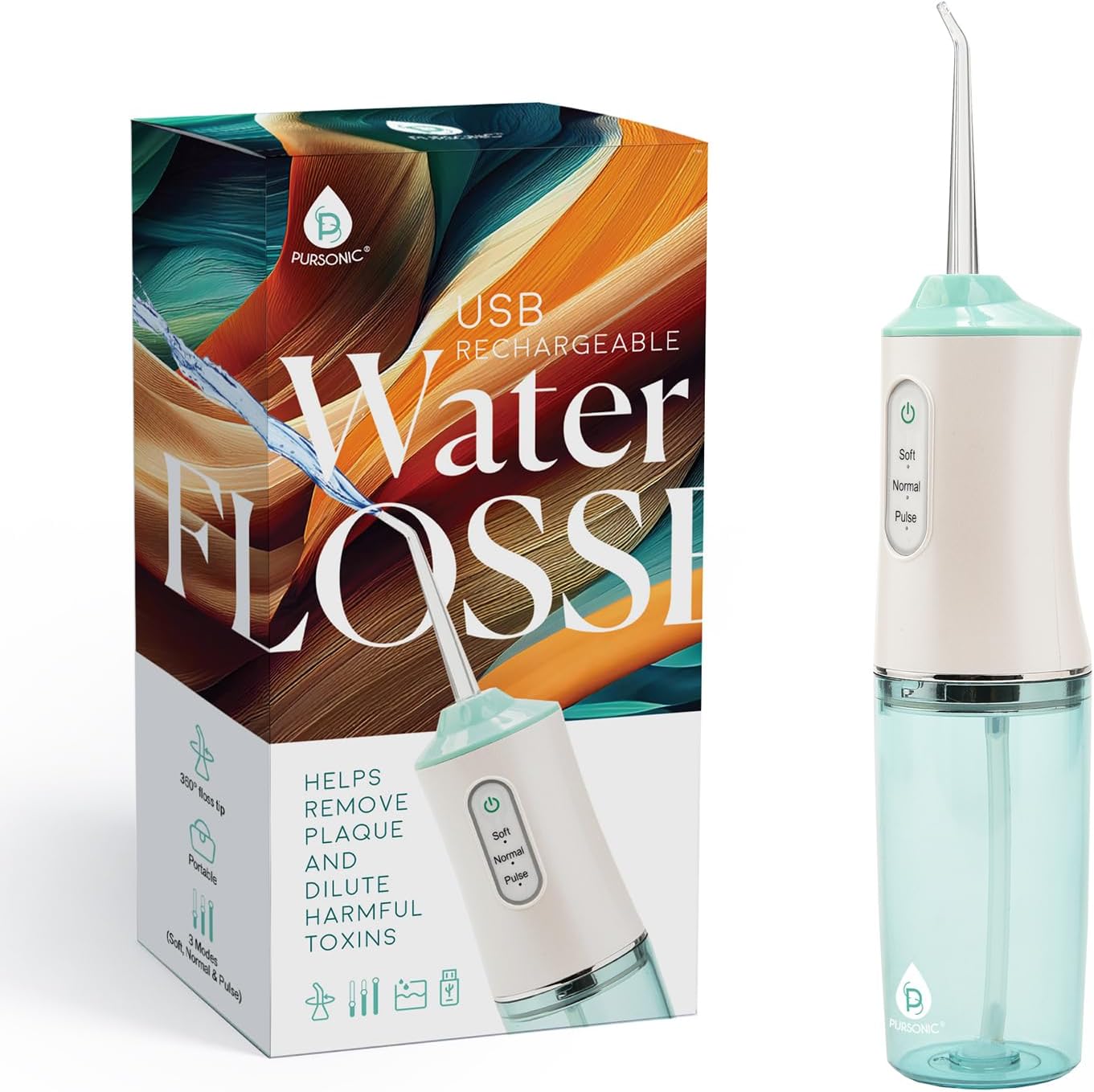
Image: The Pursonic OI13R Water Flosser unit and its retail packaging.
Product Components
Familiarize yourself with the parts of your Pursonic Water Flosser:
- Nozzle Tip
- Nozzle Release Button
- Water Inlet
- Power Button / Mode Selector
- Mode Indicator Lights (Soft, Normal, Pulse)
- Water Tank
- Charging Port (USB)

Image: Close-up of the Pursonic Water Flosser control panel, illustrating the three cleaning modes.
Setup
1. Charging the Device
Before first use, fully charge the water flosser. Connect the provided USB charging cable to the charging port on the device and plug the other end into a standard USB power adapter (not included) or a computer USB port. The indicator light will show charging status and turn off or change color when fully charged. A full charge provides up to a week of use.

Image: The Pursonic Water Flosser, USB charging cable, and a travel pouch, demonstrating its portable design.
2. Filling the Water Tank
- Detach the water tank from the main unit by twisting or pulling it down (refer to product diagram).
- Fill the tank with lukewarm water. You may also add a small amount of mouthwash if desired.
- Reattach the water tank securely to the main unit.
3. Attaching the Nozzle Tip
Insert the desired nozzle tip into the opening on the top of the main unit until it clicks into place. To remove, press the nozzle release button and pull the tip out.
Operation
1. Selecting a Mode
Press the Power/Mode button to cycle through the available cleaning modes:
- Soft Mode: Gentle pressure for sensitive gums or first-time users.
- Normal Mode: Standard pressure for effective daily cleaning.
- Pulse Mode: Pulsating stream for gum massage and enhanced cleaning.
The corresponding indicator light will illuminate to show the selected mode.

Image: Pursonic Water Flosser highlighting its customizable cleaning experience with three modes.
2. Flossing Technique
- Lean over a sink and place the nozzle tip into your mouth, aiming it at your gumline at a 90-degree angle.
- Turn on the device by pressing the Power/Mode button.
- Start with your back teeth and work your way forward. Glide the nozzle along the gumline, pausing briefly between teeth.
- Allow the water to flow into the sink.
- The 360° rotating nozzle allows you to easily reach all areas of your mouth.
- Continue until you have cleaned all areas of your mouth or the water tank is empty.

Image: Close-up of the Pursonic Water Flosser nozzle, illustrating its 360-degree rotation for comprehensive cleaning.
Tip for Braces and Implants: The precision stream of water is effective for cleaning around dental appliances like braces and implants. Carefully guide the nozzle around brackets and wires to remove trapped food particles.

Image: A woman using the Pursonic Water Flosser, demonstrating its suitability for cleaning around braces and implants.
Maintenance
1. Cleaning the Water Tank
After each use, empty any remaining water from the tank. It is recommended to rinse the tank with clean water and allow it to air dry to prevent mold and mildew buildup.
2. Cleaning the Nozzle Tip
Remove the nozzle tip and rinse it under running water. Replace nozzle tips every 3-6 months, or sooner if they become worn or damaged, to ensure optimal performance and hygiene.
3. Cleaning the Main Unit
Wipe the exterior of the main unit with a soft, damp cloth. Do not use abrasive cleaners or submerge the unit in water.
4. Storage
Store the water flosser in a cool, dry place away from direct sunlight. Ensure the water tank is empty and dry before storing for extended periods.
Troubleshooting
| Problem | Possible Cause | Solution |
|---|---|---|
| Device does not turn on. | Low battery. Device not charged. | Charge the device fully using the provided USB cable. Ensure the charging cable is properly connected to both the device and a power source. |
| Weak water pressure. | Water tank is low or empty. Nozzle tip is clogged. Incorrect mode selected. | Refill the water tank. Remove and clean the nozzle tip. Select a higher pressure mode (Normal or Pulse). |
| Water leaks from the device. | Water tank not securely attached. Nozzle tip not properly inserted. | Ensure the water tank is firmly attached to the main unit. Reinsert the nozzle tip until it clicks into place. |
| Device stops working unexpectedly. | Low battery. Internal malfunction. | Recharge the device. If the problem persists after charging, contact customer support. |
Specifications
- Model: OI13R
- Brand: Pursonic
- Power Source: Rechargeable Battery (USB)
- Water Tank Capacity: 7.5 oz (approximately 220 ml)
- Operation Modes: Soft, Normal, Pulse
- Special Features: 360° Rotating Nozzle, Cordless, Portable
- Dimensions: Approximately 10 x 5 x 2.5 inches (Package Dimensions)
- Weight: Approximately 1 Pound (Package Weight)
Warranty and Support
For warranty information or technical support, please refer to the contact details provided with your purchase or visit the official Pursonic website. Keep your proof of purchase for any warranty claims.
Manufacturer: PURSONIC