
1. Introduction
This manual provides essential instructions for the safe and effective use of your ALONEFIRE SV116 365nm UV Flashlight. This powerful blacklight is designed for detecting fluorescent substances not visible to the naked eye, including pet urine, scorpions, currency authentication, and curing resins. Please read this manual thoroughly before operation and retain it for future reference.

Figure 1: ALONEFIRE SV116 365nm UV Flashlight and accessories.
2. Safety Information
WARNING: Ultraviolet (UV) light can be harmful to eyes and skin. Always follow these safety precautions:
- DO NOT LOOK DIRECTLY AT THE UV LIGHT SOURCE. Direct exposure can cause eye damage.
- Always wear the included UV protective glasses when operating the flashlight.
- Avoid prolonged skin exposure to UV light.
- Keep out of reach of children.
- This device is Not Water Resistant. Avoid exposure to water or high humidity.
- Do not disassemble or modify the flashlight. This may cause damage and void the warranty.
3. Package Contents
Verify that all items are present in the package:
- ALONEFIRE SV116 365nm UV Flashlight
- Rechargeable Lithium Ion Battery (pre-installed)
- USB-C Charging Cable
- UV Protective Glasses
- Wrist Lanyard

Figure 2: Package contents.
4. Product Overview
The ALONEFIRE SV116 features a durable anodized aluminum body, a black UV filter lens, and high-powered 365nm UV LEDs for pure and effective ultraviolet illumination.
Key Features:
- 365nm UV LED: Utilizes 6 pieces of 4-core 365nm UV LEDs for powerful and precise detection.
- Black UV Filter Lens: Filters out visible light, enhancing the purity and intensity of the UV output.
- Aluminum Alloy Shell: Provides excellent heat dissipation, extending LED lifespan and ensuring reliability.
- USB-C Rechargeable: Convenient and easy charging with a reversible USB-C port.
- Reverse Charging: Functions as a power bank via a USB-A output port to charge other devices.

Figure 3: Flashlight head with 6PCS 4-Cores 365nm UV LEDs.
5. Setup
5.1 Initial Charging
- The flashlight comes with a pre-installed rechargeable Lithium Ion battery. For optimal performance, fully charge the battery before first use.
- Connect the provided USB-C charging cable to the flashlight's USB-C port.
- Plug the other end of the cable into a compatible USB power source (e.g., wall adapter, power bank, laptop, car charger).
- The charging indicator light will show Red while charging.
- Once fully charged, the indicator light will turn Green. Disconnect the charging cable.
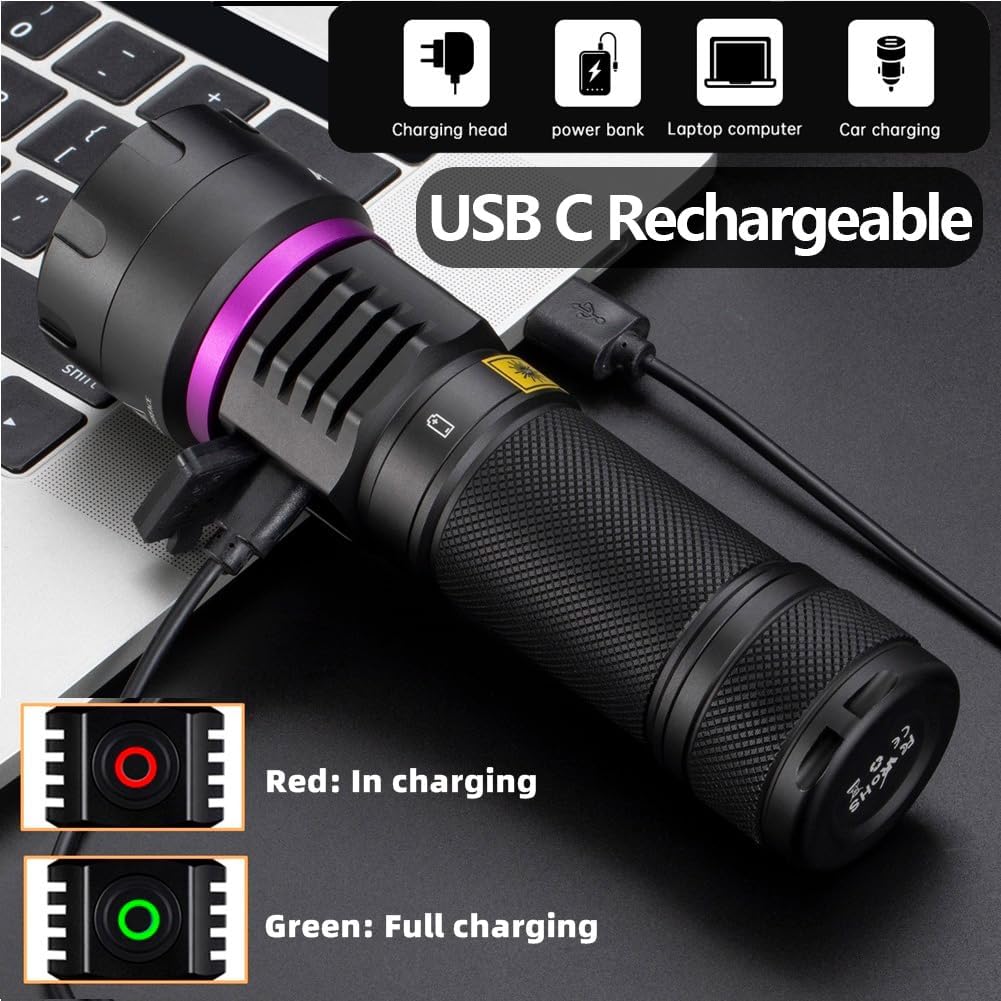
Figure 4: USB-C charging with indicator lights.
5.2 Attaching the Lanyard
Thread the wrist lanyard through the designated loop at the tail cap of the flashlight for secure handling.

Figure 5: Flashlight with wrist lanyard.
6. Operating Instructions
6.1 Power On/Off and Mode Selection
- Before turning on the flashlight, ensure you are wearing the UV protective glasses.
- Press the power button to turn the flashlight ON.
- Press the power button again to cycle through available brightness modes (e.g., Low, High).
- Press and hold the power button to turn the flashlight OFF.
6.2 Reverse Charging Function (Power Bank)
The SV116 can be used as an emergency power bank to charge other devices:
- Locate the USB-A output port on the flashlight.
- Connect your device's charging cable (USB-A to your device's port) to the flashlight's USB-A output port.
- The flashlight will begin charging your device.

Figure 6: Reverse charging a mobile device.
6.3 Applications
The 365nm UV light is effective for various detection and curing tasks:
- Pet Urine and Stains: Detect hidden pet urine, vomit, and other organic stains on carpets, furniture, and floors.
- Scorpion Detection: Scorpions fluoresce under 365nm UV light, making them easier to spot in dark environments.
- Currency and Document Authentication: Verify security features on banknotes, passports, and other official documents.
- Mineral and Gemstone Inspection: Observe fluorescence in certain minerals and gemstones.
- Resin and Glue Curing: Accelerate the curing process of UV-sensitive resins and glues.
- Bed Bug Detection: Identify bed bugs and their eggs by their fluorescent properties.

Figure 7: Examples of UV light applications.

Figure 8: 365nm UV light provides purer fluorescence compared to 395nm for certain materials.
7. Maintenance
7.1 Cleaning
- Wipe the flashlight body with a soft, damp cloth. Do not use abrasive cleaners or solvents.
- Gently clean the lens with a lens cleaning cloth to maintain optimal light output.
7.2 Battery Care and Storage
- Recharge the battery regularly, even if not in use, to prolong its lifespan.
- Store the flashlight in a cool, dry place away from direct sunlight and extreme temperatures.
- If storing for extended periods, charge the battery to approximately 50% capacity.
8. Troubleshooting
| Problem | Possible Cause | Solution |
|---|---|---|
| Flashlight does not turn on. | Battery is depleted or not properly installed. | Charge the battery fully. Ensure the battery is inserted with correct polarity. |
| Light flickers or dims unexpectedly. | Low battery or loose connection. | Recharge the battery. Ensure the battery cap is tightened securely. |
| Flashlight does not charge. | Faulty cable, power source, or charging port. | Try a different USB-C cable and power source. Ensure the cable is fully inserted. |
| Reverse charging is not working. | Device not compatible or cable issue. | Ensure your device supports charging via USB-A. Try a different USB-A cable. |
9. Specifications
| Feature | Detail |
|---|---|
| Model | SV116 |
| UV LED Type | 6pcs 4-cores 365nm UV LED |
| Power Consumption | 60W |
| Luminous Power | 8000mW |
| Material | Anodized Aluminum |
| Battery Type | 1x Lithium Ion (Rechargeable, Included) |
| Charging Port | USB-C Input |
| Reverse Charging Port | USB-A Output |
| Water Resistance Level | Not Water Resistant |
| Item Weight | 1.6 ounces |
10. Warranty and Support
10.1 Warranty Information
No specific warranty information is provided in the product details. Please refer to your purchase documentation or contact the seller for warranty terms.
10.2 Customer Support
For further assistance or inquiries, please contact ALONEFIRE customer support. You can visit the official ALONEFIRE store on Amazon for more information: ALONEFIRE Store.


