
1. Introduction
The Radtel RT-730 is a high-power 10W UHF/VHF dual-band radio designed for robust communication. Featuring a large-capacity 2500mAh battery, it offers extended usage and long-range capabilities. This manual provides essential information for setting up, operating, maintaining, and troubleshooting your RT-730 walkie-talkie.
2. What's in the Box
Your Radtel RT-730 package includes the following items:
- 2 x RT-730 Ham Radios
- 1 x Programming Cable
- 2 x Earpieces
- 2 x 2500mAh Li-ion Battery Packs
- 2 x Standard Long Antennas
- 2 x Desktop Chargers
- 2 x Belt Clips
- 2 x User Manuals

This image displays the complete set of items you should find in your Radtel RT-730 product box, including the two walkie-talkies, their respective batteries, desktop chargers, long antennas, earpieces, and a programming cable for computer connection.
3. Product Overview
The Radtel RT-730 features a clear 1.77-inch LED high-definition color screen, dual PTT buttons, and versatile charging options.
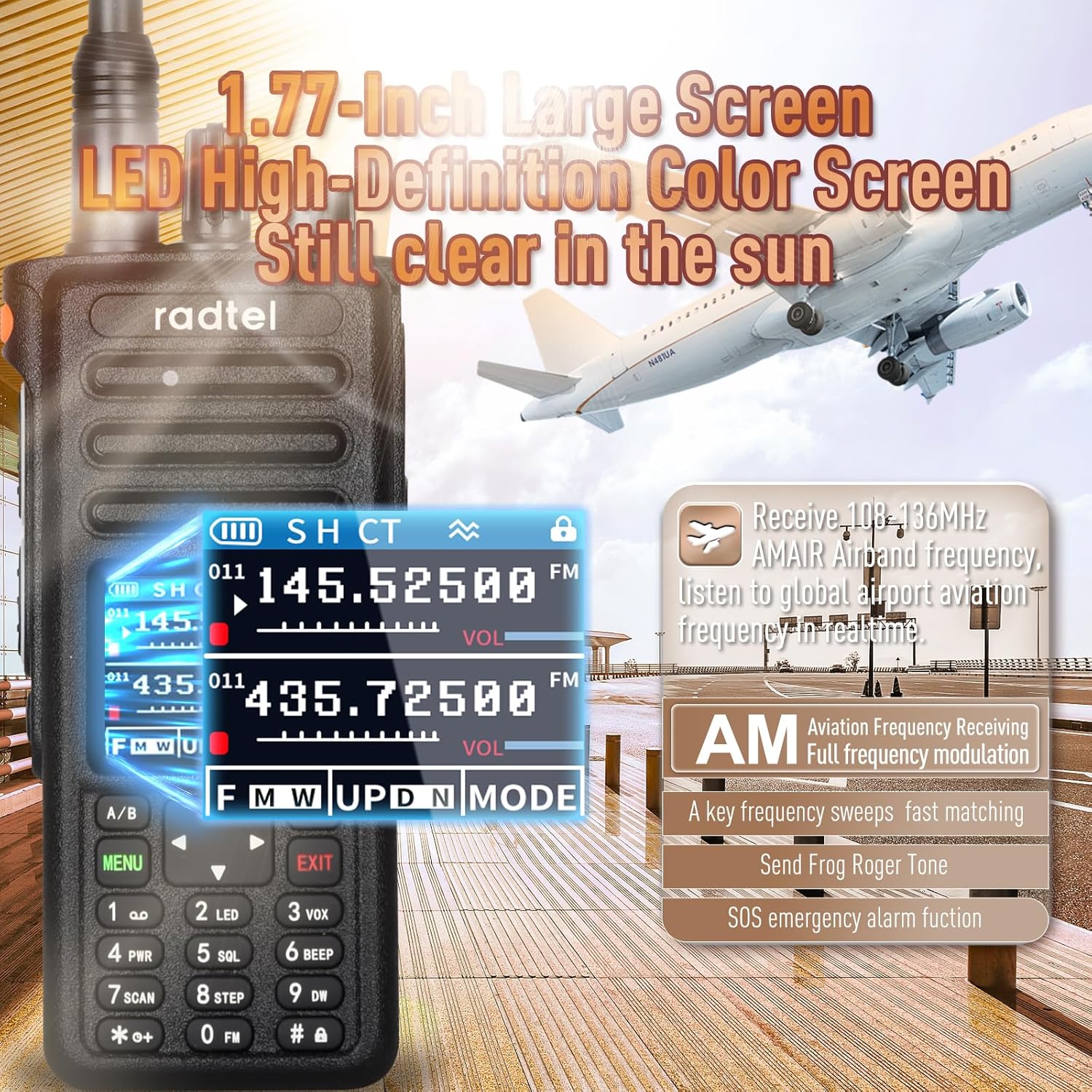
This image highlights the radio's 1.77-inch large LED high-definition color screen, which remains clear even in sunlight, displaying current frequencies and operational modes.

This image illustrates the RT-730's powerful 10W output, enabling long-distance transmission and reliable communication in challenging environments.
3.1 Key Components
- Antenna: For transmitting and receiving signals.
- Channel Knob: Used to adjust frequencies or select channels.
- Volume/Switch Knob: Controls power on/off and volume level.
- SOS Key: For emergency alarm function.
- PTT1 Key (Upper PTT): Push-to-Talk button for VHF transmission.
- PTT2 Key (Lower PTT): Push-to-Talk button for UHF transmission.
- Screen: Displays frequency, channel, battery status, and other information.
- A/B Switch Key: Toggles between upper and lower frequency bands.
- Menu/Confirmation Key: Accesses the menu and confirms selections.
- Left/Right Keys: Navigation buttons for menu and frequency adjustment.
- V/M Key: Switches between VFO (Frequency) mode and Memory (Channel) mode.
- Exit Key: Exits current menu or function.
- Keypad: Numeric and function keys for direct input and feature access.
- Type-C Interface: For convenient USB-C charging.
- FM Switch: Activates FM radio function.
4. Setup
4.1 Battery Installation
- Align the battery pack with the grooves on the back of the radio.
- Slide the battery pack upwards until it clicks securely into place.
- To remove, press the battery release latch and slide the battery downwards.
4.2 Antenna Attachment
- Screw the provided antenna clockwise into the antenna connector on top of the radio until it is finger-tight.
- Do not overtighten.
4.3 Charging the Battery
The RT-730 offers two charging methods:
- Type-C Charging: Connect a standard USB Type-C cable to the radio's Type-C port and a compatible power source (e.g., laptop, power bank, car charger).
- Desktop Charger: Place the radio (with battery installed) into the desktop charging cradle. Ensure the charging contacts align. The indicator light on the charger will show the charging status.
A full charge typically takes several hours. The 2500mAh battery provides extended operational time.
This video provides a brief introduction to the Radtel RT-730, demonstrating its key features including the screen, channel knob, dual PTTs, antenna, and both Type-C and desktop charging options. It also highlights the 2500mAh battery and 199 channels.
4.4 Programming
The Radtel RT-730 can be programmed using PC software or CHIRP. A programming cable is included in the package. Refer to the software's instructions for detailed programming procedures. (Note: Software supports PC only, not Mac).
5. Operating Instructions
5.1 Power On/Off and Volume
Rotate the Volume/Switch Knob clockwise to power on the radio. Continue rotating to increase the volume. Rotate counter-clockwise to decrease volume and power off.
5.2 Frequency/Channel Selection
- VFO Mode (Frequency Mode): Use the Channel Knob or the Up/Down arrow keys on the keypad to adjust the frequency.
- Memory Mode (Channel Mode): Press the V/M key to switch to Memory Mode. Use the Channel Knob or Up/Down arrow keys to select from the 199 pre-programmed channels.
5.3 Transmitting (PTT Function)
The RT-730 features dual PTT buttons:
- Press the Upper PTT button to transmit on the VHF frequency.
- Press the Lower PTT button to transmit on the UHF frequency.
Speak clearly into the microphone while holding down the PTT button. Release the button to listen.
5.4 VOX Function (Voice Operated Transmit)
The VOX function allows for hands-free transmission. When activated, the radio will automatically transmit when it detects your voice. Refer to the menu settings for VOX activation and sensitivity adjustment.
5.5 One-Key Copy Frequency (Frequency Auto Capture)
This feature allows you to quickly duplicate frequencies and subtones from nearby radios. Activate this function via the menu to enable instant communication with compatible devices.

This image demonstrates the one-key copy frequency feature, allowing for quick and easy duplication of frequencies between radios for seamless communication.
5.6 Special Reception Features
- NOAA Weather Channel Reception: Tune into NOAA channels to receive real-time weather alerts and forecasts.
- AM Aviation Band Reception: The RT-730 can receive frequencies in the AM aviation band (108-136MHz), allowing you to listen to air traffic communication.
6. Maintenance
6.1 Battery Care
- Charge the battery fully before first use.
- Avoid overcharging or completely draining the battery.
- Store batteries in a cool, dry place when not in use.
6.2 Cleaning
Wipe the radio with a soft, damp cloth. Do not use harsh chemicals or abrasive cleaners. Ensure the Type-C port cover is securely closed to prevent dust and moisture ingress.
6.3 Durability
The RT-730 is constructed with durable and sturdy materials designed to withstand shock and vibration in harsh environments. While water-resistant, avoid submerging the device.
7. Troubleshooting
- No Power: Check battery installation and charge level. Ensure the volume knob is turned on.
- No Reception/Transmission: Verify antenna is securely attached. Check frequency/channel settings. Ensure you are within range of other radios.
- Poor Audio Quality: Adjust volume. Check earpiece connection if used. Ensure microphone is not obstructed.
- Programming Issues: Ensure the correct programming software and drivers are installed. Verify cable connection.
If issues persist, consult the manufacturer's support resources or contact customer service.
8. Specifications
| Feature | Specification |
|---|---|
| Brand | radtel |
| Model Number | RT-730 |
| Item Weight | 2.92 pounds |
| Package Dimensions | 8.62 x 8.11 x 6.34 inches |
| Batteries | 1 Lithium Ion battery required (included) |
| Number of Channels | 199 |
| Frequency Range | 144-148MHZ / 420-450MHZ TX/RX, 16-630Mhz RX |
| Talking Range Maximum | 8 Kilometer |
| Tuner Technology | UHF/VHF |
| Voltage | 7.4 Volts |
| Water Resistance Level | Water Resistant |
| Date First Available | September 15, 2024 |
9. Warranty and Support
9.1 Warranty Information
The Radtel RT-730 comes with a 1-Year Warranty from the manufacturer, Xiamen Radtel Electronics Co.,Ltd. Please retain your proof of purchase for warranty claims.
9.2 Customer Support
For further assistance, technical support, or warranty inquiries, please visit the official Radtel Store or contact their customer service department. You can find more information and resources at the Radtel Store on Amazon.

