
1. Introduction
This instruction manual provides detailed guidance for the DOKIO 200W 36V Portable Folding Solar Panel Kit. Designed for versatility and portability, this solar panel is ideal for charging 24V batteries and various power stations, making it suitable for RVs, trailers, trucks, boats, camping, vans, and emergency power needs. Please read this manual thoroughly before use to ensure safe and efficient operation.
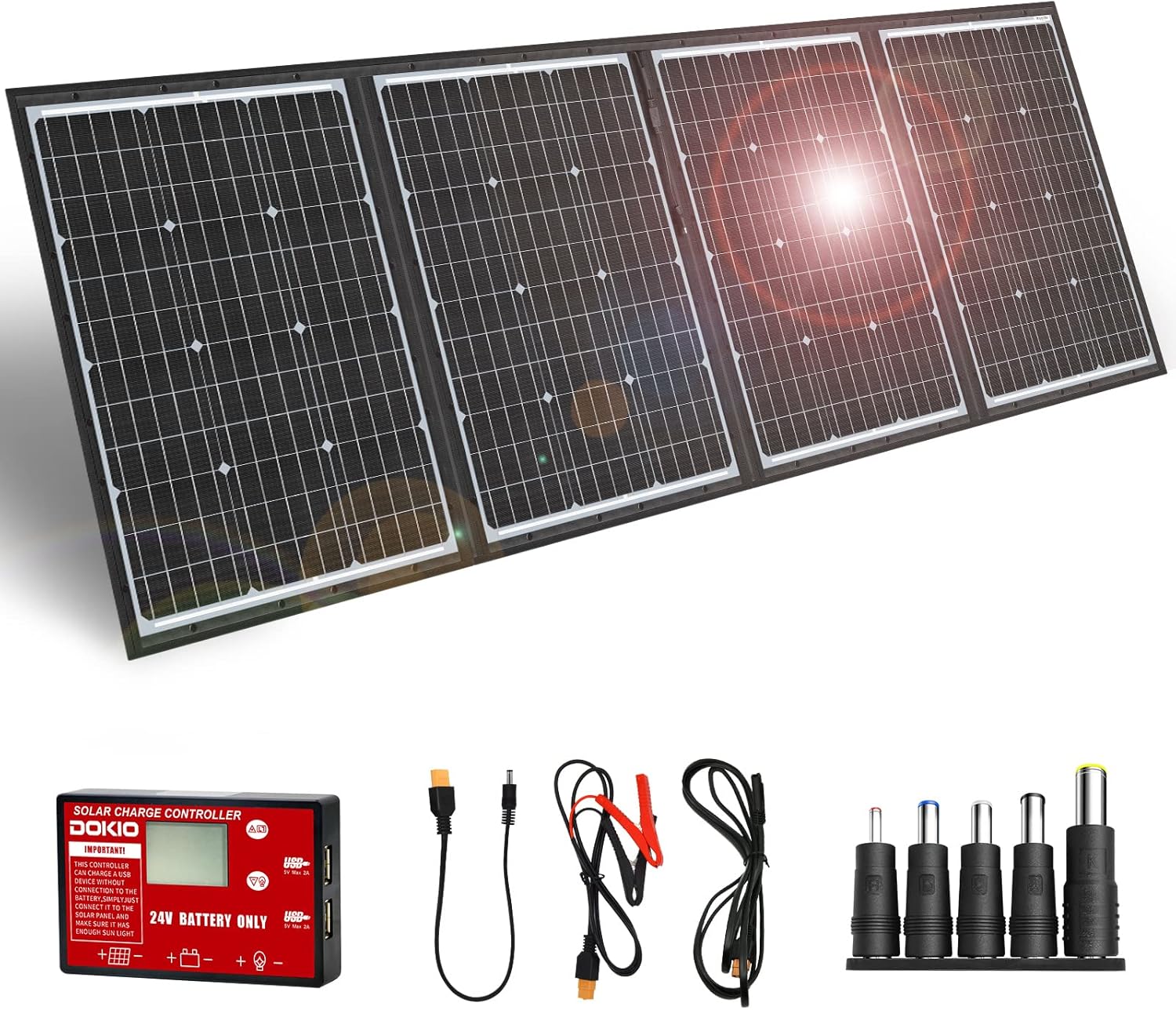
Figure 1.1: The DOKIO 200W 36V Portable Folding Solar Panel Kit, showcasing the four-panel array, charge controller, and included cables and adapters.
2. Key Features
- Compact Foldable Design: The 200W solar panel features a convenient carry handle and folds down to a slim 1.1 inches (2.8 cm) thick, weighing only 9.7 lbs (4.4 kg). This design allows for easy transport and storage in car trunks, RV storage, or boat cabins.
- Extended Cable Length: Equipped with a 9.8 ft (3 m) cable, enabling the solar panel to remain in direct sunlight while the charge controller or power station is placed in a shaded, cooler area for improved safety and charging efficiency.
- Integrated PWM Controller: Includes a standalone PWM controller specifically designed for 24V batteries, offering comprehensive protection against reverse polarity, overcharge, overload, and short-circuits. The controller is replaceable for extended service life.
- High-Efficiency Monocrystalline Cells: Utilizes premium A+ monocrystalline cells to ensure higher conversion efficiency and effective energy generation even in low-light conditions. The weather-resistant surface is designed to withstand sun exposure and splashes.
- All-in-One Accessory Kit: The kit comes complete with the 200W folding panel, PWM controller, 9.8 ft (3 m) cable, 3.3 ft (1 m) cable, and various adapters for broad compatibility.
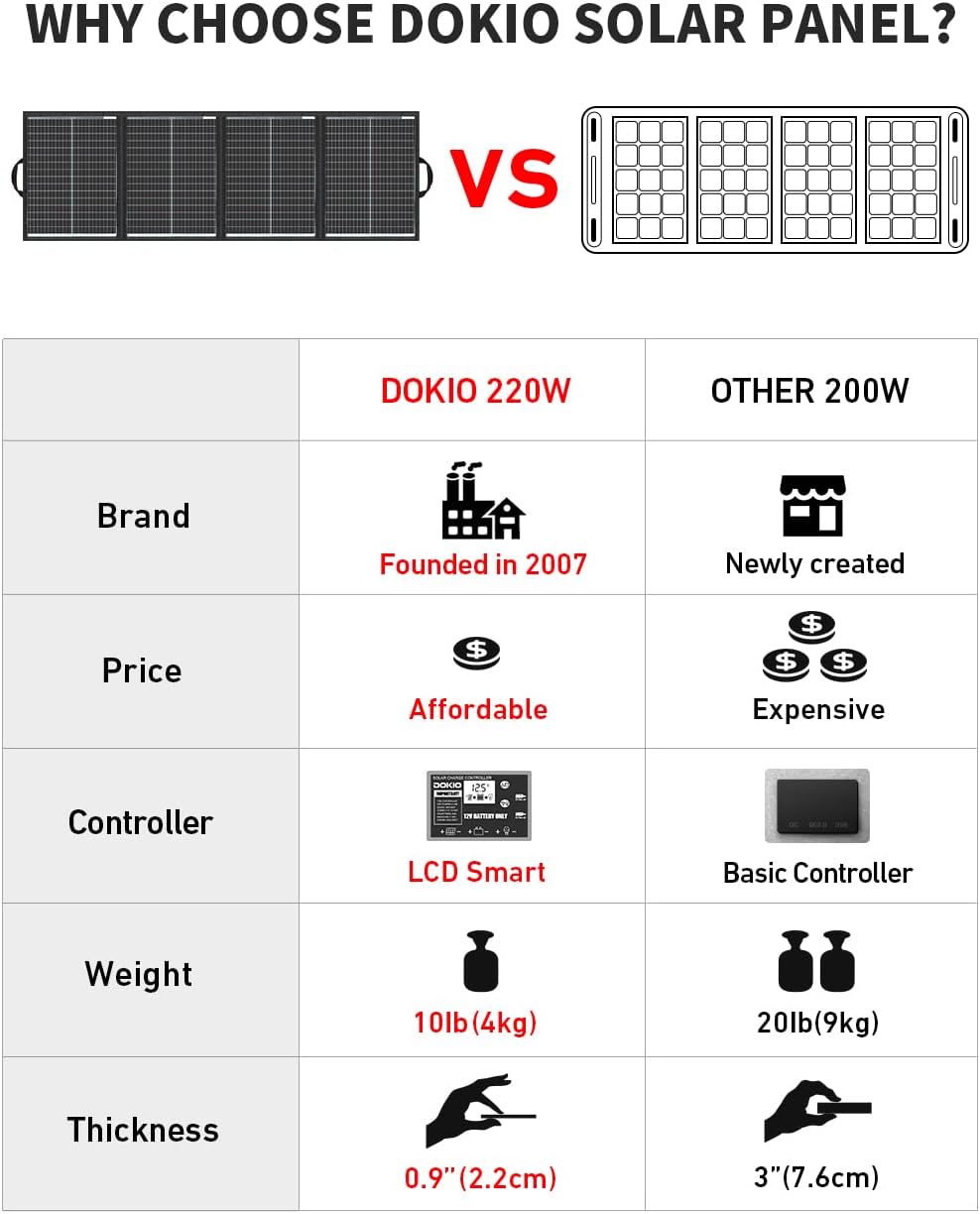
Figure 2.1: Comparative features illustrating the DOKIO panel's advantages in portability and controller technology.
3. What's Included
Your DOKIO 200W 36V Portable Folding Solar Panel Kit includes the following components:
- 1 x DOKIO 200W Folding Solar Panel
- 1 x PWM Charge Controller (for 24V batteries)
- 1 x 9.8 ft (3 m) Connection Cable
- 1 x 3.3 ft (1 m) Connection Cable
- Various DC Adapters for compatibility with different devices
- User Manual (this document)

Figure 3.1: Contents of the DOKIO 200W Solar Panel Kit.
4. Setup Instructions
The DOKIO solar panel offers flexible setup options for charging power stations or 24V batteries.
4.1. Charging Power Stations
For most power stations with built-in MPPT controllers, you can connect the solar panel directly without using the included PWM controller. Use the appropriate adapter (SAE, XT60, or DC) to match your power station's input port.
- Unfold the solar panel and position it in direct sunlight.
- Select the correct adapter for your power station.
- Connect the solar panel's output cable to the chosen adapter, then connect the adapter to your power station's solar input port.
- Ensure the power station is placed in a shaded area to prevent overheating, utilizing the panel's long cable.

Figure 4.1: Connection methods for various solar generators/power stations.
Important Note: Some power stations have limited solar input (e.g., 100-150W). Even with a 200W panel, the usable wattage may not exceed this cap. This is a design feature of the power station, not a defect of the solar panel. Always confirm your power station's specifications.
4.2. Charging 24V Batteries
When charging 24V batteries (AGM, LiFePO4, Deep Cycle, Lead-acid, Lithium, GEL), the included PWM charge controller is essential for safe and regulated charging.
- Unfold the solar panel and place it in an area with maximum direct sunlight.
- Connect the solar panel's output cable to the input terminals of the PWM charge controller.
- Connect the charge controller's output terminals to your 24V battery using the provided alligator clips. Ensure correct polarity (positive to positive, negative to negative).
- The controller's display will show the charging status and battery voltage.
- The controller also features two USB ports for charging small electronic devices.

Figure 4.2: Connection diagram for charging 24V batteries.

Figure 4.3: Overview of connection methods for power stations and 24V batteries.
5. Operating Guidelines
To maximize the efficiency and lifespan of your DOKIO solar panel, follow these operating guidelines:
- Optimal Sun Exposure: Always position the solar panel directly facing the sun. Adjust its angle throughout the day to track the sun's movement for maximum power generation. Ensure no shadows are cast on the panel.
- Controller Monitoring: If using the PWM controller, regularly check its display for battery voltage and charging status. This helps ensure your battery is charging correctly and prevents overcharging.
- Shaded Controller/Battery: Utilize the 9.8 ft (3 m) cable to keep the charge controller and the battery/power station in a shaded, cool environment. This prevents overheating, which can reduce charging efficiency and potentially damage components.
- USB Charging: The PWM controller includes USB ports (5V/2A) for direct charging of small electronic devices like smartphones or tablets.

Figure 5.1: Demonstrating the use of the long cable for optimal panel placement and shaded controller/battery.

Figure 5.2: The PWM charge controller with real-time display and USB charging capabilities.
6. Maintenance
Proper maintenance ensures the longevity and optimal performance of your solar panel kit.
- Cleaning: Regularly clean the surface of the solar panels with a soft, damp cloth to remove dust, dirt, or debris that may accumulate and reduce efficiency. Avoid abrasive cleaners or harsh chemicals.
- Storage: When not in use, fold the solar panel and store it in a dry, cool place. Its compact design makes storage easy.
- Weather Exposure: The panel has a weather-resistant surface and is IP65 waterproof, meaning it can handle splashes and light rain. However, it is designed for temporary or emergency use only and is not intended for permanent outdoor installation or prolonged exposure to severe weather conditions. Do not leave it out overnight or during bad weather.
- Cable and Connector Inspection: Periodically inspect all cables and connectors for any signs of wear, damage, or corrosion. Ensure connections are secure before each use.

Figure 6.1: Features contributing to the panel's durability and ease of transport.
7. Troubleshooting
This section addresses common questions and issues you might encounter.
7.1. Low Power Output
Issue: The solar panel is not producing the expected 200W power when charging a power station or battery.
Solution: Solar panel output is affected by many factors, including light intensity, panel angle, and temperature. The rated 200W is achieved under ideal laboratory conditions. In real-world scenarios, constantly changing light intensity and sun angle will affect performance. Ensure the panel is in full, direct sunlight with no shadows. Also, verify your power station's maximum solar input; many limit input to 100-150W, which is a design feature of the power station, not a panel defect.
7.2. Direct Connection to Battery Without Controller
Issue: Can the panel be connected directly to a battery for charging without the controller?
Solution: Most power stations have built-in MPPT controllers, allowing direct connection. However, for standalone batteries (e.g., RV or car batteries), a charge controller is crucial. Without the voltage regulation provided by the controller, there is a risk of overcharging and damaging the battery. Always use the included PWM controller when charging 24V batteries.
7.3. Permanent Outdoor Installation
Issue: Can these solar panels be permanently installed outside?
Solution: While the panel is waterproof (IP65), it is designed for temporary or emergency use only. It is not intended for permanent installation or prolonged weather exposure. Do not leave the panels out at night or in bad weather to ensure their longevity and performance.
7.4. Damaged or Faulty Panel
Issue: The panel arrived damaged or is showing operational issues.
Solution: If your panel arrives damaged or exhibits issues, please contact DOKIO customer support immediately. In most cases, issues can be resolved quickly without the need for a return, saving you time and effort.
8. Specifications
| Attribute | Detail |
|---|---|
| Brand | DOKIO |
| Model Number | FFSP 36v |
| Maximum Power | 200 Watts |
| Material | Aluminum |
| Product Dimensions (Unfolded) | 76.8"L x 26.4"W x 0.24"H (195cm L x 67cm W x 0.6cm H) |
| Folded Dimensions (Approx.) | 26.4"L x 19"W x 1.1"H (67cm L x 49cm W x 2.8cm H) |
| Item Weight | 9.7 Pounds (4.4 kg) |
| Efficiency | High Efficiency (A+ Monocrystalline Cells) |
| Included Components | Folding Panel, PWM Controller, Cables, Adapters, Bag |
| Waterproof Rating | IP65 (Weather-resistant surface) |
Figure 8.1: The DOKIO 200W solar panel in an outdoor setting, highlighting its compact and portable design.
9. Warranty & Support
DOKIO is committed to providing excellent customer service and support for your solar panel kit.
- Hassle-Free Support: If you encounter any issues with your DOKIO solar panel, such as damage upon arrival or operational problems, please contact DOKIO customer support directly. Many issues can be resolved quickly without the need for a product return, saving you time and effort.
- Contact Information: For support, please refer to the contact details provided in the packaging or visit the official DOKIO store on Amazon.
- Product Protection Plans: Additional protection plans may be available for purchase separately through the retailer to extend coverage beyond the standard manufacturer's warranty.

Figure 9.1: DOKIO customer support is available to assist with product inquiries and issues.


