
Introduction
Thank you for choosing the GUAEVER Automatic Wrist Blood Pressure Monitor. This device is designed to provide accurate and fast blood pressure readings, offering convenience for home and travel use. Please read this manual thoroughly before use to ensure proper operation and obtain reliable results.
Safety Information
Important: Measurement results can be affected by various factors. Always observe the precautions outlined in this manual for accurate readings.
- Consult your physician for interpretation of blood pressure measurements. Self-diagnosis and treatment based on measurement results are dangerous.
- Do not use this device on infants or individuals who cannot express their consent.
- Avoid taking measurements in a moving vehicle or during physical activity.
- Ensure the cuff is placed correctly and comfortably, but not too tightly, to avoid discomfort or inaccurate readings.
- Keep the device away from strong electromagnetic fields.
Product Overview & What's Included
The GUAEVER Automatic Wrist Blood Pressure Monitor kit includes:
- 1 x Blood Pressure Monitor
- 1 x Storage Case (doubles as hand support)
- 2 x AAA Batteries
- 1 x User Manual

Figure 1: Front view of the GUAEVER Automatic Wrist Blood Pressure Monitor.

Figure 2: All components included in the GUAEVER Blood Pressure Kit.
Setup
1. Battery Installation
The device operates on 2 AAA batteries. To install or replace batteries:
- Locate the battery compartment on the back of the monitor.
- Open the battery cover.
- Insert 2 AAA batteries, ensuring correct polarity (+/-).
- Close the battery cover securely.

Figure 3: Correct insertion of AAA batteries.
2. Initial Settings (Date/Time)
Refer to the detailed user manual included in the kit for instructions on setting the date and time. This ensures accurate record-keeping for your measurements.
Operating Instructions
1. Wearing the Cuff Correctly
Proper cuff placement is crucial for accurate readings. Follow these steps:
- Wear the wristband on the inner side of your left wrist.
- Ensure there is a 1-3 cm gap between the wristband and the bottom of your palm.
- The included storage case can be used as a hand support to ensure accurate readings.
- Sit up straight and relax. Keep your wrist and the monitor at the same level as your heart during measurement.

Figure 4: Visual guide for correct cuff placement and arm positioning.
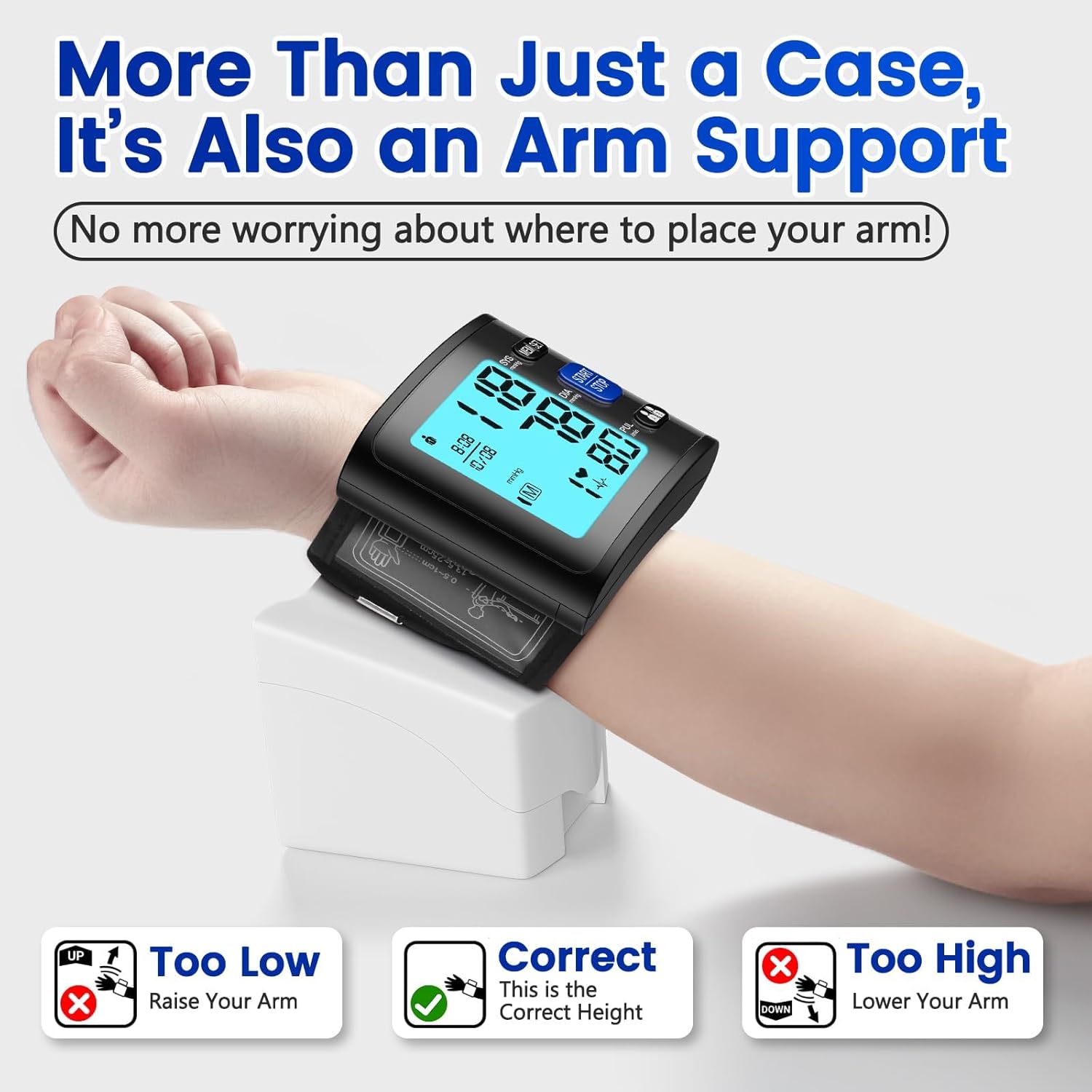
Figure 5: Using the carrying case for optimal arm support during measurement.
2. Taking a Measurement
The GUAEVER monitor features one-button operation and voice guidance for ease of use.
- Ensure the cuff is correctly positioned and your arm is at heart level.
- Press the 'START/STOP' button. The cuff will automatically inflate and begin measurement.
- Remain still and silent during the measurement process. The voice broadcast will guide you and announce the results.
- The measurement will complete within approximately 30 seconds.
Video 1: Demonstrating the operation method of the GUAEVER Wrist Blood Pressure Monitor, including cuff placement and starting a measurement.
3. Understanding Your Readings
The large backlit LCD display shows your Systolic (SYS), Diastolic (DIA), and Pulse (PUL) readings. It also includes a WHO classification indicator for easy hypertension detection.
- SYS (Systolic Pressure): The top number, indicating the pressure in your arteries when your heart beats.
- DIA (Diastolic Pressure): The bottom number, indicating the pressure in your arteries between beats.
- PUL (Pulse Rate): Your heart rate in beats per minute.
- WHO Classification Indicator: Color-coded bars on the display provide a quick reference to the World Health Organization's blood pressure classification.

Figure 6: Detailed view of the monitor's backlit LCD display and readings.
4. Dual User Mode & Memory
The monitor supports independent recording for two users, each storing up to 90 measurements. This allows for easy tracking of health data over time.
- Use the 'User A/User B' button to switch between user profiles.
- Press the 'MEM' button to access stored measurement history for the selected user.
- The device will display previous readings, allowing you to monitor trends in blood pressure and heart rate.

Figure 7: Dual user mode interface for tracking individual health data.
Maintenance
To ensure the longevity and accuracy of your GUAEVER Blood Pressure Monitor, follow these maintenance guidelines:
- Cleaning: Wipe the monitor and cuff with a soft, dry cloth. Do not use abrasive cleaners or immerse the device in water.
- Storage: Store the device in its carrying case in a cool, dry place, away from direct sunlight and extreme temperatures.
- Battery Care: If the device will not be used for an extended period, remove the batteries to prevent leakage and damage.
Troubleshooting
If you encounter issues with your monitor, consider the following common solutions:
- Inaccurate Readings: Ensure correct cuff placement, proper arm positioning (at heart level), and relaxation during measurement. Avoid speaking or moving.
- No Display/Power Issues: Check if batteries are correctly inserted or need replacement. Ensure the ON/OFF switch on the side is in the 'ON' position.
- Error Messages: Refer to the detailed troubleshooting section in the included user manual for specific error codes and their solutions.
Specifications
| Feature | Specification |
|---|---|
| Model Number | B0DH2DS2JM |
| Product Dimensions | 2.9"L x 2.56"W x 2.56"Th |
| Weight | 8.47 ounces |
| Power Source | Battery Powered (2 x AAA Batteries) |
| Display Type | Backlit LCD |
| Cuff Size | Fits wrist sizes from 5.3 to 9.8 inches |
| Memory Capacity | 2 users x 90 measurements each (180 total) |
| Measurement Time | Approx. 30 seconds |
| UPC | 707630464751 |
Warranty and Support
Your GUAEVER Blood Pressure Monitor comes with a 12-month warranty from the date of purchase. For warranty claims, technical support, or further usage information, please visit the official GUAEVER store or contact customer service.
We are committed to providing friendly and helpful customer service.