
1. Introduction
This manual provides detailed instructions for the proper use and maintenance of your UHPPOTE RF Wireless Remote Control Transmitter, Model HBK-T01. This device is designed to operate compatible UHPPOTE RF remote control systems, such as gate openers, door access controls, and other 433.92MHz RF receivers. Please read this manual thoroughly before operation to ensure safe and effective use.

Figure 1.1: UHPPOTE HBK-T01 RF Wireless Remote Control Transmitters (3-Pack)
2. Product Overview
2.1 Key Features
- Transmitting Frequency: 433.92MHz. This remote is only compatible with UHPPOTE RF remote control systems operating on this frequency.
- Fixed Code: The remote utilizes a fixed code system, allowing for straightforward programming.
- Programmable: This remote control is shipped with an empty code and requires user programming to function with your specific receiver.
- Power Source: Powered by 2pcs CR2016 batteries (included).
- Battery Life: Tested for approximately 50,000 cycles.
2.2 Components
Each package includes:
- UHPPOTE HBK-T01 RF Wireless Remote Control Transmitter
- 2 x CR2016 Batteries (pre-installed or included separately)

Figure 2.1: Ergonomic Design and Wireless Signal Transmission

Figure 2.2: Compact Remote with Integrated Keychain Loop
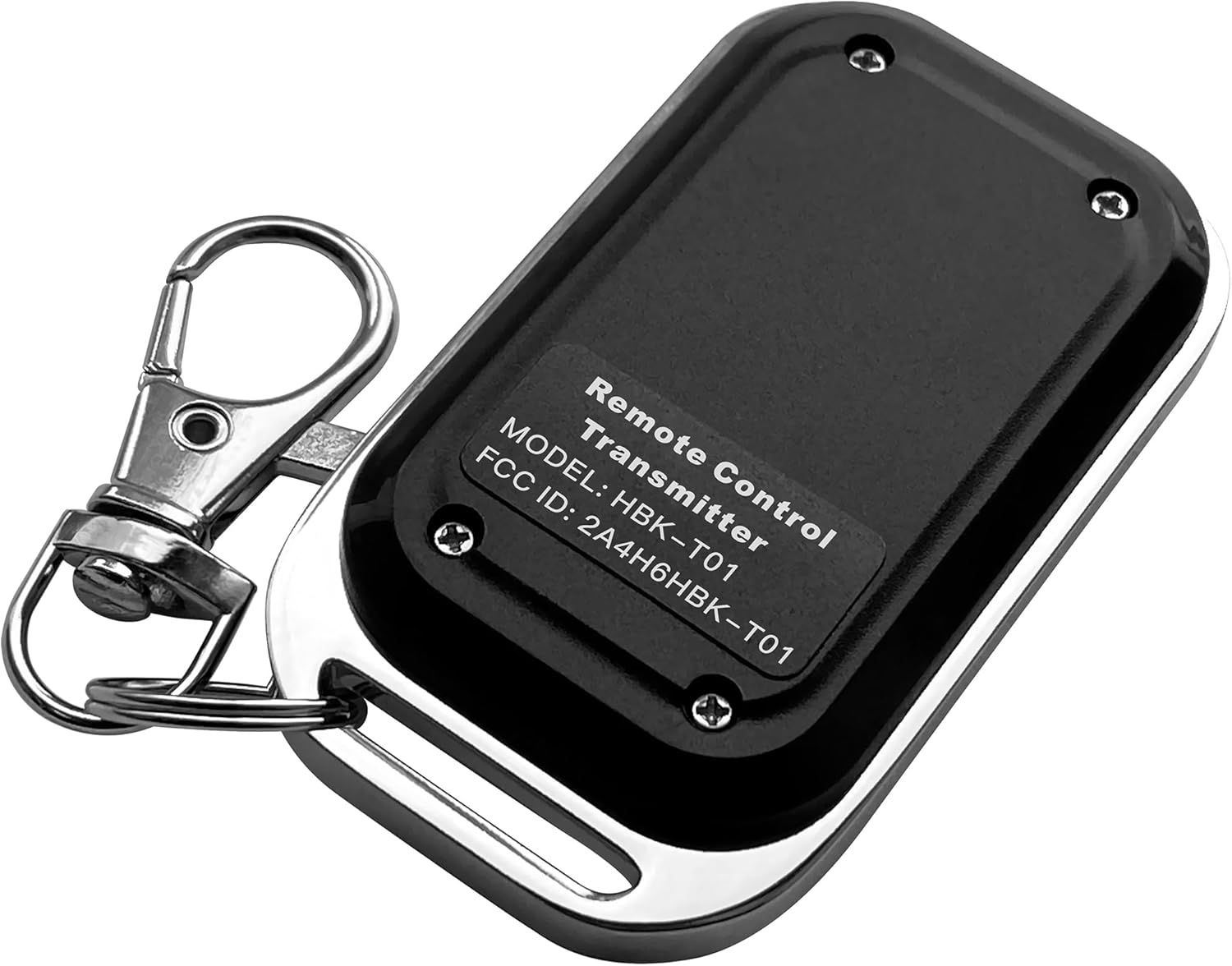
Figure 2.3: Rear View Showing Model Number HBK-T01 and FCC ID
3. Setup and Programming
3.1 Battery Installation/Replacement
The remote control is powered by two CR2016 batteries. If the remote is not responding or the indicator light is dim, the batteries may need replacement.
- Locate the small screws on the back of the remote control.
- Using a small screwdriver, carefully remove the screws and open the casing.
- Remove the old CR2016 batteries.
- Insert two new CR2016 batteries, ensuring correct polarity (+ and -).
- Close the casing and secure it with the screws.
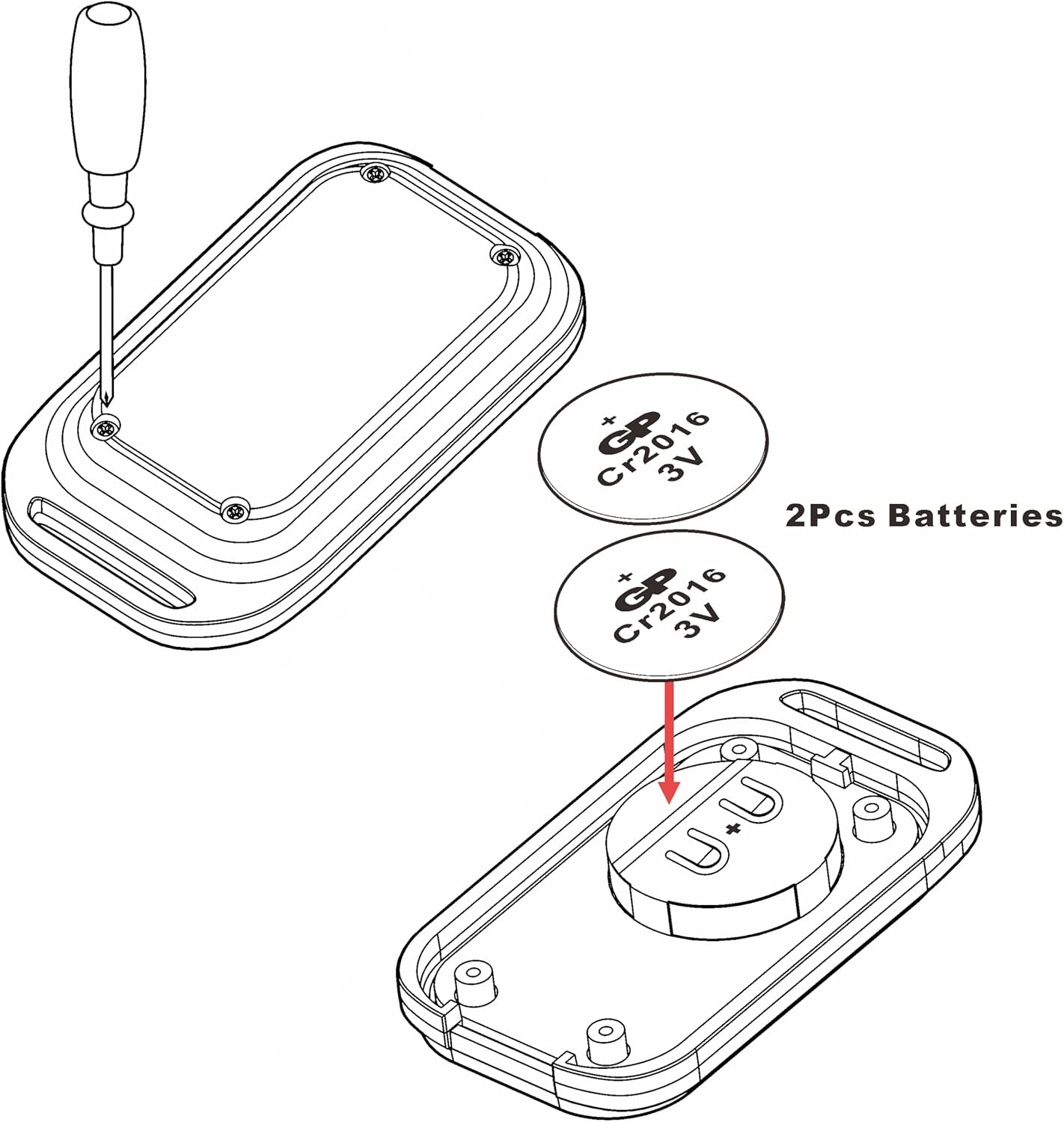
Figure 3.1: Battery Replacement Guide for CR2016 Batteries
3.2 Programming the Remote Control
The HBK-T01 remote control is shipped with an empty code and must be programmed to your specific UHPPOTE receiver unit before use. The programming procedure is typically performed on the receiver unit itself, not on the remote control.
Important: Programming instructions vary depending on the specific UHPPOTE receiver model you are using. Please refer to the instruction manual provided with your UHPPOTE receiver for detailed programming steps. If you do not have the receiver's manual or require further assistance, please contact UHPPOTE customer support.

Figure 3.2: Integration with Electric Lock Systems (Receiver required)
4. Operating Instructions
Once the HBK-T01 remote control is successfully programmed to your UHPPOTE receiver, operation is straightforward:
- Ensure the receiver unit is powered on and within range.
- Press the button on the HBK-T01 remote control.
- The remote will transmit an RF signal to the programmed receiver.
- The receiver will then activate the connected device (e.g., open a gate, unlock a door, turn on a light).
The blue LED indicator on the remote will illuminate when the button is pressed, indicating signal transmission.

Figure 4.1: Versatile Applications of the HBK-T01 Remote Control
5. Maintenance
- Cleaning: Wipe the remote control with a soft, dry cloth. Do not use abrasive cleaners or solvents.
- Battery Check: If the remote's performance degrades, check and replace the batteries as described in Section 3.1.
- Storage: Store the remote control in a cool, dry place away from direct sunlight and extreme temperatures.
- Avoid Impact: Do not drop or subject the remote control to strong impacts, as this may damage internal components.
6. Troubleshooting
| Problem | Possible Cause | Solution |
|---|---|---|
| Remote does not respond / No LED light | Dead or incorrectly installed batteries. | Replace batteries (CR2016) and ensure correct polarity. |
| Remote LED lights up, but device does not respond | Remote not programmed to receiver, or receiver is out of range/powered off. | Verify programming with receiver's manual. Ensure receiver is powered and within operating range. Check receiver's status. |
| Limited operating range | Obstructions (walls, metal structures), radio interference, low battery. | Move closer to the receiver. Remove obstructions. Check for sources of interference. Replace batteries. |
| Remote works intermittently | Low battery, intermittent interference. | Replace batteries. Try operating from a different location to rule out interference. |
7. Specifications
- Brand: UHPPOTE
- Model Number: HBK-T01
- Color: Black
- Power Source: Battery Powered
- Batteries: 2 x CR2016 (included)
- Voltage: 6 Volts
- Transmitting Frequency: 433.92MHz
- Connectivity Technology: Wireless (RF)
- Control Method: Remote
- Compatible Devices: UHPPOTE's RF remote control receivers
- Item Dimensions (L x W x H): 2.3 x 1.3 x 0.5 inches (5.84 x 3.30 x 1.27 cm)
- Item Weight: 4.6 ounces (130 grams)
- Installation Type: Wireless DIY
- Alert Type: Entry Only (refers to typical application with entry systems)
8. Warranty and Support
8.1 Warranty Information
For detailed warranty information regarding your UHPPOTE HBK-T01 remote control, please refer to the warranty card included with your purchase or visit the official UHPPOTE website. Warranty terms and conditions may vary by region and retailer.
8.2 Customer Support
If you encounter any issues, have questions about programming, or require technical assistance, please contact UHPPOTE customer support. You can typically find contact information on the product packaging, the UHPPOTE official website, or through your point of purchase.
UHPPOTE Official Website: Visit UHPPOTE Store on Amazon