
1. Introduction
This manual provides detailed instructions for the XINDADA Hello Plum H15 Pro SmartWatch. It covers setup, operation, maintenance, and troubleshooting to ensure optimal use of your device. The H15 Pro features an AMOLED display, 1GB of internal storage, and advanced functionalities including health monitoring, communication, and smart assistant integration.
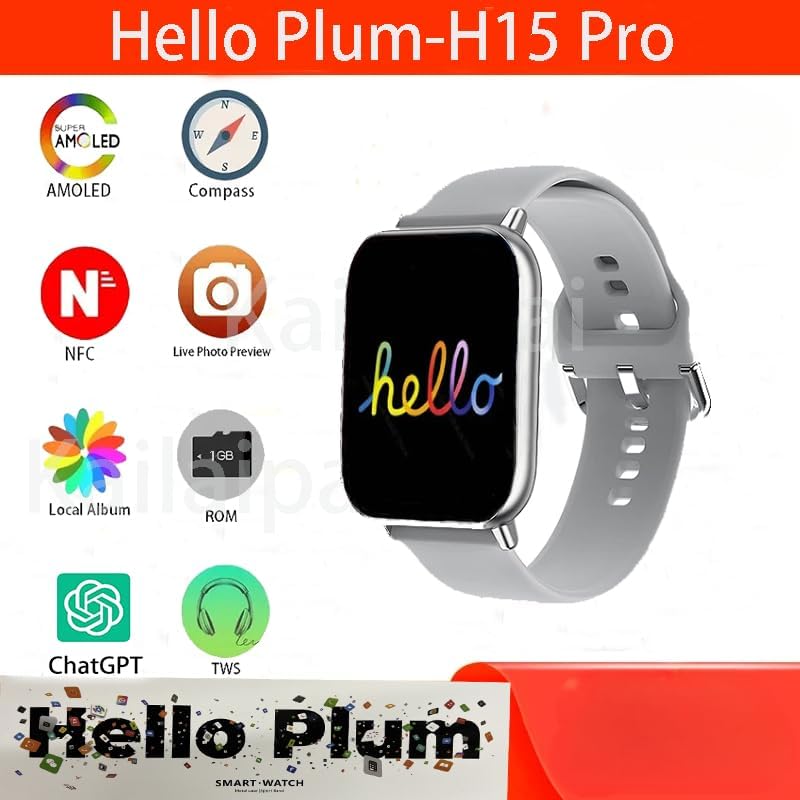
Image 1.1: Overview of the Hello Plum H15 Pro SmartWatch highlighting key features like AMOLED display, compass, NFC, live photo preview, local album, 1GB ROM, ChatGPT, and TWS support.
2. Safety Information
- Do not attempt to disassemble, repair, or modify the device. This may cause damage, fire, or electric shock.
- Keep the device away from extreme temperatures, direct sunlight, and high humidity.
- Avoid exposing the device to strong impacts or vibrations.
- Consult a medical professional before starting any new exercise regimen or if you have a medical condition that could be affected by using the smartwatch.
- The device is IP67 water-resistant, meaning it can withstand immersion in up to 1 meter of water for 30 minutes. It is not suitable for swimming or showering with hot water.
3. Package Contents
Verify that all items are present in the package:
- 1 x XINDADA Hello Plum H15 Pro SmartWatch
- 1 x Wireless Charging Cable
- 1 x User Manual (this document)
4. Setup
4.1. Charging the SmartWatch
Before first use, fully charge your smartwatch. Place the watch on the provided wireless charging cable. The watch display will indicate charging status. A full charge typically takes approximately 2 hours.
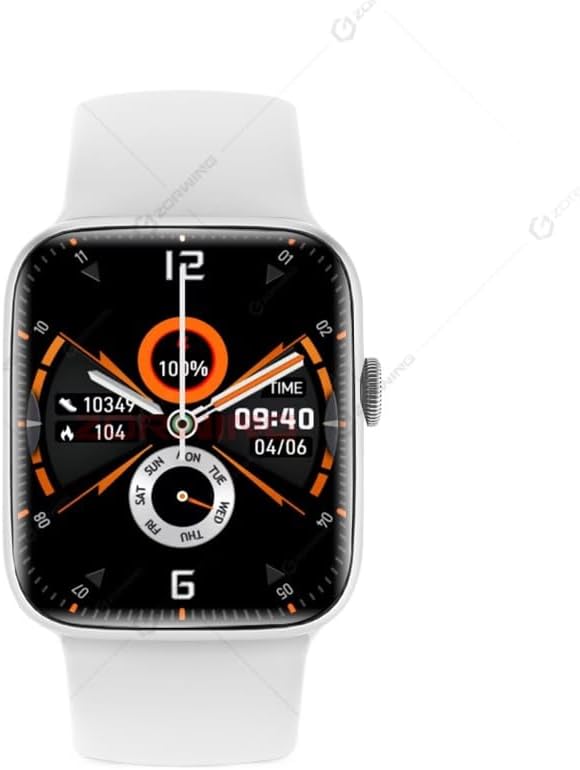
Image 4.1: The Hello Plum H15 Pro SmartWatch displaying its watch face, indicating battery level and current time.
4.2. Power On/Off
- To Power On: Press and hold the side button until the screen lights up.
- To Power Off: Press and hold the side button, then select "Power Off" on the screen.
4.3. App Installation and Pairing
To unlock the full functionality of your H15 Pro SmartWatch, download and install the "LEWEAR" application on your smartphone (Android or iOS).
- Scan the QR code in the watch's settings or search for "LEWEAR" in your smartphone's app store.
- Install and open the LEWEAR app.
- Enable Bluetooth on your smartphone.
- In the LEWEAR app, navigate to "Device" or "Add Device" and select the H15 Pro from the list of available devices.
- Confirm the pairing request on both your smartphone and the smartwatch.
Once paired, the watch will synchronize data with your phone, and you can customize settings through the app.
5. Operating Instructions
5.1. Basic Navigation
- Touchscreen: Swipe up, down, left, or right to navigate through menus and notifications. Tap to select items.
- Side Button (Digital Crown): Press to return to the home screen or wake the display. Rotate to scroll through lists or zoom in/out (where applicable).

Image 5.1: The smartwatch interface showcasing a new user interface design for an enhanced experience.

Image 5.2: The smartwatch demonstrating its "Waterfall Menu" with new animations and visuals, providing a dynamic and smooth interactive experience.
5.2. Key Features
- Bluetooth Calls & Messages: Once paired, make and receive calls directly from your watch. Receive notifications for SMS, WhatsApp, WeChat, and email.
- Health Monitoring:
- Heart Rate: Automatic 24-hour heart rate monitoring.
- Pedometer: Daily step counting and calorie tracking.
- Sleep Monitor: Records and analyzes sleep conditions from 9 PM to 9 AM.
- Multi-Sport Modes: Track various physical activities.

Image 5.3: The smartwatch showing a physical training view, allowing users to monitor metrics like heart rate intervals and fitness logs by rotating the digital crown.
- Local Music & Photo Album: With 1GB ROM, store music directly on the watch for offline playback. Upload photos to create a local album via the LEWEAR app.
- Voice Memo: Support for HD recording and local playback.
- NFC: Supports NFC functionality for various applications (e.g., offline payments like Alipay).
- ChatGPT Integration: Access AI assistant features directly from your wrist.
- E-book Reader: Supports reading e-books directly on the watch.
- Compass: Built-in compass for navigation.
- Customization: Customize watch faces and shortcut action bars. Supports always-on display in low brightness.

Image 5.4: The smartwatch interface indicating support for 24-hour voice memos, including HD recording and local playback.
6. Maintenance
- Cleaning: Wipe the watch and strap regularly with a soft, dry cloth. For stubborn dirt, use a slightly damp cloth and then dry thoroughly. Avoid harsh chemicals.
- Water Resistance (IP67): The H15 Pro is resistant to splashes and brief immersion. Do not use it for swimming, diving, or showering with hot water, as steam and high pressure can compromise the seals.
- Storage: When not in use for extended periods, store the watch in a cool, dry place and ensure it has at least a 50% charge to preserve battery health.
7. Troubleshooting
- Watch not turning on: Ensure the watch is fully charged. Connect it to the wireless charger for at least 30 minutes.
- Cannot pair with smartphone:
- Ensure Bluetooth is enabled on both devices.
- Make sure the watch is within range of your phone.
- Restart both the watch and the smartphone.
- Clear Bluetooth cache on your phone or try pairing with another device to rule out phone issues.
- Inaccurate health data: Ensure the watch is worn snugly on your wrist, not too tight or too loose. Clean the sensor regularly.
- Notifications not received: Check app permissions on your smartphone to ensure the LEWEAR app has access to notifications. Verify that notification settings are enabled in both the LEWEAR app and on the watch.
- Screen unresponsive: Try restarting the watch by holding the side button. If the issue persists, contact customer support.
8. Specifications
| Feature | Specification |
|---|---|
| Brand | XINDADA |
| Model Number | H15 Pro |
| Display | 2.04-inch AMOLED, 368 x 448 resolution |
| Processor | JL701X (Dual-core, high performance, low power) |
| Memory | RAM: 128MB; ROM: 128MB + 1GB |
| Connectivity | Bluetooth 3.0 + BLE5.3, NFC |
| Battery Capacity | 300 mAh Lithium-ion Polymer |
| Water Resistance | IP67 |
| Case Material | Aluminum |
| Strap | Standard Sport Strap |
| Charging Method | Wireless Charger |
| Compatible OS | Android, iOS |
| Application | LEWEAR |
| Supported Languages | Chinese, English, Traditional, French, German, Italian, Spanish, Portuguese, Russian, Turkish, Japanese, Arabic, Thai, Vietnamese, Ukrainian, Farsi |
9. Warranty and Support
The XINDADA Hello Plum H15 Pro SmartWatch comes with a standard manufacturer's warranty. For specific warranty terms and conditions, please refer to the warranty card included in your product packaging or contact XINDADA customer support directly.
For technical assistance, troubleshooting beyond this manual, or warranty claims, please contact the retailer or XINDADA customer service through their official website or contact channels.