
Introduction
Thank you for purchasing the ROTTOGOON 12.8" Touch Control Table Lamp. This modern and versatile lamp is designed to provide convenient lighting and charging solutions for your home or office. Featuring 3-way dimmable touch control, dual USB charging ports (Type-A and Type-C), and an included 5000K daylight LED bulb, it offers both functionality and style.
Important Safety Instructions
- Read all instructions carefully before assembly and use.
- Do not operate the lamp with a damaged cord or plug. If damaged, contact customer support.
- Ensure the power supply is disconnected before cleaning or replacing the bulb.
- This lamp is designed for indoor use only. Do not expose to water or high humidity.
- Keep away from flammable materials.
- Do not attempt to modify or disassemble the lamp beyond the instructions provided.
- Use only E26 base bulbs as specified.
Package Contents
Verify that all components are present:
- Lamp Base with integrated USB-A and USB-C ports
- Lamp Shade (White Flaxen Fabric)
- E26 Base 5000K Daylight LED Bulb
- Fixing Ring
- UL Plug Power Cord

Image: Key components of the lamp, showing the UL plug, touch switch, flaxen fabric lampshade, and the USB-A and USB-C ports on the base.
Setup Instructions
Follow these steps to assemble your ROTTOGOON table lamp:
- Unscrew the Fixing Ring: Carefully unscrew the black fixing ring from the lamp holder on the base.
- Fix the Lamp Shade: Place the fabric lamp shade onto the lamp holder, ensuring it sits securely.
- Tighten the Fixing Ring: Screw the fixing ring back onto the lamp holder to secure the lamp shade in place.
- Install the Bulb: Screw the provided E26 LED bulb into the lamp holder until it is firm. Do not overtighten.
- Connect to Power: Plug the lamp's power cord into a standard electrical outlet.

Image: Visual guide demonstrating the four steps for assembling the lamp: unscrewing the fixing ring, placing the lampshade, tightening the fixing ring, and installing the LED bulb.
Video: An official product video demonstrating the assembly process, 3-way dimming, and USB charging functionality of the ROTTOGOON Touch Control Table Lamp.
Operating Instructions
Your ROTTOGOON table lamp offers intuitive touch control and convenient charging features:
- 3-Way Dimmable Touch Control: To turn the lamp on/off or adjust brightness, simply tap anywhere on the metal lamp base. Each tap cycles through three brightness levels: Low, Medium, and High. A fourth tap will turn the lamp off.
- Dual USB Charging Ports: The lamp base includes one USB-A port and one USB-C port. These ports can be used to charge smartphones, tablets, power banks, or other USB-powered devices. The charging function works whether the lamp is on or off, as long as the lamp is plugged into a power outlet.

Image: The lamp illustrating its 3-way dimmable functionality, showing the light output at low, medium, and high settings, controlled by touching the base.

Image: A person utilizing the dual USB-A and USB-C charging ports on the lamp base to charge various electronic devices, highlighting the convenience of this feature.
Maintenance
- Cleaning: Disconnect the power before cleaning. Wipe the lamp base with a soft, dry cloth. For the fabric lampshade, use a lint roller or a soft brush to remove dust. Do not use liquid cleaners or abrasive materials.
- Bulb Replacement: Ensure the lamp is unplugged and the bulb has cooled down. Unscrew the old E26 bulb and replace it with a new E26 base LED bulb (maximum 60W equivalent).
Troubleshooting
| Problem | Possible Cause | Solution |
|---|---|---|
| Lamp does not turn on. |
|
|
| Touch control is unresponsive. |
|
|
| USB ports are not charging. |
|
|
Specifications
| Brand: | ROTTOGOON |
| Model Number: | ROLP442AW2 |
| Product Dimensions: | 3.9"D x 3.9"W x 12.8"H |
| Base Material: | Wood |
| Shade Material: | Linen |
| Finish Type: | Brushed |
| Switch Type: | Touch Control |
| Light Source Type: | LED |
| Bulb Base: | E26 |
| Included Bulb: | 5000K Daylight LED (60W equivalent) |
| Dimmable: | 3-Way (Low, Medium, High) |
| USB Ports: | 1x USB-A, 1x USB-C |
| Power Source: | Corded Electric |
| Indoor/Outdoor Usage: | Indoor |
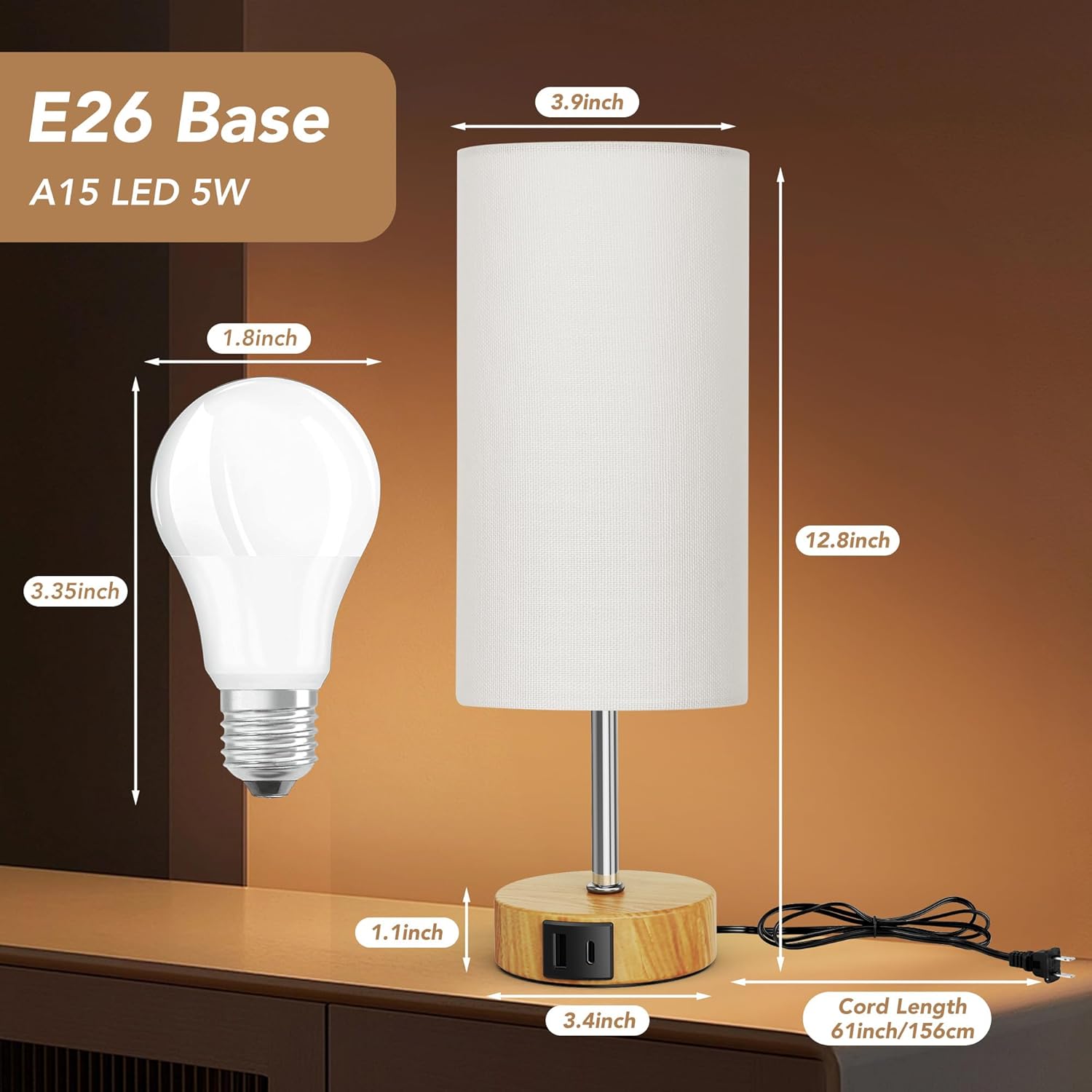
Image: A detailed diagram illustrating the physical dimensions of the lamp and the specifications of the E26 base A15 LED 5W bulb.
Warranty and Support
ROTTOGOON strives to offer quality products and services. For any assistance needed regarding your modern touch lamp, please feel free to contact us. Refer to your purchase documentation for specific warranty details.
Manufacturer: ROLP442AW2


