
Introduction
Thank you for choosing the BAOFENG UV-K61 Multi-Band Two-Way Radio. This device is designed for reliable and versatile communication, featuring 999 channels, multi-band reception (AM/FM), and convenient Type-C charging. This manual provides essential information for proper setup, operation, and maintenance to ensure optimal performance and longevity of your radio.

Image: BAOFENG UV-K61 Two-Way Radio. This image displays the BAOFENG UV-K61 radio from two angles, highlighting its compact design and antenna.
What's in the Box
Verify that all items listed below are included in your package:
- 1x BAOFENG UV-K61 Radio
- 1x 2600mAh High Capacity Battery
- 1x High Gain Antenna
- 1x USB-C Charger Cable
- 1x Charger Dock
- 1x Belt Clip
- 1x Hand Strap
- 1x User Manual
- 1x 48cm/18.89in Foldable Tactical Antenna
- 1x Programming Cable
- 1x 12V USB-C Car Charger Cable

Image: Package Contents. This image illustrates all components included with the BAOFENG UV-K61 radio, such as the radio unit, battery, antennas, and various charging accessories.
Product Overview
Familiarize yourself with the main components and functions of your BAOFENG UV-K61 radio.

Image: Product Parts Diagram. This diagram labels key parts of the BAOFENG UV-K61 radio, including the antenna, volume/power knob, PTT key, flashlight, LCD screen, keypad, and various function buttons.
Key Features
- 999 Channels: Extensive channel capacity for diverse communication needs.
- Multi-Band (AM/FM): Supports various frequency bands for broader reception.
- Wireless Frequency Copying: Simplifies programming by copying frequencies from other radios.
- NOAA Weather Channels: Provides real-time weather alerts and reports.
- VOX Function: Voice-activated transmission for hands-free operation.
- Flashlight: Integrated LED flashlight for convenience in low-light conditions.
- USB-C Charging: Modern and versatile charging options.
- 2600mAh High Capacity Battery: Extended operational time.
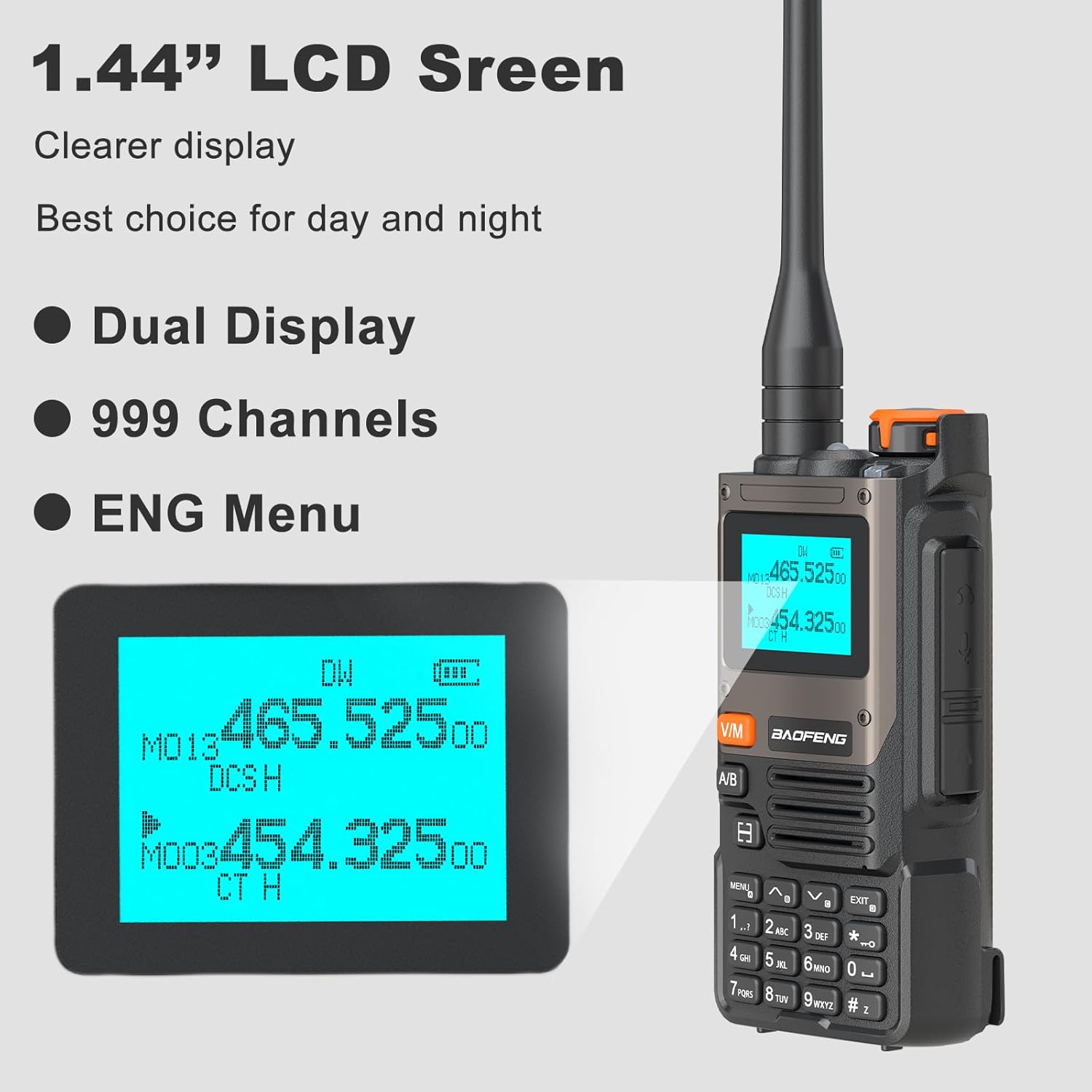
Image: Main Functions. This graphic highlights the primary features of the UV-K61 radio, including 999 channels, frequency copy, VOX function, 2600mAh battery, flashlight, 10 NOAA channels, FM radio, and AM reception.
Setup
1. Battery Installation
- Align the battery pack with the grooves on the back of the radio.
- Slide the battery upwards until it clicks into place.
- To remove, press the battery release latch (if present) and slide the battery downwards.
2. Antenna Attachment
- Screw the antenna clockwise into the connector on the top of the radio until it is finger-tight. Do not overtighten.
3. Charging the Battery
The UV-K61 offers multiple charging methods:
- Using the Charger Dock: Place the radio with the battery installed into the charging dock. Ensure the charging contacts align. The LED indicator on the dock will show charging status.
- Direct USB-C Charging: Connect the provided USB-C cable directly to the USB-C port on the side of the radio and to a USB power source (e.g., power bank, laptop, car charger).
The LED indicator on the radio or battery will typically show red during charging and turn green when fully charged.

Image: High Capacity Battery and Charging Indicator. This image shows the 2600mAh battery and the LED indicators for charging status (red for charging, green for charged).

Image: Multiple Charging Options. This image illustrates various ways to charge the UV-K61 radio, including via laptop, USB power adapter, car charger, power bank, and the charging dock.
Operating Instructions
1. Power On/Off and Volume Control
- Power On: Rotate the Volume/Power knob clockwise until you hear a click.
- Power Off: Rotate the Volume/Power knob counter-clockwise until you hear a click.
- Volume Adjustment: Rotate the Volume/Power knob to increase or decrease the audio level.
2. Channel Selection and Display
The UV-K61 features a 1.44-inch LCD screen with dual display capability and supports 999 channels.
- Use the Up/Down arrow keys or the keypad to navigate and select channels.
- Press the V/M button to switch between Frequency Mode (VFO) and Channel Mode (MR).
- The A/B button switches between the upper and lower display lines for active frequency/channel.

Image: LCD Screen Display. This image shows the 1.44-inch LCD screen of the UV-K61, highlighting its clear dual display and channel information.
3. Wireless Frequency Copying (One Key Match Frequency)
This feature allows you to quickly copy frequencies from another radio.
- Step 1: Turn on the radio. Press and hold the MENU button to enter search mode. The screen will display "SEARCH".
- Step 2: Press and hold the transmit (PTT) button on the other radio. The UV-K61 will search for and display the frequency and decode information. Press MENU to confirm.
- Step 3: Switch to channel mode (V/M button) to select the desired channel. The screen will show the frequency of the counterpart, allowing for immediate communication.

Image: One Key Match Frequency. This graphic illustrates the three steps for wirelessly copying frequencies from another radio to the UV-K61.
4. NOAA Weather Channels
The UV-K61 includes a built-in NOAA receiver with 10 channels to provide real-time weather alerts.
- Access the NOAA weather channels through the radio's menu or a dedicated function key (refer to the full manual for specific key assignments).
- The radio will scan and deliver weather reports, helping you stay informed about changing weather conditions.

Image: NOAA Weather Alert. This image depicts the UV-K61 radio with a graphic indicating its 10 NOAA weather alert channels, set against a stormy background.
5. VOX Function
The Voice Operated Exchange (VOX) function allows for hands-free transmission. When VOX is enabled, the radio will automatically transmit when it detects your voice.
- Activate VOX through the radio's menu. You can typically adjust the VOX sensitivity level to prevent accidental transmissions.
6. Flashlight
The radio includes a built-in LED flashlight for illumination.
- Press the dedicated flashlight button or access it via the menu (refer to the full manual for specific operation).
7. AM/FM Radio
The UV-K61 can also function as an AM/FM broadcast radio receiver.
- Switch to FM radio mode via the menu or a dedicated button.
- Scan for available stations or manually tune to a frequency.
Maintenance
1. Cleaning
- Wipe the radio's surface with a soft, damp cloth. Do not use harsh chemicals or abrasive cleaners.
- Ensure the radio is dry before use or charging.
2. Battery Care
- Avoid fully discharging the battery frequently to prolong its lifespan.
- Store the battery in a cool, dry place when not in use for extended periods.
- Do not expose the battery to extreme temperatures or direct sunlight.
3. Storage
- Store the radio in a dry environment, away from dust and moisture.
- Remove the battery if storing the radio for a long duration to prevent leakage.
Troubleshooting
| Problem | Possible Cause | Solution |
|---|---|---|
| Radio does not power on | Battery is low or not installed correctly. | Charge the battery or re-install it securely. |
| Cannot transmit or receive | Incorrect frequency/channel, antenna not attached, or out of range. | Verify frequency/channel settings. Ensure antenna is securely attached. Move closer to the other radio. |
| Poor audio quality | Low battery, weak signal, or incorrect squelch setting. | Charge battery. Adjust squelch level. Ensure clear line of sight. |
| Battery not charging | Charger cable/dock faulty, or battery not seated correctly. | Check connections. Try a different USB-C cable or power source. Re-seat the battery in the dock. |
Specifications
| Feature | Detail |
|---|---|
| Model Number | UV-K61 |
| Number of Channels | 999 |
| Battery Capacity | 2600mAh Lithium Ion (included) |
| Charging Type | USB-C, Charger Dock |
| Special Features | 10 NOAA Weather Alarm, Multi-Band (AM/FM), One Key Match Frequency, VOX Function, Flashlight |
| Talking Range Maximum | 5 Kilometers (approx. 3.1 miles) |
| Voltage | 7.4 Volts (DC) |
| Product Dimensions | 1.37"D x 2.16"W x 4.72"H (3.48 x 5.49 x 11.99 cm) |
| Item Weight | 1.59 pounds (approx. 0.72 kg) |
| Water Resistance Level | Not Water Resistant |

Image: Product Dimensions. This image provides a visual representation of the BAOFENG UV-K61 radio's dimensions in inches.
Warranty Information
The BAOFENG UV-K61 radio comes with a 1-year warranty provided exclusively through "Shiqun Electronics Co., Ltd". Please retain your proof of purchase for warranty claims.
For warranty service or inquiries, please contact the seller directly.
Support
If you encounter any issues or have questions regarding your BAOFENG UV-K61 radio that are not covered in this manual, please refer to the following:
- Online Resources: Visit the official BAOFENG website for additional support, FAQs, and firmware updates.
- Seller Support: Contact the seller or retailer from whom you purchased the product for direct assistance.