
Spigen Audio SA-TW P10 True Wireless Earbuds User Manual
Model: SA-TW P10
1. Introduction
Thank you for choosing the Spigen Audio SA-TW P10 True Wireless Earbuds. This manual provides essential information for setting up, operating, and maintaining your earbuds to ensure optimal performance and longevity. Please read this manual thoroughly before use.
2. What's in the Box

The image displays the Spigen Audio SA-TW P10 True Wireless Earbuds alongside their compact charging case, illustrating the product's primary components.
- 1 x Spigen Audio SA-TW P10 True Wireless Earbuds Set
- 1 x Charging Cable
- 1 x Eartips Set (Sizes S/M - installed/L)
3. Setup
3.1 Charging the Earbuds and Case
Before first use, fully charge the earbuds and the charging case. Connect the provided charging cable to the charging port on the case and a compatible USB power source. The indicator lights on the case will show the charging status.
This image highlights the extended battery life of the earbuds, offering 8 hours on a single charge and a total of 30 hours with the charging case.
3.2 Initial Pairing
- Open the charging case. The earbuds will automatically enter pairing mode.
- On your device (smartphone, tablet, etc.), enable Bluetooth.
- Search for "Spigen SA-TW P10" in the list of available Bluetooth devices.
- Select it to connect. Once connected, a voice prompt will confirm the successful pairing.

The image illustrates the smooth touch control functionality of the earbuds and highlights the seamless pairing capability via Bluetooth v5.2.
4. Operating Instructions
4.1 Touch Controls
The SA-TW P10 earbuds feature intuitive touch controls for managing audio playback, calls, and noise cancellation modes. Specific touch gestures may vary; refer to the quick start guide for detailed commands.
- Play/Pause: Single tap on either earbud.
- Next Track: Double tap on the right earbud.
- Previous Track: Double tap on the left earbud.
- Answer/End Call: Single tap on either earbud.
- Reject Call: Long press on either earbud.
- Activate Voice Assistant: Triple tap on either earbud.
- Switch ANC/Transparency Mode: Long press on the left earbud (default, customizable via app).
4.2 Active Noise Cancellation (ANC) and Transparency Mode
The earbuds offer up to 40dB of active noise cancellation with 4 multi-mode hybrid adaptive ANC settings. Switch between ANC, Transparency Mode, and Normal mode to suit your environment.

This image highlights the 40dB Active Noise Cancelling feature, along with Transparency Mode and 4 Multi-Mode Hybrid Adaptive ANC for clear calls with 6 microphones.
4.3 Gaming Mode
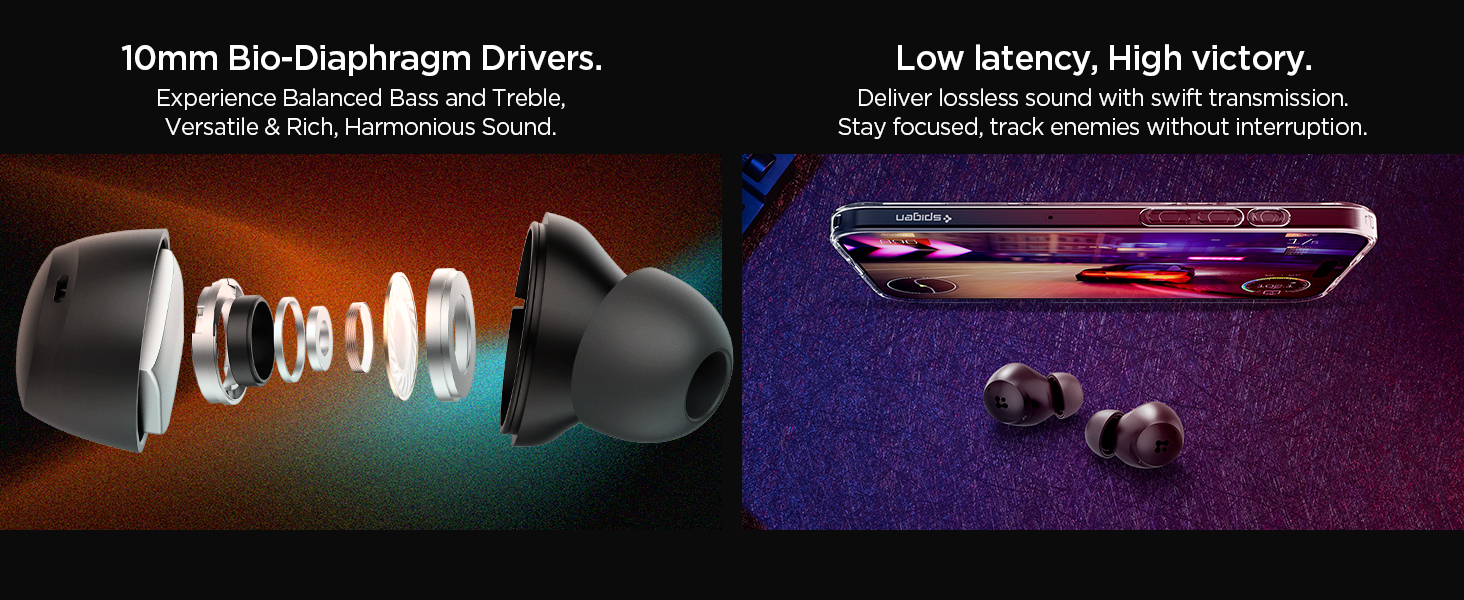
Activate Gaming Mode for low-latency audio transmission, providing a synchronized audio-visual experience crucial for gaming.

The image shows the earbuds positioned near a smartphone displaying a game, emphasizing the low latency feature for an enhanced gaming experience.
4.4 Spigen Audio App Customization
Download the Spigen Audio App to customize sound profiles, equalizer settings, and touch controls to personalize your listening experience.

This image displays the Spigen Audio App interface on a smartphone, showcasing options for sound customization, noise change modes, and channel balance.
5. Maintenance
5.1 Cleaning
- Gently wipe the earbuds and charging case with a soft, dry, lint-free cloth.
- Do not use harsh chemicals, cleaning solvents, or strong detergents.
- Remove eartips and clean them separately with water and mild soap if necessary, ensuring they are completely dry before reattaching.
5.2 Water Resistance (IPX4)
The earbuds are IPX4 water-resistant, meaning they are protected from splashing water from any direction. They are suitable for workouts and light rain but should not be submerged in water or exposed to strong jets of water.

This image shows the earbuds with water droplets, signifying their IPX4 water resistance, making them suitable for active use.
5.3 Storage
When not in use, store the earbuds in their charging case to protect them and ensure they remain charged.
6. Troubleshooting
- No Sound/Low Volume: Ensure earbuds are charged, connected, and volume is adjusted on both the earbuds and your device.
- Connectivity Issues: Place earbuds back in the case, close it, then reopen to re-establish connection. If issues persist, unpair from your device's Bluetooth settings and re-pair.
- Earbuds Not Charging: Check the charging cable and power source. Ensure the charging contacts on the earbuds and case are clean and free of debris.
- ANC Not Working Effectively: Ensure earbuds are properly seated in your ears and try different sized eartips for a better seal.
- Microphone Issues: Ensure the microphones are not obstructed. Check device settings to confirm the earbuds are selected as the audio input.
7. Specifications
| Brand | Spigen |
| Model Name | SA-TW P10 |
| Model Number | ASD07887 |
| Ear Placement | In Ear |
| Noise Control | Active Noise Cancellation (up to 40dB, 4 Multi-Mode Hybrid Adaptive ANC) |
| Audio Driver Type | 10mm Bio-Diaphragm Dynamic Driver |
| Microphones | 6 High-sensitivity MICs |
| Bluetooth Version | 5.2 |
| Battery Life (Earbuds) | Up to 8 hours on a single charge |
| Total Playtime (with Case) | Up to 30 hours |
| Water Resistance Level | IPX4 (Water Resistant) |
| Control Method | Touch |
| Compatible Devices | Smartphones, Tablets, Laptops, Desktops, Smart Speakers |
| Item Weight | 36 Grams |
8. Warranty and Support
8.1 Warranty Information
The Spigen Audio SA-TW P10 True Wireless Earbuds come with a 1 Year Warranty from the date of purchase. This warranty covers manufacturing defects. Please retain your proof of purchase for warranty claims. The warranty does not cover damage caused by misuse, accidents, or unauthorized modifications.
8.2 Customer Support
For technical assistance, warranty claims, or any other inquiries, please contact Spigen customer support:
- Email: spigen.support@spigen.com
- Manufacturer: Spigen Korea Co.,Ltd.
- Importer: Spigen India Pvt. Ltd., No.295-296, Ecotech-1, Extension, Greater Noida, UP
9. Product Overview Video
This video provides a brief overview of the Spigen SA-TW P10 Earbuds, highlighting key features such as active noise cancellation, sound quality, and design. It serves as a visual introduction to the product's capabilities.