
Spigen ASD07886
Spigen SA-TW S10 True Wireless Earbuds User Manual
Model: ASD07886 | Brand: Spigen
Introduction
Thank you for choosing the Spigen SA-TW S10 True Wireless Earbuds. These earbuds are designed to provide a superior audio experience with features such as Active Noise Cancellation (ANC), Transparency Mode, customizable EQ via the Spigen Audio App, and a low-latency Gaming Mode. This manual provides detailed instructions for setup, operation, maintenance, and troubleshooting to ensure optimal performance and longevity of your device.
Package Contents
Please verify that all items are present in your package:
- 1 x Spigen SA-TW S10 True Wireless Earbuds (TWS)
- 1 x Charging Cable
- 1 x Eartips set (S/M - installed/L)

Product Overview
The Spigen SA-TW S10 earbuds feature a sleek design and advanced audio technology. Key components include the earbuds with integrated microphones and touch control surfaces, and a compact charging case.
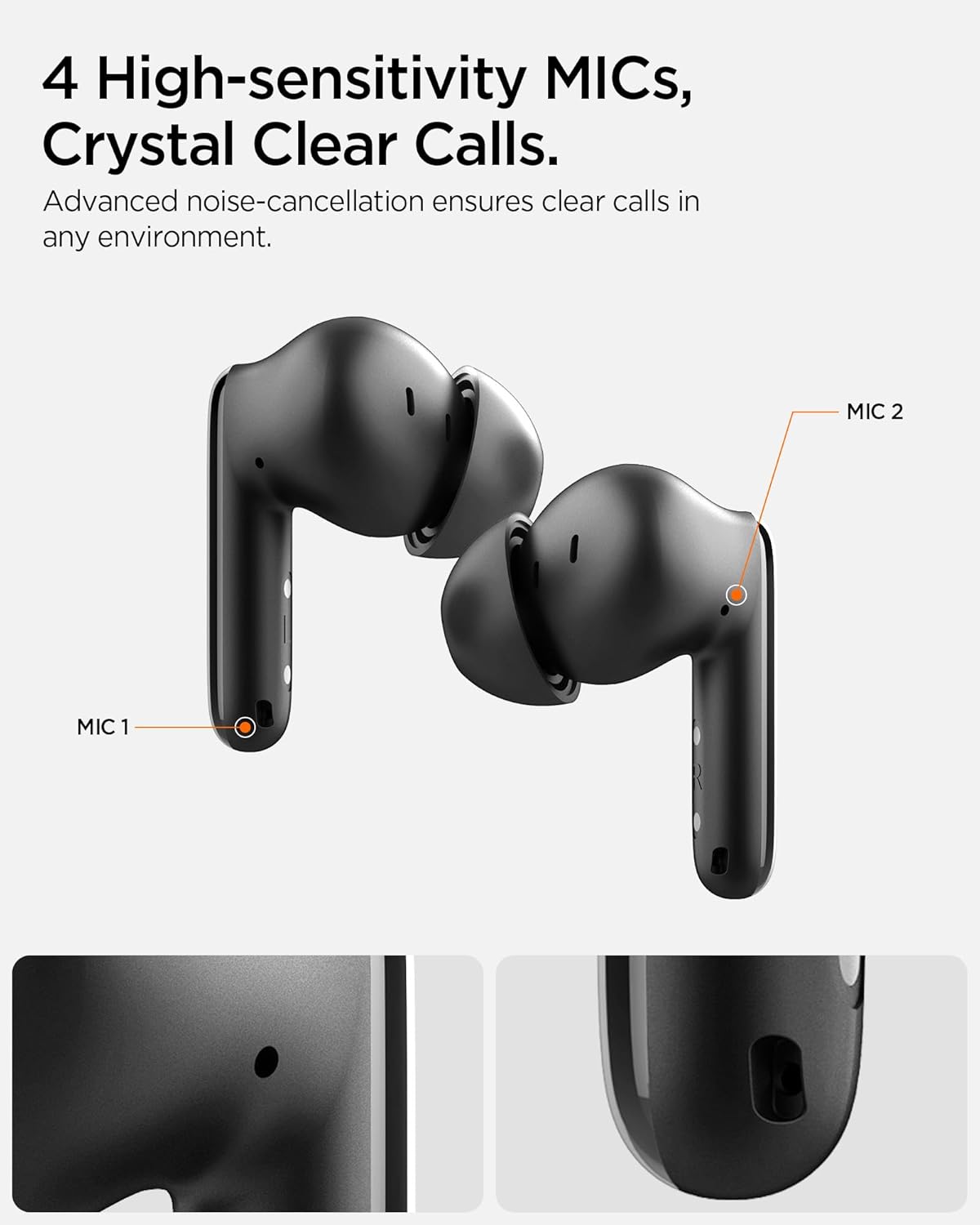
The earbuds are equipped with 10mm Bio-Diaphragm Dynamic Drivers for balanced sound and 4 high-sensitivity microphones for clear calls. They also feature intuitive touch controls on the outer surface of each earbud.
Setup
1. Charging the Earbuds and Case
Before first use, fully charge the earbuds and the charging case. Place the earbuds into the charging case. Connect the provided charging cable to the case's charging port and a USB power source. The indicator light on the case will show charging status. A full charge provides up to 6 hours of playtime for the earbuds and extends to a total of 30 hours with the charging case.

2. Initial Pairing
- Ensure the earbuds are charged and inside the charging case.
- Open the charging case lid. The earbuds will automatically enter pairing mode, indicated by a flashing LED on the earbuds.
- On your device (smartphone, tablet, laptop), enable Bluetooth.
- Search for "Spigen SA-TW S10" in the list of available Bluetooth devices and select it to connect.
- Once connected, a voice prompt will confirm successful pairing.
The earbuds utilize Bluetooth 5.3 for seamless and stable connections.
Operating Instructions
Touch Controls
The Spigen SA-TW S10 earbuds feature intuitive touch controls for managing audio playback, calls, and modes. The specific functions can be customized via the Spigen Audio App.

Active Noise Cancellation (ANC) & Transparency Mode
The earbuds offer up to 28dB of Active Noise Cancellation to reduce ambient sounds, providing an immersive listening experience. Transparency Mode allows you to hear your surroundings without removing the earbuds, enhancing situational awareness. Switch between these modes using the touch controls or the Spigen Audio App.

Gaming Mode
Activate Gaming Mode for ultra-low latency audio transmission, ensuring synchronized sound effects and dialogue during gaming sessions. This mode minimizes audio delay for a more responsive gaming experience.

Multi-Device Connectivity
The earbuds support multi-device connectivity, allowing seamless switching between two paired devices, such as a smartphone and a laptop, without needing to re-pair.

Spigen Audio App
Enhance your listening experience by downloading the Spigen Audio App, available for both iOS and Android devices. The app allows you to:
- Customize sound profiles with 5 preset EQ options or a customizable equalizer.
- Adjust noise control modes (ANC, Transparency, Normal).
- Remap touch controls to suit your preferences.
- View battery status.

Maintenance
Cleaning
Regularly clean your earbuds and charging case to maintain optimal performance and hygiene. Use a soft, dry, lint-free cloth. For earwax or debris in the eartips or speaker mesh, use a small, soft brush or cotton swab. Do not use abrasive cleaners or immerse the earbuds or case in water.
Water Resistance
The Spigen SA-TW S10 earbuds are IPX5 water resistant, meaning they are protected against low-pressure water jets from any direction. This makes them suitable for workouts and light rain. They are not designed for submersion in water. Ensure earbuds are dry before placing them back into the charging case to prevent damage.
Troubleshooting
| Problem | Possible Cause | Solution |
|---|---|---|
| Earbuds not pairing/connecting. | Low battery; out of range; pairing mode not active; previous connection interference. | Ensure earbuds are charged. Place earbuds closer to the device. Open case lid to activate pairing. Turn off Bluetooth on other devices. Forget/delete "Spigen SA-TW S10" from your device's Bluetooth list and re-pair. |
| No sound or low volume. | Volume too low on device/earbuds; improper fit; debris in speaker. | Increase volume on both earbuds and connected device. Adjust earbuds for a secure fit. Clean speaker mesh and eartips. |
| ANC not effective. | Improper fit; mode not activated. | Ensure a snug fit with the correct eartip size. Verify ANC is enabled via touch control or Spigen Audio App. |
| Microphone issues during calls. | Microphone blocked; environmental noise. | Ensure microphones are not covered. Move to a quieter environment. |
| Charging case not charging. | Faulty cable/adapter; dirty charging port. | Try a different charging cable and USB adapter. Clean the charging port gently. |
Specifications
| Feature | Detail |
|---|---|
| Model Name | SA-TW S10 - Black |
| Model Number | ASD07886 |
| Noise Control | Active Noise Cancellation (up to 28dB) |
| Connectivity Technology | Wireless (Bluetooth 5.3) |
| Audio Driver Type | 10mm Dynamic Driver (Bio-Diaphragm) |
| Battery Life (Earbuds) | 6 Hours (single charge) |
| Total Playtime (with Case) | Up to 30 Hours |
| Microphone | 4 High-sensitivity Mics |
| Control Method | Touch |
| Water Resistance Level | IPX5 (Sweat and Water Resistant) |
| Item Weight | 43.2 Grams |
| Product Dimensions | 5.26 x 5.75 x 2.88 cm |
| Compatible Devices | Smartphones, Tablets, Laptops, Desktops, Smart Speakers |
| Manufacturer | Spigen Korea Co.,Ltd. |
| Country of Origin | China |
Warranty and Support
Spigen products are manufactured with quality and care. For warranty information or technical support, please contact Spigen customer service. Keep your proof of purchase for warranty claims.
Manufacturer Contact: Spigen Korea Co.,Ltd., spigen.support@spigen.com
Please note: Refunds or exchanges are not allowed after shrink wrap removal. For products with shrink wrapping already removed, request an immediate exchange if there are issues upon receipt.
Related documentsASD07886

Ask a question about this manual
Ask about setup, troubleshooting, compatibility, parts, safety, or missing instructions. Manuals+ will review the question and use this page’s manual context to help answer it.