
1. Introduction and Overview
The Haisito C6X2 is a versatile dual-channel smart balance charger designed for various RC battery types. It features two independent charging circuits, allowing simultaneous charging of two different batteries without interference. This charger supports a wide range of battery chemistries and offers multiple operating modes to meet diverse charging requirements.
Key features include:
- Dual Channel Operation: Charge two batteries concurrently.
- Wide Battery Compatibility: Supports LiPo (1S-6S), LiFe (1S-6S), Li-ion (1S-6S), LiHv (1S-6S), NiMH (1S-15S), NiCd (1S-15S), and PB (1S-10S) batteries.
- Multiple Modes: Balance charge, normal charge, fast charge, storage charge, discharge, cycling, and battery meter functions.
- Flexible Power Input: Compatible with both AC (100-240V) and DC (11-18V) power sources.
- Advanced Safety Features: Incorporates various protections for safe operation.
2. Safety Precautions
To ensure safe operation and prevent damage to the charger or batteries, please observe the following safety guidelines:
- Always use the charger in a well-ventilated area, away from flammable materials.
- Never leave the charger unattended while in operation.
- Ensure correct battery type and cell count settings before starting any charging process. Incorrect settings can lead to battery damage or fire.
- Do not charge damaged or swollen batteries.
- Keep the charger away from moisture, dust, and direct sunlight.
- The charger features built-in protections including low input voltage limit, automatic charge current limit, Delta-peak sensitivity, capacity limit, processing time limit, and temperature threshold. However, user vigilance is still required.
- The charger casing is made of fireproof materials for enhanced safety.
- Disconnect the power supply and batteries when the charger is not in use.
3. Product Components and Diagram
Familiarize yourself with the components of your Haisito C6X2 charger:
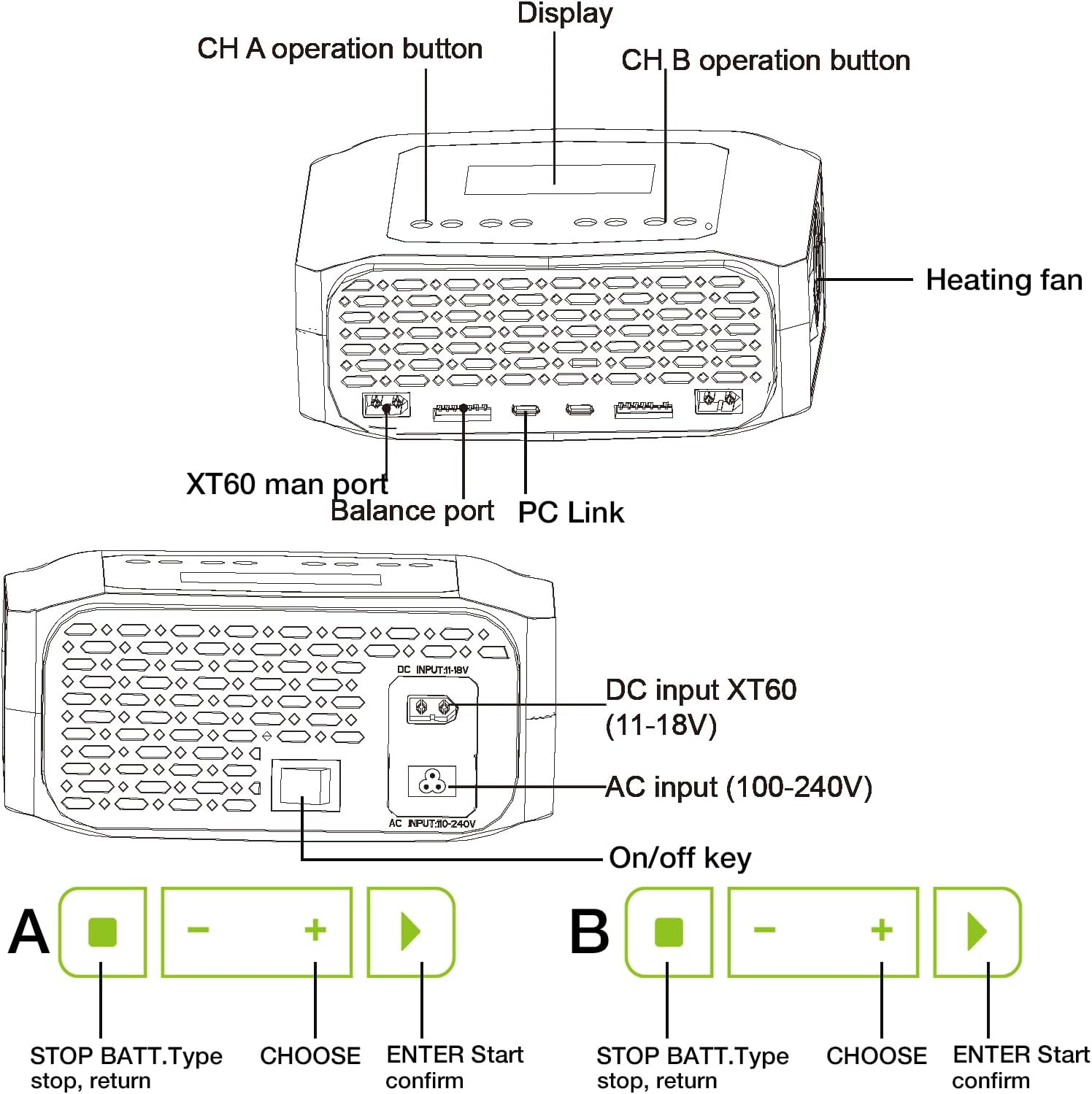
Figure 3.1: Top and Rear Panel Overview of the Haisito C6X2 Charger.
Front Panel Controls and Ports:
- Display: LCD screen for status and menu navigation.
- CH A Operation Buttons: Control buttons for Channel A (STOP/BATT.Type, CHOOSE, ENTER/Start).
- CH B Operation Buttons: Control buttons for Channel B (STOP/BATT.Type, CHOOSE, ENTER/Start).
- XT60 Main Port: Primary battery connection port for charging/discharging.
- Balance Port: Connects the battery's balance lead for cell voltage monitoring during balance charging.
- PC Link: USB port for firmware upgrades and data connection.
Rear Panel Ports:
- DC Input XT60 (11-18V): For connecting to a DC power source.
- AC Input (100-240V): For connecting to an AC wall outlet.
- On/Off Key: Power switch for the charger.
- Heating Fan: Internal cooling fan to maintain optimal operating temperature.
Package Contents:

Figure 3.2: What's in the Package.
- 1x Haisito C6X2 Charger Unit
- 2x Charge Cable (Banana Plug to T-Plug)
- 2x Extension Charge Cable (T-Plug to XT60)
- 1x AC Power Cord
- 1x DC Power Cord
- 1x User's Manual
4. Setup and Connection
Follow these steps to properly set up and connect your Haisito C6X2 charger:

Figure 4.1: How to Connect the Charger.
- Connect Power: Plug the AC power cord into the AC input port on the rear of the charger, then connect it to a wall outlet. Alternatively, connect the DC power cord to the DC input XT60 port and to a suitable DC power source (11-18V).
- Power On: Flip the On/Off key on the rear panel to power on the charger. The display will illuminate.
- Connect Main Battery Lead: Connect your battery's main discharge plug (e.g., XT60) to the corresponding XT60 main port on the front of the charger.
- Connect Balance Lead: For LiPo, LiFe, Li-ion, and LiHv batteries, connect the battery's balance lead to the balance port on the front of the charger. Ensure the balance interface is inserted correctly on the right side, aligning the pins.
- Set Battery Parameters: Use the CHOOSE and ENTER buttons for the respective channel (A or B) to navigate the menu and set the correct battery type, cell count, charge current, and desired operating mode (e.g., Balance Charge, Fast Charge).
- Start Charging: Once parameters are set, long press the 'ENTER/Start' button for approximately 2 seconds to confirm. The display will show a confirmation screen. Briefly press the 'ENTER/Start' button again to begin the charging process.
5. Operating Instructions
The Haisito C6X2 offers various operating modes for different battery management needs. Use the CHOOSE button to scroll through options and ENTER to select.

Figure 5.1: Wide Battery Type Compatibility.
Available Modes:
- Balance Charge: Recommended for LiPo, LiFe, Li-ion, and LiHv batteries. This mode charges the battery while simultaneously balancing the voltage of individual cells, ensuring optimal performance and longevity.
- Charge: Standard charging mode without cell balancing.
- Fast Charge: Charges the battery at a higher rate, typically without balancing, for quicker turnaround.
- Storage: Charges or discharges the battery to a specific voltage level suitable for long-term storage, preserving battery health.
- Discharge: Discharges the battery to a user-defined voltage.
- Cycling: Performs charge/discharge cycles to refresh NiMH/NiCd batteries or analyze battery capacity.
- Battery Meter: Displays current battery voltage, cell voltages (for balanced batteries), and other relevant information.
Terminal Voltage Control: The charger allows you to set the charge/discharge terminal voltage for specific battery types, offering greater control over the charging process.
Data Storage and Loading: The C6X2 can store up to 20 memory data profiles for each channel, allowing quick recall of frequently used battery settings.
Firmware Upgrade: The charger supports firmware upgrades via the PC Link port to ensure you have the latest features and improvements.

Figure 5.2: Advanced Charger Features.
Additional Features:
- Sync Charging Model: Provides a maximum current of 10A*2.
- Resistance Detection: Accurately measures battery internal resistance.
- Capacity Cut-off: Automatically stops charging once a set capacity (mAh) is reached.
- Safety Timer: Automatically turns off the charger according to a scheduled time.
- Voltage Check: Quickly reads the voltage of each cell.
6. Maintenance
Proper maintenance ensures the longevity and reliable performance of your Haisito C6X2 charger:
- Cleaning: Regularly wipe the charger's exterior with a soft, dry cloth. Do not use solvents or abrasive cleaners.
- Storage: Store the charger in a cool, dry place away from direct sunlight and extreme temperatures.
- Ventilation: Ensure the cooling fan and ventilation openings are free from dust and obstructions to prevent overheating.
- Cable Inspection: Periodically inspect all cables and connectors for signs of wear, damage, or corrosion. Replace any damaged cables immediately.
- Firmware: Check the manufacturer's website periodically for firmware updates to ensure optimal performance and compatibility.
7. Troubleshooting
If you encounter issues with your Haisito C6X2 charger, refer to the following common troubleshooting tips:
- Charger Not Powering On:
- Check if the AC or DC power cord is securely connected to both the charger and the power source.
- Ensure the On/Off key on the rear panel is in the 'On' position.
- Verify the power outlet or DC power source is functional.
- Charging Not Starting:
- Confirm that the battery's main lead and balance lead (if applicable) are correctly and securely connected.
- Double-check that the battery type, cell count, and charge current settings match your battery's specifications.
- Ensure you have long-pressed the 'ENTER/Start' button to confirm settings, then briefly pressed it again to start.
- Check for any error messages on the display and consult the manual for their meaning.
- Battery Not Balancing:
- Ensure the balance lead is correctly plugged into the balance port.
- Verify that 'Balance Charge' mode is selected.
- A significantly unbalanced battery may take longer to balance.
- Overheating:
- Ensure the charger's ventilation openings are not blocked.
- Reduce the charge current if the charger consistently overheats.
- Operate the charger in a cooler environment.
If the problem persists, please contact customer support.
8. Specifications
Technical specifications for the Haisito C6X2 Dual Lipo Battery Charger:

Figure 8.1: Charger Specifications Overview.
| Specification | Value |
|---|---|
| Brand | Haisito |
| Model Number | C6X2 |
| Product Dimensions | 12"D x 6"W x 5"H (approx. 30.5cm D x 15.2cm W x 12.7cm H) |
| Input Voltage | AC: 100-240V; DC: 11-18V |
| Output Voltage | 22.8 Volts (Max) |
| Charge Power | AC: CH1+CH2=150W (Dividable); DC: 120W per Channel |
| Charge Current | 10 Amps (Max per channel) |
| Discharge Current | Not specified (typically lower than charge current) |
| Number of Ports | 2 (Dual Channel) |
| Connector Type Used on Cable | Banana Plug to T-Plug, XT60 |
| Supported Battery Types | LiPo/Li-ion/LiFe/LiHv (1-6S), NiMH/NiCd (1-15S), PB (1-10S) |
| Data Storage | 20 memory data per channel |
9. Warranty and Support
Warranty Information:
The Haisito C6X2 Dual Lipo Battery Charger comes with a limited warranty. Please refer to the warranty card included in your package or contact Haisito customer service for specific details regarding coverage and duration.
Customer Support:
Should you have any questions, require technical assistance, or encounter issues not covered in this manual, please do not hesitate to contact Haisito customer support. You can typically find contact information (email, website, or phone number) on the product packaging, the official Haisito website, or through your point of purchase.
