
1. Introduction
This manual provides essential information for the safe and effective use of your Zeporix LF-X2DC Under-Desk Treadmill. Please read this manual thoroughly before operating the device and retain it for future reference.
The Zeporix LF-X2DC is a versatile and compact treadmill designed for walking and light jogging. It features a large LED display to track calories, speed, time, and distance, and includes a remote control for convenient operation and data adjustment.

Image 1: Zeporix LF-X2DC Under-Desk Treadmill in operational and folded states. A user is shown walking on the treadmill, demonstrating its primary function. The treadmill is also depicted in its compact, folded position, highlighting its space-saving design.
2. Safety Information
WARNING: To reduce the risk of serious injury, read all important precautions and instructions in this manual before using the treadmill.
- Always place the treadmill on a flat, stable surface.
- Ensure adequate clear space around the treadmill (at least 0.6 meters on each side and 2 meters behind).
- Keep children and pets away from the treadmill during operation.
- Do not operate the treadmill if it has a damaged power cord or plug.
- Wear appropriate athletic footwear.
- Use the safety key at all times. Attach the clip to your clothing. The treadmill will stop if the safety key is disengaged.
- Do not step on or off the treadmill while the belt is moving.
- Consult a physician before starting any exercise program.
- Maximum user weight capacity: 100 kg.
3. Package Contents
Verify that all components are present in the package:
- Zeporix LF-X2DC Under-Desk Treadmill unit
- Power Cable
- Remote Control
- Safety Key
- User Manual (this document)
- Assembly Tools (if required for minor setup)
4. Setup and Assembly
- Unpacking: Carefully remove the treadmill from its packaging.
- Placement: Place the treadmill on a firm, level surface. Ensure there is sufficient space around the unit for safe operation.
- Unfolding (if applicable): If the treadmill is in a folded position, gently lift the handlebar assembly until it locks into place. Refer to Image 2 for visual guidance on folding/unfolding.
- Power Connection: Plug the power cable into a grounded electrical outlet.
- Safety Key: Attach the safety key to the designated slot on the console. Clip the other end of the safety key to your clothing. The treadmill will not operate without the safety key properly engaged.
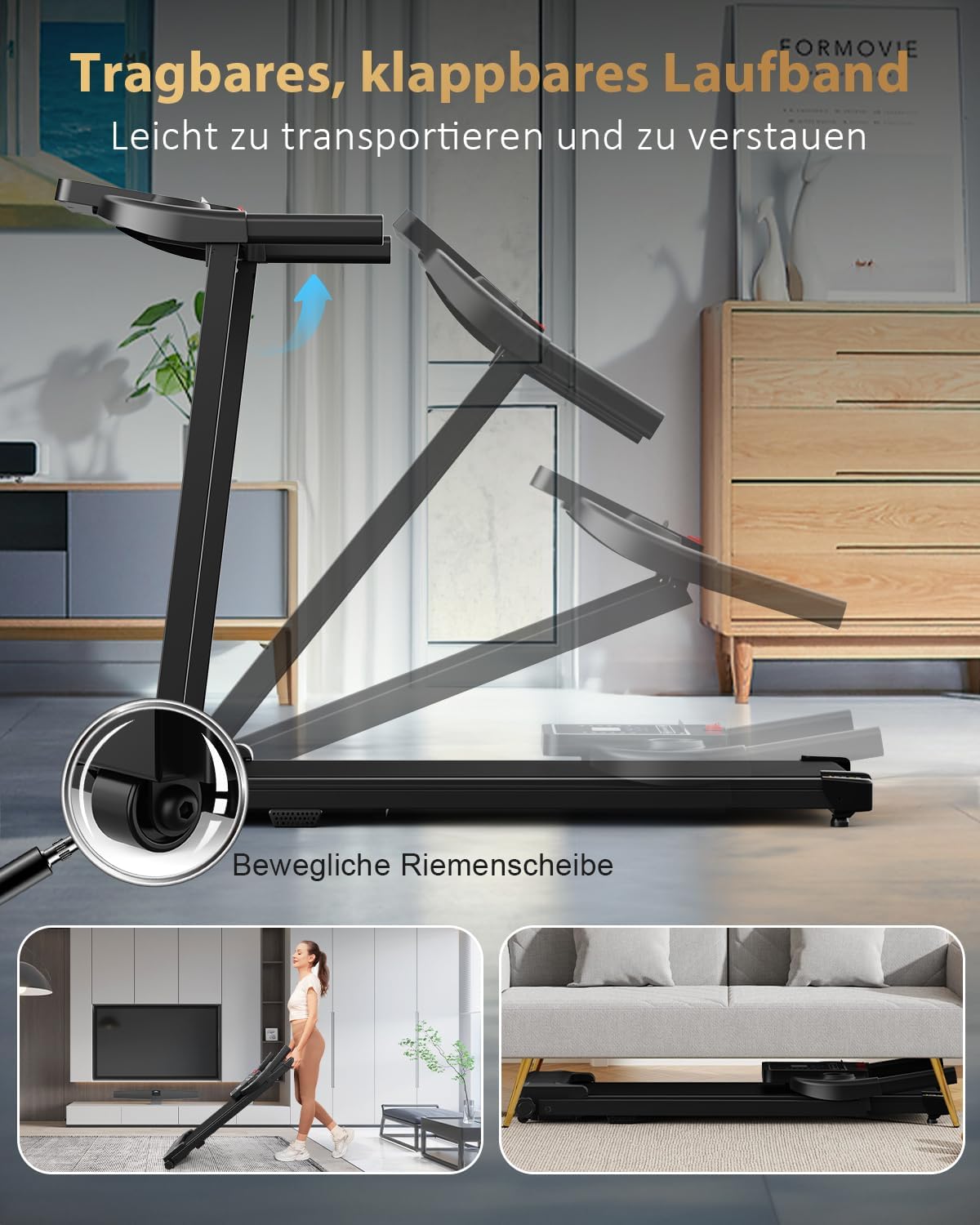
Image 2: Illustration of the Zeporix LF-X2DC Treadmill's folding mechanism and storage options. The image shows how the treadmill can be easily folded for transport using movable pulleys and stored compactly under furniture, demonstrating its portable and space-saving design.
5. Operating Instructions
5.1 Control Panel and Display

Image 3: Close-up view of the Zeporix LF-X2DC Treadmill's control panel and LED display. Icons indicate features such as speed, iPad holder, LED display, time, distance, calories, cup holder, and safety key, illustrating the real-time display and 12 program options.
The treadmill features an LED display that shows real-time exercise data. The control panel includes buttons for various functions and two cup holders.
- Display Metrics: Speed, Distance, Time, Calories burned.
- Start/Stop Button: Initiates and pauses/stops the treadmill.
- Speed Adjustment: Use the '+' and '-' buttons to increase or decrease speed.
- Program Selection: The treadmill offers 12 pre-set programs. Use the 'Program' button to cycle through them.
- Mode Button: Changes the display mode or resets values.
- Safety Key Slot: The magnetic safety key must be in place for the treadmill to operate.
5.2 Remote Control
The included remote control allows for convenient adjustment of speed and starting/stopping the treadmill without reaching the console.
- Power Button: Turns the treadmill on/off.
- Start/Stop Button: Initiates and pauses/stops the treadmill.
- Speed +/- Buttons: Adjusts the treadmill speed.
5.3 Starting an Exercise
- Ensure the treadmill is plugged in and the safety key is properly attached to the console and your clothing.
- Step onto the treadmill belt, placing your feet on the side rails.
- Press the 'Start' button on the console or remote control. The treadmill will begin at a low speed.
- Gradually increase the speed using the '+' button to your desired pace.
- To stop, press the 'Stop' button. The treadmill will gradually slow down and stop. Alternatively, pull the safety key to immediately stop the treadmill in an emergency.

Image 4: Visual representation of adjustable speed settings on the Zeporix LF-X2DC Treadmill, ranging from working (0.6-1.5 mph) to running (3.0-6.0 mph). Different users are depicted engaging in various activities, illustrating how the treadmill accommodates diverse fitness levels and exercise needs up to 10 km/h.
6. Maintenance
Regular maintenance ensures the longevity and optimal performance of your treadmill.
- Cleaning: Wipe down the treadmill with a damp cloth after each use. Avoid abrasive cleaners.
- Belt Lubrication: The running belt may require lubrication periodically (every 3-6 months depending on usage). Refer to specific instructions for your treadmill model regarding lubrication type and application.
- Belt Tension and Alignment: Check the running belt tension and alignment regularly. Adjust if the belt slips or drifts to one side.
- Storage: When not in use, store the treadmill in a dry, clean area. The folding design allows for compact storage (refer to Image 2).
7. Troubleshooting
| Problem | Possible Cause | Solution |
|---|---|---|
| Treadmill does not start. | Power cable not connected; Safety key not engaged; Power switch off. | Ensure power cable is securely plugged in; Engage the safety key; Turn on the power switch. |
| Running belt slips. | Belt tension too loose; Belt worn out. | Adjust belt tension (refer to maintenance section); Contact customer support for belt replacement. |
| Unusual noise during operation. | Loose components; Lack of lubrication; Motor issue. | Check for and tighten any loose screws; Lubricate the belt; Contact customer support. |
| Display not working. | Loose connection; Power issue. | Check all cable connections; Ensure power supply is stable. |
8. Specifications
- Model Number: LF-X2DC
- Brand: Zeporix
- Color: Black
- Display Type: LED
- Frame Material: Plastic (ABS)
- Running Belt Material: Polyvinyl Chloride (PVC)
- Motor Power: 2 Kilowatts
- Maximum Speed: 10 Kilometers per hour (approx. 6.2 mph)
- Counter Functions: Speed, Distance, Time, Calories burned
- Number of Programs: 12
- Power Source: Corded Electric
- Special Features: Portable, Compact design, with wheels, Shock absorption system (6 integrated, 4 silicone)
- Included Parts: Safety Key
- Product Dimensions: 115 x 55.5 x 15 cm (Length x Width x Height)
- Product Weight: 25 kg
- Maximum User Weight: 100 kg
- Recommended Use: Daily exercise, walking or light jogging at home, fitness and training
- Target Audience: Adults

Image 5: Detailed view of the Zeporix LF-X2DC Treadmill's powerful motor. Key specifications such as speed range (1-10 km/h), noise level (<70 dB), load capacity (100 kg), and motor lifespan (3500 hours) are highlighted, emphasizing its performance and durability.

Image 6: Illustration of the Zeporix LF-X2DC Treadmill's knee protection and shock absorption system. The image highlights 6 integrated shock absorbers and 4 silicone shock absorbers, designed to provide a safer running experience and support a load capacity of 100 kg.
9. Warranty and Support
For warranty information or technical support, please refer to the contact details provided with your purchase documentation or visit the official Zeporix website. Keep your purchase receipt as proof of purchase.