
Beyution dv3100 remote
Replacement Remote Control User Manual
For Furrion Entertainment System DV3300, DV3100, DV3100-RC, DV3300S-BL
Introduction
This manual provides essential information for the proper use and maintenance of your new replacement remote control. Designed for seamless compatibility with Furrion Entertainment Systems, this remote offers a straightforward solution for controlling your DV3300, DV3100, DV3100-RC, and DV3300S-BL models. Please read this manual thoroughly to ensure optimal performance and longevity of your device.
Product Features
- Model: DV3100 Replacement Remote Control
- Connectivity: Infrared (IR) technology
- Operating Distance: Up to 10 meters (approximately 33 feet)
- Material: Durable ABS plastic with soft rubber buttons
- Ergonomic Design: Lightweight and comfortable to grip
- No Programming Required: Ready to use out of the box, no setup or pairing needed
- Responsive Buttons: Buttons offer good elasticity for precise control
- Enhanced Performance: Features upgraded smart chips for stable performance and fast response

Figure 1: Front view of the DV3100 Replacement Remote Control, displaying all functional buttons.
Setup
Battery Installation
The remote control requires two AAA 1.5V batteries (not included). Follow these steps to install the batteries:
- Locate the battery compartment on the back of the remote control.
- Press down on the latch and slide the battery cover downwards to open it.
- Insert two AAA batteries, ensuring the positive (+) and negative (-) terminals align correctly with the markings inside the compartment.
- Slide the battery cover back into place until it clicks securely.
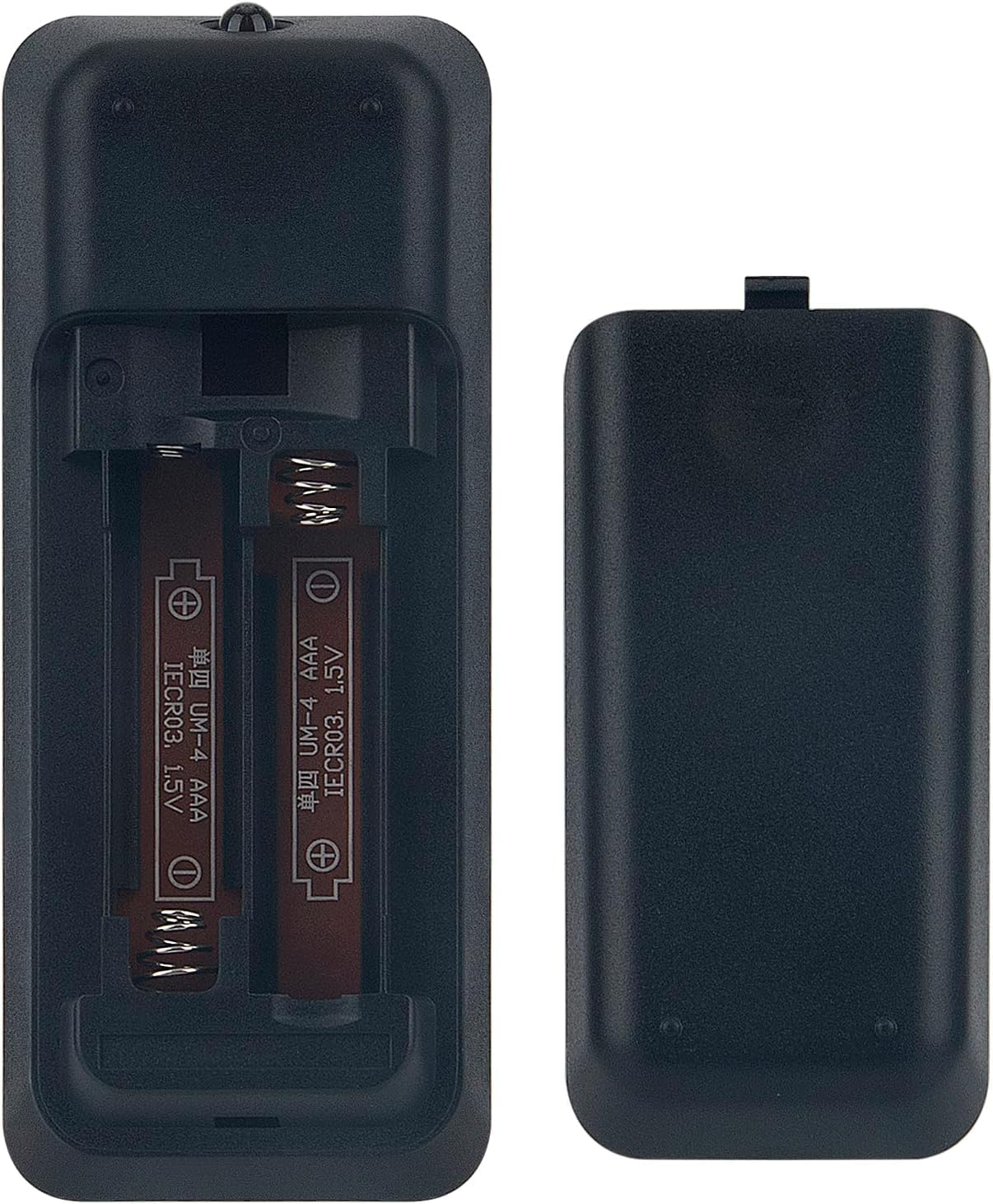
Figure 2: Rear view of the remote control, illustrating the battery compartment with batteries installed.
Initial Use
This replacement remote control is designed to work immediately with compatible Furrion Entertainment Systems (DV3300, DV3100, DV3100-RC, DV3300S-BL) without any programming or pairing. Simply point the remote towards your entertainment system and begin operation.
Operating Instructions
The remote control provides full functionality for your Furrion Entertainment System. Below are common button functions:
| Button | Function |
|---|---|
| PWR | Power On/Off the entertainment system. |
| EJECT | Eject disc from the DVD/CD player. |
| AUX / AV IN | Select auxiliary or AV input sources. |
| DVD USB / AM/FM | Switch between DVD/USB playback and AM/FM radio modes. |
| SEL | Select menu options or confirm settings. |
| Navigation Arrows (Up, Down, Left, Right) | Navigate through menus and options. |
| OK | Confirm selection. |
| + / - (Volume) | Adjust volume level. |
| SETUP | Access system setup menu. |
| Play/Pause, Stop, Fast Forward, Rewind, Skip | Control media playback. |
| Number Buttons (0-9, 10+) | Direct input for channels, tracks, or numerical settings. |
| MUTE | Mute/unmute audio. |
| ZOOM | Adjust zoom level for video playback. |
| AUDIO | Select audio tracks or modes. |
| SUBT | Toggle subtitles on/off. |
| PROG | Access programming functions. |
| OSD | Display On-Screen Display information. |
For specific functions related to your Furrion Entertainment System model, please refer to your system's original user manual.
Maintenance
Battery Replacement
Replace batteries when the remote's range decreases or it becomes unresponsive. Always replace both batteries at the same time with new ones of the same type (AAA 1.5V). Do not mix old and new batteries, or different types of batteries.
Cleaning
To clean the remote control, gently wipe its surface with a soft, dry cloth. For stubborn dirt, a slightly damp cloth can be used, but ensure no moisture enters the remote. Do not use abrasive cleaners, alcohol, or solvents.
Storage
Store the remote control in a cool, dry place away from direct sunlight, extreme temperatures, and high humidity. If the remote will not be used for an extended period, it is recommended to remove the batteries to prevent leakage and potential damage.
Troubleshooting
- Remote is unresponsive or has limited range:
- Ensure there are no obstructions between the remote control and the entertainment system's IR receiver.
- Check and replace the batteries if they are low or depleted. Ensure they are inserted with correct polarity.
- Verify that the remote is pointed directly at the entertainment system.
- Specific buttons do not work:
- Ensure the remote is in the correct mode (e.g., DVD, Radio) if applicable for the function you are trying to use.
- Clean the remote's surface, especially around the unresponsive buttons, to remove any dirt or debris that might be obstructing button presses.
- Remote control is damaged or still not working:
If the remote control you received is damaged or does not work after following the troubleshooting steps, please contact the seller for assistance. They will provide a satisfactory solution.
Specifications
| Attribute | Detail |
|---|---|
| Product Dimensions | 7 x 1.5 x 0.5 inches |
| Item Weight | 1.9 ounces |
| Item Model Number | dv3100 remote |
| Brand | Beyution |
| Special Features | Ergonomic, No Programming Required |
| Color | Black |
| Max Number of Supported Devices | 18 (for general remote capabilities, though this specific remote is for Furrion systems) |
| Compatible Devices | Furrion Entertainment Systems (DV3300, DV3100, DV3100-RC, DV3300S-BL) |
Warranty and Support
As a replacement product, specific warranty terms may vary. For any issues regarding the functionality or condition of the remote control, please contact the seller directly through your purchase platform. They are committed to providing a satisfactory solution for any concerns you may have.
For further assistance or inquiries, please reach out to the seller via email as indicated on your purchase documentation or product listing. Provide your order details for quicker support.
Ask a question about this manual
Ask about setup, troubleshooting, compatibility, parts, safety, or missing instructions. Manuals+ will review the question and use this page’s manual context to help answer it.