
UPBRIGHT ALLPOWERS R600 S2000 Car DC Adapter
UpBright Car DC Adapter User Manual
For ALLPOWERS R600, S2000, and S2000 Pro Portable Power Stations
1. Product Overview
The UpBright Car DC Adapter is designed to provide a reliable power source for charging your ALLPOWERS R600, S2000, and S2000 Pro portable power stations directly from your vehicle's 12V cigarette lighter socket. This adapter features an XT60 plug for secure connection to compatible power stations and is built with short circuit protection for enhanced safety.

Figure 1.1: The UpBright Car DC Adapter, showing the cigarette lighter plug on one end and the yellow XT60 connector on the other, with the coiled cable in between.
2. Safety Instructions
- Do not expose to water or moisture: This adapter is not waterproof. Keep it away from liquids to prevent electric shock or damage.
- Use in well-ventilated areas: Ensure adequate airflow around the adapter during operation to prevent overheating.
- Avoid extreme temperatures: Do not operate the adapter in excessively hot or cold environments.
- Inspect before use: Before each use, check the adapter and cables for any signs of damage. Do not use if damaged.
- Keep out of reach of children: This product is not a toy.
- Disconnect when not in use: Always unplug the adapter from both the vehicle and the power station when not actively charging.
- Short Circuit Protection: The adapter is equipped with short circuit protection. However, always ensure proper connection to avoid potential issues.
3. Package Contents
Please verify that all items are present in your package:
- 1 x UpBright Car DC Adapter with XT60 Plug
4. Setup
Follow these steps to set up your UpBright Car DC Adapter for charging:
- Ensure your vehicle's engine is running or the accessory power outlet is active.
- Insert the cigarette lighter plug end of the UpBright Car DC Adapter firmly into your vehicle's 12V accessory power outlet.
- Connect the XT60 plug end of the adapter to the XT60 input port on your ALLPOWERS portable power station (e.g., R600, S2000, S2000 Pro). Ensure the connection is secure.
- Your power station should now begin charging. Refer to your power station's manual for charging indicators.
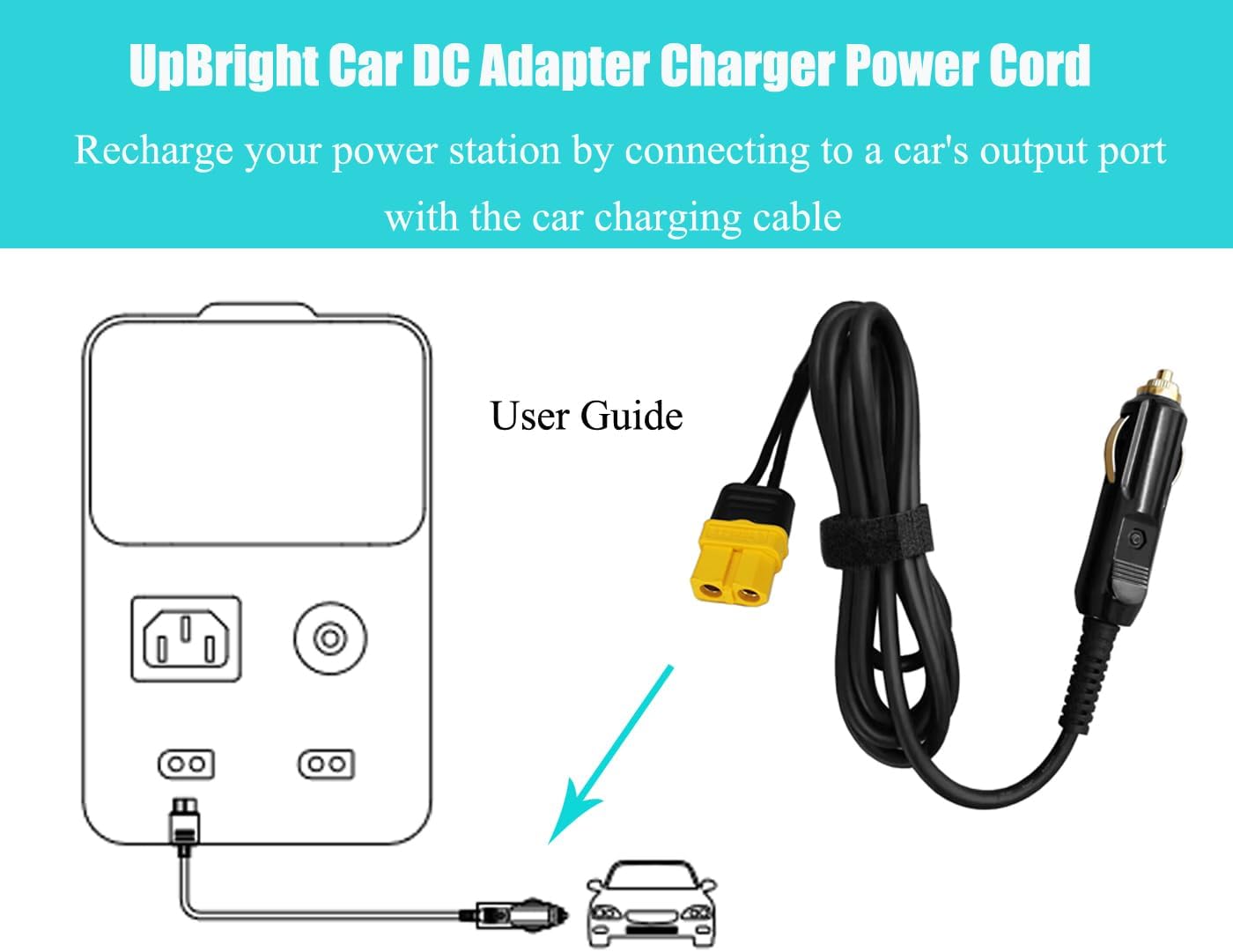
Figure 4.1: User guide diagram illustrating how to connect the UpBright Car DC Adapter from a car's output port to a portable power station.
5. Operating Instructions
Once connected as described in the "Setup" section, the UpBright Car DC Adapter will automatically begin charging your compatible ALLPOWERS portable power station. The adapter is designed for continuous use during vehicle operation.
- Charging Indicator: The charging status will be indicated on your ALLPOWERS power station's display. Consult your power station's manual for specific details.
- Optimal Charging: For optimal charging performance, ensure your vehicle's engine is running, especially for longer charging sessions.
- Disconnection: To stop charging, simply disconnect the XT60 plug from the power station or remove the cigarette lighter plug from the vehicle's outlet.
6. Maintenance
6.1. Cleaning
To maintain the adapter's performance and longevity:
- Ensure the adapter is disconnected from all power sources before cleaning.
- Wipe the exterior of the adapter with a soft, dry cloth. Do not use liquid cleaners or abrasive materials.
- Keep the connectors free of dust and debris.
6.2. Fuse Replacement
The cigarette lighter plug contains a replaceable fuse to protect against overcurrent. If the adapter stops working, the fuse may need replacement.
- Unscrew the tip: Carefully unscrew the metal tip of the cigarette lighter plug counter-clockwise.
- Remove the old fuse: Gently pull out the old fuse. Note its amperage rating.
- Insert new fuse: Insert a new fuse of the exact same amperage rating.
- Reassemble: Screw the metal tip back onto the plug clockwise until secure.

Figure 6.1: Visual guide for replacing the fuse within the car DC adapter's cigarette lighter plug. It shows unscrewing the tip, removing the fuse, and reassembling.
7. Troubleshooting
| Problem | Possible Cause | Solution |
|---|---|---|
| Adapter not charging power station. |
|
|
| Adapter feels warm during use. |
|
|
8. Specifications
| Product Name | UpBright Car DC Adapter |
| Model Number | ALLPOWERS R600 S2000 Car DC Adapter |
| Input Voltage | 12 Volts (DC) |
| Wattage | 120 watts |
| Connector Type | XT60 Plug (2-Pin) |
| Compatible Devices | ALLPOWERS R600, S2000, S2000 Pro Portable Power Stations |
| Special Feature | Short Circuit Protection |
| Product Dimensions | 5 x 3 x 1 inches |
| Item Weight | 4 ounces |
| Color | Black |
9. Warranty and Support
UpBright stands behind the quality of its products. This adapter comes with:
- 30-Day Refund Policy: If you are not satisfied with your purchase, you may be eligible for a refund within 30 days.
- 24-Month Exchange Policy: In the event of a defect or malfunction, the product is eligible for exchange for 24 months from the date of purchase.
For technical support, warranty claims, or any other inquiries, please contact UpBright customer service through the platform where you purchased the product or visit the official UpBright store page:
Ask a question about this manual
Ask about setup, troubleshooting, compatibility, parts, safety, or missing instructions. Manuals+ will review the question and use this page’s manual context to help answer it.