
Comfytemp K1005
Comfytemp Cordless Foot Massager User Manual
Model: K1005
1. Product Overview
The Comfytemp Cordless Foot Massager with Heat and Compression is designed to provide soothing relief and relaxation for your feet and ankles. Featuring a portable, cordless design, it offers advanced air compression massage with heat therapy, targeting muscle fatigue and discomfort. It's suitable for use at home, in the office, or while traveling.
This massager features three-zone airbags that deliver a precise and tailored massage experience, ensuring a larger coverage area and even pressure distribution. Additionally, 3 acupressure points on the sole provide deep relaxation.

Image: The Comfytemp Cordless Foot Massager, showing its compact design and the accompanying mobile app interface.
2. Important Safety Information
Do not use while standing. This product may produce noise during operation. Caution: Battery-powered and cordless, handle with care to prevent electrical and fire hazards. Follow instructions for proper use and maintenance. Keep away from water and heat sources. Do not use if damaged or malfunctioning. Consult a healthcare professional before use if you have any medical conditions or are pregnant. Always supervise children when using this product.
3. What's Included
- 1 x Comfytemp Cordless Foot Massager (Pair)
- 1 x USB Charging Cable
- 1 x User Manual
4. Getting Started
4.1 Charging the Device
Before first use, fully charge the massager using the provided USB charging cable. Connect the cable to the massager's charging port and a compatible USB power source. The indicator lights on the control panel will show the charging status.
4.2 Wearing the Massager
Ensure the massager is correctly positioned on each foot. The adjustable hook-and-loop straps allow for a snug and comfortable fit around the instep and ankle. The massager accommodates a maximum instep length of 13.8 inches and a maximum ankle circumference of 15.4 inches. The sole measures 11 inches / 28 cm in length. Do not use this foot massager while standing.

Image: A user comfortably wearing the cordless foot massager while seated on a sofa, highlighting its portability.
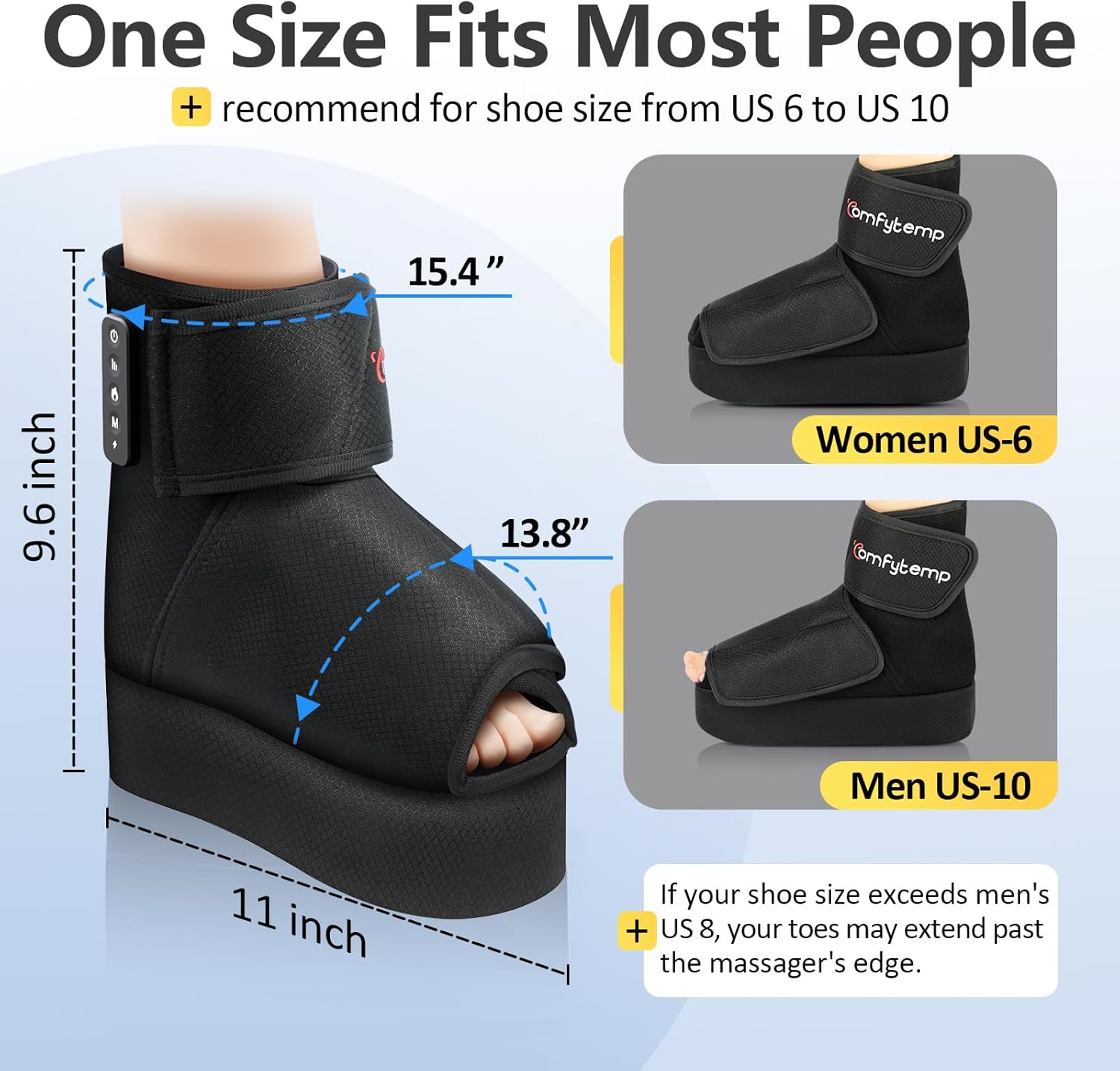
Image: A detailed diagram illustrating the dimensions of the foot massager and recommended shoe sizes for optimal fit.
5. Operating Your Comfytemp Foot Massager
5.1 Onboard Control
The massager features an intuitive onboard control panel located on the side of the device. Press the power button to turn on/off. Use the mode button to cycle through 3 massage modes, and the intensity button to select from 3 intensity levels. The heat button activates soothing heat up to 45℃/103℉. A default 15-minute timer is set for each session.

Image: An illustration detailing the functions of the onboard control buttons and comparing them to the APP control options.
Video: Demonstration of the Comfytemp Cordless Foot Massager in use, showcasing its features and operation.
5.2 APP Control
For a more personalized experience, download the Comfytemp app from your device's app store. The app allows access to up to 9 auto-timers and a variety of customizable massage programs, perfect for those with limited mobility or specific preferences. You can also control the 3 modes, 3 intensity levels, and optional heating via the app.
Video: A step-by-step guide on how to use the Comfytemp mobile application to control the foot massager's settings.
6. Care and Maintenance
To clean the massager, simply wipe the interior with a damp cloth and allow it to air dry completely before storage. Do not submerge the device in water. Store the massager in a cool, dry place away from direct sunlight.
7. Troubleshooting
| Issue | Possible Cause / Solution |
|---|---|
| Device not turning on | Ensure the device is fully charged. Check the charging cable connection. |
| Insufficient massage intensity | Adjust the intensity level using the onboard controls or the app. Ensure the massager is worn snugly. |
| No heat | Activate the heat function via the onboard controls or the app. Allow a few minutes for the heat to build up. |
| Excessive noise during operation | A certain amount of noise is normal during operation due to the air compression mechanism. If the noise is unusually loud or accompanied by malfunction, contact support. |
| App connectivity issues | Ensure Bluetooth is enabled on your device. Restart the app and the massager. Refer to the app's help section for specific troubleshooting steps. |
8. Product Specifications
| Feature | Detail |
|---|---|
| Product Dimensions | 1 x 1 x 2 inches; 1.32 Pounds |
| Item Model Number | K1005 |
| Power Source | Battery Powered |
| Material | Polyester |
| Item Weight | 600 Grams |
| Brand | Comfytemp |
| Manufacturer | Shenzhen Yicai Health Technology Co. , Ltd |
9. Warranty and Support
Comfytemp products are designed for durability and performance. For warranty information, technical support, or any inquiries, please refer to the contact details provided in your product packaging or visit the official Comfytemp website. Protection plans are also available for extended coverage.
Related documentsK1005


Ask a question about this manual
Ask about setup, troubleshooting, compatibility, parts, safety, or missing instructions. Manuals+ will review the question and use this page’s manual context to help answer it.