
1. Introduction
This manual provides detailed instructions for the assembly, use, and maintenance of your Coleshome 40 Inch Small Computer Desk with Drawers. Designed for efficiency in small spaces, this desk features two large capacity fabric drawers, a reversible and adjustable storage shelf, and a durable particleboard tabletop with a solid metal frame. Please read all instructions carefully before assembly and use.
2. Safety Information
- Always assemble the desk according to the provided instructions.
- Ensure the desk is stable and secure before use.
- Keep the area around the desk clear, especially of items that could pose a tripping hazard, such as headphones or cables.
- Do not place heavy items on the desk that could cause it to tip over.
- For ease and safety, it is recommended that two people assemble this desk.
- Exercise caution when handling components during assembly.
3. Package Contents
Before beginning assembly, verify that all components listed in the parts diagram are present and undamaged. Refer to the assembly video for a visual guide to parts and accessories.
Video 1: Coleshome Laptop Desk Installation Video. This video provides a step-by-step guide for assembling the desk, including identifying all parts and accessories.
4. Assembly Instructions
Follow these steps carefully to assemble your Coleshome computer desk. All necessary tools are included.
4.1. Frame Assembly
Begin by assembling the main metal frame components. Ensure all screws are tightened securely but do not overtighten.

Image 1: The fully assembled metal frame of the desk, showcasing the main structure and side shelves.
4.2. Reversible Shelf Installation
The side shelf unit can be installed on either the left or right side of the desk, depending on your preference. The middle shelf is also adjustable to two different heights or can be removed for larger items.
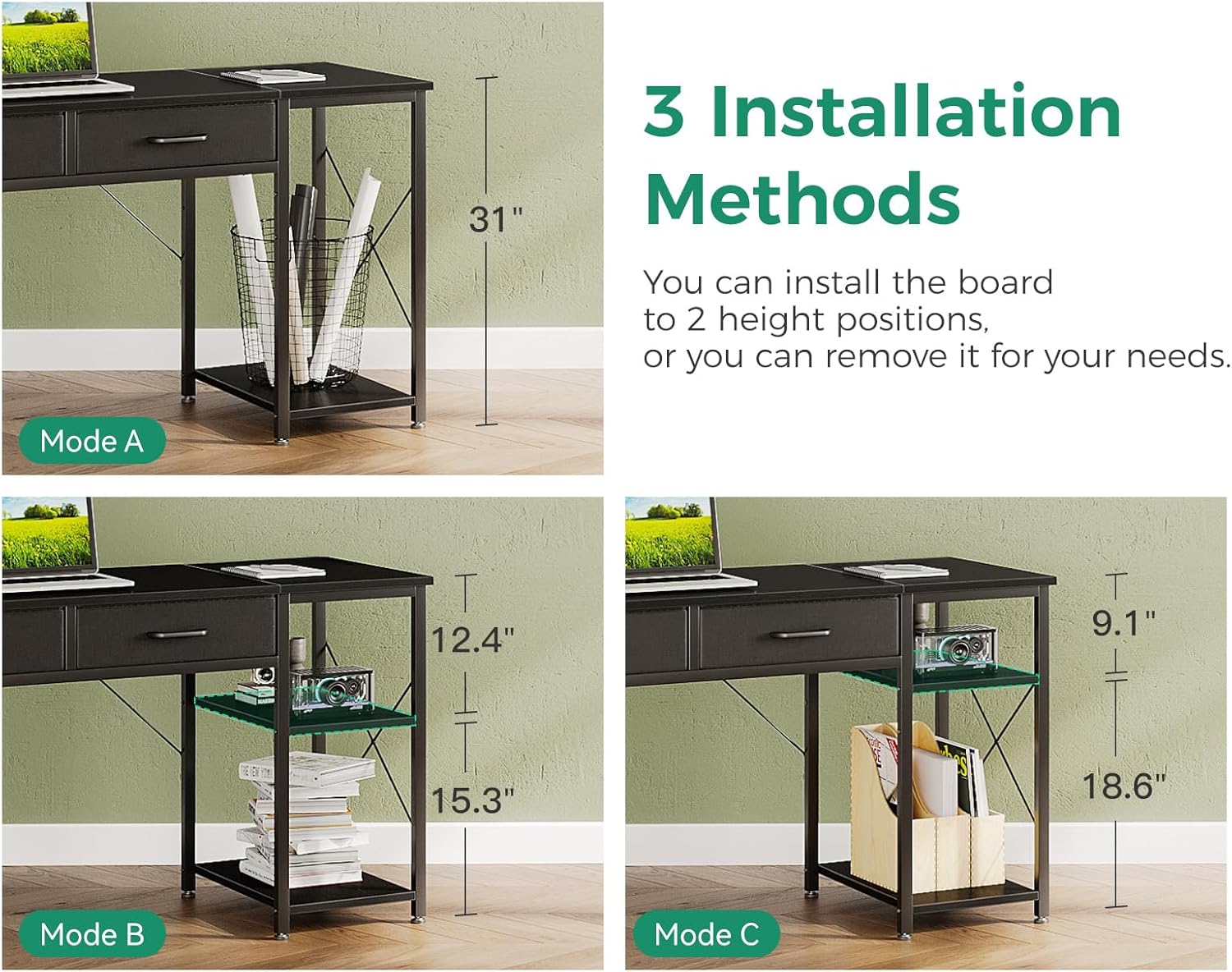
Image 2: Visual representation of the reversible design, allowing the side shelf to be positioned on either the left or right side of the desk.

Image 3: Illustration of the three possible configurations for the adjustable middle shelf: removed, high position, and low position.
4.3. Desktop and Drawer Installation
Attach the particleboard desktop to the assembled frame. Then, assemble and insert the two fabric drawers.

Image 4: A close-up view of the durable fabric drawers, demonstrating their capacity for organizing office supplies and personal items.
4.4. Power Outlet and Headphone Hook
Install the built-in power outlet with USB ports and the headphone hook as indicated in the instructions. The power outlet provides convenient access for charging electronic devices.

Image 5: A detailed view of the integrated power outlet, featuring standard AC sockets and USB ports for convenient device charging.

Image 6: A close-up of the iron hook, designed for hanging headphones or bags, keeping the desk surface clear.
5. Features and Usage
Your Coleshome computer desk is designed for functionality and space-saving. Key features include:
- Compact Design: With dimensions of 15.75"D x 39.4"W x 30.9"H, it maximizes room layout, ideal for small spaces.
- Fabric Drawers: Two large capacity fabric drawers provide ample storage for office supplies, stationery, or personal items, keeping your desk clutter-free.
- Reversible & Adjustable Storage Shelf: The side shelf can be installed on the left or right. The middle shelf is adjustable to two heights or removable for larger storage.
- Built-in Power Outlet: Conveniently located on the desktop, it includes standard outlets and USB ports for charging devices.
- Headphone Hook: A dedicated hook on the side allows for easy storage of headphones or bags.
- Durable Material: The tabletop is made of scratch-resistant, anti-collision, and waterproof particleboard, supported by a solid metal frame for stability.
Video 2: Video show of computer desk with 2 drawers. This video demonstrates the functionality and features of the desk, including the drawers and overall design.
6. Maintenance
To ensure the longevity and appearance of your desk, follow these maintenance guidelines:
- Cleaning: Wipe the desk surface with a soft, damp cloth. Avoid harsh chemicals or abrasive cleaners that could damage the laminated finish.
- Spills: Clean up spills immediately to prevent staining or damage to the particleboard.
- Stability Check: Periodically check all screws and connections to ensure they remain tight. Retighten if necessary.
- Heat Protection: Use coasters or protective pads under hot items to prevent heat damage to the desktop.
- Sunlight Exposure: Avoid prolonged direct sunlight exposure to prevent fading or discoloration of the desk surface.
7. Troubleshooting
If you encounter any issues with your desk, refer to the following common troubleshooting tips:
- Wobbly Desk: Ensure all screws are fully tightened. Check that the desk is on a level surface; adjust foot pads if necessary.
- Drawers Not Sliding Smoothly: Verify that the fabric drawers are correctly assembled and inserted. Check for any obstructions in the drawer slots.
- Missing Parts: If any parts are missing upon arrival, please contact customer support for assistance.
- Damaged Parts: If any parts are damaged, do not proceed with assembly. Contact customer support for replacements.
8. Specifications
| Feature | Detail |
|---|---|
| Brand | Coleshome |
| Model | 40 Inch Computer Desk |
| Product Dimensions | 15.75"D x 39.4"W x 30.9"H |
| Color | Black |
| Material Type | Engineered Wood (Tabletop), Metal (Frame) |
| Finish Type | Laminated |
| Special Features | Compact, Reversible Shelf, Built-in Outlet, Built-in USB Port, 2 Fabric Drawers |
| Item Weight | 9.9 Kilograms |
| Number of Drawers | 2 |
| Number of Shelves | 2 (1 adjustable) |
| Assembly Required | Yes (All tools included) |
9. Warranty and Support
For warranty information or customer support, please refer to the contact details provided with your purchase or visit the official Coleshome website. If you encounter any product problems about assembly or damaged issues, please feel free to contact us.