
1. Introduction
Thank you for choosing the DEKOPRO 3.7V Mini Rotary Tool Kit. This versatile cordless tool is designed for various precision tasks such as carving, cutting, sanding, grinding, polishing, and engraving. Please read this manual thoroughly before operation to ensure safe and efficient use of the product.
2. Safety Instructions
Always follow basic safety precautions to reduce the risk of fire, electric shock, and personal injury.
- Wear Eye Protection: Always wear safety goggles or safety glasses with side shields when operating the tool.
- Secure Workpiece: Always clamp or otherwise secure the workpiece. Do not hold the workpiece in your hand or across your legs.
- Maintain a Clean Work Area: Cluttered areas and benches invite injuries.
- Avoid Accidental Starting: Ensure the switch is in the OFF position before connecting to a power source or picking up the tool.
- Do Not Overreach: Keep proper footing and balance at all times.
- Use the Right Tool: Do not force a small tool or attachment to do the job of a heavy-duty tool.
- Store Idle Tools: When not in use, tools should be stored in a dry, high, or locked-up place, out of reach of children.
- Check for Damaged Parts: Before further use of the tool, a guard or other part that is damaged should be carefully checked to determine that it will operate properly and perform its intended function.
3. Package Contents
The DEKOPRO Mini Rotary Tool Kit includes the following items:
- 1x DEKOPRO 3.7V Mini Rotary Tool
- 1x USB-C Charging Cable
- 1x Accessory Case
- 1x Wrench
- 5x Aluminum Oxide Grinding Stones
- 6x Diamond Wheel Points
- 12x Sanding Bands
- 30x Sanding Discs
- 2x Polishing Wheel Points
- 1x Bristle Brush
- 2x Engraving Bits
- 1x Drill Bit
- 1x Drum Mandrel
- 1x Mandrel for Disc
- 1x Mandrel for Felt Wheel
- 3x Felt Wheels
- 2x Rubber Wheel Points

Image: Overview of the DEKOPRO Mini Rotary Tool Kit and its 70 accessories, including sanding bands, grinding stones, polishing wheels, engraving bits, and various mandrels.
4. Product Overview
Familiarize yourself with the components of your DEKOPRO Mini Rotary Tool.
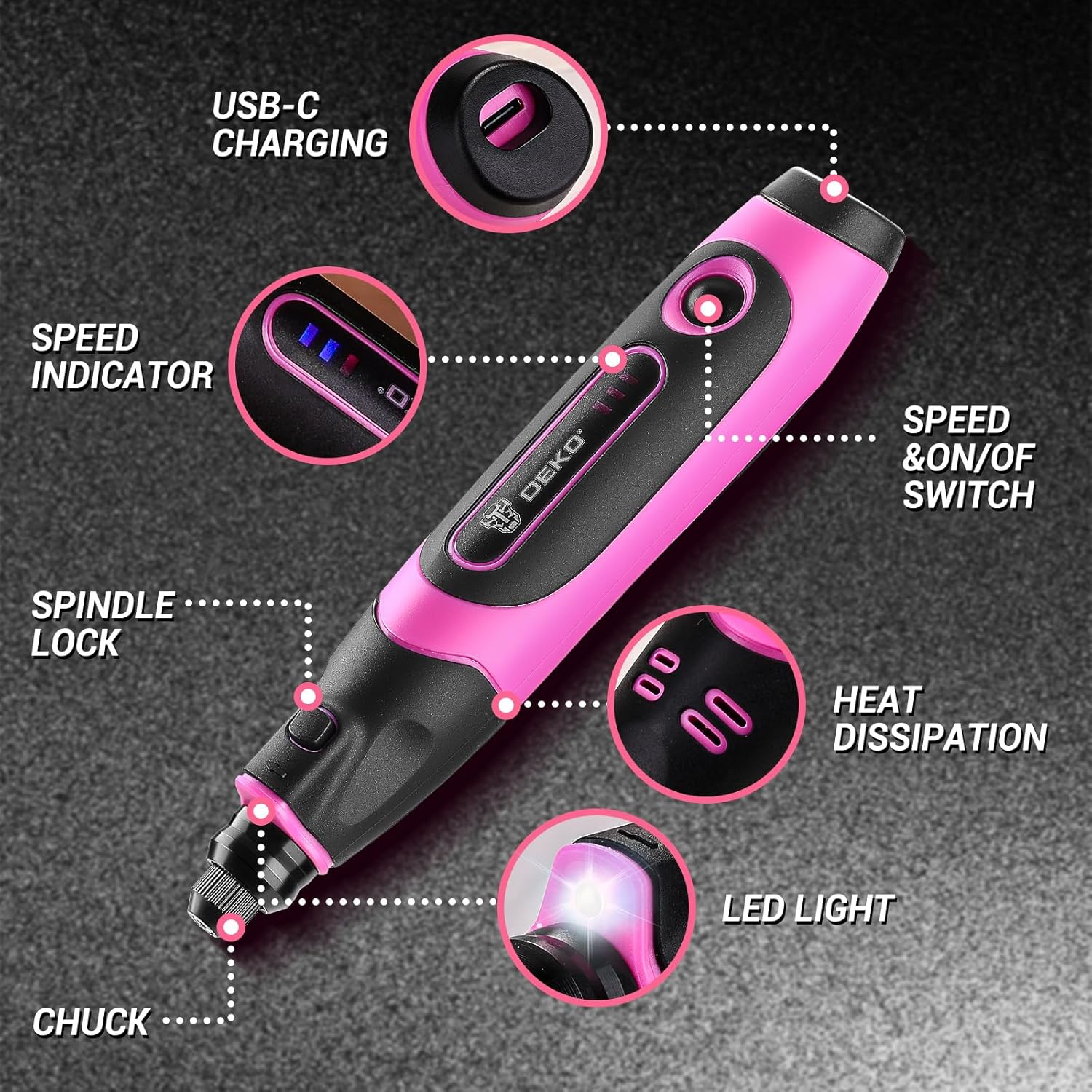
Image: Diagram highlighting key parts of the DEKOPRO Mini Rotary Tool, including the USB-C charging port, speed indicator, speed & on/off switch, spindle lock, chuck, LED light, and heat dissipation vents.
5. Setup
5.1 Charging the Tool
The rotary tool features a convenient USB-C charging port. Connect the provided USB-C cable to the tool and a compatible USB power source (e.g., computer, wall adapter, car charger, power bank).

Image: The DEKOPRO Mini Rotary Tool connected via a USB-C cable to a laptop for charging, illustrating its compatibility with various USB-C power sources.
5.2 Installing Accessories
Follow these steps to correctly install accessories:
- Step 1: Press and hold the spindle lock button. Unscrew the collet nut.
- Step 2: Choose the suitable collet and accessory for your task and insert it into the chuck.
- Step 3: Tighten the collet nut securely with the provided wrench. Ensure the accessory is firmly seated before operation.

Image: Three-step visual guide demonstrating how to install accessories: pressing the spindle lock, inserting the accessory, and tightening the collet nut with a wrench.
6. Operating Instructions
6.1 Power On/Off and Speed Adjustment
The tool features a speed & on/off switch. Press the switch to turn the tool on and cycle through the three available speed settings. Three LED indicators display the current speed level.
- 5000 RPM: Ideal for fine polishing and delicate tasks.
- 12000 RPM: Suitable for detailed carving and general work.
- 18000 RPM: For faster material removal, cutting, and grinding.
6.2 Using the LED Light
The built-in LED light illuminates the work area, improving visibility for intricate details and reducing shadows. This feature is particularly useful when working on small or hard-to-see projects.

Image: Close-up of the DEKOPRO Mini Rotary Tool showing its illuminated LED light, enhancing visibility for detailed work.
6.3 Applications
This rotary tool is designed for a wide range of applications:
- Sanding: Use sanding bands and discs for smoothing surfaces.
- Grinding: Utilize grinding stones and rubber wheel points for shaping and deburring.
- Carving & Engraving: Employ diamond wheel points and engraving bits for intricate designs.
- Polishing: Use felt wheels and polishing points to achieve a smooth, shiny finish.
- Drilling: Attach the drill bit for small hole creation.
- Cutting: Use appropriate cutting discs (not included in all kits, refer to package contents) for light cutting tasks.

Image: Collage showing the DEKOPRO Mini Rotary Tool performing various tasks: sanding wood, grinding a surface, carving a wooden disc, drilling into wood, and polishing a stone.
7. Maintenance
7.1 Cleaning
Regularly clean the tool and accessories. Use a soft, dry cloth to wipe down the tool. Do not use harsh chemicals or abrasive cleaners. Ensure the heat dissipation vents are clear of debris.
7.2 Storage
Store the tool and its accessories in a dry, cool place, away from direct sunlight and moisture. Keep out of reach of children.
8. Troubleshooting
- Tool does not turn on: Ensure the tool is fully charged. Check the power switch position.
- Accessory wobbles or falls out: Ensure the collet nut is tightened securely with the wrench. Verify the correct collet size is used for the accessory.
- Tool stops during operation: The tool may have an overload protection feature. Reduce pressure on the workpiece or use a lower speed setting. Allow the tool to cool down if it feels hot.
- Reduced performance: The battery may be low, or the accessory may be worn out and needs replacement.
If you encounter issues not listed here, please contact customer support.
9. Specifications
| Feature | Specification |
|---|---|
| Brand | DEKOPRO |
| Model Number | DKPSRTA03VDC1-K1-OLPK-EU |
| Voltage | 3.7 Volts |
| Power Source | Battery Powered |
| Special Features | Cordless, Variable Speed, Multi-purpose, Type-C Charging, Built-in LED Light |
| Minimum Rotation Speed | 5000 RPM |
| Maximum Rotation Speed | 18000 RPM |
| Number of Accessories | 70 pieces |
| Recommended Uses | Carving, Sanding, Grinding, Polishing, Cutting, Engraving, Drilling |
10. Warranty and Support
For warranty information or technical support, please refer to the documentation included with your purchase or visit the official DEKOPRO website. You may also contact the seller directly through the platform where the product was purchased.