
TESMEN TSM-599 & TCM-300D
TESMEN TSM-599 Smart Digital Multimeter & TCM-300D Digital Clamp Meter User Manual
Comprehensive Guide for Safe and Accurate Electrical Measurements
1. Introduction
This user manual provides detailed instructions for the safe and effective operation of your TESMEN TSM-599 Smart Digital Multimeter and TESMEN TCM-300D Digital Clamp Meter. These instruments are designed for comprehensive electrical testing and measurement, offering precision, safety, and ease of use for both professional and DIY applications. Please read this manual thoroughly before use and retain it for future reference.

Figure 1: TESMEN TSM-599 Smart Digital Multimeter (right) and TCM-300D Digital Clamp Meter (left).
2. Safety Information
Safety is paramount when working with electrical measurements. Always adhere to the following safety guidelines to prevent personal injury or damage to the instruments.
- Do not exceed the maximum input limits for any measurement function.
- Ensure test leads are in good condition and properly connected before making measurements.
- Never measure voltage on circuits with unknown voltage levels.
- Use caution when working with voltages above 30V AC RMS, 42V peak, or 60V DC. These voltages pose a shock hazard.
- The TSM-599 features a 10A fuse and insulated casing to prevent overload and electric shocks. Do not bypass or modify these safety features.
- The TCM-300D is CAT III 600V certified, indicating its suitability for measurements in distribution boards, circuit breakers, wiring, and cables.
- Always disconnect power to the circuit before measuring resistance, continuity, or capacitance.
- Utilize the Non-Contact Voltage (NCV) function to detect live wires without direct contact, enhancing safety.
- Do not operate the meters if they appear damaged or are not functioning properly.
- Refer to local and national safety codes.

Figure 2: TSM-599's internal fuse protection and insulated casing for enhanced safety.
3. Package Contents
Upon opening the package, please verify that all items listed below are present and in good condition.
- 1 x TESMEN TSM-599 Smart Digital Multimeter
- 1 x TESMEN TCM-300D Digital Clamp Meter
- 1 x Pair of Test Leads for TSM-599
- 1 x Thermocouple for TSM-599
- 1 x Storage Bag for TSM-599
- 1 x Pair of Test Leads for TCM-300D
- 1 x Temperature Probe Pens for TCM-300D
- 1 x Carrying Case for TCM-300D
- User Manual (this document)
4. Product Features
4.1 TESMEN TSM-599 Smart Digital Multimeter
- TRMS 6000 Counts: Provides accurate readings for non-sinusoidal waveforms.
- Measurement Functions: AC/DC Voltage, AC/DC Current, Resistance, Continuity, Diode, Capacitance, Frequency/Duty Cycle, Temperature, Non-Contact Voltage (NCV), Live Wire detection.
- Smart Auto Mode: Automatically identifies and measures voltage, resistance, and continuity.
- Manual Mode: Allows selection of specific measurement functions.
- Large Color LCD Screen: Features an analog bar and temperature display for clear data visibility.
- Safety Features: 10A fuse protection, full-coverage insulated case.
- User-Friendly: Auto-off feature, low battery indicator, built-in flashlight.
- Input Jack Indicator Light: Guides correct test lead connection.

Figure 3: TSM-599's comprehensive measurement capabilities and display.

Figure 4: TSM-599's Smart and Manual Mode options.

Figure 5: TSM-599's NCV feature and integrated flashlight.
4.2 TESMEN TCM-300D Digital Clamp Meter
- TRMS 6000 Counts: Ensures accurate readings for complex waveforms.
- Clamp Design: Allows non-contact AC/DC current measurement without interrupting the circuit.
- Measurement Functions: AC/DC Current, AC/DC Voltage, Resistance, Continuity, Diodes, Frequency, Capacitance, Temperature, Non-Contact Voltage (NCV), Live Wire detection, Inrush Current.
- Safety Certification: CAT III 600V certified with overload protection.
- Display: Backlight display for easy reading in various lighting conditions.
- Additional Features: Inrush current test, Data Hold, Zero function.

Figure 6: TCM-300D's capability for AC and DC current measurement.

Figure 7: TCM-300D's Inrush Current Test feature.

Figure 8: TCM-300D's comprehensive measurement capabilities.
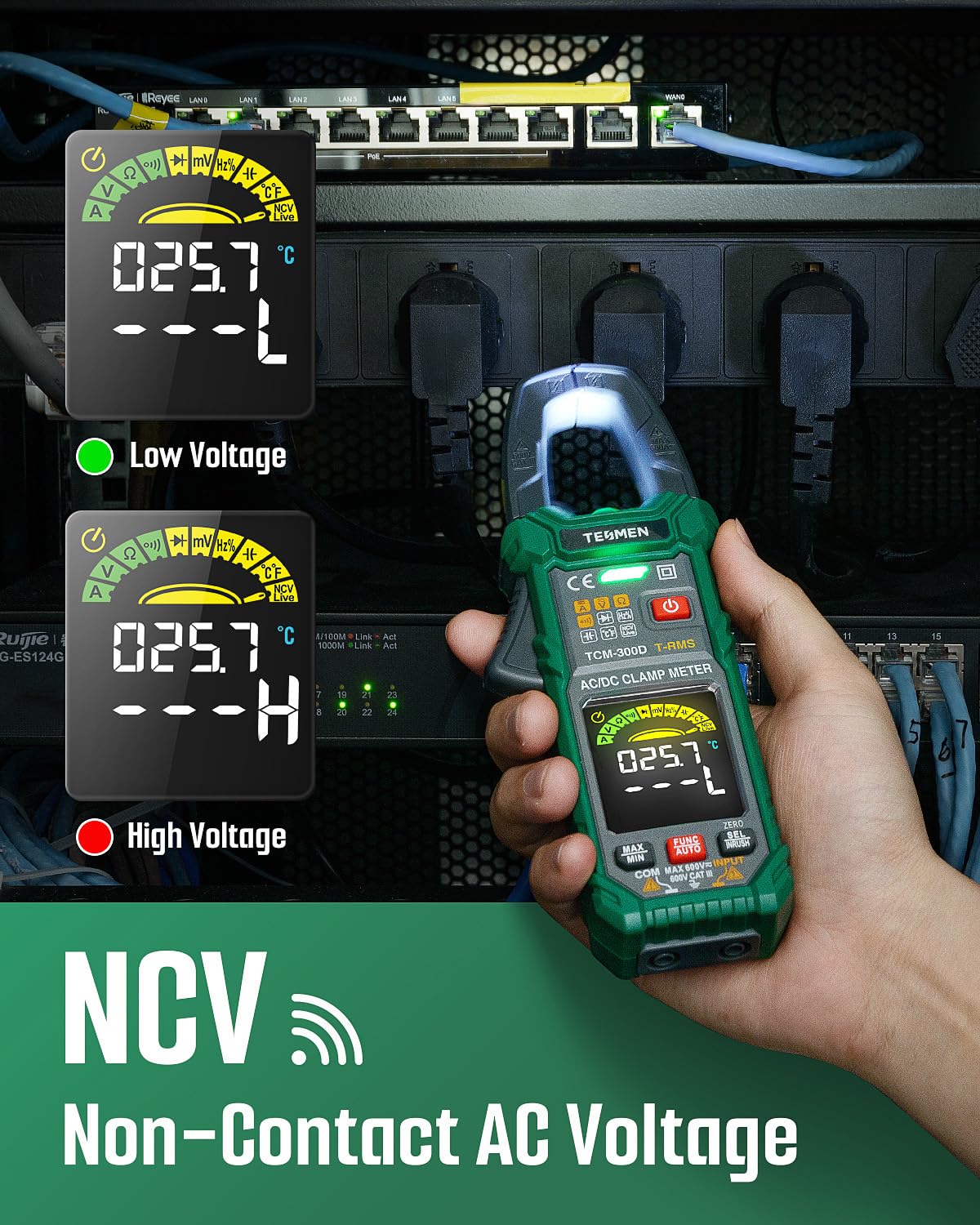
Figure 9: TCM-300D's Non-Contact AC Voltage (NCV) detection.
5. Setup
5.1 Battery Installation
Both the TSM-599 and TCM-300D are battery-powered. Locate the battery compartment on the back of each device. Use a screwdriver to open the compartment, insert the required batteries (typically AAA or 9V, refer to the device markings if unsure), ensuring correct polarity. Close the compartment securely.
5.2 Connecting Test Leads
For measurements requiring test leads (TSM-599 and some TCM-300D functions):
- Insert the black test lead into the "COM" (Common) jack.
- Insert the red test lead into the appropriate input jack for the desired measurement (e.g., "VΩmA" for voltage, resistance, small current, or "10A" for high current on TSM-599). The TSM-599 features an input jack indicator light to guide correct connection.
- Ensure connections are firm and secure.
6. Operating Instructions
Both meters offer flexible measurement modes.
6.1 TSM-599 Smart Digital Multimeter Operation
Power On/Off: Press the power button to turn the device on or off.
Smart Auto Mode
In Smart Auto mode, the TSM-599 automatically detects and measures AC/DC voltage, resistance, and continuity. This is the default mode for quick and easy measurements.
- Turn on the meter. It will typically default to Smart mode.
- Connect the test leads to the circuit or component. The meter will automatically display the relevant measurement.
Manual Mode
For specific measurements like current, capacitance, frequency, temperature, diode, or NCV, switch to Manual mode using the "FUNC" button.
- Voltage (AC/DC): Select the voltage function (V~ for AC, V- for DC). Connect leads in parallel to the circuit.
- Current (AC/DC): Select the current function (A~ for AC, A- for DC). Connect leads in series with the circuit. Ensure correct jack usage (e.g., 10A for high current).
- Resistance (Ω): Select the resistance function. Ensure power is off on the circuit. Connect leads across the component.
- Continuity (🔊): Select the continuity function. Ensure power is off. A beep indicates continuity.
- Diode (▶|): Select the diode function. Ensure power is off. Connect leads across the diode.
- Capacitance (╍): Select the capacitance function. Ensure capacitor is discharged. Connect leads across the capacitor.
- Frequency/Duty Cycle (Hz%): Select the frequency function. Connect leads to the signal source.
- Temperature (°C/°F): Connect the thermocouple to the meter and place the probe at the measurement point.
- Non-Contact Voltage (NCV): Select NCV. Place the top of the meter near a live conductor. The meter will indicate voltage presence with lights and sound.
- Live Wire Detection: Select Live. Insert the red test lead into the live wire socket. The meter will indicate live status.
- Data Hold: Press the "HOLD" button to freeze the current reading on the display. Press again to release.
- Flashlight: Press the flashlight button to illuminate the work area.
6.2 TCM-300D Digital Clamp Meter Operation
Power On/Off: Press the power button to turn the device on or off.
Current Measurement (AC/DC) - Clamp Function
The primary advantage of the TCM-300D is its ability to measure current without breaking the circuit.
- Select the AC Current (A~) or DC Current (A-) function using the rotary dial or function button.
- Open the clamp jaws by pressing the trigger.
- Encircle a single conductor with the clamp jaws. Ensure the jaws are fully closed around the conductor.
- Read the current value on the display.
- Inrush Current Test: Select the Inrush function. This measures the initial surge current when a device is turned on.
- Zero Function: For DC current measurements, press the "ZERO" button to eliminate any residual magnetic field influence before clamping.
Other Measurements (with Test Leads)
For other functions, connect test leads similar to the TSM-599.
- Voltage (AC/DC): Select the voltage function. Connect leads in parallel.
- Resistance (Ω), Continuity (🔊), Diode (▶|), Capacitance (╍), Frequency (Hz%): Select the desired function. Ensure power is off for resistance, continuity, diode, and capacitance measurements.
- Temperature (°C/°F): Connect the temperature probe pens.
- Non-Contact Voltage (NCV): Select NCV. Place the top of the clamp meter near a live conductor.
- Data Hold: Press the "HOLD" button to freeze the reading.
- MAX/MIN: Press the "MAX/MIN" button to record maximum and minimum readings during a measurement session.
7. Maintenance
- Cleaning: Wipe the meters with a damp cloth and mild detergent. Do not use abrasives or solvents.
- Storage: Store the meters in a cool, dry place, away from direct sunlight and extreme temperatures. If storing for extended periods, remove the batteries to prevent leakage.
- Battery Replacement: When the low battery indicator appears, replace the batteries promptly to ensure accurate readings. Refer to Section 5.1 for battery installation.
- Fuse Replacement (TSM-599): If the TSM-599 fails to measure current, the fuse may be blown. Refer to the device's internal diagram for fuse location and replace it with a fuse of the same type and rating (e.g., 10A). Always disconnect test leads and power off the device before opening the case.
- Calibration: For professional use, periodic calibration by a qualified technician is recommended to maintain accuracy.
8. Troubleshooting
| Problem | Possible Cause | Solution |
|---|---|---|
| Meter does not power on. | Dead or incorrectly installed batteries. | Replace batteries, ensuring correct polarity. |
| No reading or "OL" (Overload) displayed. | Measurement range exceeded; incorrect function selected; open circuit. | Select higher range (if applicable); verify function; check circuit for breaks. |
| Inaccurate readings. | Low battery; dirty test leads; external interference; meter needs calibration. | Replace batteries; clean test leads; move away from interference; consider calibration. |
| TSM-599 cannot measure current. | Blown fuse. | Replace the fuse with one of the same type and rating. |
| TCM-300D clamp reading is unstable or zero for DC current. | Residual magnetism; multiple conductors in clamp. | Use the "ZERO" function before measurement; ensure only one conductor is clamped. |
9. Specifications
| Attribute | Detail |
|---|---|
| Brand | TESMEN |
| Models | TSM-599 (Multimeter), TCM-300D (Clamp Meter) |
| Display Counts | 6000 Counts (True RMS) |
| Safety Rating | CAT III 600V |
| Power Source | Battery Powered |
| Color | Green |
| Measurement Functions (TSM-599) | AC/DC Voltage, AC/DC Current, Resistance, Continuity, Diode, Capacitance, Frequency/Duty Cycle, Temperature, NCV, Live Wire |
| Measurement Functions (TCM-300D) | AC/DC Current (Clamp), AC/DC Voltage, Resistance, Continuity, Diodes, Frequency, Capacitance, Temperature, NCV, Live Wire, Inrush Current |
10. Warranty and Support
TESMEN products are manufactured to high quality standards. For warranty information, please refer to the warranty card included with your product or visit the official TESMEN website.
For technical support, troubleshooting assistance, or inquiries regarding your TESMEN TSM-599 Smart Digital Multimeter or TCM-300D Digital Clamp Meter, please contact TESMEN customer service through their official channels.
TESMEN Official Store: Visit the TESMEN Store on Amazon
Related documentsTSM-599 & TCM-300D

Ask a question about this manual
Ask about setup, troubleshooting, compatibility, parts, safety, or missing instructions. Manuals+ will review the question and use this page’s manual context to help answer it.