
Deolme B0DGSPXVYQ
Deolme Smart Oversized Electric Recliner Chair User Manual
Model: B0DGSPXVYQ
Brand: Deolme
Introduction
This manual provides essential information for the safe and efficient operation, assembly, and maintenance of your Deolme Smart Oversized Electric Recliner Chair. Please read this manual thoroughly before use and retain it for future reference.
The Deolme Smart Oversized Electric Recliner Chair is designed for ultimate relaxation, featuring a power recline function, 360-degree swivel, and glider rocking motion. It includes integrated smart features such as voice control, USB charging ports, and built-in speakers for an enhanced user experience.
Important Safety Information
Please observe the following safety precautions to prevent injury or damage to the product:
- Maximum Weight Capacity: Do not exceed the maximum weight capacity of 450 pounds (204 kg). Exceeding this limit may cause damage to the chair and lead to injury.
- Assembly: Assembly is required. Ensure all components are correctly assembled and tightened before use. Refer to the "Setup" section for detailed instructions.
- Children and Pets: Keep children and pets away from the chair's moving parts, especially during recline or adjustment.
- Power Cord: Ensure the power cord is not pinched, tangled, or placed under the chair where it could be damaged. Use only the provided power adapter.
- Placement: Place the chair on a level, stable surface. Ensure there is adequate clearance around the chair for reclining and swiveling.
- Cleaning: Disconnect power before cleaning. Use only recommended cleaning agents and methods as described in the "Maintenance and Care" section.
- Modifications: Do not attempt to modify or repair the chair yourself. Contact customer support for assistance.
Package Contents
Please check that all components are present before beginning assembly. If any parts are missing or damaged, contact customer support.
- Recliner Base (1)
- Recliner Backrest (1)
- Seat Cushion (1)
- Power Adapter (1)
- Lumbar Pillow (1)
- User Manual (1)
Setup and Assembly
Follow these steps to assemble your Deolme Smart Oversized Electric Recliner Chair:
- Unpack Components: Carefully remove all parts from the packaging. Place them on a soft, clean surface to prevent scratches.
- Attach Backrest: Align the metal brackets on the backrest with the corresponding slots on the seat base. Push down firmly until the backrest clicks securely into place. Ensure both sides are fully engaged.
- Connect Power: Locate the power cable extending from the back of the chair. Connect it to the provided power adapter, then plug the adapter into a standard wall outlet.
- Position Chair: Place the assembled chair in your desired location, ensuring sufficient space for full recline and swivel motion.
- Final Check: Gently test the recline function and swivel to ensure smooth operation.

Image: The assembled Deolme Smart Oversized Electric Recliner Chair in a room, showcasing its design and size.

Image: A close-up view of the power connection port located on the back of the recliner, where the power cable is inserted.
Operating Instructions
Power Recline Function
The chair features an electric recline mechanism, allowing adjustment from 90 to 135 degrees. You can control the recline using the side buttons or voice commands.
- Button Control: Locate the control panel on the side of the chair. Press the forward button to recline and the backward button to return to the upright position.
- Voice Control: The chair supports voice commands for recline. Use phrases like "Hi~, Open Sofa" or "Hi~, Smart Sofa" to initiate recline. Specific commands for stopping or adjusting may vary.

Image: Visual representation of the smart sofa's voice control functionality and various recline positions for different activities like reading, music, and sleeping.

Image: The recliner shown with its footrest fully extended, demonstrating the comfortable lounging position.
Swivel and Glider Rocking
The chair offers 360-degree swivel and a gentle glider rocking motion for enhanced comfort and versatility.
- Swivel: The chair can rotate 270 degrees smoothly on its base, allowing you to easily change your viewing direction.
- Glider Rocking: The chair provides a gentle front-to-back gliding motion, ideal for relaxation or lulling children.

Image: A visual guide demonstrating the chair's three primary functions: reclining, 280-degree swivel, and 30-degree glider rocking motion.
Integrated Features
- USB Charging Ports: Located on the side control panel, these ports allow you to charge your mobile devices while relaxing.
- Built-in Speakers: The chair includes integrated speakers for an immersive audio experience. Connect your device via Bluetooth.
- Bluetooth Audio: To connect, enable Bluetooth on your mobile phone and search for the chair's Bluetooth name (refer to your phone's Bluetooth settings for pairing instructions). Once connected, audio from your device will play through the chair's speakers.
- Hidden Armrest Storage: The widened armrests feature hidden storage compartments, ideal for remote controls, books, or other small items.
- Phone Holder: A flexible phone holder is integrated, allowing you to comfortably view your device.

Image: A user enjoying the chair's 360-degree surround Bluetooth audio feature, with a smartphone connected to the chair's speakers.
Maintenance and Care
Proper care will extend the life and appearance of your recliner.
- Cleaning Fabric: The faux leather material is designed for easy maintenance. For general cleaning, wipe the surface with a soft, damp cloth. For spills, blot immediately with a clean, dry cloth. For stubborn stains, use a mild soap solution and wipe clean, then dry thoroughly. Avoid abrasive cleaners or harsh chemicals.
- Frame and Mechanism: Periodically check all bolts and screws to ensure they are tight. Do not overtighten. Lubricate moving parts if necessary with a silicone-based lubricant, avoiding contact with fabric.
- Power Components: Keep the power adapter and cords dry and free from dust. Do not expose to liquids.
- Sunlight Exposure: Avoid prolonged exposure to direct sunlight to prevent fading and material degradation.
Troubleshooting
| Problem | Possible Cause | Solution |
|---|---|---|
| Chair does not recline. |
|
|
| Bluetooth audio not connecting. |
|
|
| Chair makes unusual noises. |
|
|
If the problem persists after attempting these solutions, please contact customer support.
Specifications
| Brand | Deolme |
| Model Number | B0DGSPXVYQ |
| Color | Dark Brown |
| Product Dimensions (D x W x H) | 35"D x 32"W x 38.19"H |
| Overall Size (H x W x D) | 38.19 inches H x 44.88 inches W x 60.62 inches D (fully reclined) |
| Maximum Weight Recommendation | 450 Pounds (204 kg) |
| Item Weight | 130.6 pounds (59.2 kg) |
| Reclining Angle | 90 - 135 degrees |
| Swivel Angle | 270 degrees |
| Material | Faux Leather (Soft Fabric), Sponge Fill |
| Special Features | Electric Recline, Swivel, Glider Rocking, Voice Control, USB Ports, Built-in Speakers, Hidden Armrest Storage, Phone Holder |
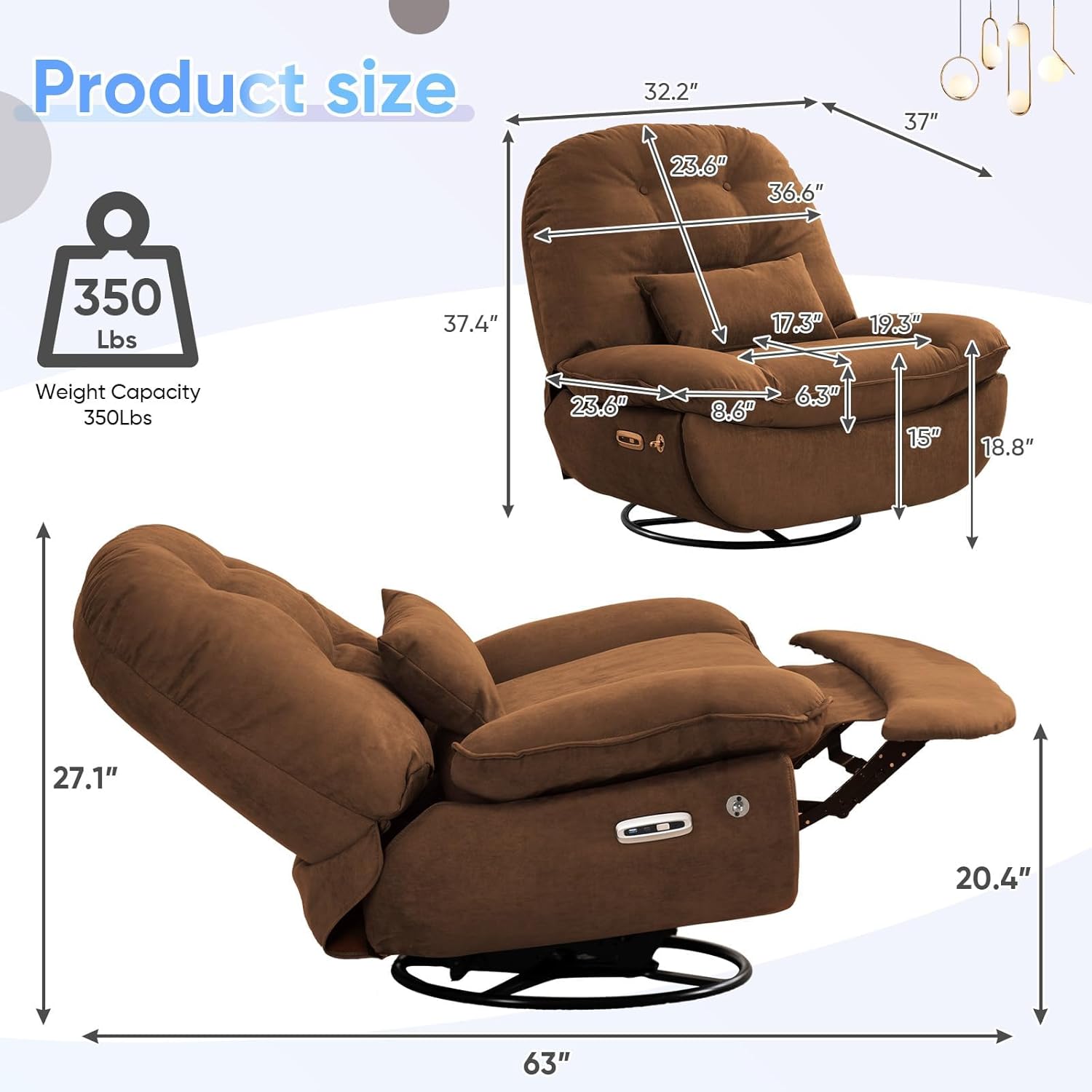
Image: Detailed product dimensions and weight capacity diagram for the Deolme Smart Oversized Electric Recliner Chair.
Warranty and Support
For warranty information or technical support, please contact Deolme customer service. Keep your purchase receipt and model number (B0DGSPXVYQ) handy when contacting support.
Contact Information: Please refer to the product packaging or the retailer's website for the most up-to-date customer service contact details.
Protection Plans: Additional protection plans may be available for purchase through your retailer. These plans typically offer extended coverage beyond the manufacturer's warranty.
Ask a question about this manual
Ask about setup, troubleshooting, compatibility, parts, safety, or missing instructions. Manuals+ will review the question and use this page’s manual context to help answer it.