
Midea MID60S110.1
Midea Integrated Dishwasher 60 cm, 12 Place Settings
User Manual - Model MID60S110.1
1. Introduction
This manual provides essential information for the safe and efficient use of your Midea Integrated Dishwasher, Model MID60S110.1. Please read these instructions carefully before installation, operation, and maintenance. Keep this manual for future reference.
2. Safety Information
Always follow basic safety precautions when using electrical appliances to reduce the risk of fire, electric shock, and injury to persons.
- Ensure the dishwasher is properly grounded.
- Do not operate the dishwasher if it is damaged. Contact qualified service personnel.
- Keep children away from the dishwasher, especially when the door is open.
- Use only detergents and rinse aids specifically designed for dishwashers.
- Sharp items should be loaded with points down to prevent injury.
- The appliance is equipped with an AquaStop system to detect water leaks.
3. Product Overview
The Midea MID60S110.1 is a 60 cm integrated dishwasher designed for seamless integration into your kitchen cabinetry. It offers a capacity for 12 place settings and features advanced cleaning technologies.
Key Features:
- Integrated Design: Blends seamlessly with kitchen furniture, with controls hidden on the top edge of the door.
- Capacity: Accommodates up to 12 place settings, suitable for large families.
- AquaStop Protection: Detects and prevents water leaks, enhancing safety.
- Residual Heat Drying: Utilizes residual heat to dry dishes, reducing water spots and ensuring dry, shiny results.
- Antibacterial Filter: Special materials inhibit microorganism growth, promoting hygiene without excessive hot water cycles.
- Hygiene Care Level 3: Achieves the highest hygiene level for domestic appliances, effectively eliminating viruses.
- Wash Programs: Four dedicated programs for various cleaning needs.
Control Panel:
The control panel is located on the top edge of the dishwasher door. It includes buttons for program selection, delay start, and other functions.

Image: Close-up view of the Midea dishwasher's control panel, showing various buttons and indicators for program selection and settings.
4. Setup and Installation
Proper installation is crucial for the dishwasher's performance and safety. It is recommended that installation be performed by a qualified technician.
Dimensions and Cabinet Requirements:
The dishwasher is designed to fit into a standard 60 cm cabinet opening. Ensure your kitchen cabinet meets the following dimensions:
- Width: Minimum 600 mm
- Height: 820-840 mm
- Depth: Minimum 570 mm
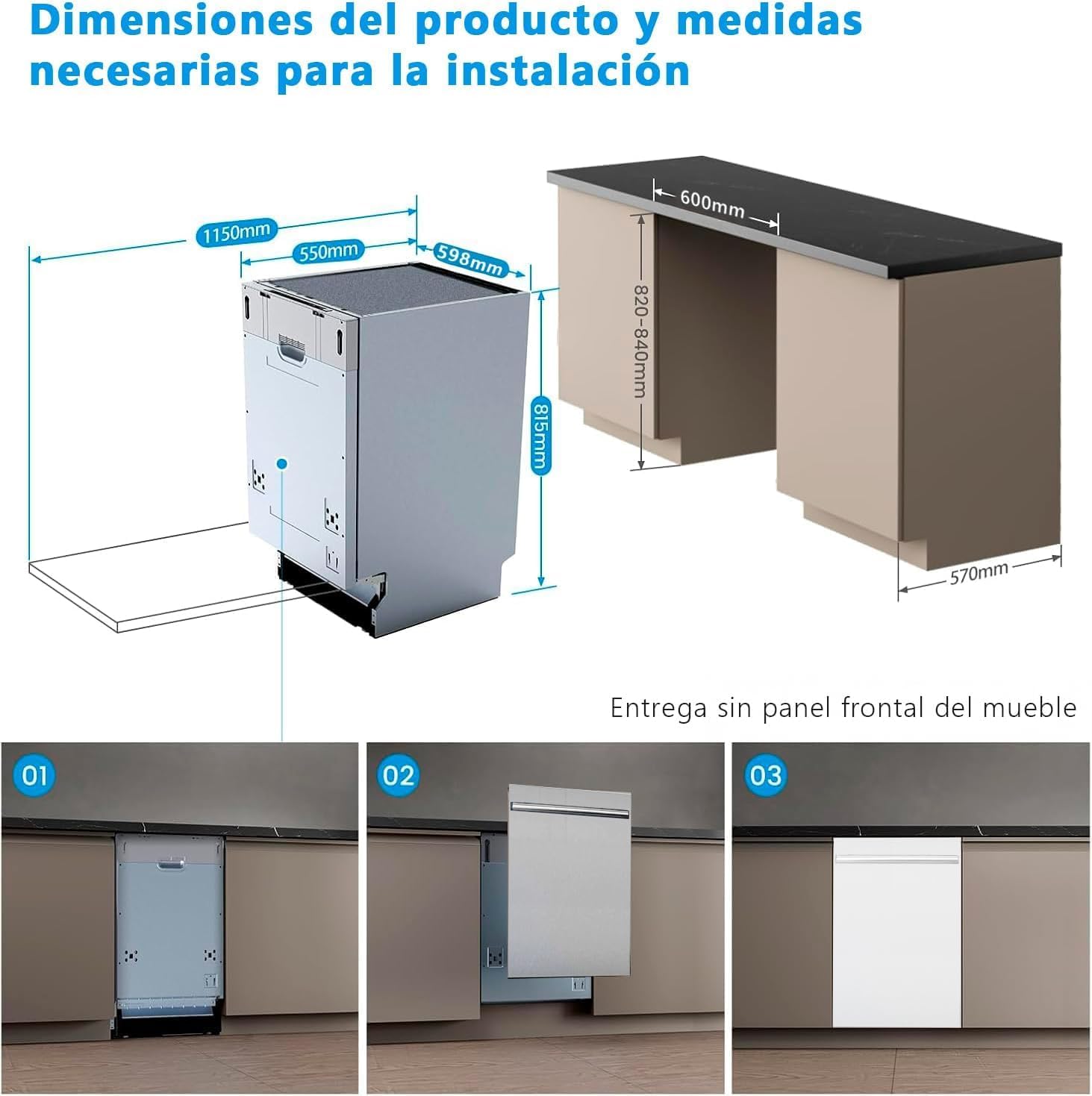
Image: Diagram illustrating the product dimensions and necessary cabinet measurements for integrated installation, showing width, height, and depth requirements.

Image: Detailed technical drawing for the installation of a fully integrated 60 cm dishwasher, showing options for sliding hinges (left and right) and precise measurements for cabinet integration.
Installation Steps (Summary):
- Prepare the cabinet opening according to the specified dimensions.
- Connect the water inlet hose to a cold water supply.
- Connect the drain hose to the kitchen sink drain or a dedicated drain pipe.
- Connect the power cable to a grounded electrical outlet (220 Volts).
- Slide the dishwasher into the cabinet opening and secure it.
- Attach the custom kitchen panel to the dishwasher door.
- Level the appliance using the adjustable feet.
Refer to the detailed installation instructions provided in the separate installation guide for complete steps.
5. Operating Instructions
Follow these steps for optimal performance and dish cleaning.
Loading the Dishwasher:
- Scrape off large food particles from dishes.
- Load dishes securely in the baskets, ensuring water can reach all surfaces.
- Place glasses, cups, and smaller items in the upper basket.
- Place plates, bowls, and larger items in the lower basket.
- Load cutlery in the cutlery basket with handles down for most items, but sharp knives with points down.

Image: Interior view of the Midea dishwasher, fully loaded with dishes, glasses, and cutlery, demonstrating its 12 place setting capacity.
Adding Detergent and Rinse Aid:
- Fill the detergent dispenser with the appropriate amount of dishwasher detergent.
- Check the rinse aid indicator and refill if necessary. Rinse aid helps with drying and prevents water spots.
Selecting a Wash Program:
The dishwasher offers four main wash programs:
- Eco: Energy-efficient program for normally soiled dishes.
- 90 Minutes: A standard program for daily loads.
- Hygiene Pro: Intensive cleaning with high temperatures for maximum hygiene, suitable for heavily soiled items and baby bottles.
- Rapid: Quick wash for lightly soiled dishes without drying.

Image: A hand selecting one of the four wash programs (HygieneCare+, Eco, Rapid, 90 minutes) on the dishwasher's control panel.
Starting a Wash Cycle:
- Close the dishwasher door firmly.
- Press the Power button to turn on the appliance.
- Select the desired wash program using the program selection button.
- Press the Start button to begin the cycle.
- You can also use the delay start function (3h, 6h, 9h, 12h) to postpone the start of the cycle.
6. Maintenance and Cleaning
Regular maintenance ensures the longevity and efficiency of your dishwasher.
Cleaning the Filters:
- The dishwasher has an antibacterial filter system.
- Regularly check and clean the coarse and fine filters to prevent blockages and ensure effective cleaning.
- Twist and remove the filter assembly, rinse under running water, and brush away any food debris.
- Reassemble the filters correctly after cleaning.
Cleaning the Spray Arms:
- Periodically check the spray arm nozzles for blockages.
- Remove the spray arms and clear any debris from the holes using a thin wire or toothpick.
Exterior and Interior Cleaning:
- Wipe the exterior surfaces with a soft, damp cloth. For stainless steel models, use a specialized stainless steel cleaner.
- Clean the interior of the dishwasher, including the door seal, with a damp cloth and mild detergent.
- Run a dishwasher cleaning cycle periodically using a dishwasher cleaner.
7. Troubleshooting
Before contacting service, refer to the following table for common issues and their solutions.
| Problem | Possible Cause | Solution |
|---|---|---|
| Dishwasher does not start | Power supply issue, door not closed properly, program not selected. | Check power connection, ensure door is latched, select a program and press Start. |
| Dishes are not clean | Incorrect loading, clogged spray arms, insufficient detergent, dirty filters. | Reload dishes correctly, clean spray arms, add more detergent, clean filters. |
| Water spots on dishes | Lack of rinse aid, hard water. | Refill rinse aid dispenser, adjust rinse aid dosage, consider a water softener if water is very hard. |
| Dishwasher leaks | Loose hose connections, damaged door seal, excessive suds. | Check hose connections, inspect door seal for damage, use correct detergent amount. The AquaStop system should prevent major leaks. |
| Unusual noise | Items interfering with spray arms, foreign objects in pump. | Ensure dishes do not block spray arms, check for and remove any foreign objects. |
8. Specifications
| Parameter | Value |
|---|---|
| Model Number | MID60S110.1 |
| Brand | Midea |
| Type | Integrated Dishwasher |
| Capacity | 12 Place Settings |
| Dimensions (H x W x D) | 81.5 x 59.8 x 55 cm |
| Weight | 40.8 kg |
| Voltage | 220 Volts |
| Energy Efficiency Class | E |
| Energy Consumption (per 100 cycles) | 90 kWh |
| Water Consumption (per cycle) | 10.5 Liters |
| Noise Level | 52 dB |
| Wash Programs | Eco, 90 Minutes, Hygiene Pro, Rapid |
| Special Features | Child Lock, Antibacterial Filter, Half Load Function, AquaStop Overflow Protection |
| Included Components | Power Cable, User Manual |
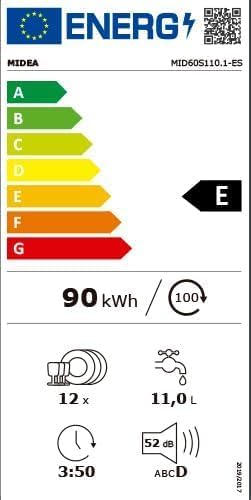
Image: European energy label for the Midea dishwasher, indicating an energy efficiency class of E, 90 kWh per 100 cycles, 12 place settings, 11.0 liters water per cycle, and 52 dB noise level.
9. Warranty and Support
Your Midea dishwasher Model MID60S110.1 comes with a manufacturer's warranty.
- Warranty Period: The minimum warranty offered by the supplier is 36 months.
- For warranty claims or technical support, please contact Midea customer service or your retailer.
- Ensure you have your proof of purchase and the model number (MID60S110.1) available when contacting support.
- Additional information and support resources may be available on the official Midea website: www.midea.es
Ask a question about this manual
Ask about setup, troubleshooting, compatibility, parts, safety, or missing instructions. Manuals+ will review the question and use this page’s manual context to help answer it.