
Rugged Radios GMR2-PLUS-2-PACK
Rugged Radios GMR2 Plus GMRS Handheld Two Way Radio Instruction Manual
Model: GMR2-PLUS-2-PACK
Brand: Rugged Radios
1. Introduction
This manual provides comprehensive instructions for the operation and maintenance of your Rugged Radios GMR2 Plus GMRS Handheld Two Way Radios. Designed for reliable communication in various environments, these radios are ideal for hiking, off-roading, events, and warehouse communication. Please read this manual thoroughly before using your device to ensure optimal performance and safety.
2. What's in the Box
Upon unboxing, please verify that all components listed below are present:
- (2) GMR2-PLUS Two Way Handheld Radios
- (2) Charging Cradles
- (2) 110 Wall Adaptors

Image: Contents of the Rugged Radios GMR2 Plus package, including two radios, two charging cradles, and two wall adaptors.
3. Product Overview
3.1. Key Features
- GMRS Frequencies: Transmit and receive on GMRS frequencies with 22 channels and 121 privacy codes.
- Long Range Performance: Optimized transmitter and tuned antenna for extended range in challenging conditions.
- Universal Compatibility: Compatible with other handhelds or mobile radios operating on GMRS frequencies.
- NOAA Weather Channels: Access to weather channels for emergency preparedness.
- Integrated Flashlight: Built-in flashlight for convenience.
- User-Friendly Design: Intuitive button layout and easy-to-read LCD screen.
- FM Radio: Listen to FM radio broadcasts.
3.2. Radio Components and Controls
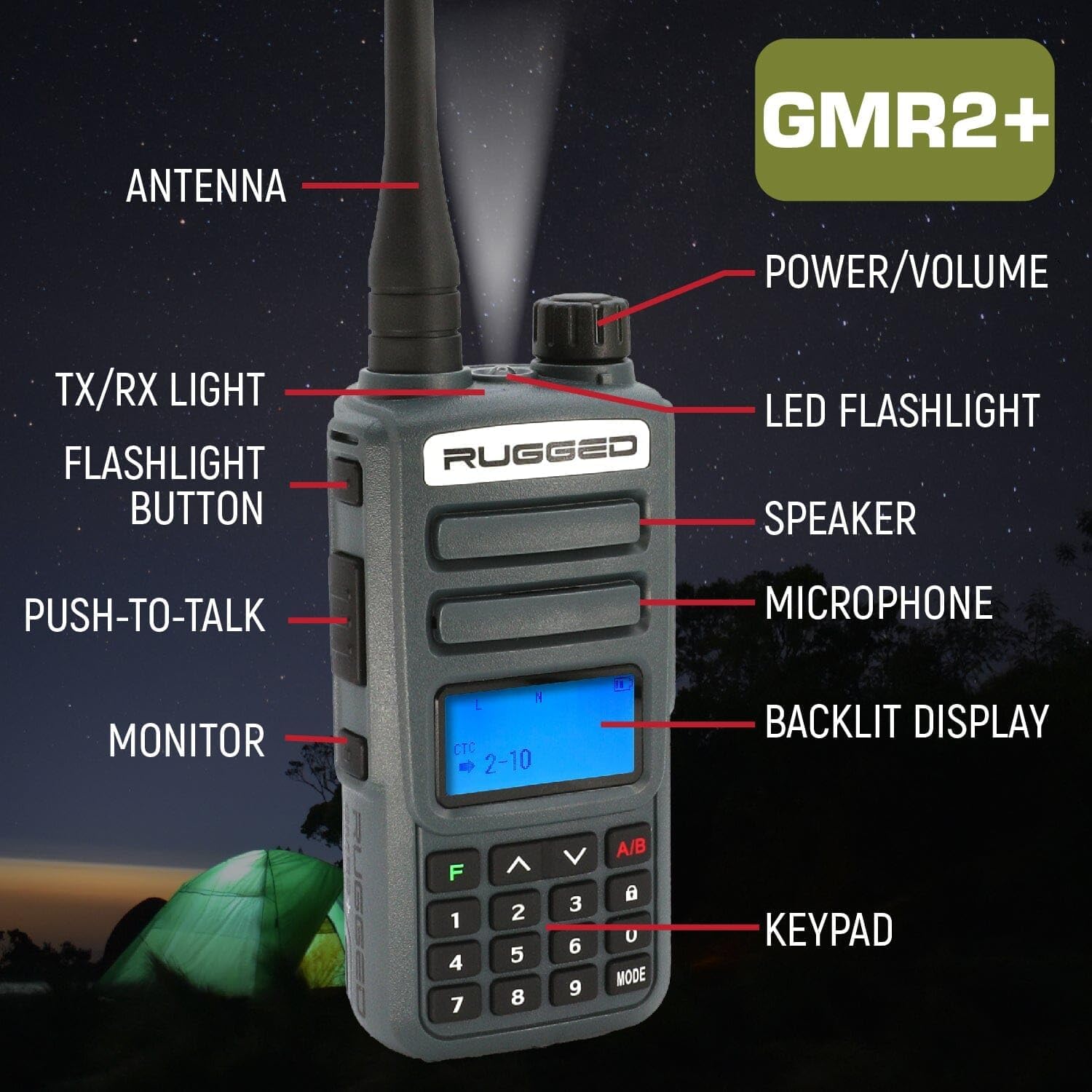
Image: Detailed diagram of the GMR2 Plus radio, highlighting its various components and controls.
- Antenna: For transmitting and receiving radio signals.
- Power/Volume Knob: Rotate to turn the radio on/off and adjust volume.
- TX/RX Light: Indicates transmission (red) or reception (green).
- LED Flashlight: Provides illumination.
- Flashlight Button: Activates the LED flashlight.
- Speaker: Outputs received audio.
- Microphone: For transmitting your voice.
- Push-to-Talk (PTT) Button: Press and hold to transmit, release to listen.
- Monitor Button: Allows you to listen to weak signals or monitor a channel without squelch.
- Backlit Display: Shows channel, battery status, and other information.
- Keypad: For channel selection, menu navigation, and other functions.
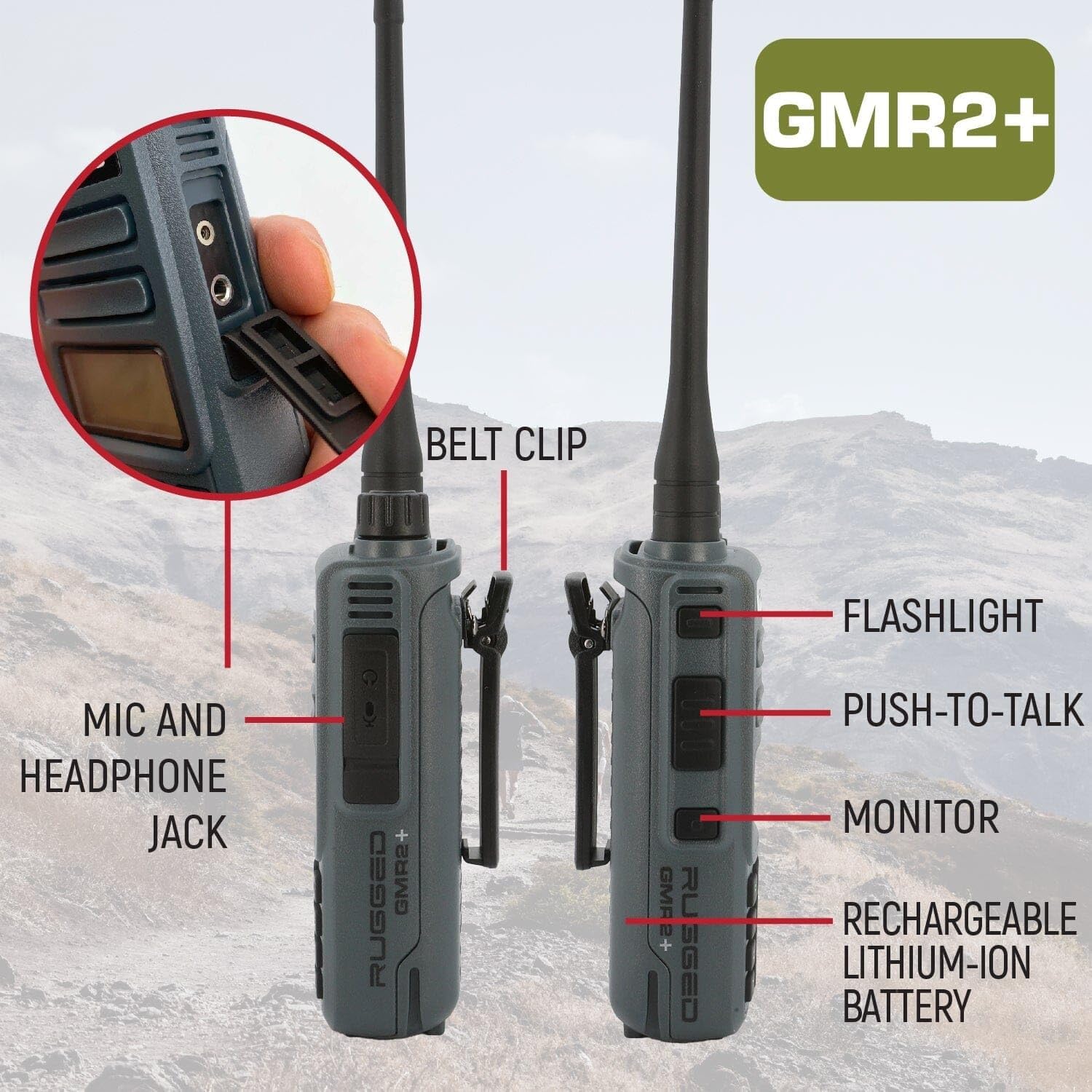
Image: Side view of the GMR2 Plus radio, detailing the mic/headphone jack, belt clip, and side buttons.
- Mic and Headphone Jack: For connecting external audio accessories.
- Belt Clip: For convenient carrying.
- Rechargeable Lithium-Ion Battery: Powers the device.
4. Setup
4.1. Battery Installation and Charging
- Ensure the radio is powered off before installing or removing the battery.
- Align the battery pack with the battery compartment on the back of the radio and slide it into place until it clicks securely.
- To charge the radio, place it into the charging cradle. Connect the 110V wall adaptor to the charging cradle and plug it into a standard electrical outlet.
- The indicator light on the charging cradle will typically show red when charging and green when fully charged.
- A full charge may take several hours. Do not overcharge the battery.

Image: The GMR2 Plus radio being charged in its A/C charging cradle.
5. Operating Instructions
5.1. Power On/Off and Volume Adjustment
Rotate the Power/Volume knob clockwise to turn the radio on. Continue rotating clockwise to increase the volume. Rotate counter-clockwise to decrease volume and turn the radio off.
5.2. Channel Selection
Use the keypad to directly enter the desired GMRS channel number (1-22). Alternatively, use the Up/Down arrow buttons to cycle through channels.
5.3. Transmitting and Receiving
- To transmit, press and hold the Push-to-Talk (PTT) button located on the side of the radio. Speak clearly into the microphone. The TX/RX light will illuminate red.
- Release the PTT button to stop transmitting and return to receive mode. The TX/RX light will illuminate green when receiving a signal.
- Ensure you are on the same channel and privacy code as the person you wish to communicate with.
5.4. Privacy Codes (CTCSS/DCS)
The GMR2 Plus supports 121 privacy codes (CTCSS/DCS) to filter out unwanted conversations. Refer to the radio's on-screen menu or a more detailed programming guide for setting privacy codes. Both radios must have the same channel and privacy code set to communicate.
5.5. NOAA Weather Channels
To access NOAA weather channels, navigate through the radio's menu or use a dedicated button if available. These channels provide real-time weather alerts and forecasts.
5.6. Flashlight Function
Press the dedicated Flashlight Button to turn the LED flashlight on or off.
5.7. Vehicle-to-Vehicle Communication
The GMR2 Plus can be integrated into vehicle communication systems. Connect to a Rugged Radios intercom for vehicle-to-vehicle communication through your headset or helmet speaker kit with an optional cable (e.g., CC-KEN or CJ-KEN-XL).

Image: Setup for vehicle-to-vehicle communication using the GMR2 Plus and an intercom system.
6. Maintenance
6.1. Cleaning
Wipe the radio with a soft, damp cloth. Do not use harsh chemicals or abrasive cleaners. Ensure the radio is dry before use or charging.
6.2. Battery Care
- Store batteries in a cool, dry place when not in use.
- Avoid fully discharging the battery frequently to prolong its lifespan.
- If the radio will not be used for an extended period, remove the battery.
6.3. Storage
Store the radios in a clean, dry environment, away from extreme temperatures and direct sunlight.
7. Troubleshooting
| Problem | Possible Cause | Solution |
|---|---|---|
| Radio does not power on. | Battery is not installed correctly or is depleted. | Ensure battery is securely installed. Charge the battery fully. |
| Cannot transmit or receive. | Incorrect channel or privacy code. Out of range. Low battery. | Verify channel and privacy code match. Move closer to other radio. Recharge battery. |
| Poor audio quality or static. | Weak signal. Interference. Volume too low. | Move to an open area. Check for sources of interference. Adjust volume. |
| Battery life is short. | Battery not fully charged. Old battery. Frequent transmission. | Ensure full charge. Consider replacing old battery. Minimize continuous transmission. |
8. Specifications
| Feature | Detail |
|---|---|
| Model Number | GMR2-PLUS-2-PACK |
| Brand | Rugged Radios |
| Color | Grey |
| Number of Channels | 22 |
| Frequency Range | 462 MHz to 467 MHz |
| Talking Range Maximum | 3 Mile |
| Tuner Technology | UHF |
| Voltage | 3.7 Volts |
| Water Resistance Level | Water Repellent |
| Special Features | Long Range, Digital Display, Rechargeable, Lightweight |
| Country of Origin | China |
9. Warranty and Support
9.1. Warranty Information
Rugged Radios guarantees its Radios, Intercoms & Headsets to be free from manufacturing defects in material and workmanship under normal use for a period of three (3) years from the date of purchase. All other Rugged Radios branded products carry a one-year warranty. Aviation headsets are warrantied for 7 years.
In the event of a defect covered by the warranty, Rugged Radios, at its discretion, will either repair or replace the product. This action shall be the full extent of Rugged Radios' liability and the Customer’s sole and exclusive reparation. The warranty does not cover defects or damage resulting from mishandling, abuse, misuse, improper storage, or improper operation of the device, including use with incompatible or inferior equipment, or failure to maintain specified environmental conditions.
9.2. Customer Support
For any questions or concerns regarding your Rugged Radios GMR2 Plus, please contact Rugged Radios customer support:
- Phone: 888-541-7223
- Email: amazon@ruggedradios.com
- Website: ruggedradios.com
10. Optional Accessories
Enhance your GMR2 Plus experience with these optional accessories:

Image: Various optional accessories available for the GMR2 Plus radio.
- Shoulder Mic with 3.5mm Jack (#HM-RH): For convenient hands-free communication.
- Extra Large High Capacity Battery (#BAT-GMR2-XL): Extends operating time.
- USB Charging Cable for BAT-GMR2-XL (#USB-BAT-RH): For charging the XL battery via USB.
- Long Range GMRS Antenna (#GMRS-SMA-M): Improves signal range.
Ask a question about this manual
Ask about setup, troubleshooting, compatibility, parts, safety, or missing instructions. Manuals+ will review the question and use this page’s manual context to help answer it.