
Fosmon C-10824FBUS
Fosmon Minutes Countdown Plug-in Timer Outlet User Manual
Model: C-10824FBUS
Brand: Fosmon
Introduction
The Fosmon Minutes Countdown Plug-in Timer Outlet is designed to provide convenient and safe control over various electrical appliances and lighting. This timer allows users to set precise countdown durations, offering both flexibility and energy-saving benefits. Its intuitive design and robust safety features make it an ideal solution for managing power to your devices.

Figure 1: Fosmon Minutes Countdown Plug-in Timer Outlet
Safety Information
This timer is designed with multiple safety features to ensure reliable operation and user protection. Please observe the following:
- ETL Certified: The timer is ETL-certified, ensuring it meets recognized safety standards.
- Grounded Outlets: Features two grounded outlets to protect against electrical shock.
- Fire-Resistant Shell: The timer's shell boasts a V-0 rating for enhanced fire safety.
- Maximum Load: Supports a maximum load of 15A/1875W and 1/2 horsepower. Do not exceed these ratings.
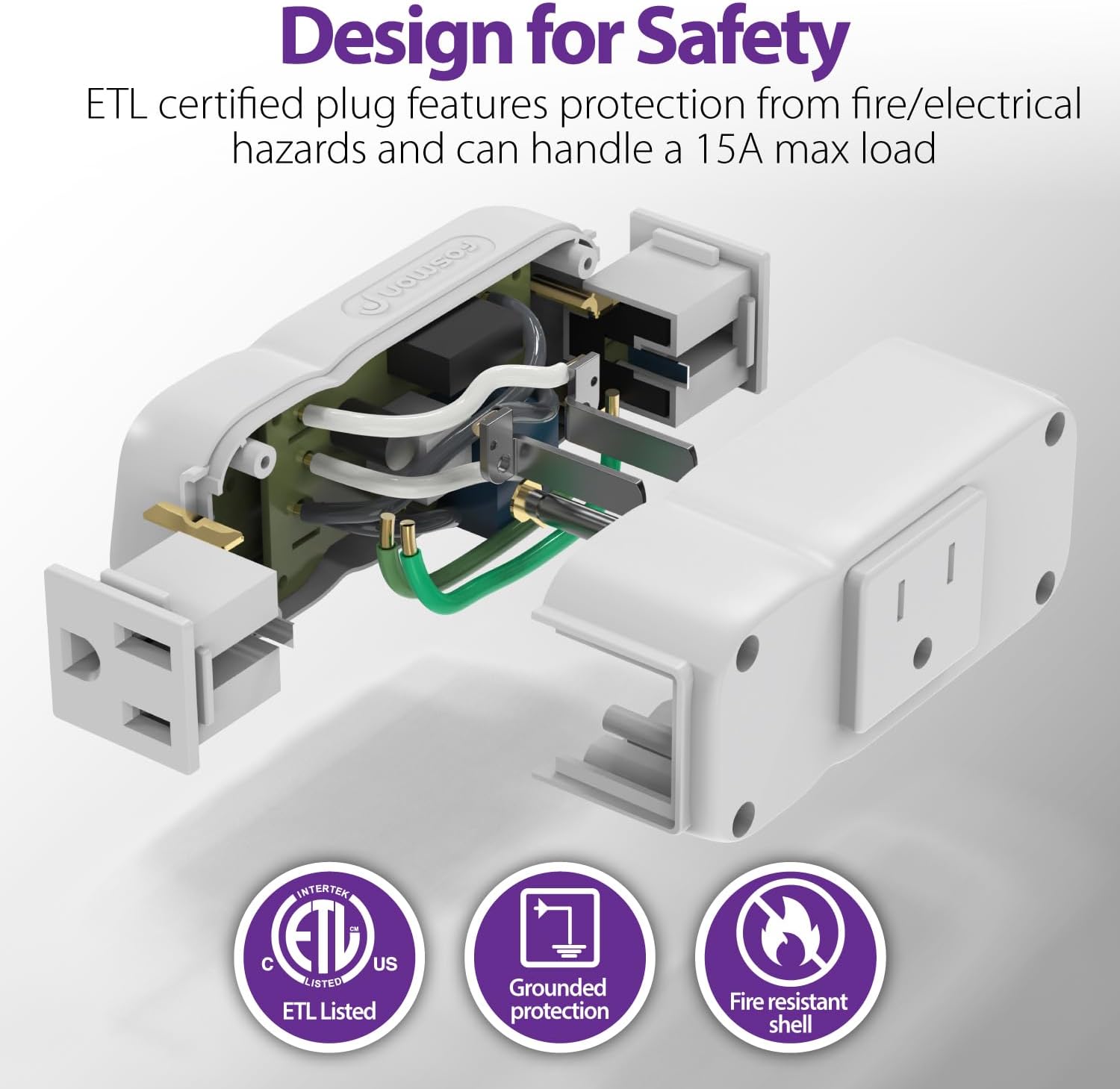
Figure 2: Safety features including ETL certification, grounded protection, and fire-resistant shell.
Product Features
- Customizable Countdown: Set durations from 1 minute up to 63 minutes by combining multiple time buttons.
- Easy Programming: Simple button presses for setting desired countdown times.
- Daily Repeat Function: Allows the same countdown to run daily at the set time.
- On/Off Switch: Provides instant manual control to turn devices on or off.
- Wide Compatibility: Compatible with incandescent, CFL, and LED lights, as well as various appliances.
- Built-in Battery Backup: Maintains settings during power outages.

Figure 3: Key features of the Fosmon timer, including battery backup and daily repeat.
Setup Guide
This section provides instructions for setting up your Fosmon Countdown Timer.
Video Setup Guide
Video 1: Set-Up Guide for Fosmon 63 Minute Plug In Countdown Timer. This video demonstrates how to plug in the device, set a countdown time using the buttons, and utilize the daily repeat function.
Initial Setup
- Plug the Fosmon Countdown Timer into a standard grounded electrical outlet.
- Plug your desired appliance or light into one of the two grounded outlets on the timer.

Figure 4: The timer plugged into an outlet, highlighting its compact design and button layout.
Operating Instructions
Setting a Countdown Timer
The timer uses a combination of buttons (1, 2, 4, 8, 16, 32 minutes) to achieve a desired countdown duration from 1 to 63 minutes. To set a time:
- Press the minute buttons that sum up to your desired duration. For example, to set a 20-minute countdown, press the 16-minute button and then the 4-minute button.
- Ensure you press subsequent buttons within approximately 2 seconds of the previous one for them to combine. If you wait too long, a new button press will override the previous selection.
- The selected minute buttons will illuminate, indicating the active countdown.
- The connected device will turn off automatically once the countdown is complete.

Figure 5: Illustrates combining minute buttons for various countdown times.
Using the Daily Repeat Function
The daily repeat function allows your set countdown to activate at the same time every day.
- First, set your desired countdown duration as described above.
- At the exact time you wish the timer to repeat daily, press the 'Repeat' button (indicated by a circular arrow icon).
- The timer will now activate for the set duration at that specific time every day.

Figure 6: The daily repeat function can be used to automate lighting for home security.
Manual On/Off Control
The timer also features an 'On/Off' button (indicated by a power icon) for immediate manual control of the connected device, bypassing the timer function.
Multiple Uses
The Fosmon Countdown Timer is versatile and can be used with a wide range of indoor appliances and lighting:
- Kitchen Appliances: Coffee makers, kettles, griddles.
- Personal Care: Hair straighteners, curling irons, hair dryers.
- Lighting: Lamps, grow lights, string lights, holiday decorations.
- Other Appliances: Fans, small pumps, reptile lights, aquarium equipment.

Personal Care Appliances

Household Appliances

Lighting and Decorations

Diverse Applications
Specifications
| Attribute | Value |
|---|---|
| Product Dimensions | 2.21 x 3.82 x 1.5 inches |
| Item Weight | 5.3 ounces |
| Model Number | C-10824FBUS |
| Brand | Fosmon |
| Color | White |
| Power Rating | 125V/15A, 1875W, 1/2 HP |
| Battery | 1 CR123A (included) |
| UPC | 879565007218 |
Troubleshooting
If you encounter issues with your Fosmon Minutes Countdown Plug-in Timer, please consider the following common solutions:
- Timer Not Activating: Ensure the timer is securely plugged into a live electrical outlet. Verify that the appliance connected to the timer is functioning correctly when plugged directly into a wall outlet.
- Countdown Not Starting/Incorrect: Double-check that you are pressing the minute buttons in quick succession (within 2 seconds) to combine them for the desired total time. If the buttons are not combining, try pressing them more quickly.
- Daily Repeat Not Working: Ensure you pressed the 'Repeat' button at the exact time you want the daily cycle to begin. The timer will repeat the last set countdown from that specific time each day.
- No Power to Device: Confirm that the 'On/Off' button is in the 'On' position if you are trying to manually power the device. Check the power rating of your appliance to ensure it does not exceed the timer's maximum load (15A/1875W, 1/2 HP).
- Buttons Not Responding: If buttons are unresponsive, try unplugging the timer from the wall outlet for a few seconds and then plugging it back in to reset it.
If problems persist after attempting these steps, please contact customer support for further assistance.
Warranty and Support
Fosmon offers a limited lifetime warranty for this product. For any inquiries or support needs, please contact our experienced and dedicated US-based customer service team.
You can also visit the official Fosmon store for more information and products: Fosmon Store
Ask a question about this manual
Ask about setup, troubleshooting, compatibility, parts, safety, or missing instructions. Manuals+ will review the question and use this page’s manual context to help answer it.