
Elgato 20AAT9901
Elgato Wave Mic Arm Pro - Instruction Manual
Model: 20AAT9901
Introduction
The Elgato Wave Mic Arm Pro is a professional-grade microphone arm designed for broadcasting, podcasting, and streaming. It features advanced suspension technology for smooth, silent adjustments and a low-profile design to maintain an unobstructed workspace. This manual provides detailed instructions for the setup, operation, and maintenance of your Wave Mic Arm Pro.

Image: The Elgato Wave Mic Arm Pro in black, shown clamped to a desk. A translucent outline of a microphone is attached to the end of the arm, illustrating its function.
What's in the Box
Verify that all components are present before beginning installation:
- Wave Mic Arm Pro
- Riser
- 1/4″ to 3/8″ Adapter
- 1/4″ to 5/8″ Adapter
- Hex Key
- Quick Start Guide

Image: A visual representation of the items included in the product packaging: the main Wave Mic Arm Pro assembly, a separate riser component, two threaded adapters (1/4" to 3/8" and 1/4" to 5/8"), a hex key for adjustments, and a quick start guide.
Setup
1. Desk Clamp Installation
Attach the padded desk clamp to a sturdy surface. The clamp is designed to fit desks up to 60 mm (2.4 inches) thick. Ensure the clamp is securely tightened to prevent movement.
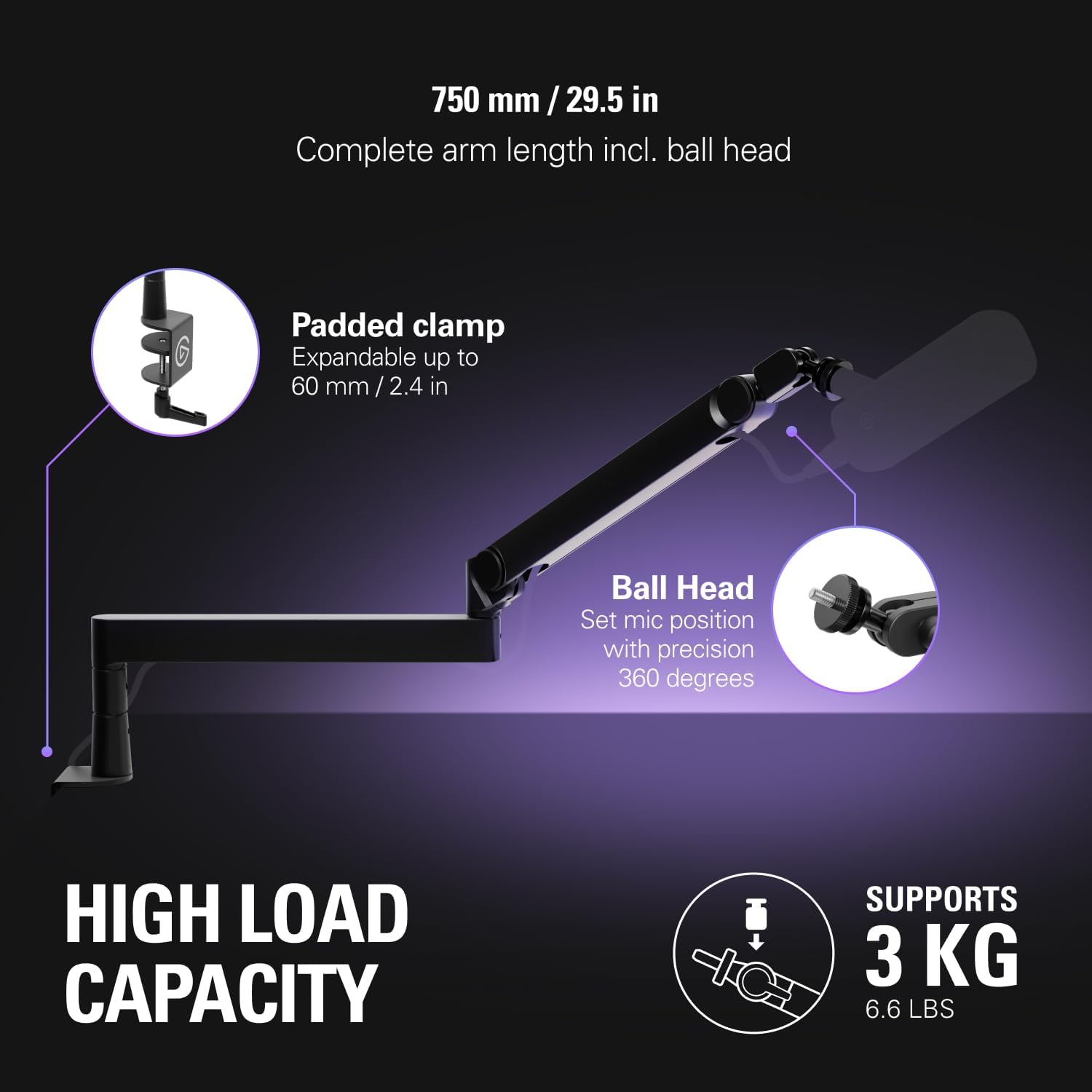
Image: A detailed view of the padded desk clamp, which can expand up to 60 mm / 2.4 inches, and the ball head for precise microphone positioning. The image also indicates the arm's high load capacity of 3 kg / 6.6 lbs.
2. Attaching Your Microphone
The Wave Mic Arm Pro is compatible with microphones using 1/4″, 3/8″, and 5/8″ threads. Use the included adapters as necessary to match your microphone's thread size. Securely screw your microphone onto the arm's mounting point.

Image: An illustration demonstrating how to mount a microphone to the Wave Mic Arm Pro, showcasing the compatibility with 1/4", 3/8", and 5/8" threads and the use of the provided adapters.
3. Cable Management
Utilize the hidden cable channels to route your microphone cable. The channels are secured by strong magnetic covers, keeping cables organized and out of sight for a clean setup.

Image: A detailed shot of the Wave Mic Arm Pro's design, showing the magnetic covers lifted to reveal the hidden cable channels, designed to keep microphone cables tidy and concealed.
4. Riser Installation (Optional)
An optional riser is included to provide additional clearance, which can be useful for setups with other desktop devices. Install the riser between the desk clamp and the main arm assembly if desired.

Image: A visual of the optional extra-high riser, which adds 100 mm / 3.9 inches of vertical clearance, preventing interference with other desktop equipment.
Operating the Mic Arm
Adjusting Position
The Wave Mic Arm Pro features gas spring suspension for smooth, silent adjustments without the need to loosen screws. The arm offers 360° elbow rotation and can move 90° upwards and 60° downwards from its horizontal position. Use the included hex key to adjust the tension of the gas spring to match the weight of your microphone for optimal stability.

Image: A person using the hex key to adjust the gas spring suspension of the Wave Mic Arm Pro, illustrating how to achieve smooth, silent adjustments without needing to loosen screws.

Image: A graphic detailing the arm's flexibility, showing 360° elbow rotation, base rotation, and vertical movement capabilities (90° up, 60° down).
Load Capacity
The mic arm supports a maximum load of up to 3 kg (6.6 lbs), including the microphone and any attached accessories. Ensure your equipment does not exceed this weight limit for safe and stable operation.

Image: The Wave Mic Arm Pro holding a microphone, demonstrating its heavy-duty capability to support devices up to 3 kg / 6.6 lbs without sagging, providing stable support.
Maintenance
To ensure the longevity and optimal performance of your Elgato Wave Mic Arm Pro, follow these maintenance guidelines:
- Cleaning: Wipe the arm with a soft, dry cloth. Avoid using abrasive cleaners or solvents, as these can damage the finish.
- Inspecting Connections: Periodically check the desk clamp and microphone attachment points to ensure they remain secure. Tighten if necessary.
- Cable Management: Ensure cables are properly routed within the hidden channels to prevent pinching or damage.
Troubleshooting
If you encounter issues with your Wave Mic Arm Pro, consider the following:
- Arm Sagging or Not Holding Position:
- Ensure your microphone and accessories do not exceed the 3 kg (6.6 lbs) load capacity.
- Adjust the gas spring tension using the included hex key. Refer to the "Operating the Mic Arm" section for guidance.
- Unstable or Loose Arm:
- Verify that the desk clamp is securely fastened to your desk.
- Check that the microphone is properly screwed onto the arm's mounting point.
- Difficulty Routing Cables:
- Ensure the magnetic covers are fully removed before attempting to route cables.
- Avoid forcing thick cables into the channels; use appropriate cable sizes.
Specifications
| Feature | Detail |
|---|---|
| Model Number | 20AAT9901 |
| Product Dimensions (L x W x H) | 2.76 x 11.42 x 17.32 inches |
| Item Weight | 4.49 pounds (2.04 Kilograms) |
| Material | Metal |
| Color | Black |
| Max Load Capacity | 3 kg / 6.6 lbs |
| Desk Clamp Thickness | Up to 60 mm / 2.4 inches |
| Microphone Thread Compatibility | 1/4″, 3/8″, 5/8″ |
Warranty and Support
For detailed warranty information and technical support, please visit the official Elgato website or contact their customer service. Keep your purchase receipt as proof of purchase.
Official Elgato Website: www.elgato.com
Related documents20AAT9901

Ask a question about this manual
Ask about setup, troubleshooting, compatibility, parts, safety, or missing instructions. Manuals+ will review the question and use this page’s manual context to help answer it.