
1. Introduction and Overview
The SignalBrick KSP Pro Cell Signal Booster is designed to improve 5G, 4G LTE, and 3G cellular reception within your home or multi-room environment. Featuring a smart LCD display for real-time monitoring and dual indoor panel antennas, it provides coverage up to 8,000 sq. ft. for clearer calls and faster data speeds. This device is compatible with all major US carriers and is FCC approved.
This manual provides detailed instructions for the proper installation, operation, and maintenance of your SignalBrick KSP Pro Cell Signal Booster. Please read it thoroughly before installation to ensure optimal performance and safety.
2. Package Contents
Verify that all items listed below are included in your package:
- 1x Signal Booster Unit
- 1x Outdoor Antenna
- 2x Indoor Panel Antennas
- 3x 30 ft RG6 Coaxial Cables
- 1x 15 ft RG6 Coaxial Cable
- 1x 12V Power Supply
- 1x Signal Splitter
- 1x Roof/Pole Mount Bracket Kit
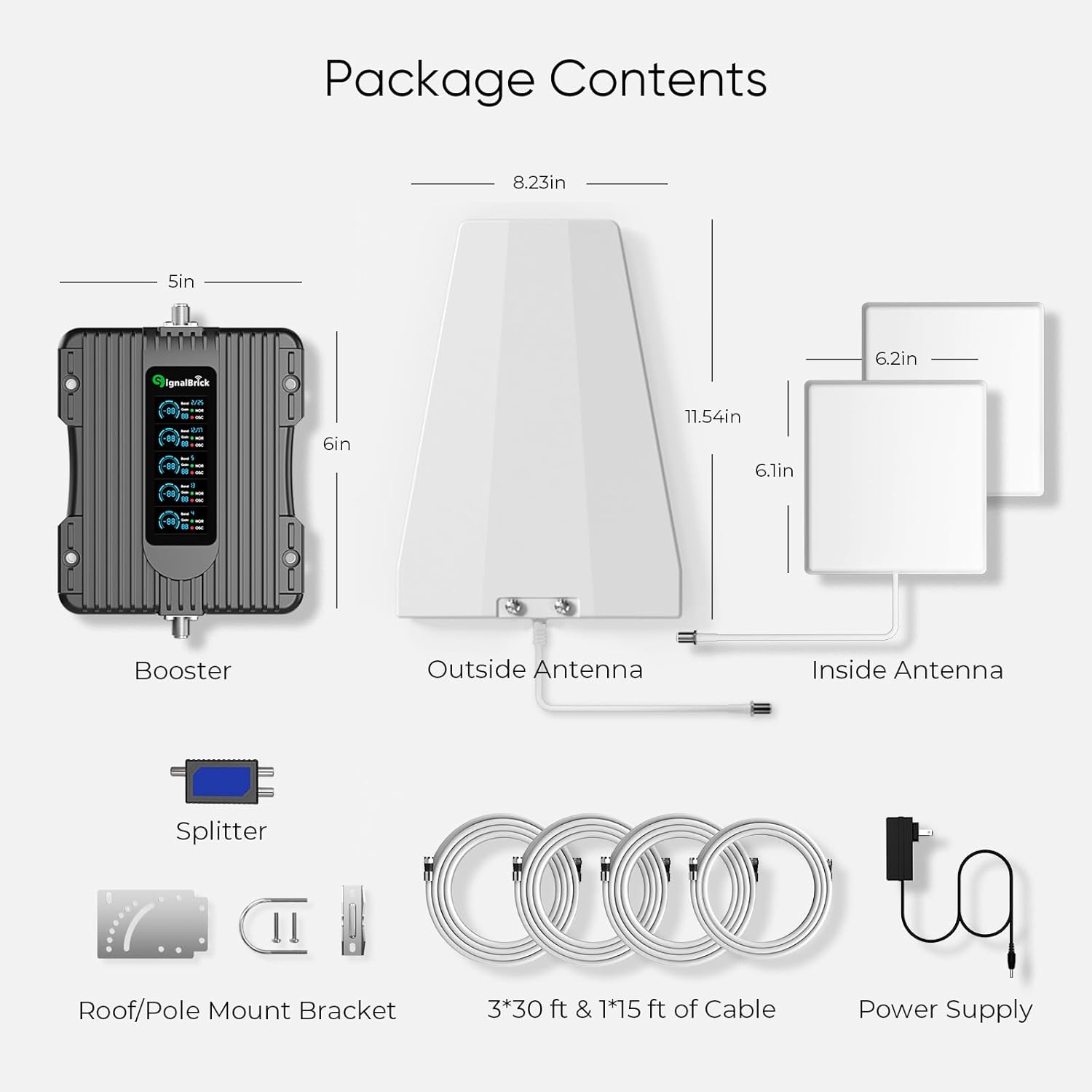
Image: All components included in the SignalBrick KSP Pro Cell Signal Booster package.
3. Setup & Installation
Proper installation is crucial for optimal performance. Ensure you have at least one bar of outdoor signal before installation. Maintain a minimum separation distance of at least 20 feet (6 meters) vertically or 30 feet (9 meters) horizontally between the outdoor and indoor antennas to prevent oscillation.
3.1. FCC Registration Requirement
BEFORE USE, you MUST REGISTER THIS DEVICE with your wireless provider and have your provider's consent. Most wireless providers consent to the use of signal boosters. Some providers may not consent to the use of this device on their network. If you are unsure, contact your provider. You MUST cease operating this device immediately if requested by the FCC or a licensed wireless service provider.
3.2. Outdoor Antenna Installation
Mount the outdoor antenna in the highest possible location on your property, free from obstructions like trees or buildings, and point it towards the nearest cell tower. Use the provided mount bracket kit for secure installation. Ensure the antenna is positioned to maximize signal reception.

Image: An outdoor antenna mounted on a pole, positioned to receive the best signal.
Connect one of the 30 ft RG6 coaxial cables to the outdoor antenna. Route the cable securely into your home, ensuring it is protected from weather elements.
3.3. Booster Unit Placement
Place the Signal Booster unit in a central location within your home where it can be easily connected to both the outdoor and indoor antennas. Ensure it is in a well-ventilated area, away from excessive heat, direct sunlight, and moisture.
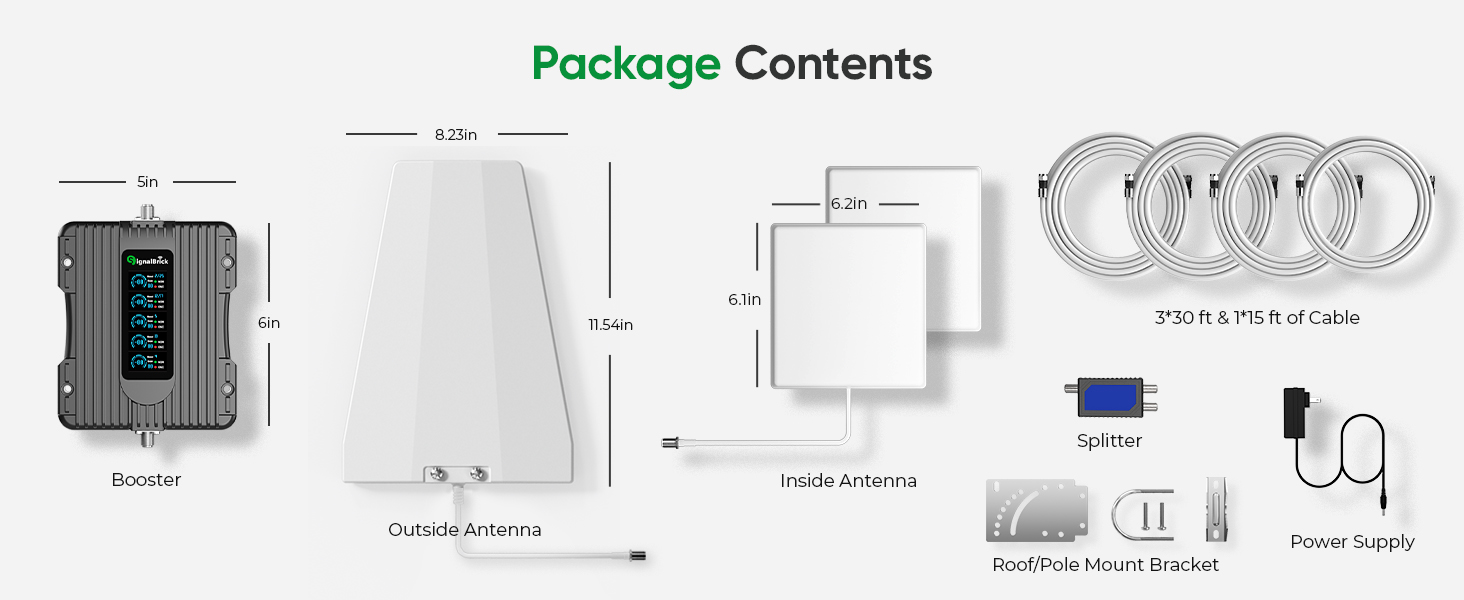
Image: The SignalBrick KSP Pro booster unit featuring a Smart LCD Display.
3.4. Indoor Antenna Installation
Connect the outdoor antenna cable to the designated 'Outdoor' port on the booster unit. Then, connect the 15 ft RG6 coaxial cable to the 'Indoor' port on the booster and to the provided signal splitter. Connect the two indoor panel antennas to the splitter using the remaining 30 ft RG6 coaxial cables.
Mount the indoor panel antennas in the areas where you need improved signal. These antennas are ideal for multi-room or multi-floor coverage. Ensure adequate vertical and horizontal separation from the outdoor antenna to prevent signal interference.

Image: Diagram illustrating the coverage area of the SignalBrick KSP Pro booster, up to 8,000 sq. ft. across multiple rooms or floors.
3.5. Power On
Plug the 12V power supply into the booster unit and then into a power outlet. The booster will power on, and the Smart LCD Display will show real-time signal strength and operational status for each frequency band.
Video: Official installation guide for the SignalBrick Multiroom Cell Phone Booster, demonstrating the setup process.
4. Operating Instructions
The SignalBrick KSP Pro features a Smart LCD Display that provides real-time information without the need for a separate app. The display updates every 1.5 seconds and shows:
- Band Number: Identifies the frequency band being boosted.
- Operating Status: Indicates if the band is operating normally (NOR) or if there's oscillation (OSC).
- Gain: Shows the signal gain in dB.
- Indoor Signal Strength: Displays the real-time signal strength inside your coverage area.
Monitor the display to ensure optimal performance. If an 'OSC' (oscillation) warning appears, adjust the distance or orientation of the antennas until the warning clears.

Image: Close-up view of the SignalBrick KSP Pro's Smart LCD Display, showing real-time monitoring data for various frequency bands.
5. Maintenance
To ensure the longevity and optimal performance of your SignalBrick KSP Pro Cell Signal Booster, follow these maintenance guidelines:
- Keep the booster unit in a well-ventilated area, away from excessive heat, direct sunlight, and moisture.
- Regularly check all cable connections to ensure they are secure and free from damage.
- Keep antennas clean and free from obstructions.
- Avoid placing the indoor antenna too close to the outdoor antenna to prevent oscillation.
6. Troubleshooting
If you experience issues with your SignalBrick KSP Pro, refer to the following common troubleshooting steps:
- No Signal Improvement: Ensure the outdoor antenna is pointed towards the nearest cell tower and is free from obstructions. Verify all cable connections are tight. Check the outdoor signal strength with your phone; at least one bar is required for the booster to function effectively.
- Oscillation (OSC) Warning on LCD: This indicates feedback between antennas. Increase the separation distance between the outdoor and indoor antennas (minimum 20 feet vertical or 30 feet horizontal). Adjust the angle of the antennas.
- Power Light Off: Check if the power adapter is securely plugged into the booster and the power outlet. Ensure the outlet is functional.
- Poor Call Quality/Slow Data: This could be due to weak outdoor signal, insufficient antenna separation, or obstructions. Re-evaluate antenna placement and connections.
7. Specifications
| Feature | Detail |
|---|---|
| Model | KSP Pro |
| Coverage Area | Up to 8,000 sq. ft. |
| Supported Networks | 3G, 4G LTE, 5G (Bands 12/17, 13, 5, 4/66, 2/25) |
| Indoor Antennas | 2x Panel Antennas |
| Display | Smart LCD Display |
| FCC Approved | Yes (ID: A7V-SR75702002, HVIN: SR75702002B) |
| Power Supply | 12V |
| Item Weight | 8.45 pounds |
| Package Dimensions | 14.41 x 9.49 x 7.24 inches |
8. Warranty & Support
The SignalBrick KSP Pro Cell Signal Booster comes with a 3-year warranty. For any questions, technical assistance, or warranty claims, please contact SignalBrick customer support.
Contact Information: Please refer to the product packaging or the official SignalBrick website for the most up-to-date contact details.