
Introduction
This manual provides comprehensive instructions for the setup, operation, and maintenance of your G-MARK G2000 IEM UHF In Ear Monitor System. Please read this manual thoroughly before using the product to ensure proper functionality and to maximize its performance and longevity. This system is designed for professional audio monitoring applications, offering reliable wireless performance for stage, studio, and band environments.
Product Overview
Components
The G-MARK G2000 IEM system includes the following components:
- 1 x Wireless Transmitter Unit
- 1 x UHF Receiver (Bodypack)
- 1 x In-Ear Headphones
- 1 x 6.35mm Audio Cable
- 1 x Power Adapter
- 1 x Antenna
- 1 x Instruction Manual (this document)

Figure 1: Overview of the G-MARK G2000 IEM system, showing the transmitter unit, bodypack receiver, and included in-ear headphones.
Key Features
- Wireless Range: Up to 160 feet (50 meters) in open space, utilizing antenna diversity and digital signal processing for stable transmission.
- Expandable System: Supports an unlimited number of bodypack receivers for multi-user monitoring.
- UHF Wireless Technology: Operates within the 500-590MHz frequency band with 100 selectable channels.
- Audio Quality: Wide frequency response of 20Hz-25KHz, dynamic range of 107dB, uncompressed wireless signal transmission, low noise, and low delay.
- User Interface: Both transmitter and receiver feature LCD displays for frequency, AF, and battery status.
- Durable Construction: Transmitter unit is constructed from metal for robustness.
- Versatile Connectivity: 6.35mm mixed input for compatibility with various audio equipment.
Setup Instructions
1. Transmitter Placement and Connection
- Place the transmitter unit on a stable surface or install it into a standard rack unit. Ensure adequate ventilation.
- Connect the included antenna to the antenna port on the rear of the transmitter.
- Connect the power adapter to the transmitter's power input and then to a suitable power outlet.
- Connect your audio source (e.g., mixing console, audio interface) to the 6.35mm audio input jacks on the rear of the transmitter using the provided 6.35mm audio cable.

Figure 2: The G-MARK G2000 IEM transmitter can be integrated into standard rack cabinets, demonstrating compatibility with various audio devices.
2. Receiver (Bodypack) Setup
- Open the battery compartment on the bodypack receiver and insert two AA batteries (not included), observing correct polarity.
- Connect the in-ear headphones to the 3.5mm headphone jack on the receiver.
- Attach the bodypack receiver to your belt or clothing using the integrated clip.
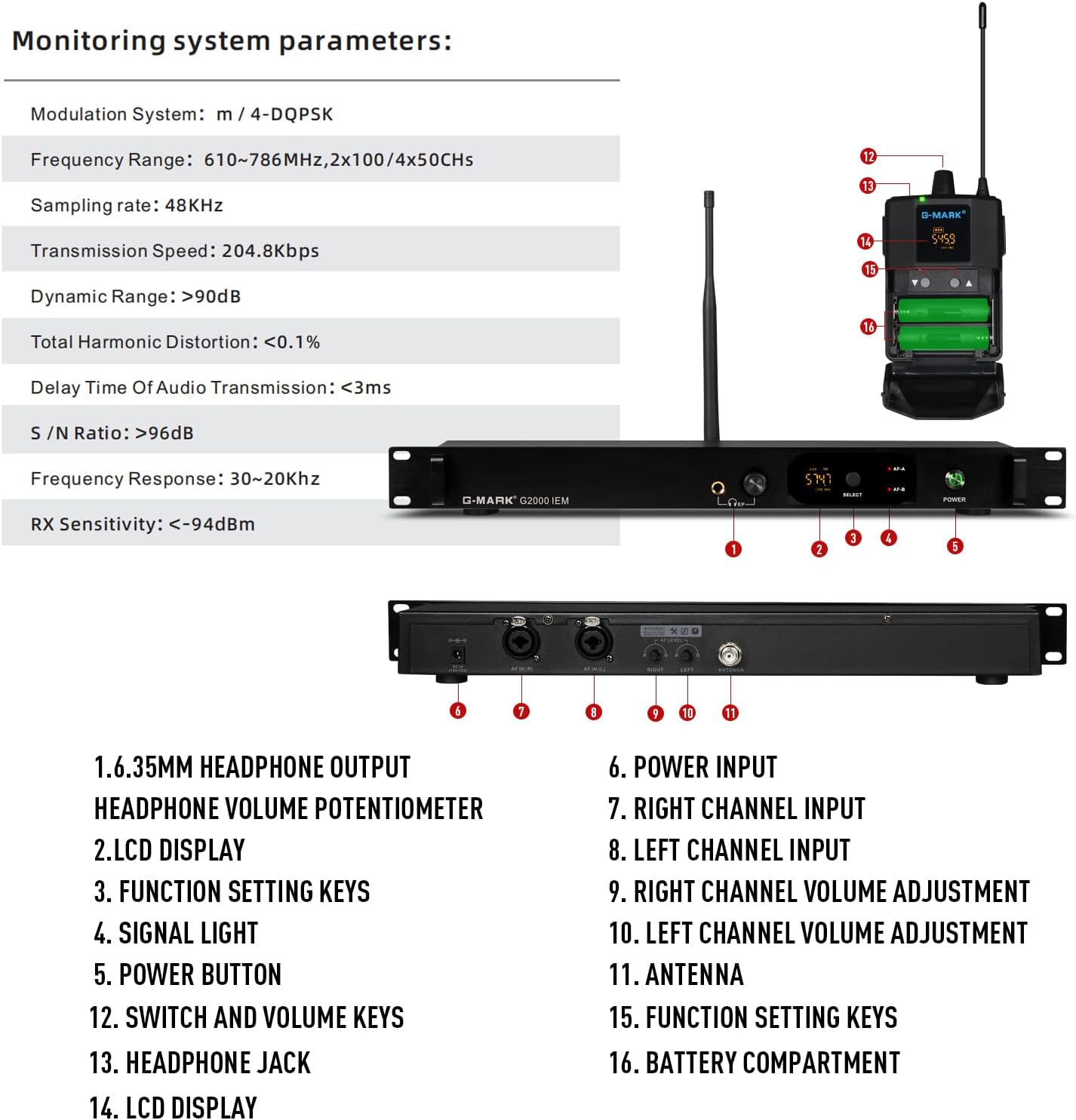
Figure 3: The wireless bodypack receiver is designed for easy wear, allowing freedom of movement during performance.
3. Frequency Matching (FlashMatch)
To establish a wireless connection, the transmitter and receiver must be tuned to the same frequency channel.
- Power on both the transmitter and the receiver.
- On the transmitter, use the function setting keys to select a desired channel. The LCD display will show the current frequency.
- On the receiver, access the frequency matching function (refer to the receiver's specific controls, often a "SET" or "SYNC" button).
- Align the infrared ports (if available) or follow the on-screen prompts to synchronize the receiver with the transmitter's selected frequency. The receiver's LCD will confirm successful synchronization.

Figure 4: The "FlashMatch" feature simplifies the process of synchronizing the receiver's frequency with the transmitter.
Operation
Power On/Off
- Transmitter: Press the power button on the front panel. The LCD will illuminate.
- Receiver: Press and hold the power button on the bodypack until the LCD illuminates.
- To power off, press and hold the respective power buttons until the displays turn off.
Volume Adjustment
- Transmitter: Adjust the left and right channel volume adjustment knobs on the front panel to control the input level.
- Receiver: Use the volume keys on the bodypack to adjust the listening level through the in-ear headphones.
Channel Selection
The system offers 100 selectable UHF channels to avoid interference. If you experience signal drops or interference, try changing the channel on the transmitter and re-synchronizing the receiver.
- On the transmitter, use the function setting keys to cycle through available channels.
- After selecting a new channel on the transmitter, repeat the frequency matching process (FlashMatch) with the receiver.
Monitoring with Multiple Receivers
The G2000 system supports an unlimited number of bodypack receivers operating on the same frequency as a single transmitter. This allows an entire band or team to monitor the same audio feed.
- Ensure all additional receivers are powered on and have fresh batteries.
- Synchronize each additional receiver to the transmitter's active channel using the FlashMatch function.
- Each receiver can then independently adjust its own headphone volume.
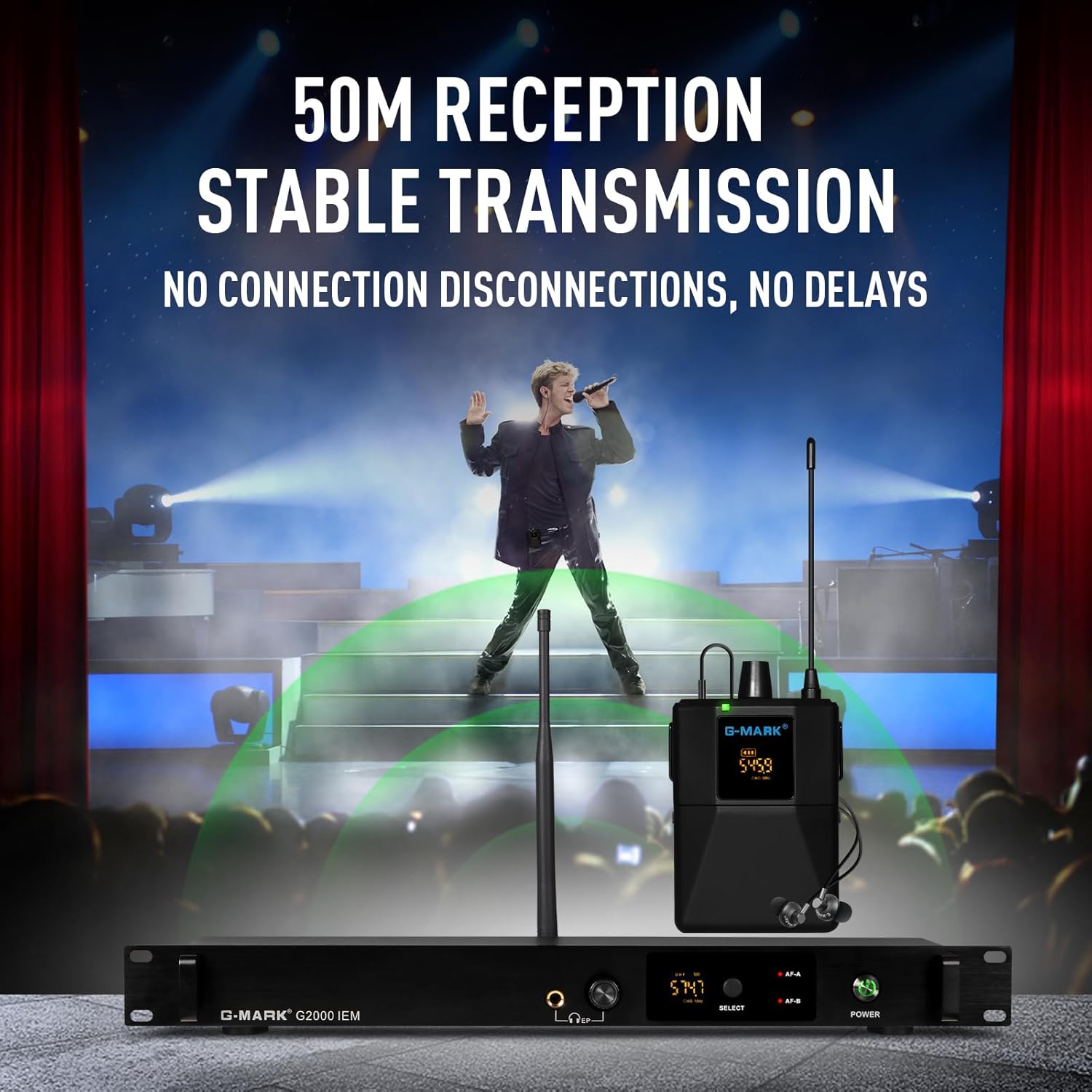
Figure 5: The system supports multiple receivers, enabling an entire group to monitor audio from a single transmitter.
Using External Headphones
The transmitter unit features a 6.35mm headphone output with an adjustable volume potentiometer. This allows for real-time monitoring of the audio signal being sent to the wireless receivers.
- Connect standard 6.35mm headphones to the headphone output jack on the front of the transmitter.
- Adjust the headphone volume potentiometer to your desired listening level.

Figure 6: The transmitter's headphone output allows for direct monitoring of the audio signal.
Maintenance
Battery Replacement (Receiver)
When the battery indicator on the receiver's LCD shows low power, replace the batteries promptly to avoid interruption during use. Always use fresh AA batteries.
- Power off the receiver.
- Open the battery compartment.
- Remove the old batteries and insert new AA batteries, ensuring correct polarity (+/-).
- Close the battery compartment securely.
Cleaning
- Wipe the exterior surfaces of the transmitter and receiver with a soft, dry cloth.
- Do not use abrasive cleaners, solvents, or chemical sprays, as these can damage the finish or internal components.
- For in-ear headphones, gently clean ear tips with a damp cloth and allow to dry completely before reattaching.
Storage
When not in use for extended periods, store the system in a cool, dry place away from direct sunlight and extreme temperatures. Remove batteries from the receiver to prevent leakage.
Troubleshooting
| Problem | Possible Cause | Solution |
|---|---|---|
| No sound from receiver |
|
|
| Interference or signal drops |
|
|
| Low audio quality / distortion |
|
|
Specifications
General Product Specifications
| Brand | G-MARK |
| Model Number | G2000 |
| Connectivity Technology | Wireless |
| Connector Type | Aux (6.35mm) |
| Material | Metal (Transmitter) |
| Number of Channels | 1 (Transmitter, supports multiple receivers) |
| Audio Input | 6.35mm In-Ear Headphones (for monitoring) |
| Power Source | Corded Electric (Transmitter), Battery (Receiver) |
| Item Weight | 3.96 pounds (total package) |
| UPC | 748743241082 |
Monitoring System Parameters

Figure 7: Detailed diagram of the G-MARK G2000 IEM system, highlighting key components and their functions, alongside technical specifications.
| Modulation System | m / 4-DQPSK |
| Frequency Range | 610-786MHz, 2x100/4x50Chs |
| Sampling Rate | 48KHz |
| Transmission Speed | 204.8kbps |
| Dynamic Range | >90dB |
| Total Harmonic Distortion | <0.1% |
| Delay Time Of Audio Transmission | <3ms |
| S/N Ratio | >96dB |
| Frequency Response | 30~20KHz |
| RX Sensitivity | <-94dBm |
Warranty and Support
For warranty information, technical support, or service inquiries, please contact G-MARK customer support directly. Refer to the product packaging or the official G-MARK website for the most current contact details.
You can also visit the official G-MARK store on Amazon for additional product information and support: G-MARK Store