
1. Product Overview
The GZLMMY S10 Bone Conduction Headphones are designed for active lifestyles, featuring IPX8 waterproofing, Bluetooth 5.4 connectivity, and an integrated 32GB MP3 player. This device transmits audio through your cheekbones, allowing you to hear ambient sounds while enjoying your music.
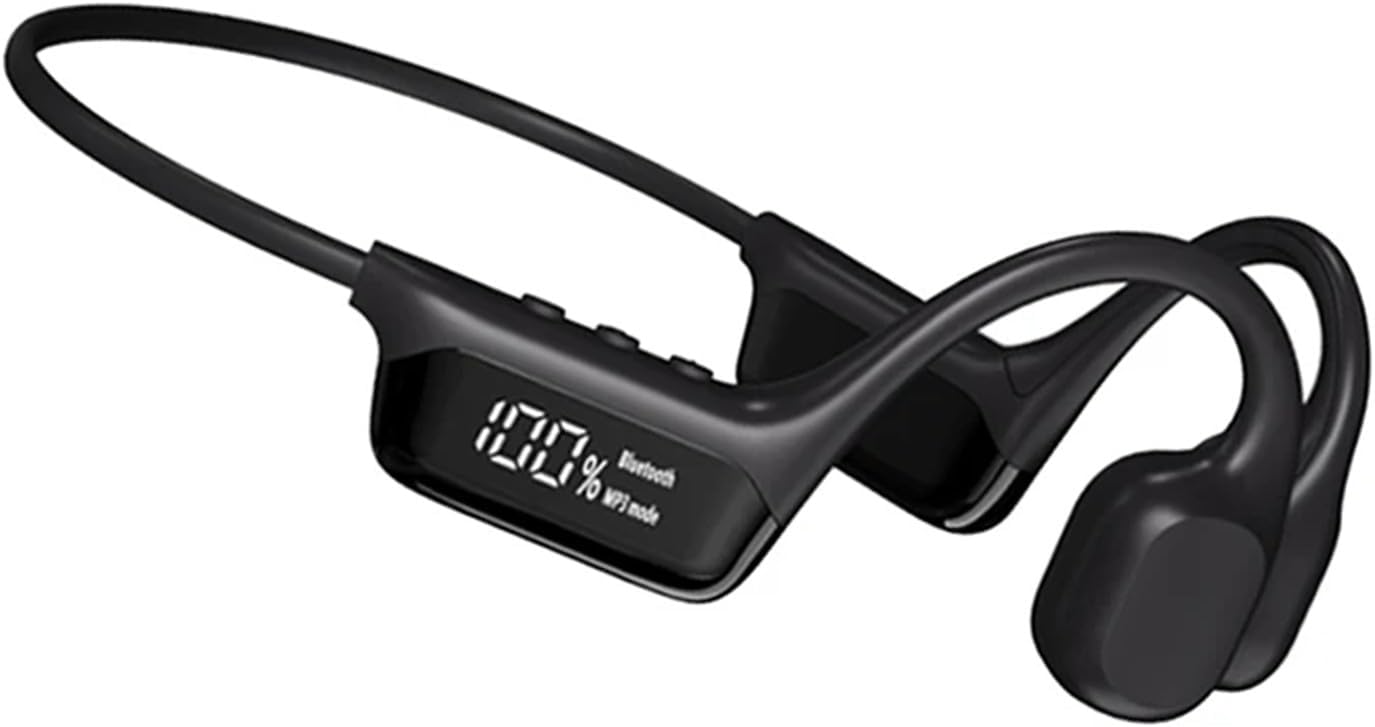
Image 1.1: Front view of the GZLMMY S10 Bone Conduction Headphones, showcasing the sleek design and integrated display.
2. Package Contents
Ensure all items are present in the package:
- GZLMMY S10 Bone Conduction Headphones
- Charging Cable
- User Manual
3. Device Layout and Controls
Familiarize yourself with the headphone's components and controls.

Image 3.1: Detailed view of the headphone's side panel, indicating the Power Display, MP3 Mode indicator, and Bluetooth Mode indicator. The display shows '100%' charge and 'Bluetooth' or 'MP3 mode' status.

Image 3.2: Close-up of the AI Smart Screen, illustrating the power display (e.g., 100%), Bluetooth playback mode, and MP3 playback mode indicators.
4. Setup and Initial Use
4.1 Charging the Headphones
Before first use, fully charge the headphones. Connect the provided charging cable to the charging port on the device and a USB power source. A full charge takes approximately 2 hours. The display will indicate charging status.
4.2 Power On/Off
- To Power On: Press and hold the Power button until the indicator light illuminates and an audible prompt is heard.
- To Power Off: Press and hold the Power button until the indicator light turns off and an audible prompt is heard.
4.3 Bluetooth Pairing
To connect your headphones to a Bluetooth-enabled device:
- Ensure the headphones are powered on and in Bluetooth mode. The Bluetooth indicator will flash, indicating pairing mode.
- On your smartphone, tablet, or other compatible device, navigate to the Bluetooth settings.
- Search for available devices and select "GZLMMY S10" (or similar name).
- Once connected, the Bluetooth indicator will stop flashing and remain solid.
4.4 MP3 Mode Operation
The headphones feature an integrated 32GB MP3 player, allowing you to store approximately 8,000 songs. This mode is ideal for activities where carrying a phone is inconvenient, such as swimming or running.
- Switching to MP3 Mode: Press the Mode button (refer to Image 3.1 for location) to switch from Bluetooth to MP3 playback mode. The display will show 'MP3 mode'.
- Transferring Music: Connect the headphones to a computer using the charging cable. The device will appear as a removable drive. Drag and drop your audio files (MP3, FLAC, WMA, WAV, APE formats are supported) into the device's storage.
5. Operating the Headphones
5.1 Basic Controls
- Volume Control: Use the volume buttons (typically + and -) to adjust the audio level.
- Play/Pause: Press the Play/Pause button (often the main function button) to start or pause playback.
- Next/Previous Track: Use dedicated track skip buttons or long-press volume buttons, depending on the model.
5.2 Waterproof Usage (IPX8)
The GZLMMY S10 headphones are IPX8 rated, meaning they are fully waterproof and suitable for continuous immersion in water under specified conditions. This makes them ideal for swimming, showering, or use in heavy rain.
- Ensure the charging port cover is securely closed before exposing the headphones to water.
- For optimal performance in water, use the MP3 mode as Bluetooth connectivity can be limited underwater.

Image 5.1: The GZLMMY S10 headphones demonstrating their waterproof capability, partially submerged in water.

Image 5.2: A person swimming while wearing the GZLMMY S10 headphones, highlighting their suitability for aquatic activities.

Image 5.3: A person wearing the GZLMMY S10 headphones during an outdoor activity, illustrating the secure and comfortable fit.

Image 5.4: A person running while wearing the GZLMMY S10 headphones, demonstrating their use for sports and fitness.
6. Maintenance
6.1 Cleaning
After use, especially after exposure to water or sweat, gently wipe the headphones with a soft, dry cloth. Do not use abrasive cleaners or solvents.
6.2 Storage
Store the headphones in a cool, dry place away from direct sunlight and extreme temperatures. Avoid placing heavy objects on the headphones.
6.3 Battery Care
To prolong battery life, avoid fully discharging the headphones frequently. Charge the device regularly, even if not in use for extended periods. The average battery life is 10 hours at 75% volume.
7. Troubleshooting
- No Power: Ensure the headphones are fully charged. Connect to a power source and check if the charging indicator lights up.
- Cannot Pair via Bluetooth:
- Ensure the headphones are in Bluetooth pairing mode (flashing indicator).
- Turn off and on Bluetooth on your device.
- Move the headphones closer to your device.
- Clear previous Bluetooth connections on your device if too many are stored.
- No Sound in MP3 Mode: Ensure music files are correctly transferred and are in a supported format (MP3, FLAC, WMA, WAV, APE). Check volume levels.
- Sound Quality Issues: Ensure the bone conduction transducers are positioned correctly on your cheekbones.
- Charging Issues: If the device does not charge, try a different charging cable or USB power adapter. Ensure the charging port is clean and free of debris.
8. Specifications
| Feature | Specification |
|---|---|
| Model Name | S10 (Open Ear Headphone) |
| Connectivity Technology | Wireless (Bluetooth 5.4) |
| Water Resistance Level | IPX8 (Waterproof) |
| Internal Storage | 32GB (for MP3 Player) |
| Supported Audio Formats | MP3, FLAC, WMA, WAV, APE |
| Battery Life | Up to 10 hours (at 75% volume) |
| Charging Time | Approximately 2 hours |
| Material | Plastic |
| Control Type | Volume Control, Remote |
| Special Features | Built-in Microphone, Open Ear Design |
| Compatible Devices | Smartphones, tablets, laptops, MP3 players |
9. Warranty and Support
For warranty information and customer support, please refer to the documentation provided at the time of purchase or contact GZLMMY customer service directly. Keep your proof of purchase for any warranty claims.