
1. Product Overview
The Coleshome 71 Inch Executive Desk is engineered for both home and professional office environments, offering a spacious and robust workspace. Its design integrates modern aesthetics with practical features, including built-in power outlets and USB charging ports, to enhance productivity and organization. The desk is constructed with a thick engineered wood surface and a reinforced steel frame, ensuring stability and durability for various office setups.

Figure 1: Coleshome 71 Inch Executive Desk in a typical office setup, showcasing its ample workspace and integrated features.
2. Setup and Assembly
Assembly of the Coleshome Executive Desk is designed to be straightforward and hassle-free. All necessary tools and clear instructions are included to guide you through the process. Pre-drilled holes ensure accurate alignment of components, allowing for quick setup, typically within 30 minutes.
2.1 Unpacking and Component Check
- Carefully unpack all components from the packaging.
- Verify that all parts listed in the instruction manual are present and undamaged.
- Place components on a soft, clean surface to prevent scratches during assembly.
2.2 Assembly Steps
- Attach the leg frames to the desktop using the provided screws and Allen wrench. Ensure all connections are secure.
- Connect the crossbars between the leg frames for added stability.
- Adjust the leg pads at the bottom of each leg to level the desk on uneven floors.
- Carefully place the desk in its desired location.
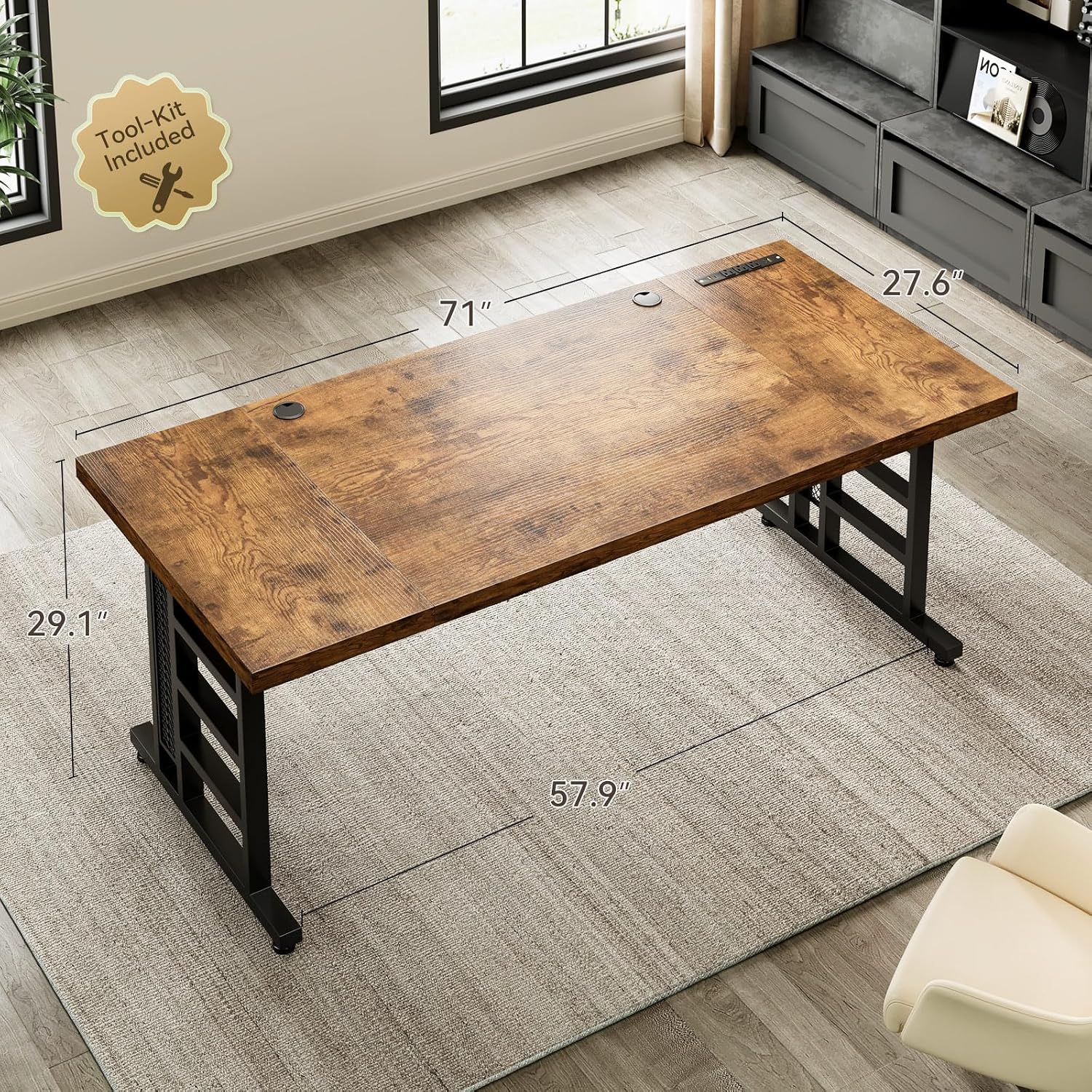
Figure 2: Desk dimensions and indication of included toolkit for easy assembly.

Figure 3: Detail of the desk's thick desktop and sturdy leg construction, highlighting stability features.
3. Operating Instructions
The Coleshome Executive Desk is designed to optimize your workspace with integrated power solutions and ample surface area.
3.1 Utilizing Integrated Charging Ports
- The desk features 3 standard AC power outlets, 2 USB charging ports, and 2 Type-C charging ports.
- Plug the desk's main power cord into a wall outlet.
- Connect your devices (laptops, phones, tablets, etc.) directly to the integrated ports for convenient charging and power access.
- Use the dual cable ports to manage and route cables, keeping your workspace organized and clutter-free.

Figure 4: Detailed view of the recessed power strip with various charging options.
3.2 Maximizing Workspace
- With a generous 71" x 27.6" desktop, the desk provides ample room for multiple monitors, keyboards, mice, and other office essentials.
- Arrange your equipment to create an ergonomic and efficient setup.
- The sturdy construction supports heavy equipment, including multiple monitors and printers.

Figure 5: Example of a fully equipped workstation on the Coleshome desk, demonstrating its spaciousness.
3.3 Product Demonstration Video
Video 1: Official product video demonstrating the features and versatility of the Coleshome Executive Desk, including its integrated power solutions and various usage scenarios.
4. Maintenance
Proper maintenance will ensure the longevity and appearance of your Coleshome Executive Desk.
4.1 Cleaning the Desktop
- For daily cleaning, wipe the desktop surface with a soft, damp cloth.
- For stubborn marks, use a mild, non-abrasive cleaner specifically designed for wood or laminate surfaces.
- Avoid using harsh chemicals, abrasive pads, or excessive moisture, as these can damage the finish.
- Promptly wipe up any spills to prevent staining or water damage.
4.2 Frame and Legs
- Wipe the steel frame and legs with a dry or slightly damp cloth to remove dust.
- Periodically check all screws and connections to ensure they remain tight. Retighten if necessary.
5. Troubleshooting
This section addresses common issues you might encounter with your Coleshome Executive Desk.
5.1 Desk Wobbles
- Check Leg Pads: Ensure all adjustable leg pads are properly extended and making firm contact with the floor. Adjust them individually to compensate for uneven surfaces.
- Tighten Screws: Verify that all assembly screws, especially those connecting the desktop to the legs and the crossbars, are securely tightened. Over time, screws can loosen.
- Even Weight Distribution: Ensure that the weight on the desk is evenly distributed. Heavy items placed predominantly on one side can affect stability.
5.2 Charging Ports Not Working
- Check Power Connection: Ensure the desk's main power cord is securely plugged into a functional wall outlet.
- Test Outlet: Try plugging another device into the wall outlet to confirm it is supplying power.
- Device Compatibility: Ensure your device is compatible with the USB or Type-C charging specifications (5V/2A).
- Reset: Unplug the desk from the wall outlet for a few minutes, then plug it back in to reset the internal power strip.
5.3 Surface Marks Easily
- The vintage wood finish may show fingerprints or smudges more readily. Regular cleaning with a soft, dry cloth is recommended.
- Consider using a desk mat or blotter to protect the surface from scratches and marks, especially in high-traffic areas or under keyboards/mice.
6. Specifications
| Feature | Detail |
|---|---|
| Brand | Coleshome |
| Product Dimensions | 27.6"D x 70.9"W x 29.1"H |
| Color | Vintage |
| Style | Modern |
| Base Material | Feet Pad |
| Top Material Type | Engineered Wood |
| Finish Type | Polished |
| Special Feature | USB Ports |
| Mounting Type | Tabletop |
| Furniture Leg Material | Rubber/Plastic |
| Model Number | 749c388b-2fa1-4faf-84a6-1156166369c6 |
| Required Assembly | Yes |
| Tabletop Thickness | 1.37 Inches |
7. Warranty and Support
Coleshome is committed to providing high-quality products and excellent customer service.
7.1 Product Warranty
Your Coleshome Executive Desk comes with a 1-year warranty from the date of purchase. This warranty covers manufacturing defects and material flaws under normal use. Please retain your proof of purchase for warranty claims.
7.2 Customer Support
For any questions, concerns, or assistance with assembly, operation, or troubleshooting, our customer support team is available 24/7. Please contact us through the retailer's platform or refer to the contact information provided with your purchase. The seller for this product is Hui Lan Cheng.
For additional support and resources, you may visit the official Coleshome Store on Amazon: Coleshome Store